Windows 7 Forums


Windows 7: Headphones play opposite

19 Mar 2010   #1

Win 7 Ultimate x64
LTU
 
 
Headphones play opposite

So when playing game I noticed that my headphones play opposite that it should (left one sounds like right and so), when in Dead Space doors opened on right side, but I heard it with left side headphone. It's also opposite when playing test sound on Realtek HD Audio Manager..

What could be the problem? This is how my audio "system" looks:


http://www.ipix.lt/images/20346339.jpg

When I plug headphones to back panel it's ok, so it's not headphones prob..
My System SpecsSystem Spec

19 Mar 2010   #2

Win 8 Release candidate 8400


Quote   Quote: Originally Posted by iMaStEr View Post
So when playing game I noticed that my headphones play opposite that it should (left one sounds like right and so), when in Dead Space doors opened on right side, but I heard it with left side headphone. It's also opposite when playing test sound on Realtek HD Audio Manager..

What could be the problem? This is how my audio "system" looks:

http://www.ipix.lt/images/20346339.jpg

When I plug headphones to back panel it's ok, so it's not headphones prob..
I would suspect your driver. what driver is installed?
My System SpecsSystem Spec
19 Mar 2010   #3

Windows 7, 64 bit Home SP1, Win 8 Pro 64 bit
Citrus Co, FL


Could also be the headset is wired incorrectly. Can you try a different headset to verify if it's the PC or the headset.
My System SpecsSystem Spec
.


19 Mar 2010   #4

Windows 7 Ultimate x64 Service Pack 1
Doncaster, UK


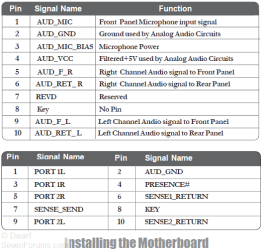
Not likely to be the headset if it sounds correct when plugged into the rear panel. Instead, it's more likely to be the connection between your motherboard and the front panel being set up incorrectly with an L-R reversal. The following diagram shows how it should be connected.

Headphones play opposite-capture.png
My System SpecsSystem Spec
19 Mar 2010   #5

Windows 7 Enterprise 64-bit
Brooklyn, NY


If it works in the rear but not the front, Dwarf is correct. It's just a matter of switching wires to fix.
My System SpecsSystem Spec
19 Mar 2010   #6

Windows 7 Ultimate x64 Service Pack 1
Doncaster, UK


That's correct. Just swap 5 with 9 and 6 with 10.
My System SpecsSystem Spec
19 Mar 2010   #7

Windows 7 x64 (SP1)


Or swap the headphones around on your head? :P
My System SpecsSystem Spec
19 Mar 2010   #8

Windows 7 Enterprise 64-bit
Brooklyn, NY


Yes, but that would only be a temporary fix, plus I would imagine they would be uncomfortable to use that way.
My System SpecsSystem Spec
19 Mar 2010   #9

Windows 7, 64 bit Home SP1, Win 8 Pro 64 bit
Citrus Co, FL


I have several headsets, since I have a recording studio, and the headsets can be worn either way and there is no physical difference.
My System SpecsSystem Spec
20 Mar 2010   #10

Win 7 Ultimate x64
LTU


ok, thanks, I'll try that what Dwarf said.

Quote   Quote: Originally Posted by fireberd View Post
I have several headsets, since I have a recording studio, and the headsets can be worn either way and there is no physical difference.
Since most of the people (me also) doesn't have the same heaphones as you (which doesn't have front side), it's not comfortable to wear other's reversed, especially with a mic
My System SpecsSystem Spec
Reply

 Headphones play opposite problems?


Thread Tools


Similar help and support threads for: Headphones play opposite
Thread Forum
Sound does not want to play through headphones Sound & Audio
Play some sounds through speakers and some through headphones Sound & Audio
Speakers play ONLY when headphones are plugged in Sound & Audio
Speakers and headphones play at the same time? Sound & Audio
Headphones and speakers play at the same time Sound & Audio


All times are GMT -5. The time now is 03:34 AM.


Seven Forums Android App Seven Forums IOS App Follow us on Facebook

Windows 7 Forums is an independent web site and has not been authorized,
sponsored, or otherwise approved by Microsoft Corporation.
"Windows 7" and related materials are trademarks of Microsoft Corp.
© Designer Media Ltd
  

1 2 3 4 5 6 7 8 9 10 11 12 13 14 15 16 17 18 19 20 21 22 23 24 25 26 27 28 29 30 31 32