Windows 7 Forums


Windows 7: Reinstalled Creative drivers now Ventrillo has issues

22 Mar 2010  
scferg

win7
14 posts
 
 
Reinstalled Creative drivers now Ventrillo has issues

Hi -

After unstalling and reinstalling my drivers for my Creative X-Fi XtremeGamer soundcard in an effort to resolve my previous problem (here), Ventrillo is having some odd issues.

As expected, I had to reset all of my sound options for my drivers and other software. I have everything set up as it was before the reinstall as far as I know. I can hear Vent's connect, disconnect (and the over WAV) sounds, but TTS and the PTT key sound doesn't work and I can't hear people talk.

My speakers are a 5.1 system and that is how I had my settings set pre-reinstall. The only way I can get the aforementioned things to work now is by setting my speakers to 2.1 surround which doesn't sound very good.

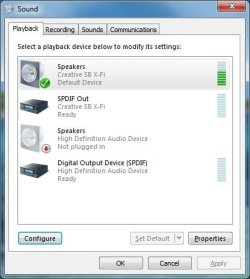
I've rebooted, reinstalled Vent but nothing is fixing it. When I have the Control Panel > Sound > Playback window open and Vent makes a sound that I can't hear through 5.1 (the PTT click for example), the green bar moves. It seems that the system is making the sound, it's just not getting out.

If anyone could let me know what's going on it'd be greatly appreciated.

Thanks in advance.

Attached Thumbnails
Reinstalled Creative drivers now Ventrillo has issues-ventsettings.jpg   Reinstalled Creative drivers now Ventrillo has issues-soundwindow.jpg  
My System SpecsSystem Spec

22 Mar 2010  
Wishmaster

Windows 7 Home Premium 64bit
4,268 posts
Southern Ohio


Have you tried setting Vent to ;
Use default Device for both speakers and Mic, as well as
checking Use Direct Sound?
My System SpecsSystem Spec
22 Mar 2010  
scferg

win7
14 posts


Just tried it. Sadly, it doesn't do anything.
My System SpecsSystem Spec
.


22 Mar 2010  
Wishmaster

Windows 7 Home Premium 64bit
4,268 posts
Southern Ohio


I looked at your other thread briefly, but admittly not all of it.

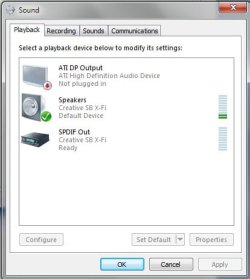
My X-Fi looks like this in the Sound properties:

The ones yours is showing (Speakers & SPDIF) as "Not plugged in" is likely the onboard sound thats still enabled.

Even though its showing as not plugged in , the drivers are still loaded. it's quite possible there could be some form of conflict with the X-Fi.


To check, go into you bios and look for on board audio and disable it.


Is Vent picking up any other Audio out options other than X-fi Speakers, Default Device?
Attached Thumbnails
Reinstalled Creative drivers now Ventrillo has issues-untitled.jpg  
My System SpecsSystem Spec
22 Mar 2010  
scferg

win7
14 posts


Yes:

SPDIF Out (Creative SB X-Fi)
Digital Output Device (SPDIF) (
My System SpecsSystem Spec
22 Mar 2010  
scferg

win7
14 posts


And after going through my BIOS, I couldn't find anything pertaining to a sound card.

Unless I'm missing it since I'm not familiar with BIOS, it's not there.

Thanks for the help so far by the way.
My System SpecsSystem Spec
22 Mar 2010  
Wishmaster

Windows 7 Home Premium 64bit
4,268 posts
Southern Ohio


It depends on the type of bios you have, and Im not too familiar with Alienware.

But On the main Screen, it should be something like:


Onboard periphals --->> Onboard PCI Device --->> Onboard HD Audio

It could be labeled somewhat differently, or even in a diff. location.
May have to look around a bit.


Do you know what type of motherboard it is and what type of bios it has?

I think the first thing youll need to do, is find out where and how to disable onboard audio.
My System SpecsSystem Spec
22 Mar 2010  
scferg

win7
14 posts


Yeah, the first place I looked was the peripherals section. I don't recall anything about audio, I'll go look again of course.

And here's some BIOS info I dug up:
Manufacturer: Phoenix Technologies, LTD
Name: Phoenix - AwardBIOS v6.00PG
My System SpecsSystem Spec
22 Mar 2010  
scferg

win7
14 posts


Ok ,I went back and finally found the option to turn off the onboard audio and did so. It is no longer on my Control Panel > Sound > Playback window. I then proceeded to reconfigure my speakers back to 5.1 and still the same issues with Vent occur.
My System SpecsSystem Spec
Reply

 Reinstalled Creative drivers now Ventrillo has issues problems?


Thread Tools


Similar help and support threads for: Reinstalled Creative drivers now Ventrillo has issues
Thread Forum
Reinstalled Windows 7, lost all drivers! Drivers
Solved Network Drivers Need To Be Uninstalled/Reinstalled Help Drivers
graphics card crashing, drivers installed and reinstalled windows same BSOD Help and Support
Drivers Missing After WIN 7 Reinstalled Drivers
Just reinstalled Windows 7 without graphics drivers? Graphic Cards


All times are GMT -5. The time now is 01:45 PM.


Windows 7 Forums is an independent web site and has not been authorized,
sponsored, or otherwise approved by Microsoft Corporation.
"Windows 7" and related materials are trademarks of Microsoft Corp.
© Designer Media Ltd