|  | | |
02 Apr 2010
|
#1 | | W7 Ulti/64, XP Pro/32 NYC |
HDCP High Definition Control Protocol,
I do not fully understand, but if you are having sound issues with the newer equipment, it might not be a driver problem! Whomever has started applying control mechanisms to content. Be it TV manufacturers or Vid card manufacturers.
This I know, my older computer with no HDCP parts will allow me to connect to HDTV, DVI>HDMI for video and mini stereo plug>rcs splitter for sound, and I get sound. My new puter which has HDCP compliant vid cards will not give me sound with same type connections??????????????????? Any one more clear about this stuff and can illuminate me? Is there such a thing as a Realtek HDMI driver? | My System Specs |
| System Manufacturer/Model Number DIY #3, #2 OS W7 Ulti/64, XP Pro/32 CPU INTEL i7 920 DO, Core2 Duo 6400 Motherboard GIGABYTE EX58 UD3R-SLI, EP45-UD3R Memory KINGSTON DDR3 1333MHz, CORSAIR DDR2 800MHz Graphics Card EVGA GTX 260 x2, 8800 GTX Sound Card REALTEK HD onboard, ditto Monitor(s) Displays SONY 40" BRAVIA LCD Screen Resolution 1360 X 768 Keyboard MS Mouse MS PSU COOLERMASTER 900W, ENERMAX 850W Case COOLERMASTER HAF 932 x2 Cooling stock Hard Drives OCZ VERTEX/RAID0 -3, Vertex 30GB Internet Speed ADSL 3MB/768KBs Other Info amateur enthusiast |
02 Apr 2010
|
#2 | | XP Pro SP3 X86 / Win7 Pro X86 Southern Ontario Canada |

Quote: Originally Posted by spyknee High Definition Control Protocol,
I do not fully understand, but if you are having sound issues with the newer equipment, it might not be a driver problem! Whomever has started applying control mechanisms to content. Be it TV manufacturers or Vid card manufacturers.
This I know, my older computer with no HDCP parts will allow me to connect to HDTV, DVI>HDMI for video and mini stereo plug>rcs splitter for sound, and I get sound. My new puter which has HDCP compliant vid cards will not give me sound with same type connections??????????????????? Any one more clear about this stuff and can illuminate me? Is there such a thing as a Realtek HDMI driver? I use an ASROCK ion 330 as my HTPC... Yes it has a separate HDMI Audio driver that has to be installed before you hear sound from the TV set.... I have no idea how common this is but I can confirm it does exist. | My System Specs | | System Manufacturer/Model Number Homebrew OS XP Pro SP3 X86 / Win7 Pro X86 CPU Amd 64 x2 4200 (2.4ghz) Motherboard Asus M2N-MX SE Plus Memory Kingston DDR2 800 2gb Graphics Card Nvidia GF-8400 Sound Card Realtek on Motherboard Monitor(s) Displays Acer x-193bw Screen Resolution 1440 x 900 Keyboard yes Mouse yes PSU 350watt In-Win Case In-Win Cooling Air Hard Drives Western Digital 500g Internet Speed 5mpbs Other Info Also ASRock ION 330 as HTPC (on XP).
Acer Aspire as GP netbook (on XP). |
02 Apr 2010
|
#3 | | Windows 7 Home Premium Southwest U.S. |
I'm certainly not any more clear about it but do have a couple of observations.
At the bottom of Realtek download page is an ATI HDMI Audio Device. This tells me that in some cases HDMI audio is handled by the Graphics card. ?? Realtek
The other option would be to check any hidden output devices.
Right click on the Microsoft speaker icon, select playback devices.
Next, right click almost anywhere in the middle of the window that opens and select both "show disabled devices" and "show disconnected devices".
What devices are showing and which device is set as the Default Output?
Ap | My System Specs | | System Manufacturer/Model Number Assembled in my workshop OS Windows 7 Home Premium CPU Intel Core 2 Duo @ 3.00gHz Motherboard Gigabyte GA-P35-S3G Memory 4 GB Graphics Card ATI Radeon HD 2600 XT Sound Card RME 24/96 Card, Realtek Internal Audio PreSonus FireStudio Monitor(s) Displays Acer 1917 (x2) Screen Resolution 1280 x 1024 on both monitors Keyboard Macally w/2/USB ports. Mouse Trackman Wheel PSU Rosewill 500-watt Case Rosewill mid-tower Cooling Noctua NH-U9B (CPU), PwrSupply fan + single large case Fan Hard Drives Three 250GB Seagate SATA Barracuda 7200rpm Other Info Event 20/20 bas studio monitors, Yamaha sub.
Rackmount Korg/Roland/Yamaha synthesizers,
Cubase MIDI/audio recording. Sony Soundforge audio/mastering software. CD Architect Mastering. RME & Presonus audio interfaces. |
02 Apr 2010
|
#4 | | XP Pro SP3 X86 / Win7 Pro X86 Southern Ontario Canada |

Quote: Originally Posted by Aphelion I'm certainly not any more clear about it but do have a couple of observations.
At the bottom of Realtek download page is an ATI HDMI Audio Device. This tells me that in some cases HDMI audio is handled by the Graphics card. ?? Realtek There's one on the NVidia page for their chipsets as well... | My System Specs | | System Manufacturer/Model Number Homebrew OS XP Pro SP3 X86 / Win7 Pro X86 CPU Amd 64 x2 4200 (2.4ghz) Motherboard Asus M2N-MX SE Plus Memory Kingston DDR2 800 2gb Graphics Card Nvidia GF-8400 Sound Card Realtek on Motherboard Monitor(s) Displays Acer x-193bw Screen Resolution 1440 x 900 Keyboard yes Mouse yes PSU 350watt In-Win Case In-Win Cooling Air Hard Drives Western Digital 500g Internet Speed 5mpbs Other Info Also ASRock ION 330 as HTPC (on XP).
Acer Aspire as GP netbook (on XP). |
02 Apr 2010
|
#5 | | W7 Ulti/64, XP Pro/32 NYC |
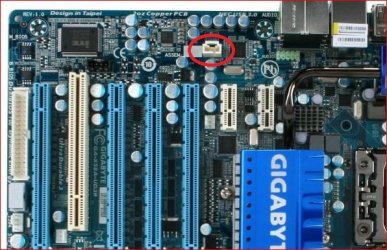
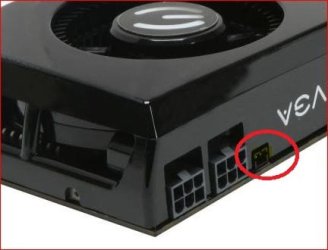
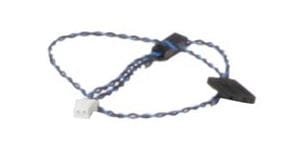
I know that I installed a 2 wire jumper from 1 of my video cards, theres 2 in SLI, to the mobos onboard s/pdif header. I only ever used the standard stereo plug out, tho.
My LCD's HDMI input also has a left/right rca input.
The puter has two styles of s/pdif outputs. 1 optical, square, and 1 rca looking. I tried the rca output to a rca splitter, but no sound.
As I metioned above the older puter worked and gave me sound, not the new one, except with the PC input.
nVidia based cards, not ATI.
What am I missing,here? | My System Specs | | System Manufacturer/Model Number DIY #3, #2 OS W7 Ulti/64, XP Pro/32 CPU INTEL i7 920 DO, Core2 Duo 6400 Motherboard GIGABYTE EX58 UD3R-SLI, EP45-UD3R Memory KINGSTON DDR3 1333MHz, CORSAIR DDR2 800MHz Graphics Card EVGA GTX 260 x2, 8800 GTX Sound Card REALTEK HD onboard, ditto Monitor(s) Displays SONY 40" BRAVIA LCD Screen Resolution 1360 X 768 Keyboard MS Mouse MS PSU COOLERMASTER 900W, ENERMAX 850W Case COOLERMASTER HAF 932 x2 Cooling stock Hard Drives OCZ VERTEX/RAID0 -3, Vertex 30GB Internet Speed ADSL 3MB/768KBs Other Info amateur enthusiast |
02 Apr 2010
|
#6 | | W7 Ulti/64, XP Pro/32 NYC |
[/QUOTE]
There's one on the NVidia page for their chipsets as well...[/QUOTE]
This probably for an nVidia chipset mobo, mines an Intel chipset. I saw something surfing about HTPC systems. Home Theatre PC mobos by nVidia. | My System Specs | | System Manufacturer/Model Number DIY #3, #2 OS W7 Ulti/64, XP Pro/32 CPU INTEL i7 920 DO, Core2 Duo 6400 Motherboard GIGABYTE EX58 UD3R-SLI, EP45-UD3R Memory KINGSTON DDR3 1333MHz, CORSAIR DDR2 800MHz Graphics Card EVGA GTX 260 x2, 8800 GTX Sound Card REALTEK HD onboard, ditto Monitor(s) Displays SONY 40" BRAVIA LCD Screen Resolution 1360 X 768 Keyboard MS Mouse MS PSU COOLERMASTER 900W, ENERMAX 850W Case COOLERMASTER HAF 932 x2 Cooling stock Hard Drives OCZ VERTEX/RAID0 -3, Vertex 30GB Internet Speed ADSL 3MB/768KBs Other Info amateur enthusiast |
02 Apr 2010
|
#7 | | Windows 7 Ultimate x64 SP1 Hampton VA |

Quote: Originally Posted by Aphelion I'm certainly not any more clear about it but do have a couple of observations.
At the bottom of Realtek download page is an ATI HDMI Audio Device. This tells me that in some cases HDMI audio is handled by the Graphics card. ?? Yes. ATI Radeon? HD 4000 Graphics Family Quote: HDMI with 7.1 digital surround sound support and integrated DisplayPort technology5 with audio | My System Specs | | Computer type PC/Desktop System Manufacturer/Model Number Built by me OS Windows 7 Ultimate x64 SP1 CPU Intel Core i7-950 (3.06GHz) OC to 3.8GHz Motherboard Gigabyte GA-X58A-UD5 rev 1, F6 Bios Memory 12 gig Corsair DDR3 Dominator GT Memory (3X 4GB) Graphics Card AMD Radeon HD6950 2gig (Sapphire) Sound Card X-Fi Titanium Fatality Pro Monitor(s) Displays HP ZR22w 22" LCD Monitor Screen Resolution 1920 x 1080 Keyboard Logitech Wireless Wave Mouse Logitech Performance MX PSU Antec Signature - SG-850 Case Cooler Master HAF X Cooling Noctua NH-C12P SE14 Hard Drives Primary - OCZ Vertex 4 SSD (256GB). Storage - OCZ Vertex 2 SSD (120GB) & 2TB WD Caviar Black. Internet Speed High Speed Cable Other Info Memory Timings - 1600MHz @ 8-8-8-20-1T @ 1.640 volts |
02 Apr 2010
|
#8 | | Windows 7 Home Premium Southwest U.S. |
[/QUOTE]This probably for an nVidia chipset mobo, mines an Intel chipset. I saw something surfing about HTPC systems. Home Theatre PC mobos by nVidia.[/QUOTE]
I would think the nVidea HDMI driver is for your graphics card and probably enables all of the audio options.
Other possibilities, look at your graphics card control panel and see if there's an option to route HDMI audio out to your audio card. Sound like the RCA (coaxial) s/pdif output might work for you if the monitor has an RCA -digital input-.
Ap | My System Specs | | System Manufacturer/Model Number Assembled in my workshop OS Windows 7 Home Premium CPU Intel Core 2 Duo @ 3.00gHz Motherboard Gigabyte GA-P35-S3G Memory 4 GB Graphics Card ATI Radeon HD 2600 XT Sound Card RME 24/96 Card, Realtek Internal Audio PreSonus FireStudio Monitor(s) Displays Acer 1917 (x2) Screen Resolution 1280 x 1024 on both monitors Keyboard Macally w/2/USB ports. Mouse Trackman Wheel PSU Rosewill 500-watt Case Rosewill mid-tower Cooling Noctua NH-U9B (CPU), PwrSupply fan + single large case Fan Hard Drives Three 250GB Seagate SATA Barracuda 7200rpm Other Info Event 20/20 bas studio monitors, Yamaha sub.
Rackmount Korg/Roland/Yamaha synthesizers,
Cubase MIDI/audio recording. Sony Soundforge audio/mastering software. CD Architect Mastering. RME & Presonus audio interfaces. |
02 Apr 2010
|
#9 | | Win 7 Ultimate x64 Etobicoke, Ontario |

Quote: Originally Posted by sygnus21 
Quote: Originally Posted by Aphelion I'm certainly not any more clear about it but do have a couple of observations.
At the bottom of Realtek download page is an ATI HDMI Audio Device. This tells me that in some cases HDMI audio is handled by the Graphics card. ?? Yes. ATI Radeon? HD 4000 Graphics Family Quote: HDMI with 7.1 digital surround sound support and integrated DisplayPort technology5 with audio Yes ATI cards since the HD 2xxx series have all had a Realtek audio chip on them hence the download link for ATI HDMI Audio, and all are cabable of outputting audio over HDMI either using a native HDMI port or a special DVI-HDMI adapter that came with the cards (or came with most that didn't come with a HDMI port). Quote: I would think the nVidea HDMI driver is for your graphics card and probably enables all of the audio options. There are very few Nvidia cards with their own built in audio. Not sure if any of the new GT 2xx or GT 3xx re-brands do, but pretty sure that nothing from the 8xxx series up to the GTX 295 has one. In fact to get audio over HDMI out of any of them you have to do this, Guide: 8800GT/9800GT/9800GTX Sound over HDMI (Now including Creative cards) - Overclock.net - Overclocking.net
All it basically is is plain old SPDIF passthrough, and then it is hit and miss with the lower model 8xxx and 9xxx series of cards as to whether they have the required SPDIF connector on the card. | My System Specs | | System Manufacturer/Model Number Me OS Win 7 Ultimate x64 CPU Phenom II x4 955 @ 4 GHz. Motherboard Asus M5A97 EVO Memory 2x2 GB Kingston HyperX DDR3 1600 Graphics Card Sapphire HD 6850 Sound Card Xonar DGX w/ Logitech X-530 Monitor(s) Displays Acer S232HL Abid Screen Resolution 1920x1080 Keyboard Logitech Wave Mouse Logitech G5 v2 PSU Antec Earthwatts 650W Green Case Antec Three Hundred Cooling Cooler Master 212 EVO Hard Drives 120 GB OCZ Vertex 3
500 GB Seagate 7200.12 Internet Speed 24000/1000 |
02 Apr 2010
|
#10 | | W7 Ulti/64, XP Pro/32 NYC |
So,
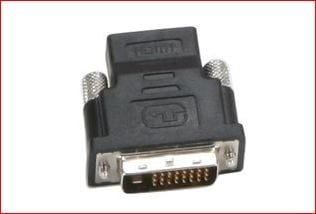
It looks like I have to buy a DVI/spdif>HDMI converter if I want the true digital audio experience. From there I'd have to use the HDTV's spdif optical out and connect to receiver and all the surround sound speakers. That ain't happening cuz the receivers to old and has no optical in. Too much to spend. Thats an $80 converter and a new modern receiver, easially $300+.
So then, how do I get the new puters analog out, to work with the HDTV's HDMI input, like the older puter will? bleeping bS
Sound works for PC input but not HDMI input. HDMI input has a left/right analog input with it???????? bleep | My System Specs | | System Manufacturer/Model Number DIY #3, #2 OS W7 Ulti/64, XP Pro/32 CPU INTEL i7 920 DO, Core2 Duo 6400 Motherboard GIGABYTE EX58 UD3R-SLI, EP45-UD3R Memory KINGSTON DDR3 1333MHz, CORSAIR DDR2 800MHz Graphics Card EVGA GTX 260 x2, 8800 GTX Sound Card REALTEK HD onboard, ditto Monitor(s) Displays SONY 40" BRAVIA LCD Screen Resolution 1360 X 768 Keyboard MS Mouse MS PSU COOLERMASTER 900W, ENERMAX 850W Case COOLERMASTER HAF 932 x2 Cooling stock Hard Drives OCZ VERTEX/RAID0 -3, Vertex 30GB Internet Speed ADSL 3MB/768KBs Other Info amateur enthusiast All times are GMT -5. The time now is 08:04 AM. | |