Windows 7 Forums


Windows 7: No audio devices are installed. Please help.

25 Apr 2010   #1

Windows 7 32 bit
 
 
No audio devices are installed. Please help.

Hi

I recently upgraded from XP to 7 and have been stumped by a problem for over a week now that I can't seem to find in any other forums.

I have a Gigabyte GA-965P-DS3P motherboard with RealTek High Definition onboard sound (I'm pretty sure, could someone confirm this?)

RealTek High Definition Audio appears in device manager but in the Sound window of Control panel it says there are "No audio devices installed".

I have the most up to date driver for the RealTek onboard sound from the thread on this website. (Driver version - 6.0.1.6083), yet it still doesn't show as an audio device?

When i try to let windows update them automatically they say i have the most up to date drivers?

Under properties for Realtek HD Audio i have this error "Windows cannot load the device driver for this hardware. The driver may be corrupted or missing. (Code 39).

Any help would be greatly appreciated.


Cheers,
Josh

Last edited by JoshDavis; 25 Apr 2010 at 11:35 PM..
My System SpecsSystem Spec

26 Apr 2010   #2

Windows 7 Home Premium
Southwest U.S.


In your BIOS, do you have an option for Azalia codec? is it enabled?

Also, did you know you have to install the Drivers twice? The first time removes the old drivers, the second time installs the new driver.

Ap
My System SpecsSystem Spec
26 Apr 2010   #3

Windows 7 32 bit
 
 
BIOS

Hi Ap,

In my BIOS i have two options for Azalia Codecs, auto and disabled. I have it on Auto. I have installed the driver for the onboard sound a couple of times to make sure the old driver has been removed.

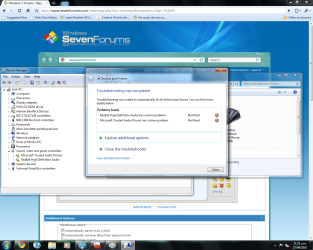
When i turn on/restart my computer a Windows Update "Playing Audio" troubleshooter opens and says that re-intalling the driver might work and do I want to apply this fix? It tries to install an update for my Realtek High Definition Audio but fails. Same for the Microsoft Trusted Audio Drivers.

"Problems found
Realtek High Definition Audio has a driver problem Not fixed X"

In my device manager it shows Microsoft Trusted Audio Drivers and Realtek High Definition Audio under Sound, Video and Game Controllers but they both have the yellow triangle with exclamation mark in the middle.

Thanks for your reply.

Any ideas what could be going wrong?
My System SpecsSystem Spec
.


26 Apr 2010   #4

Windows 7 32 bit
 
 
Errors

Maybe this helps
Attached Thumbnails
No audio devices are installed. Please help.-errors.png  
My System SpecsSystem Spec
26 Apr 2010   #5

windows 7 Ultimate x64


I just looked that motherboard up on the Gigabyte website and it says it uses Intel High Definition audio... might want to try getting the driver from the manufacturer's site.
My System SpecsSystem Spec
26 Apr 2010   #6

Windows 7 32 bit
 
 
Intel Driver for Audio

On the Gigabyte website, under audio drivers for the GA-965P-DS3P is says the most recent update for an audio codec is

"Realtek Function driver for Realtek Azalia audio chip (Including Microsoft UAA Driver in English edition) Version:R2.45 39.36 MB"

This is from the manufacturer website?

It doesn't mention anything about Intel in the driver updates even though in the product description it says it uses Intel High Definition Audio????

I have downloaded the most up to date version of this from a thread in these forums. Version R 2.46. In my BIOS i have an option for Azalia Codec too? Which i have enabled.

I am seriously confused? Do i have Realtek or Intel? And what is the driver i need for Intel if so because i can't seem to find anything on the website.

Last edited by JoshDavis; 26 Apr 2010 at 07:09 PM..
My System SpecsSystem Spec
26 Apr 2010   #7

Windows 7 Home Premium
Southwest U.S.


Quote   Quote: Originally Posted by JoshDavis View Post
Hi Ap,

In my BIOS i have two options for Azalia Codecs, auto and disabled. I have it on Auto. I have installed the driver for the onboard sound a couple of times to make sure the old driver has been removed.

When i turn on/restart my computer a Windows Update "Playing Audio" troubleshooter opens and says that re-intalling the driver might work and do I want to apply this fix? It tries to install an update for my Realtek High Definition Audio but fails. Same for the Microsoft Trusted Audio Drivers.

"Problems found
Realtek High Definition Audio has a driver problem Not fixed X"

In my device manager it shows Microsoft Trusted Audio Drivers and Realtek High Definition Audio under Sound, Video and Game Controllers but they both have the yellow triangle with exclamation mark in the middle.

Thanks for your reply.

Any ideas what could be going wrong?
Yep, "Auto" is the correct selection in the BIOS.

This is what Gigabyte lists.

GA-965P-DS3P (rev. 3.3) - GIGABYTE - Support&Download - Motherboard - Driver

It's version 2.45 of the Realtek driver.

Do you have the Audigy out of the machine and removed any and all related creative drivers? (i looked at your spec)

i would use the Control Panel applet to remove all audio related drivers, first uninstalling them in Device manager then try the Gigabyte Realtek driver.

We've seen other problems here but not the audio device being recognized... not unless you have other cards or devices that are causing a direct IRQ or address conflict.

Ap
My System SpecsSystem Spec
26 Apr 2010   #8

Windows 7 32 bit


Yeah the Audigy is gone. I gave up on trying to get that working and would prefer onboard to nothing at all.

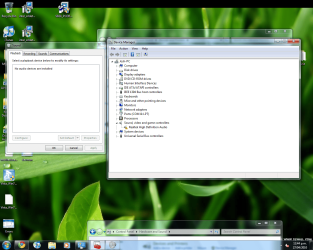
I have completely uninstalled all Creative drivers and Realtek Drivers. Device manager now looks like this.

Downloading R2.45 from Gigabyte site now.

I have seen a few different types of methods for installing the driver. Should i run the setup.exe or is there a way i should manually install?
Attached Thumbnails
No audio devices are installed. Please help.-clean.png  
My System SpecsSystem Spec
26 Apr 2010   #9

Windows 7 32 bit


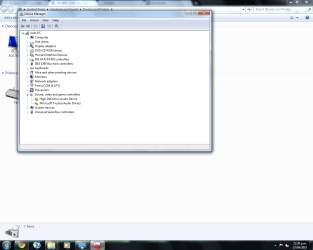
Ran the setup.exe and restarted.

Installed but still no audio devices installed?

Any ideas?
Attached Thumbnails
No audio devices are installed. Please help.-devman.png  
My System SpecsSystem Spec
26 Apr 2010   #10

Windows 7 Home Premium
Southwest U.S.


Quote   Quote: Originally Posted by JoshDavis View Post
Ran the setup.exe and restarted.

Installed but still no audio devices installed?

Any ideas?
You did an upgrade over the top of XP?

Did HD audio work under XP?

The only think I can come up with is some conflict with left over settings or files.

Ap

Last edited by Aphelion; 26 Apr 2010 at 11:28 PM.. Reason: Stupid replies on my part....
My System SpecsSystem Spec
Reply

 No audio devices are installed. Please help. problems?


Thread Tools


Similar help and support threads for: No audio devices are installed. Please help.
Thread Forum
No Audio Devices Installed, Help !~! Sound & Audio
Solved No audio devices are installed Sound & Audio
No Audio Devices Are Installed in Recording Tab Sound & Audio
Recording: no Audio devices are installed. Sound & Audio
No audio devices are installed. Sound & Audio


All times are GMT -5. The time now is 01:45 AM.


Seven Forums Android App Seven Forums IOS App Follow us on Facebook

Windows 7 Forums is an independent web site and has not been authorized,
sponsored, or otherwise approved by Microsoft Corporation.
"Windows 7" and related materials are trademarks of Microsoft Corp.
© Designer Media Ltd
  

1 2 3 4 5 6 7 8 9 10 11 12 13 14 15 16 17 18 19 20 21 22 23 24 25 26 27 28 29 30 31 32