You can try downloading the latest Realtek HD drivers if your microphone is part of your sound card.
Realtek
It's likely that your microphone is working, you just don't have it installed correctly. First of all make sure that the levels in the advanced settings are correct.
Start > Control Panel > All Items > Sound > Recording Tab > Right Click Device You Wish to Use > Properties > Levels Tab
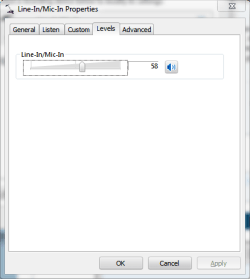
Make sure that the levels are high enough (set to 100 for now)
Now make noise near your microphone and watch the levels on the Recording Tab of the Sound portion of Control panel. If the levels are jumping while you speak, then the microphone is functioning properly. If not, then something isn't working.
Second, you should know if you're attempting to plug an external microphone into your computer through the line-in port, most won't work. This is because most headset microphones are not powered and therefore require a microphone-in port, not a line-in port. The only microphones that will work in Line-In ports are powered microphones.


