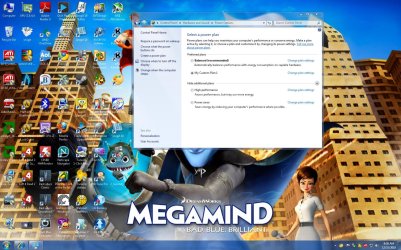
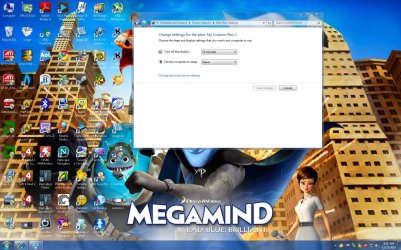
Hey guys I have a ASUS M51vr Notebook Running windows 7,
I have the latest ATI Drivers for my ATI HD3470 mobility
Plus latest Realtek HD drivers.
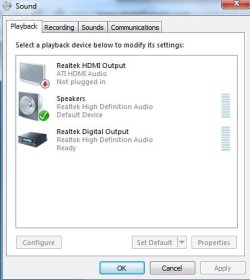
My problem is when i plug in my hdmi output via my hdmi cable it doesn't make the new device detected sound it would make on vista then allow me to choose to extend or duplicate to the new monitor. When i plug in my hdmi cable in, there is no picture until i reboot the computer then the picture comes. But i still am not able to have audio coming out from the HDMI output. On Vista i would connect the cable and then the new device sound would beep and it will allow me to choose extend options and the sound will work without a problem.. Now i see this is a comman problem and i been doing my head in trying to fix it the past 2 months, i'll post my Computer details and images of the HDMI cable not detected as it is currently connected.
Chipset
-------------------------------------------------------------------------
Northbridge Intel PM45 rev. 07
Southbridge Intel 82801IM (ICH9-M) rev. 03
Graphic Interface PCI-Express
Monitoring
-------------------------------------------------------------------------
Mainboard Model M51Vr (0x0000017B - 0x00029C20)
LPCIO
-------------------------------------------------------------------------
Hardware Monitors
-------------------------------------------------------------------------
Hardware monitor ACPI
Temperature 0 53°C (127°F) [0xCBE] (THRM)
Hardware monitor Intel Mobile Core 2 Duo P8600
Temperature 0 39°C (102°F) [0x3D] (Core #0)
Temperature 1 40°C (103°F) [0x3C] (Core #1)
Hardware monitor ATI Mobility Radeon HD 3400 Series
Temperature 0 52°C (125°F) (GPU Core)
DMI
-------------------------------------------------------------------------
DMI BIOS
vendor American Megatrends Inc.
version 211
date 11/17/2008
DMI System Information
manufacturer ASUSTeK Computer Inc.
product M51Vr
version 1.0
serial NF1S8831970253
UUID 9D3D81DD-4EDD236B-F7000022-157460F1
DMI Baseboard
vendor ASUSTeK Computer Inc.
model M51Vr
revision 1.0
serial BSN12345678901234567
DMI System Enclosure
manufacturer ASUSTeK Computer Inc.
chassis type Notebook
chassis serial CSN12345678901234567
Graphics
-------------------------------------------------------------------------
Number of adapters 1
Graphic APIs
-------------------------------------------------------------------------
API ATI OD5
API ATI I/O
Display Adapters
-------------------------------------------------------------------------
Display adapter 0
Manuf. API index 0
Display name \\.\DISPLAY1
Name ATI Mobility Radeon HD 3400 Series
Codename RV620LE
Technology 55 nm
Memory size 256 MB
Memory bus width 64 bits
GPU ref clock 27000
PCI device bus 1 (0x1), device 0 (0x0), function 0 (0x0)
Vendor ID 0x1002 (0x1043)
Model ID 0x95C4 (0x1875)
Performance Level 0
Core clock 300.0 MHz
Memory clock 400.0 MHz
Software
-------------------------------------------------------------------------
Windows Version Microsoft Windows 7 (6.1) Ultimate Edition (Build 7600)
DirectX Version 11.0
That is all the information, If you guys need more please let me know... This problem has been driving me insane..
I have the latest ATI Drivers for my ATI HD3470 mobility
Plus latest Realtek HD drivers.
My problem is when i plug in my hdmi output via my hdmi cable it doesn't make the new device detected sound it would make on vista then allow me to choose to extend or duplicate to the new monitor. When i plug in my hdmi cable in, there is no picture until i reboot the computer then the picture comes. But i still am not able to have audio coming out from the HDMI output. On Vista i would connect the cable and then the new device sound would beep and it will allow me to choose extend options and the sound will work without a problem.. Now i see this is a comman problem and i been doing my head in trying to fix it the past 2 months, i'll post my Computer details and images of the HDMI cable not detected as it is currently connected.
Chipset
-------------------------------------------------------------------------
Northbridge Intel PM45 rev. 07
Southbridge Intel 82801IM (ICH9-M) rev. 03
Graphic Interface PCI-Express
Monitoring
-------------------------------------------------------------------------
Mainboard Model M51Vr (0x0000017B - 0x00029C20)
LPCIO
-------------------------------------------------------------------------
Hardware Monitors
-------------------------------------------------------------------------
Hardware monitor ACPI
Temperature 0 53°C (127°F) [0xCBE] (THRM)
Hardware monitor Intel Mobile Core 2 Duo P8600
Temperature 0 39°C (102°F) [0x3D] (Core #0)
Temperature 1 40°C (103°F) [0x3C] (Core #1)
Hardware monitor ATI Mobility Radeon HD 3400 Series
Temperature 0 52°C (125°F) (GPU Core)
DMI
-------------------------------------------------------------------------
DMI BIOS
vendor American Megatrends Inc.
version 211
date 11/17/2008
DMI System Information
manufacturer ASUSTeK Computer Inc.
product M51Vr
version 1.0
serial NF1S8831970253
UUID 9D3D81DD-4EDD236B-F7000022-157460F1
DMI Baseboard
vendor ASUSTeK Computer Inc.
model M51Vr
revision 1.0
serial BSN12345678901234567
DMI System Enclosure
manufacturer ASUSTeK Computer Inc.
chassis type Notebook
chassis serial CSN12345678901234567
Graphics
-------------------------------------------------------------------------
Number of adapters 1
Graphic APIs
-------------------------------------------------------------------------
API ATI OD5
API ATI I/O
Display Adapters
-------------------------------------------------------------------------
Display adapter 0
Manuf. API index 0
Display name \\.\DISPLAY1
Name ATI Mobility Radeon HD 3400 Series
Codename RV620LE
Technology 55 nm
Memory size 256 MB
Memory bus width 64 bits
GPU ref clock 27000
PCI device bus 1 (0x1), device 0 (0x0), function 0 (0x0)
Vendor ID 0x1002 (0x1043)
Model ID 0x95C4 (0x1875)
Performance Level 0
Core clock 300.0 MHz
Memory clock 400.0 MHz
Software
-------------------------------------------------------------------------
Windows Version Microsoft Windows 7 (6.1) Ultimate Edition (Build 7600)
DirectX Version 11.0
That is all the information, If you guys need more please let me know... This problem has been driving me insane..
Attachments
My Computer
At a glance
Windows 7Processor Intel(R) Core(TM)2 Duo CPU P8600 @ ...Installed Physical Memory (RAM) 3.00 GBATI Mobility Radeon HD 3470
- Computer Manufacturer/Model Number
- Asus M51vr Notebook
- OS
- Windows 7
- CPU
- Processor Intel(R) Core(TM)2 Duo CPU P8600 @ 2.40GHz, 2
- Motherboard
- BIOS Version/Date American Megatrends Inc. 211, 17/11/2008
- Memory
- Installed Physical Memory (RAM) 3.00 GB
- Graphics Card(s)
- ATI Mobility Radeon HD 3470
- Sound Card
- Realtek High Definition Audio
- Monitor(s) Displays
- 15.4" WXGA/WXGA+/WSXGA+ Color-Shine
- Hard Drives
- 320GB
- PSU
- Laptop