| Windows 7: RealTek ALC 892 sound problems |
05 Jun 2010
|
#1 | | |
RealTek ALC 892 sound problems I just got a new computer today and have this lovely issue of having terrible sound coming out of my speakers. I have an Asus M4A89GTD PRO, onboard sound RealTek ALC 892.
Specs:
CPU: AMD Phenom II X4 965 Black Edition
CPU Cooler: CoolerMaster V8
RAM: 8GB (4 x 2GB) Kingston HyperX DDR3 1600
HD: 300GB Western Digi VelociRaptor + 1TB SATA-II
Motherboard: ASUS M4A89GTD Pro
PSU: Corsair 950W
GPU: ASUS 1GB Radeon HD 5870
Case: In-Win Ironclad (Comes with 250mm side fan)
Monitor: ASUS 24" VW246H 2ms HDMI
The issue is that when I plug in my stereo speakers, the sound produced is muffled with some static. Overall, disgusting sound and I have Harman/Kardon speakers (2 speakers, 1 sub). There are two plugs (one lime green, one black) and I connect them to the corresponding colors on the audio inputs and the sound produced is ghastly. It is not crisp and my phone's ringtone is better than what I am hearing. I truly believe there is a problem here, not that I am judging the quality of sound... I believe something is not functioning properly. Sometimes the sound is either somewhat muffled or muffled beyond recognition. (Plugging either the lime green or black plug into the lime green jack makes no difference. As long as one is in the lime green jack, audio is heard but obviously terrible.)
I have had these speakers for a few years and they have served two previous computers magnificently. I cannot fathom that it's just "that bad". | My System Specs |
| |
06 Jun 2010
|
#2 | | Windows 7 Ultimate 64-bit Chicago |

Quote: Originally Posted by BrettC03 I just got a new computer today and have this lovely issue of having terrible sound coming out of my speakers. I have an Asus M4A89GTD PRO, onboard sound RealTek ALC 892.
Specs:
CPU: AMD Phenom II X4 965 Black Edition
CPU Cooler: CoolerMaster V8
RAM: 8GB (4 x 2GB) Kingston HyperX DDR3 1600
HD: 300GB Western Digi VelociRaptor + 1TB SATA-II
Motherboard: ASUS M4A89GTD Pro
PSU: Corsair 950W
GPU: ASUS 1GB Radeon HD 5870
Case: In-Win Ironclad (Comes with 250mm side fan)
Monitor: ASUS 24" VW246H 2ms HDMI
The issue is that when I plug in my stereo speakers, the sound produced is muffled with some static. Overall, disgusting sound and I have Harman/Kardon speakers (2 speakers, 1 sub). There are two plugs (one lime green, one black) and I connect them to the corresponding colors on the audio inputs and the sound produced is ghastly. It is not crisp and my phone's ringtone is better than what I am hearing. I truly believe there is a problem here, not that I am judging the quality of sound... I believe something is not functioning properly. Sometimes the sound is either somewhat muffled or muffled beyond recognition. (Plugging either the lime green or black plug into the lime green jack makes no difference. As long as one is in the lime green jack, audio is heard but obviously terrible.)
I have had these speakers for a few years and they have served two previous computers magnificently. I cannot fathom that it's just "that bad". Realtek Select High Definition Audio Codecs. That chip is so new as not to even show on their datasheets. I'm sure it needs a new driver. | My System Specs | | System Manufacturer/Model Number baarod/MCP OS Windows 7 Ultimate 64-bit CPU Core2 Quad Q6600 @ 3.6GHz 9x400FSB Motherboard Gigabyte G33M-S2H Memory 4GB DDR2 1066 Graphics Card ATI Radeon HD 4670 Sound Card Integrated Azalia Monitor(s) Displays Acer AL1711 Screen Resolution 1280x1024 Keyboard Microsoft Wireless Comfort Keyboard 4000 Mouse Microsoft Wireless Lasr Mouse 5000 PSU 240W TFX Case InWin BT566 Cooling Intel Retail Stock Hard Drives OCZ Vertex SATAII w/ 1.5FW 30,528MB system and apps
Maxtor 6L300R0 PATA 286,188MB page file, data and user profiles Internet Speed 3Mbps Verizon DSL over 802.11g Other Info Hauppauge WinTV PVR II Tuner, Generic $13 SoC Webcam, RT61 WiFi with remote antenna, Media Center Remote and Receiver |
21 Jul 2010
|
#4 | | |
could u find a solution for this problem?? I have almost the same hardware as you, and I've tryed everything but i get only hum from the speakers :'( | My System Specs | | OS Windows 7 CPU Phenom II x4 965 Motherboard Asus M4A89GTD PRO Memory Gskill 1333mhz 2x2GB Graphics Card Sapphire Ati 5850 Sound Card Onboard Monitor(s) Displays Dell ST2310 PSU CM 600w Case Cm 690 Cooling Cm V8 Hard Drives Samsung 320gb
WD 1TB Black sata 3 |
21 Jul 2010
|
#5 | | Windows 7 Ultimate x64 SP1 |
Try this: right click on the white speaker - the notification area of Windows. And then in "Playback Devices". Select the port you are using and go to the "Supported Formats" tab. Test each of the options. I believe your problem is related to the inability of your amplifier to decode some formats.
Let us know the results!!! "PLEASE REP ANYONE WHO HELPS YOU" | My System Specs | | System Manufacturer/Model Number WALLONN7 / LIN BLACK SERIES II OS Windows 7 Ultimate x64 SP1 CPU AMD PHENOM II X6 1090T 3.2GHz Motherboard GIGABYTE GA-890FXA-UD7 Memory 8GB G.SKILL RIPJAWS - F3-10666CL7D Graphics Card SAPPHIRE ATI RADEON HD 5870 VAPOR X OC Sound Card REALTEK DOLBY HOME THEATER Monitor(s) Displays LED LG W2486L Screen Resolution 1080p Keyboard MICROSOFT DIGITAL MEDIA KEYBOARD 3000 - USB Mouse MICROSOFT BASIC OPTICAL MOUSE 2.0 - USB PSU ZALMAN ZM1000-HP 1000W Case THERMALTAKE XASER VI VG4000SWA Cooling 140MM x3 / 120MM x1 AIR COOLING - THERMALTAKE Hard Drives SEAGATE 1TB -ST31000528AS - AHCI MODE - AS SATA Internet Speed 600KBPS Other Info MICROSOFT XBOX 360 CONTROLLER |
21 Jul 2010
|
#6 | | |
thank you very much for answering so fast. I've tried what you said but I have no Supported Formats Tab. I do have that tab in HDMI, but that port is working correctly. Since I installed the Ati 5850 to the motherboard the Realtek HD has gone crazy.
Besides only having a hum noise, the Realtek Administrator (orange speaker) tells me every a minute or so that a device has been disconnected, and then has been reconected. Don't why this has gotten has happen, I know realtek doesn't even list the ALC 892 in his page, new drivers may be coming, but sucks.
Ah just to tell you the major difference is I have Windows 7 at 32bits. But i guess im seeing the same thing as BrettC03.
Cheers | My System Specs | | OS Windows 7 CPU Phenom II x4 965 Motherboard Asus M4A89GTD PRO Memory Gskill 1333mhz 2x2GB Graphics Card Sapphire Ati 5850 Sound Card Onboard Monitor(s) Displays Dell ST2310 PSU CM 600w Case Cm 690 Cooling Cm V8 Hard Drives Samsung 320gb
WD 1TB Black sata 3 |
22 Jul 2010
|
#7 | | Windows 7 Ultimate x64 SP1 |

Quote: Originally Posted by Teije thank you very much for answering so fast. I've tried what you said but I have no Supported Formats Tab. I do have that tab in HDMI, but that port is working correctly. Since I installed the Ati 5850 to the motherboard the Realtek HD has gone crazy.
Besides only having a hum noise, the Realtek Administrator (orange speaker) tells me every a minute or so that a device has been disconnected, and then has been reconected. Don't why this has gotten has happen, I know realtek doesn't even list the ALC 892 in his page, new drivers may be coming, but sucks.
Ah just to tell you the major difference is I have Windows 7 at 32bits. But i guess im seeing the same thing as BrettC03.
Cheers
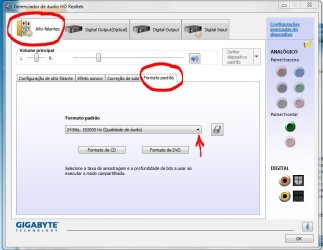
I faced a problem with version 2.49. I could not make use of the Dolby Home Theater. The problem was resolved with version 2.50. So I recommend that you download this version of the driver. Download this driver, install it and open the Realtek HD Audio Manager. Navigate to the Default Format tab, as shown below. Change the default format and do some testing to see if the problem is solved.
Let us know the results!! "PLEASE REP ANYONE WHO HELPS YOU" | My System Specs | | System Manufacturer/Model Number WALLONN7 / LIN BLACK SERIES II OS Windows 7 Ultimate x64 SP1 CPU AMD PHENOM II X6 1090T 3.2GHz Motherboard GIGABYTE GA-890FXA-UD7 Memory 8GB G.SKILL RIPJAWS - F3-10666CL7D Graphics Card SAPPHIRE ATI RADEON HD 5870 VAPOR X OC Sound Card REALTEK DOLBY HOME THEATER Monitor(s) Displays LED LG W2486L Screen Resolution 1080p Keyboard MICROSOFT DIGITAL MEDIA KEYBOARD 3000 - USB Mouse MICROSOFT BASIC OPTICAL MOUSE 2.0 - USB PSU ZALMAN ZM1000-HP 1000W Case THERMALTAKE XASER VI VG4000SWA Cooling 140MM x3 / 120MM x1 AIR COOLING - THERMALTAKE Hard Drives SEAGATE 1TB -ST31000528AS - AHCI MODE - AS SATA Internet Speed 600KBPS Other Info MICROSOFT XBOX 360 CONTROLLER |
22 Jul 2010
|
#8 | | |
Sry, but nothing happened. I still don't have any sound.
Rephrasing my previous post, I don't have a hum all the time, only if a really crank up the speakrs the speakrs, but that part of the noise of the speakers themselves. I can only hear something if a mute and un mute the speakers which gives me a loud bump.
Just other peace of information. When i plug my speakers to the green jack in the bakc of the pc, the realtek administrator tell me there also something connected to the black jack. Whenever i connect something to the black jack it tells me that a microphone has been connected to the red jack.
Last edited by Teije; 22 Jul 2010 at 11:45 PM..
| My System Specs | | OS Windows 7 CPU Phenom II x4 965 Motherboard Asus M4A89GTD PRO Memory Gskill 1333mhz 2x2GB Graphics Card Sapphire Ati 5850 Sound Card Onboard Monitor(s) Displays Dell ST2310 PSU CM 600w Case Cm 690 Cooling Cm V8 Hard Drives Samsung 320gb
WD 1TB Black sata 3 |
23 Jul 2010
|
#9 | | |
It was determined that my motherboard's audio jacks themselves were the issue. RMA'd the motherboard, got a new one, and now I have crystalline sound. For onboard sound, this competes with previous generation Sound Blaster X-Fi cards, hopefully you can get yours working without the trouble I had. | My System Specs | | |
23 Jul 2010
|
#10 | | Windows 7 Ultimate x64 SP1 |

Quote: Originally Posted by BrettC03 It was determined that my motherboard's audio jacks themselves were the issue. RMA'd the motherboard, got a new one, and now I have crystalline sound. For onboard sound, this competes with previous generation Sound Blaster X-Fi cards, hopefully you can get yours working without the trouble I had. I'm sorry that we failed to be of much help in solving your problem. Anyway, good to know that the root of it was determined to be a manufacturing defect. Therefore, since the problem was solved in a way, I ask you to click the icon of a triangle at the top right of this post and report that your thread is solved.
We'll be here if you need any help! "PLEASE REP ANYONE WHO HELPS YOU" | My System Specs | | System Manufacturer/Model Number WALLONN7 / LIN BLACK SERIES II OS Windows 7 Ultimate x64 SP1 CPU AMD PHENOM II X6 1090T 3.2GHz Motherboard GIGABYTE GA-890FXA-UD7 Memory 8GB G.SKILL RIPJAWS - F3-10666CL7D Graphics Card SAPPHIRE ATI RADEON HD 5870 VAPOR X OC Sound Card REALTEK DOLBY HOME THEATER Monitor(s) Displays LED LG W2486L Screen Resolution 1080p Keyboard MICROSOFT DIGITAL MEDIA KEYBOARD 3000 - USB Mouse MICROSOFT BASIC OPTICAL MOUSE 2.0 - USB PSU ZALMAN ZM1000-HP 1000W Case THERMALTAKE XASER VI VG4000SWA Cooling 140MM x3 / 120MM x1 AIR COOLING - THERMALTAKE Hard Drives SEAGATE 1TB -ST31000528AS - AHCI MODE - AS SATA Internet Speed 600KBPS Other Info MICROSOFT XBOX 360 CONTROLLER RealTek ALC 892 sound problems problems? All times are GMT -5. The time now is 06:46 PM. | |