Windows 7 Forums Search
Welcome to Windows 7 Forums. Our forum is dedicated to helping you find solutions with any problems, errors or issues you are experiencing with Windows 7. The Windows 7 forum also covers news and updates and has an extensive Windows 7 tutorial section that covers a wide range of tips and tricks.


Windows 7 - No HDMI audio out with Windows 7


07-15-2010   #51


windows 7


finally working

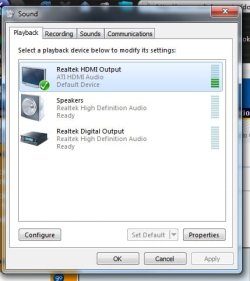
I updated the video driver following the aforementioned instructions, and Viola! I got the HDMI thing on sound playback! Set it as default and got sound on TV. Beautiful. Thank U guys so very much.

My System SpecsSystem Spec
07-29-2010   #52


Windows 7


No HDMI Audio

I figured it out! You have to uninstall the IDT driver, restart with the computer plugged into the monitor via the HDMI cable. It will auto-install the correct driver. Then you have to go to the device in your sound menu and set it as a default device. It was really simple in the end!
My System SpecsSystem Spec
08-05-2010   #53


windows 7


Is it possible to get sound from laptop (windows 7 OS) on the HDTV, connected using an RCA audio cable? My dell vostro has no HDMI port and I dont want to do any conversion

I was able to do it with Vista but Ive recently upgraded
My System SpecsSystem Spec
.


08-06-2010   #54


winxp


nice post. thanks for sharing.
My System SpecsSystem Spec
09-17-2010   #55


indows 7 Ultimate 32bit


Similar problem solved

Hi, I posted this in msn answers bc I found a solution for my particular issue which seems to yours:

I lost audio on the HDMI input of my TV/Monitor, all drivers (nvidia WHQL 258,96, realtek sound were up-to-date) and this is the setup:

-OS: Windows 7
- Video card: Nvidia XFX GTS-250 connected to a 32LH70YR LG Full HD TV through a DVI to HDMI adapter cable.
- Audio: 3,5mm audio cable from one of the rear outputs of the motherboard integrated sound to the sound input of the TV.

The solution I found:
1.- HDMI integrates audio by default, so I disabled its audio feature like this:
a. On the clear desktop, right click then go to "NVIDIA Control Panel"
b. At Nvidia Control Panel, go to Display -> Change Resolution.
c. Select your desired resolution and make sure the HDMI-HDTV connector is set to "Audio disabled", this way the TV will use the audio coming from your sound card and not the default integrated in HDMI.

2.- If that didn't work inmediately, then you may have a program related to overclocking/temperature measurement. In my case I had running MSI Afterburner. CLOSE IT. Then try Enabling/disabling HDMI sound as explained in point 1.
Notes:
- Don't forget to play a song or video, as well as checking your TV's volume and player volume before saying it didn't work.
- Also make sure the tv speakers are set as your default device under "Windows Control Panel -> Sound". You can even change the icon to a TV-like one.
- I did this with all devices on. I've read you need to turn on PC then TV, that's not true at least for me.

Good luck.
My System SpecsSystem Spec
09-18-2010   #56


Windows 7 Pro & Vista Home Premium


You need to completely uninstall the video card drivers before updating.

Download Driver Sweeper

Now go to this page to update your chip drivers and NVidia drivers:

nVIDIA Geforce 480 470 285 260 9800 275 295 GT GTX AMD ATI Radeon HD 5870 5850 5770 4890 X2 - Guru of 3D: PC Hardware Reviews
My System SpecsSystem Spec
01-14-2011   #57


Windows 7 Professional x64


Everything on laptop shows there should be sound !

WW3 - I have the same problem you have described and apparently solved. Namely, I have video through the HDMI from my Vaio to my LCD (Sony), but no audio. I can see the levels moving in the volume mixer (For iTunes and Sony TV) but there is no sound. My laptop speakers are disabled and HDMI, which is the TV, is set to be the default in the control panel.
I have had my Vaio connected successfully to a Panasonic TV about a year ago and remember I had to reboot if I was to change my default speakers. However, if I change the default back to laptop, the sound plays without having to reboot.

I'm really stumped. Could you let me know how you fixed your problem?
My System SpecsSystem Spec
01-19-2011   #58


Windows 7 Home Premium x64


Quote   Quote: Originally Posted by capricious View Post
Is it possible to get sound from laptop (windows 7 OS) on the HDTV, connected using an RCA audio cable? My dell vostro has no HDMI port and I dont want to do any conversion

I was able to do it with Vista but Ive recently upgraded
Yep. All you have to do is get a stereo 3mm male to RCA female adapter and plug it into your line out jack on your laptop. Newer HDTVs also have a pc audio port. You might want to check to see if that is an option. If so you just need a stereo 3mm double male cable.

Windows 7 should recognize and you should be able to select the port. Line out is usually labeled with speakers and the audio driver you are using.
My System SpecsSystem Spec
02-07-2011   #59


Windows 7 64bit


No Sound

I'm by no means a computer person. However I've beenusing my desktop with my HMDI tv 42" LG for about 6 months now without a problem. I've choosen to use the tv speakers over my computer speakers just for the sake of ease. Anyways everything was working fine until a couple days ago. For whatever reason I get no audio through the hdmi cable. My computer shows that the sound is working fine but I don't hear anything. If I change the audio to my computer speakers everything works fine. Switch it back to HDMI and nothing. All drivers are updated. I don't know what happened or how to fix it but it's really frustrating.
Attached Thumbnails
No HDMI audio out with Windows 7-sound.png  
My System SpecsSystem Spec
03-19-2011   #60


windows 7 Ultimate 32 bit


Windows 7: No sound in HDMI output using Recommended Realteck Drivers. Re-solved. I have a Sony Vaio VGN AR 61M Notebook. I upgraded from Vista to Windows 7 32 bit and had exactly the same problem. This Solution worked for me: 1: I Remove installed drivers from the sound card and delete them with the given option. 2: Re-start Windows. 3: Windows will recognize you have no drivers for your sound card and install its drivers, which work fine. I have HDMI Audio out to my LCD TV through the HDMI cable. Everything works fine. Hope this works for you.
My System SpecsSystem Spec
Reply

 No HDMI audio out with Windows 7


Thread Tools


Similar Threads for: No HDMI audio out with Windows 7
Thread Forum
HDMI audio problem when connecting LCD TV to PC via HDMI Sound & Audio
No HDMI Audio in Windows 7 Sound & Audio
Windows 7 - HDMI out no audio - Intel HDMI audio Sound & Audio
Windows 7 64 bit HDMI Audio Problem Sound & Audio
Laptop > HDTV (HDMI - HDMI) No Audio!? Sound & Audio


All times are GMT -5. The time now is 01:06 AM.


Windows 7 Forums is an independent web site and has not been authorized,
sponsored, or otherwise approved by Microsoft Corporation.
"Windows 7" and related materials are trademarks of Microsoft Corp.
© Designer Media Ltd
  

1 2 3 4 5 6 7 8 9 10 11 12 13 14 15 16 17 18 19 20 21 22 23 24 25 26 27 28 29 30