Windows 7 Forums


Windows 7: Problem with my microphone

18 Jun 2010   #1

Windows 7
 
 
Problem with my microphone

Hi everyone,


I worked for a long time with Windows XP.
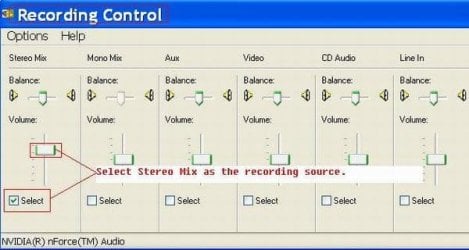
I used this computer for podcast recording:
- Windows XP
- Input: Stereo-Mix
Now, I have a new computer, Windows 7 Ultimate 32bit.
When I plug my microphone in my computer and start Audacity,
the sound is very bad. It's the same problem for other Windows 7 computers...
- Windows 7
- Input: Microphone

Does someone know how I can solve this problem?
Attached Thumbnails
Problem with my microphone-swf-ipod-4.jpg  
My System SpecsSystem Spec

18 Jun 2010   #2

Windows 7 Ultimate x64 Service Pack 1
Doncaster, UK


Hi radiofreak and welcome to Windows 7 Forums

It would help us to help you if we knew what soundcard you were using . Is it separate, or is it built in to the motherboard?. Can you please fill in your System Specs (see mine, at the foot of this post, for an example of what we need).
My System SpecsSystem Spec
18 Jun 2010   #3

Windows 7 Ultimate x64.
Ellesmere Port, UK.


First can you post your system specs so we can see what we're working with. You will find the options in the bottom left of your post, my system specs..

Second have you updated your drivers?
My System SpecsSystem Spec
.


18 Jun 2010   #4

Windows 7


Now my System Specs are updated...
Quote:
Second have you updated your drivers?
Yes, I did, my drivers are updated...
My System SpecsSystem Spec
18 Jun 2010   #5

Windows 7 Ultimate x64 Service Pack 1
Doncaster, UK


Thanks for that. I assume that you are using the R2.49 driver version.

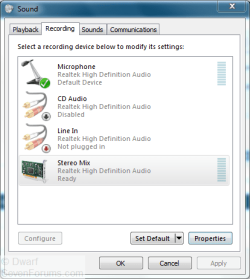
Right-click the speaker icon in the notification area and select the Recording devices option.
Problem with my microphone-capture.png
If you don't see all of the input options, right-click on the dialogue panel and ensure that the options Show Disabled Devices and Show Disconnected Devices are both enabled.
My System SpecsSystem Spec
18 Jun 2010   #6

Windows 7


OK, right-click, options, and now?
My System SpecsSystem Spec
18 Jun 2010   #7

Windows 7 Ultimate x64 Service Pack 1
Doncaster, UK


Assuming that you have the dialogue panel displayed as above, right-click on the input option that you wish to modify and then click Enable on the menu that appears. You might also need to click on Properties to change things such as levels and enhancements for the device.
My System SpecsSystem Spec
19 Jun 2010   #8

Windows 7


I think, the problem is solved. The problem lies with the Tube MP that gives only a Mono signal instead of a stereo signal.

You can see on top of the mixer, Input and Output:
Input is an XLR cable
Output is with 1 Mini-jack cable from Output to Microphone-Input on my laptop.

Last edited by radiofreak; 19 Jun 2010 at 03:55 AM..
My System SpecsSystem Spec
17 Aug 2010   #9

windows 7


I have a problem with my microphone. I am using windows 7 with realtek audio drivers. I even rolled back my drivers and the problem still persisted. I am using Fruity loops to record a track but the only microphone that seems to be working is the one in the speakers of my lap top. When I attach a microphone I hear a small click or bumb in my headphones. There is then a slight wistle then the audio drops. I then hear nothing. i can't seem to find the problem as I have checked all the volumes and made sure nothing is muted. I need help.

Last edited by MadMatt555; 20 Aug 2010 at 10:32 PM..
My System SpecsSystem Spec
Reply

 Problem with my microphone problems?


Thread Tools


Similar help and support threads for: Problem with my microphone
Thread Forum
Odd microphone problem. Sound & Audio
I have problem with my microphone . Sound & Audio
Problem with usb microphone Hardware & Devices
Microphone problem? Sound & Audio
Microphone problem Sound & Audio


All times are GMT -5. The time now is 02:13 AM.


Seven Forums Android App Seven Forums IOS App Follow us on Facebook

Windows 7 Forums is an independent web site and has not been authorized,
sponsored, or otherwise approved by Microsoft Corporation.
"Windows 7" and related materials are trademarks of Microsoft Corp.
© Designer Media Ltd
  

1 2 3 4 5 6 7 8 9 10 11 12 13 14 15 16 17 18 19 20 21 22 23 24 25 26 27 28 29 30 31 32