| Windows 7: Is There a Quick Toggle for 'Loudness Equalization'? |
22 Jun 2010
|
| | Windows 7 Ultimate x64 SP1 || Linux Mint 14 (Maya) x64 1,118 posts Just outside the box you call 'reality'. |
Is There a Quick Toggle for 'Loudness Equalization'? I use my PC for mostly games, but also watching movies and series (I don't see the point in buying a TV and DVD player when I'll only ever use it for DVDs), as a result I like having the 'Loudness Equalization' feature enabled for watching media, and disabled for playing games and listening to music...
Is there a quick way to toggle this on and off? It's a bit irritaing having to right-click the volume control, select properties, etc etc. Would've made more sense to have a "Audio Enhancements" sub-menu when right-clicking the audio icon in the system tray, but apparently MS didn't think of that.
Does anybody have an idea of where this setting is stored? Perhaps in the registry or a settings file somewhere? Any more details would help quite a bit, I can't seem to find much technical information on this feature with a Google search. | My System Specs |
| Computer type PC/Desktop System Manufacturer/Model Number .oO-monstrosity-Oo. OS Windows 7 Ultimate x64 SP1 || Linux Mint 14 (Maya) x64 CPU AMD Phenom II x4 975BE 4.0GHz Motherboard MSI 990FXA-GD65 v3.0 (19.6 BIOS) Memory 2x4GB Patriot G2 DDR3-1600 Graphics Card EVGA GTX 275 Superclocked 896mb Sound Card Onboard Realtek ALC892 Monitor(s) Displays LG Flatron E2442 Screen Resolution 1920x1080 Keyboard A4Tech Multimedia Keyboard Mouse Logitech G700 Wireless/Wired PSU CoolerMaster eXtreme Power Plus 650w Case Corsair Graphite 600T Special Edition White Cooling Zalman CNPS9700NT (Zalman MFC1 and 4x 120mm Zalman spare) Hard Drives WD 250GB, 2x Barracuda 500GB 7200.12, Barracuda 2TB 7200.12. Internet Speed 1Mb uncapped ADSL (Afriihost) |
22 Jun 2010
|
| | Windows 7 Home Premium 914 posts Southwest U.S. |

Quote: Originally Posted by ZaLiTH I use my PC for mostly games, but also watching movies and series (I don't see the point in buying a TV and DVD player when I'll only ever use it for DVDs), as a result I like having the 'Loudness Equalization' feature enabled for watching media, and disabled for playing games and listening to music... Yep, that's exactly how I use it, on for DVD/media, off for everything else.
There probably is a registry setting... you can check this topic to get an idea of a possible location. Realtek Equalizer Settings
Ap | My System Specs | | System Manufacturer/Model Number Assembled in my workshop OS Windows 7 Home Premium CPU Intel Core 2 Duo @ 3.00gHz Motherboard Gigabyte GA-P35-S3G Memory 4 GB Graphics Card ATI Radeon HD 2600 XT Sound Card RME 24/96 Card, Realtek Internal Audio PreSonus FireStudio Monitor(s) Displays Acer 1917 (x2) Screen Resolution 1280 x 1024 on both monitors Keyboard Macally w/2/USB ports. Mouse Trackman Wheel PSU Rosewill 500-watt Case Rosewill mid-tower Cooling Noctua NH-U9B (CPU), PwrSupply fan + single large case Fan Hard Drives Three 250GB Seagate SATA Barracuda 7200rpm Other Info Event 20/20 bas studio monitors, Yamaha sub.
Rackmount Korg/Roland/Yamaha synthesizers,
Cubase MIDI/audio recording. Sony Soundforge audio/mastering software. CD Architect Mastering. RME & Presonus audio interfaces. |
22 Jun 2010
|
| | Windows 7 Ultimate x64 SP1 || Linux Mint 14 (Maya) x64 1,118 posts Just outside the box you call 'reality'. |

Quote: Originally Posted by Aphelion Yep, that's exactly how I use it, on for DVD/media, off for everything else.
There probably is a registry setting... you can check this topic to get an idea of a possible location. Realtek Equalizer Settings
Ap Thanks, I do remember seeing that thread a while back.. I know my XFX board makes use of a Realtek audio chipset (Realtek ALC888 to be precise), but are the registry entries mentioned there not only for the Realtek controls? I'm using the standard Windows drivers, I don't even have the Realtek audio control panel installed...
I'll check tonight when I get home (Win XP at work, Win 7 at home) and see, but I somehow doubt that's quite what I'm looking for.. | My System Specs | | Computer type PC/Desktop System Manufacturer/Model Number .oO-monstrosity-Oo. OS Windows 7 Ultimate x64 SP1 || Linux Mint 14 (Maya) x64 CPU AMD Phenom II x4 975BE 4.0GHz Motherboard MSI 990FXA-GD65 v3.0 (19.6 BIOS) Memory 2x4GB Patriot G2 DDR3-1600 Graphics Card EVGA GTX 275 Superclocked 896mb Sound Card Onboard Realtek ALC892 Monitor(s) Displays LG Flatron E2442 Screen Resolution 1920x1080 Keyboard A4Tech Multimedia Keyboard Mouse Logitech G700 Wireless/Wired PSU CoolerMaster eXtreme Power Plus 650w Case Corsair Graphite 600T Special Edition White Cooling Zalman CNPS9700NT (Zalman MFC1 and 4x 120mm Zalman spare) Hard Drives WD 250GB, 2x Barracuda 500GB 7200.12, Barracuda 2TB 7200.12. Internet Speed 1Mb uncapped ADSL (Afriihost) |
22 Jun 2010
|
| | Windows 7 Home Premium 914 posts Southwest U.S. |

Quote: Originally Posted by ZaLiTH 
Quote: Originally Posted by Aphelion Yep, that's exactly how I use it, on for DVD/media, off for everything else.
There probably is a registry setting... you can check this topic to get an idea of a possible location. Realtek Equalizer Settings
Ap Thanks, I do remember seeing that thread a while back.. I know my XFX board makes use of a Realtek audio chipset (Realtek ALC888 to be precise), but are the registry entries mentioned there not only for the Realtek controls? I'm using the standard Windows drivers, I don't even have the Realtek audio control panel installed...
I'll check tonight when I get home (Win XP at work, Win 7 at home) and see, but I somehow doubt that's quite what I'm looking for..
I was thinking along the lines of finding the registry value that changed from 0 (off) to 1 (on) when enabling/disabling loudness eq, then you could export the registry values with each setting and use them as a toggle.
Ap | My System Specs | | System Manufacturer/Model Number Assembled in my workshop OS Windows 7 Home Premium CPU Intel Core 2 Duo @ 3.00gHz Motherboard Gigabyte GA-P35-S3G Memory 4 GB Graphics Card ATI Radeon HD 2600 XT Sound Card RME 24/96 Card, Realtek Internal Audio PreSonus FireStudio Monitor(s) Displays Acer 1917 (x2) Screen Resolution 1280 x 1024 on both monitors Keyboard Macally w/2/USB ports. Mouse Trackman Wheel PSU Rosewill 500-watt Case Rosewill mid-tower Cooling Noctua NH-U9B (CPU), PwrSupply fan + single large case Fan Hard Drives Three 250GB Seagate SATA Barracuda 7200rpm Other Info Event 20/20 bas studio monitors, Yamaha sub.
Rackmount Korg/Roland/Yamaha synthesizers,
Cubase MIDI/audio recording. Sony Soundforge audio/mastering software. CD Architect Mastering. RME & Presonus audio interfaces. |
22 Jun 2010
|
| | Windows 7 Ultimate x64 SP1 || Linux Mint 14 (Maya) x64 1,118 posts Just outside the box you call 'reality'. |

Quote: Originally Posted by Aphelion 
Quote: Originally Posted by ZaLiTH 
Quote: Originally Posted by Aphelion Yep, that's exactly how I use it, on for DVD/media, off for everything else.
There probably is a registry setting... you can check this topic to get an idea of a possible location. Realtek Equalizer Settings
Ap Thanks, I do remember seeing that thread a while back.. I know my XFX board makes use of a Realtek audio chipset (Realtek ALC888 to be precise), but are the registry entries mentioned there not only for the Realtek controls? I'm using the standard Windows drivers, I don't even have the Realtek audio control panel installed...
I'll check tonight when I get home (Win XP at work, Win 7 at home) and see, but I somehow doubt that's quite what I'm looking for..
I was thinking along the lines of finding the registry value that changed from 0 (off) to 1 (on) when enabling/disabling loudness eq, then you could export the registry values with each setting and use them as a toggle.
Ap Oh, I see what you mean. I did try to do that last night, but I must admit, trying to do anything intelligent on a computer at 3am generally ends in failure with me... I'll try again tonight and see what I can find. | My System Specs | | Computer type PC/Desktop System Manufacturer/Model Number .oO-monstrosity-Oo. OS Windows 7 Ultimate x64 SP1 || Linux Mint 14 (Maya) x64 CPU AMD Phenom II x4 975BE 4.0GHz Motherboard MSI 990FXA-GD65 v3.0 (19.6 BIOS) Memory 2x4GB Patriot G2 DDR3-1600 Graphics Card EVGA GTX 275 Superclocked 896mb Sound Card Onboard Realtek ALC892 Monitor(s) Displays LG Flatron E2442 Screen Resolution 1920x1080 Keyboard A4Tech Multimedia Keyboard Mouse Logitech G700 Wireless/Wired PSU CoolerMaster eXtreme Power Plus 650w Case Corsair Graphite 600T Special Edition White Cooling Zalman CNPS9700NT (Zalman MFC1 and 4x 120mm Zalman spare) Hard Drives WD 250GB, 2x Barracuda 500GB 7200.12, Barracuda 2TB 7200.12. Internet Speed 1Mb uncapped ADSL (Afriihost) |
23 Jun 2010
|
| | Windows 7 Home Premium 914 posts Southwest U.S. |

Quote: Originally Posted by ZaLiTH Oh, I see what you mean. I did try to do that last night, but I must admit, trying to do anything intelligent on a computer at 3am generally ends in failure with me... I'll try again tonight and see what I can find. Ok... I found it, first try too, it's not going to be exactly the same on your system but should be very close.
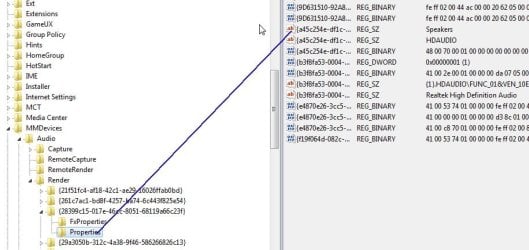
The basics should be found here:
HKEY_LOCAL_MACHINE/SOFTWARE/MICROSOFT/WINDOWS/CURRENTVERSION/MMDEVICES/AUDIO/RENDER
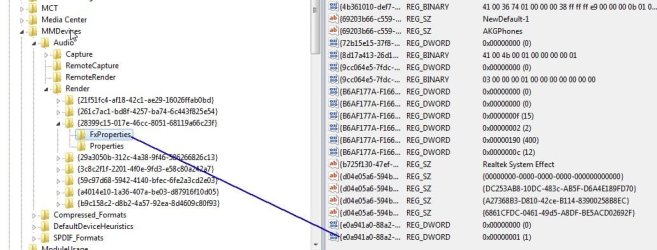
One of the underlying keys will have properties for your output device, in my case, Speakers! Changes are not made here but instead with the associated FXProperties.
Speakers:
FXProperties and Loudness Equalization binary value. 1=enabled.... etc.
Ap | My System Specs | | System Manufacturer/Model Number Assembled in my workshop OS Windows 7 Home Premium CPU Intel Core 2 Duo @ 3.00gHz Motherboard Gigabyte GA-P35-S3G Memory 4 GB Graphics Card ATI Radeon HD 2600 XT Sound Card RME 24/96 Card, Realtek Internal Audio PreSonus FireStudio Monitor(s) Displays Acer 1917 (x2) Screen Resolution 1280 x 1024 on both monitors Keyboard Macally w/2/USB ports. Mouse Trackman Wheel PSU Rosewill 500-watt Case Rosewill mid-tower Cooling Noctua NH-U9B (CPU), PwrSupply fan + single large case Fan Hard Drives Three 250GB Seagate SATA Barracuda 7200rpm Other Info Event 20/20 bas studio monitors, Yamaha sub.
Rackmount Korg/Roland/Yamaha synthesizers,
Cubase MIDI/audio recording. Sony Soundforge audio/mastering software. CD Architect Mastering. RME & Presonus audio interfaces. |
23 Jun 2010
|
| | Windows 7 Ultimate x64 SP1 || Linux Mint 14 (Maya) x64 1,118 posts Just outside the box you call 'reality'. |
Well that was good timing; I was just coming back to say I'd found where the setting is stored on my PC. I exported the [HKEY_LOCAL_MACHINE\SOFTWARE\Microsoft\Windows\CurrentVersion\MMDevices\Audio\Render] key with Loudness Equalization turned on and off, then compared the two files in Notepad++ to find what changed...
It'll be fun trying to get this working though... I can't play with it right now unfortunately since I'm at work, but I did play around with it a little bit earlier this morning. If I import either the 'enabled' or 'disabled' registry entry, the setting doesn't take effect until I log off and back on agin. I can only think that the properties window reloads something in the sound device drivers upon clicking 'OK'.
So, bottom line is this: I know where it is, I know how to change it, but it's not as easy as I originally thought it would be. I'll try find a way around it and post back when I find a way to work around it... It'll be interesting trying to find a single solution that will work on any Win 7 computer... | My System Specs | | Computer type PC/Desktop System Manufacturer/Model Number .oO-monstrosity-Oo. OS Windows 7 Ultimate x64 SP1 || Linux Mint 14 (Maya) x64 CPU AMD Phenom II x4 975BE 4.0GHz Motherboard MSI 990FXA-GD65 v3.0 (19.6 BIOS) Memory 2x4GB Patriot G2 DDR3-1600 Graphics Card EVGA GTX 275 Superclocked 896mb Sound Card Onboard Realtek ALC892 Monitor(s) Displays LG Flatron E2442 Screen Resolution 1920x1080 Keyboard A4Tech Multimedia Keyboard Mouse Logitech G700 Wireless/Wired PSU CoolerMaster eXtreme Power Plus 650w Case Corsair Graphite 600T Special Edition White Cooling Zalman CNPS9700NT (Zalman MFC1 and 4x 120mm Zalman spare) Hard Drives WD 250GB, 2x Barracuda 500GB 7200.12, Barracuda 2TB 7200.12. Internet Speed 1Mb uncapped ADSL (Afriihost) Is There a Quick Toggle for 'Loudness Equalization'? problems? All times are GMT -5. The time now is 05:24 AM. | |