ASUS Mobo - No sound

dem86

New member
I have spent about a week reading through the fixes offered in these great forums but have been unable to fix my system.

I have a ASUS P5E WS Pro mobo. I have tried removing my sound card, reinstalling drivers, reinstalling sound card, reinstalling drivers and all combos of the above and yet I still can't get any sound.

If I play a cd and go into manage audio devices I see the speaker level changing so it is detecting the sound but nothing out of my speakers.

Any thoughts or advice would be greatly appreciated.
 

My Computer

OS
Window 7
Motherboard
Asus P5E WS Pro
Do you have sound from the ports built into your motherboard? I would recommend you test this with your add in sound card removed.
I have an Asus P5K motherboard and am using the built in sound.

Let me know
:D
 

My Computer

Computer type
PC/Desktop
Computer Manufacturer/Model Number
custom build
OS
WinXP / Win 7 / Win 8.1 64bit Dual Boot
CPU
i7-4770K
Motherboard
Asus Z87-A
Memory
16 gb G.Skill Ripjaws
Graphics Card(s)
on board 4600
Sound Card
On Board Soundmax HD
Monitor(s) Displays
Dell 19" Flat Panel
Screen Resolution
1280x1024
Hard Drives
Samsung 840 Pro 512gb SSD
WD1001 Caviar Win 7 Boot
WD500 Caviar Win XP Boot
2xWD500 Caviar (Raid 0)
WD750 Caviar (Backup)
PSU
Aerocool StrikeX 800w x2
Case
Aerocool Strike X
Cooling
Air
Keyboard
Microsoft Wireless
Mouse
Microsoft Wireless
Internet Speed
Cable
Other Info
Asus 12x Blu-ray writer

My Computer

Computer Manufacturer/Model Number
DELL XPS Studio 435T
OS
Vista 64 Ultimate, Windows 7 64 Ultimate, Ubuntu 9.10
CPU
i7 975 3.3 GHz Extreme (Factory OC'd to 3.6 GHz)
Motherboard
DELL provided
Memory
18 Gb Tri-Channel 1066
Graphics Card(s)
ATI 5970 2048 Mb
Sound Card
X-Fi Extreme Gamer
Monitor(s) Displays
Vizio 37" HD-TV
Screen Resolution
1920 x 1080
Hard Drives
1.5 Tb HDD
1.5 Tb HDD
2.0 Tb Network Drive
512 Gb Crucial SSD
PSU
DELL Provided 475 watts
Case
DELL
Cooling
3 fans
Keyboard
Logitech Performance K350 Wireless
Mouse
Logitech Performance MX Wireless
Internet Speed
3 Mb up 750 Kb down
Other Info
Bamboo Fun Tablet, Belkin N+ Wireless router, Pioneer Dolby System Wireless Headphones, Bose 5.1 Dolby Surround Sound System, LifeCam VX 3000 Webcam, Blu-Ray/Hi Def DVD +RW combo and Blu-ray +RW,l 15 in 1 media card reader, Logitech Rumblepad 2, Hauppauge 2250 DTV Tuner with MS Media Center Remote

Laptop:Alienware M17x, Q9100 CPU, 8Gb RAM, 1920x1200 WUXGA LCD driven by 4870's in CrossFireX, Bl
I have updated my drivers and still have no sound coming out of the speakers. The system is recognizing the sound as the levels move when looking at the 'volume mixer' but nothing is coming out of the physical speakers.
I tried to paste a picture but was unsuccessful and I think my description explains it well enough.
 

My Computer

OS
Window 7
Motherboard
Asus P5E WS Pro
I have spent about a week reading through the fixes offered in these great forums but have been unable to fix my system.

I have a ASUS P5E WS Pro mobo. I have tried removing my sound card, reinstalling drivers, reinstalling sound card, reinstalling drivers and all combos of the above and yet I still can't get any sound.

If I play a cd and go into manage audio devices I see the speaker level changing so it is detecting the sound but nothing out of my speakers.

Any thoughts or advice would be greatly appreciated.

Mine is doin the same thing. I cant play my dvd player, I hope it not in my MB.
 

My Computer

Computer Manufacturer/Model Number
Compaq SR5130NX
OS
Windows 7 64 bit
CPU
AMD 64X2 6000+
Motherboard
Asus
Memory
4 MB
Graphics Card(s)
Nvidia Geforce 9600 GSO
Screen Resolution
1024X740
Hard Drives
Stock 200 GB 7400 rpm
Cooling
3 Blue colored Fans
Internet Speed
ATT 6.0 Xtreme
Still banging my head on the desk over this problem. Speakers work fine on laptop so that is not the problem. I have removed and let the system reinstall the RealTek drivers with no success.

I hate to think that I have to buy a new mobo, cpu, memory, etc just bc I upgraded to win 7 64...

Any help or advice would be appreciated.
 

My Computer

OS
Window 7
Motherboard
Asus P5E WS Pro
Still banging my head on the desk over this problem. Speakers work fine on laptop so that is not the problem. I have removed and let the system reinstall the RealTek drivers with no success.

I hate to think that I have to buy a new mobo, cpu, memory, etc just bc I upgraded to win 7 64...

Any help or advice would be appreciated.

Laptop.. ? but you're talking about a desktop, right.

Are you still seeing the green bar move?

Things to check...


-Plug stereo speakers into the back "light green" jack in the back of the machine.

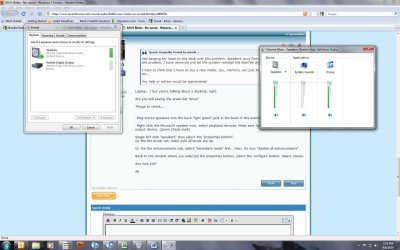
-Right click the Microsoft speaker icon, select playback devices. Make sure Speakers are your default output device. (green check mark)

Single left click "speakers" then select the "properties button".
Go the the levels tab, make sure all levels are up.

Go the the enhancements tab, select "immediate mode" first.. then, for now "disable all enhancements".

Back to the window where you selected the properties button, select the configure button. Select stereo.

Any luck yet?

Ap
 

My Computer

Computer Manufacturer/Model Number
Assembled in my workshop
OS
Windows 7 Home Premium
CPU
Intel Core 2 Duo @ 3.00gHz
Motherboard
Gigabyte GA-P35-S3G
Memory
4 GB
Graphics Card(s)
ATI Radeon HD 2600 XT
Sound Card
RME 24/96 Card, Realtek Internal Audio PreSonus FireStudio
Monitor(s) Displays
Acer 1917 (x2)
Screen Resolution
1280 x 1024 on both monitors
Hard Drives
Three 250GB Seagate SATA Barracuda 7200rpm
PSU
Rosewill 500-watt
Case
Rosewill mid-tower
Cooling
Noctua NH-U9B (CPU), PwrSupply fan + single large case Fan
Keyboard
Macally w/2/USB ports.
Mouse
Trackman Wheel
Other Info
Event 20/20 bas studio monitors, Yamaha sub.
Rackmount Korg/Roland/Yamaha synthesizers,
Cubase MIDI/audio recording. Sony Soundforge audio/mastering software. CD Architect Mastering. RME & Presonus audio interfaces.
Laptop was to just make sure speakers worked...

Unfortunately I have tried everything you suggest and I am still having the same problem. It seems like it has to be something stupid that I am overlooking... screen print.jpg
 

My Computer

OS
Window 7
Motherboard
Asus P5E WS Pro
Hmm, what type of sound system are you running?
In reference to Stereo, 4.1, 5.1, 7.1 etc etc.

Sometimes sound will not be produced unless the correct sound setup is chosen.

Tbh, it's a bit hard to do this through text, need to be there to do a check over, but i'll see what i can do.
 

My Computer

Computer Manufacturer/Model Number
Custom Build
OS
W7 RTM Ultimate x64
CPU
Intel Q8400 @ 2.66GHZ
Motherboard
Gigabyte GA-EG45M-UD2H
Memory
4GB DDR2-800
Graphics Card(s)
Gainward GTS 450 GLH 1GB Edition
Sound Card
Integrated 8 Channel
Monitor(s) Displays
AOC 23.6 Inch Widescreen LCD
Screen Resolution
1920x1080
Hard Drives
Seagate 500GB Internal
Western Digital 1TB Internal

Hitachi 1TB External
PSU
Apevia Java Power 500W
Case
Cooler Master HAF 922 Black
Cooling
Stock Intel CPU Fan
Keyboard
HP SK-2960 Multimedia Keyboard
Mouse
Logitech M350 Wireless Gaming Mouse
Internet Speed
1.5MB
It is a simple Logitech S220 system. 2 small fronts and a little sub.

I know it is hard to diag on a forum but appreciate any help. screen print.jpg
 

My Computer

OS
Window 7
Motherboard
Asus P5E WS Pro
It is a simple Logitech S220 system. 2 small fronts and a little sub.

Strange, every pic you've shown has a signal present.
The speakers work fine on a CD or Mp3 player I assume.

Were there any jumpers for audio on that board ot a connector to hook up the front panel jacks?

All outputs are unmuted?

This almost seems like something mechanical, have you tried the most of the back panel jacks?

Ap
 

My Computer

Computer Manufacturer/Model Number
Assembled in my workshop
OS
Windows 7 Home Premium
CPU
Intel Core 2 Duo @ 3.00gHz
Motherboard
Gigabyte GA-P35-S3G
Memory
4 GB
Graphics Card(s)
ATI Radeon HD 2600 XT
Sound Card
RME 24/96 Card, Realtek Internal Audio PreSonus FireStudio
Monitor(s) Displays
Acer 1917 (x2)
Screen Resolution
1280 x 1024 on both monitors
Hard Drives
Three 250GB Seagate SATA Barracuda 7200rpm
PSU
Rosewill 500-watt
Case
Rosewill mid-tower
Cooling
Noctua NH-U9B (CPU), PwrSupply fan + single large case Fan
Keyboard
Macally w/2/USB ports.
Mouse
Trackman Wheel
Other Info
Event 20/20 bas studio monitors, Yamaha sub.
Rackmount Korg/Roland/Yamaha synthesizers,
Cubase MIDI/audio recording. Sony Soundforge audio/mastering software. CD Architect Mastering. RME & Presonus audio interfaces.
That is what I was thinking wrt mechanical. I pulled off the speaker jumper from mobo just to see if it made a difference. I basically took everything 'extra' out and still nothingHo

Not sure where I would look to see if all outputs were muted.
 

My Computer

OS
Window 7
Motherboard
Asus P5E WS Pro
That is what I was thinking wrt mechanical. I pulled off the speaker jumper from mobo just to see if it made a difference. I basically took everything 'extra' out and still nothingHo

Not sure where I would look to see if all outputs were muted.


Right click MS speaker icon in the system tray.. then Playback Devices, select Speakers then select the properties button, there should be a window with several tabs, one of then is "Levels" should have all your levels there along with mute buttons. There's a sidebar scroll as there are many level settings

There Stereo level adjustment is usually labeled "Front" but just to be sure I would unmute everything and bring all levels up.

Ap
 

My Computer

Computer Manufacturer/Model Number
Assembled in my workshop
OS
Windows 7 Home Premium
CPU
Intel Core 2 Duo @ 3.00gHz
Motherboard
Gigabyte GA-P35-S3G
Memory
4 GB
Graphics Card(s)
ATI Radeon HD 2600 XT
Sound Card
RME 24/96 Card, Realtek Internal Audio PreSonus FireStudio
Monitor(s) Displays
Acer 1917 (x2)
Screen Resolution
1280 x 1024 on both monitors
Hard Drives
Three 250GB Seagate SATA Barracuda 7200rpm
PSU
Rosewill 500-watt
Case
Rosewill mid-tower
Cooling
Noctua NH-U9B (CPU), PwrSupply fan + single large case Fan
Keyboard
Macally w/2/USB ports.
Mouse
Trackman Wheel
Other Info
Event 20/20 bas studio monitors, Yamaha sub.
Rackmount Korg/Roland/Yamaha synthesizers,
Cubase MIDI/audio recording. Sony Soundforge audio/mastering software. CD Architect Mastering. RME & Presonus audio interfaces.
Have you tried killing the OB sound in the BIOS to see what happens?
 

My Computer

Computer Manufacturer/Model Number
HB
OS
W7x64 Ult.
CPU
i7 975
Motherboard
P6T7 SC
Memory
12GB Corsair Dom
Graphics Card(s)
Evga GTX285
Sound Card
OB
Monitor(s) Displays
HP LP2475
Screen Resolution
1920x1200
Hard Drives
Velociraptors Raid0 BU
Crucial M4 OS
WD RE4 Data
PSU
PC Power & Cooling 950
Case
Chieftec Bravo
Cooling
Air 6 GentleTyphoon
Keyboard
Logitech Illuminated
Mouse
Logitech MX518
May not help (but won't hurt) but while you are in the window Aphelion pointed you to, click on Advanced and if it isn't already it set it to 16 bit/44100 Hz.
 

My Computer

Computer type
PC/Desktop
Computer Manufacturer/Model Number
Me
OS
Win 7 Ultimate x64
CPU
FX-8350 @ 4.6 GHz so far
Motherboard
Asus M5A97 EVO
Memory
ADATA XPG V1 Series Black 8GB DDR3 1600
Graphics Card(s)
Sapphire R9 270x Dual-X
Sound Card
Xonar DGX w/ Corsair Vengence 1300
Monitor(s) Displays
Acer S232HL Abid
Screen Resolution
1920x1080
Hard Drives
120 GB OCZ Vertex 3
500 GB Seagate 7200.12
PSU
Antec Earthwatts 650W Green
Case
Antec Three Hundred
Cooling
Cooler Master 212 EVO
Keyboard
Logitech G510
Mouse
Logitech G500s
Internet Speed
35000/3000
I finally have some free time to revisit this issue. I have tried all of the above recommendations and still am without sound. Seems like it has to be some stupid little thing that I am overlooking. I can't believe that the board has a problem with Win7 otherwise there would be a lot more people complaining.
 

My Computer

OS
Window 7
Motherboard
Asus P5E WS Pro
have you tried to re-install all Mobo drivers from disc ?

That ussually does the trick most of the time something else mixed up the configuration

By the way i read partially the post so if someone suggested this already sorry .......

Ok editing this post i read you did try drivers already maybe you have a loose sound cable connection or maybe you have a cable going from the dvd/cd rom to the Mobo if so get rid of it might be conflicting if it is no good or working so so ......

also run a diagnostic check of what is conflicting also your reasourse or driver mods might really be off if not I would just consider working on installing a different sound card keep in mind windows 7 might not work with that soundcard vs the last os
 

My Computer

Computer type
PC/Desktop
Computer Manufacturer/Model Number
CoreI7-6700K MrFingerIII Special Builds
OS
Windows 10 Home Premium 64bit sp1
CPU
Intel I7-6700K @ 4.6 Ghz 1.344 volts everyday OC
Motherboard
Asrock Fatality K6 Z170 Socket 1151
Memory
32GB G-Skill TridentZ 3200mhz 16-18-18-38 DDR4
Graphics Card(s)
Sli Gigabyte Windforce GTX 980 G1
Sound Card
AC97 Creative Rage Tactic 3D Headphones Bluetooth
Monitor(s) Displays
27" Asus ROG Swift PG278Q G-Sync 48" Vizio Smart HD TV
Screen Resolution
2560x1440p 27"- 48" Currently Gaming at 2560x1440p Res 2K
Hard Drives
250GB Samsung Evo840SSD Seagate baracuda 500 GB WD Mybook 500Gb 1TB Seagate Barracuda
PSU
HX1050w Corsair Silver 80plus certified crosfire/sli
Case
Enthod Pro Full Tower
Cooling
Corsair H110i GT 280 mm High Performance WaterBlock
Keyboard
Logitech wireless keyboard
Mouse
Logitech wireless mouse
Internet Speed
Cox Cable 100+ mb
Antivirus
WebRoot Spysweeper with Antivirus
Browser
IE-10, Chrome, Opera
Other Info
My Other Rig is a AMD FX8320E @4.6Ghz 16GB Ballistic Sport Ram
Mobo Asrock Fatality 990FX 120GB OCZ SSD 1TB Seagate Barracuda Corsair H75 Cooling PSU Corsair CX750
GPU GTX Gigabyte 970G1
Back
Top