malware?

Anderson2

New member
Power User
Local time
8:14 AM
Messages
188
I am running W 7 home Premium 64 bit and have the firewall enabled, use a router, have Avast, A2, etc. None show any problems.

But when perusing my registry file I find under EscDomains a whole list of sites that look like bad sites. I suspect these may be there to protect me from them but I am not sure if that is true or they mean I am infected with all these things.

Examples: kaaweb.it kacero.net karaweb.it

Suggestions for a second AV to use beside Avast (and microsoft's own ..I forget its name with updates every two weeks or so)? I tried to install Kaspersky but it took forever and would not install correctly on my system. So I removed it.
 

My Computer

OS
Windows 7
All you really need it is one real-time AV and one on-demand only AV such as MalwareBytes. Have you tried deleting all your cookies through your web browser?
 

My Computer

Computer type
Laptop
Computer Manufacturer/Model Number
Toshiba P775-S7100
OS
Windows 7 Professional SP1 64-bit
CPU
Intel Core i5-2450M @2.5 GHz
Memory
6 GB DDR3 1333MHz
Graphics Card(s)
Intel HD 3000
Monitor(s) Displays
Built-in 17.3" LED; 22" Insignia NS-L22Q-10A
Screen Resolution
1600x900; 1360x768
Hard Drives
750 GB Hitachi
1TB Seagate FreeAgent External
Internet Speed
Verizon DSL Speed(Down/Up): 3360 Kbps / 800 Kbps
Antivirus
MSE and MBAM Pro
Browser
IE10
1. Run MBAM to see what's going on.
2. MSE is a free AV program that I use and updates daily.
Let us know if we can provide more help!

Slow typist here! Petey
 

My Computer

Computer Manufacturer/Model Number
HP M9077c
OS
Windows 7 Home Premium 64bit
CPU
Intel(R)Core(TM)2 quad [email protected] 2.39GHz
Motherboard
ASUSeK
Memory
6GB DDR2 6400
Graphics Card(s)
GeForce 8500/512MB
Sound Card
Realtek High Def Audio
Monitor(s) Displays
HP w2408 LCD 24" widescreen
Screen Resolution
1920x1200
Cooling
6 pack of Bud
Keyboard
MS wireless Inteli
Mouse
MS wireless Inteli
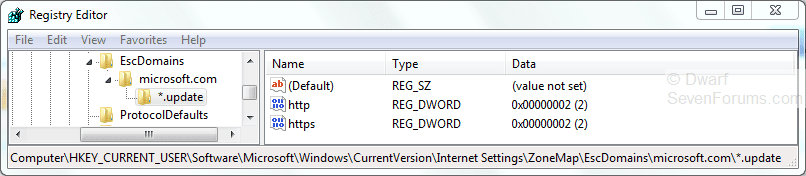
These are the only entries I have under that key:

Capture.PNG

I would delete all other entries apart from those. Remember to log on as each user and repeat this operation.
 

My Computer

Computer type
PC/Desktop
Computer Manufacturer/Model Number
Dwarf Dwf/11/2012 r09/2013
OS
Windows 8.1 Pro RTM x64
CPU
Intel Core-i5-3570K 4-core @ 3.4GHz (Ivy Bridge) (OC 4.4GHz)
Motherboard
ASRock Z77 Extreme4-M
Memory
4 x 4GB DDR3-1600 Corsair Vengeance CMZ8GX3M2A1600C9B (16GB)
Graphics Card(s)
MSI GeForce GTX770 Gaming OC 2GB
Sound Card
Realtek High Definition on board solution (ALC 898)
Monitor(s) Displays
ViewSonic VA1912w Widescreen (VGA)
Screen Resolution
1440x900
Hard Drives
OCZ Agility 3 SSD 120GB SATA III x2 (RAID 0)
Samsung HD501LJ 500GB SATA II x2
Hitachi HDS721010CLA332 1TB SATA II
Iomega 1.5TB Ext USB 2.0
WD 2.0TB Ext USB 3.0
PSU
XFX Pro Series 850W Semi-Modular
Case
Gigabyte IF233
Cooling
1 x 120mm Front Inlet 1 x 120mm Rear Exhaust
Keyboard
Microsoft Comfort Curve Keyboard 3000 (USB)
Mouse
Microsoft Comfort Mouse 3000 for Business (USB)
Internet Speed
NetGear DG834Gv3 ADSL Modem/Router (Ethernet) ~4.0 Mb/s (O2)
Antivirus
Avast! 8.0.1497
Browser
IE 11
Other Info
Optical Drive: HL-DT-ST BD-RE BH10LS30 SATA Bluray
Lexmark S305 Printer/Scanner/Copier (USB)
WEI Score: 8.1/8.1/8.5/8.5/8.25
Asus Eee PC 1011PX Netbook (Windows 7 x86 Starter)
Restore Microsofts Host file with HostXpert


Download the HostsXpert 4.3 - Hosts File Manager.
  • Unzip HostsXpert 4.3 - Hosts File Manager to a convenient folder such as C:\HostsXpert
  • Click HostsXpert.exe to Run HostsXpert 4.3 - Hosts File Manager from its new home
  • Click "Make Hosts Writable?" in the upper right corner (If available).
  • Click Restore Microsoft's Hosts file and then click OK.
  • Click the X to exit the program.
  • Note: If you were using a custom Hosts file you will need to replace any of those entries yourself.
Now, go here and download a good Hosts file http://www.mvps.org/winhelp2002/hosts.htm
 

My Computer

Computer type
PC/Desktop
Computer Manufacturer/Model Number
Bruce ... somewhere in his 40's
OS
Windows 7 Ultimate 32bit SP1
CPU
Intel(R) Core(TM)2 Quad CPU @ 2.40GHz, 2400 MHz
Motherboard
INTEL/D975XBX2
Memory
4 GB
Graphics Card(s)
ATI Radeon HD 2600 Pro
Monitor(s) Displays
Samsung SyncMaster 914v
Screen Resolution
1280 x 1024
Hard Drives
2/500GB each ... ST3500630AS ATA Device.
One is not connected
PSU
Rocketfish 700 W
Case
G.Skill Gigabyte Chassis
Keyboard
Standard PS/2 Keyboard
Mouse
Microsoft PS/2 Mouse
Internet Speed
DSL
Antivirus
Avira Internet Security
Browser
IE 11
Other Info
ATI HDMI Audio
Cookies in both my main browser (Firefox) and IE which I use occasionally are all deleted.

I will download HostsXpert 4.3 and try it.

I am the only user on the system so with everyone else saying they do not have anything else under that registry key, I am now really worried. Also worried to just delete all this stuff from the registry. I suppose I would be safe if I backed the registry first.

For AV I have Avast running constantly and occasionally I run Malwarebytes. Neither find anything and yes I do update MB before running it. I also have run Spybot which found a couple of cookies but nothing anymore.

If a create a new hosts file I can always re-run Spybot to "immunize" it but I am worried about what else I need to add to it so as not to lose my internet connection. It was a real hassle getting that to work the first time around. Thanks everyone for helping.
 

My Computer

OS
Windows 7
Restore Microsofts Host file with HostXpert


Download the HostsXpert 4.3 - Hosts File Manager.
  • Unzip HostsXpert 4.3 - Hosts File Manager to a convenient folder such as C:\HostsXpert
  • Click HostsXpert.exe to Run HostsXpert 4.3 - Hosts File Manager from its new home
  • Click "Make Hosts Writable?" in the upper right corner (If available).
  • Click Restore Microsoft's Hosts file and then click OK.
  • Click the X to exit the program.
  • Note: If you were using a custom Hosts file you will need to replace any of those entries yourself.
Now, go here and download a good Hosts file Blocking Unwanted Parasites with a Hosts File

Is this hosts file for W 7 64 bit or does it not matter? Where does it go?
 

My Computer

OS
Windows 7
1. Run MBAM to see what's going on.
2. MSE is a free AV program that I use and updates daily.
Let us know if we can provide more help!

Slow typist here! Petey

Ran Malwarebytes: nothing found
Ran Spybot: nothing found.

I could create a new hosts file but what about all these registry entries?

Anyone know what the EscDomains key is about? The name suggests its entries (a long list of bad and porn sites) may actually be there to bypass these domains or does it mean they are "trusted zones"?
 

My Computer

OS
Windows 7
Where is the active hosts file in W 7 64 bit?

If it is the one in C:\Windows\System32\drivers\etc\hosts
Then on my PC it has right at the top:

# localhost name resolution is handled within DNS itself.
# 127.0.0.1 localhost
# ::1 localhost
# Start of entries inserted by Spybot - Search & Destroy
127.0.0.1 007guard.com - 007guard and Windows Vista
127.0.0.1 007guard.com
127.0.0.1 008i.com
127.0.0.1 008k.com

and yet as the nslookup showed, 007Guard is still getting through!

Could that not be the right hosts file?
 

My Computer

OS
Windows 7

My Computer

Computer type
PC/Desktop
Computer Manufacturer/Model Number
Bruce ... somewhere in his 40's
OS
Windows 7 Ultimate 32bit SP1
CPU
Intel(R) Core(TM)2 Quad CPU @ 2.40GHz, 2400 MHz
Motherboard
INTEL/D975XBX2
Memory
4 GB
Graphics Card(s)
ATI Radeon HD 2600 Pro
Monitor(s) Displays
Samsung SyncMaster 914v
Screen Resolution
1280 x 1024
Hard Drives
2/500GB each ... ST3500630AS ATA Device.
One is not connected
PSU
Rocketfish 700 W
Case
G.Skill Gigabyte Chassis
Keyboard
Standard PS/2 Keyboard
Mouse
Microsoft PS/2 Mouse
Internet Speed
DSL
Antivirus
Avira Internet Security
Browser
IE 11
Other Info
ATI HDMI Audio
But what about the entries in the registry under EscDomains ? From my internet searches about EscDomains it seems all these bad sites are exempted and are placed in the "safe internet". Should I really delete them from the registry or is there somewhere else in W 7 that I can go to tell W7 these are not safe and good sites?

Is there any connection between the hosts file and EscDomains ?

I think the hosts file is being by-passed by the registry entries. When I run nslookup I get

C:\Users\JSM>nslookup 007guard.com
Server: UnKnown
Address: 192.168.1.1
Non-authoritative answer:
Name: 007guard.com
Addresses: 208.72.2.179
208.72.2.180
208.72.2.186
208.72.2.187
208.75.252.106
208.75.252.107
208.75.252.108
208.65.130.26
208.65.130.27
208.72.2.18
208.72.2.19
208.72.2.20
208.72.2.178
So even though 007Gurad.com is the very fist list in the hosts file, things seem to be getting through and the hosts file is being bypassed somehow. That is why I am asking about those resComains listings.
 

My Computer

OS
Windows 7
OK, everything is solved! The porn and other sites listed under the registry's zonemap (Esc Domains and Domans) are part of Spybot's protection system. It adds these to the registry as well as to the hosts file. So all is well (I think). As I said MBAM, Avast and others find nothing bad on my system.

Still worried about the nslookup results.
 

My Computer

OS
Windows 7
Back
Top