Windows 7 Forums Search
Welcome to Windows 7 Forums. Our forum is dedicated to helping you find solutions with any problems, errors or issues you are experiencing with Windows 7. The Windows 7 forum also covers news and updates and has an extensive Windows 7 tutorial section that covers a wide range of tips and tricks.


Windows 7 - Any way to log in to Windows with a Biometric Fingerprint Reader?

 
10-31-2010   #1


Windows 7 64Bit


Any way to log in to Windows with a Biometric Fingerprint Reader?

This is probably really obvious, but I recently purchased a new laptop with a Fingerprint reader. It came with a fingerprint reader (an AuthenTec AES2501A), and Windows installed all the drivers for it and stuff, and it came with this little program to "learn" your fingerprint for each finger (which I went through), but I was hoping you could actually "do" something with it, LOL!

Is this feasible?

Thanks.

- 2 Bunny

My System SpecsSystem Spec
10-31-2010   #2


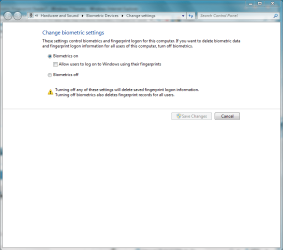
type biometric into the search bar and the settings will allow you to register use the device to log into windows.
Attached Thumbnails
Any way to log in to Windows with a Biometric Fingerprint Reader?-capture.png  
My System SpecsSystem Spec
11-01-2010   #3


Windows 7 & Windows Vista Ultimate


Hi, 2 Bunny.

Since Jan has so nicely pulled references together in another thread, please consider what she wrote:

Quote   Quote: Originally Posted by JMH View Post
I realize this is not answering your question.... but I suggest you do some reading on the pros & cons of fingerprint readers.

Quote:
If somebody steals your fingerprints, you're pretty much out of luck for the rest of your life. You wouldn't be able to use your prints as a form of identification until you were absolutely sure all copies had been destroyed. There's no way to get new prints.
I have 3 HP laptops here with fingerprint readers. I consider them part of HP's bloatware & as such are never used.

HowStuffWorks "How Fingerprint Scanners Work"

Case studies reveal the pros and cons of biometrics

FAQ on Fingerprint Scanner, different types of fingerprint sensors/readers, Capacitive Sensors, Optical Sensors, Thermal Sensors, Pressure Sensors, RF Sensors, Ultrasonic Sensors, Static Fingerprint Reader/Sensor, Swipe Fingerprint Reader/Sensor

Fingerprint Reader Why or Why Not?
My System SpecsSystem Spec
.


11-01-2010   #4


Windows 7 64Bit


BIOMETRIC Reply

Quote   Quote: Originally Posted by Corrine View Post
Hi, 2 Bunny.

Since Jan has so nicely pulled references together in another thread, please consider what she wrote:

Quote   Quote: Originally Posted by JMH View Post
I realize this is not answering your question.... but I suggest you do some reading on the pros & cons of fingerprint readers.

Quote:
If somebody steals your fingerprints, you're pretty much out of luck for the rest of your life. You wouldn't be able to use your prints as a form of identification until you were absolutely sure all copies had been destroyed. There's no way to get new prints.
I have 3 HP laptops here with fingerprint readers. I consider them part of HP's bloatware & as such are never used.

HowStuffWorks "How Fingerprint Scanners Work"

Case studies reveal the pros and cons of biometrics

FAQ on Fingerprint Scanner, different types of fingerprint sensors/readers, Capacitive Sensors, Optical Sensors, Thermal Sensors, Pressure Sensors, RF Sensors, Ultrasonic Sensors, Static Fingerprint Reader/Sensor, Swipe Fingerprint Reader/Sensor

Fingerprint Reader Why or Why Not?
Didn't they also have a thing on mythbusters or something where they were able to fool a "StateOfTheArt" Biometric Door unlocker machine with just a standard copy machine and some paper?

For me, the machine mostly doesn't leave the house that much, so somebody would need to break in and physically steal the machine first. Good thought though. I just need something convenient, especially at this stage of setting things up, rebooting, tweaking, etc.

Quote   Quote: Originally Posted by Pusspa View Post
type biometric into the search bar and the settings will allow you to register use the device to log into windows.
Sorry, nothing there when I search for "Biometric".

While we're at it, anybody know of any Biometric login software for WinXP x64?

Thanks.

- 2 Bunny
My System SpecsSystem Spec
11-03-2010   #5


Windows 7 64Bit


SOLUTION SOON TO COME Reply

Any new solutions in the community on this one?

Thanks.

- 2 Bunny
My System SpecsSystem Spec
11-03-2010   #6


Windows 7 Ultimate x64 SP1 RC


My netbook has a biometric fingerprint reader, also an AuthenTec, and the results when I was using it to log in were hit and miss.

You should be able to go into control panel, and there should be a control panel item that allows you to register your fingerprints for login. I don't have my netbook right here with me, or I would be able to be more specific.

I do know that you need to register your fingerprints within Windows before it will allow you to use the biometric scanner to log in though.
My System SpecsSystem Spec
11-03-2010   #7


Yes, there is, but you have to get the fingerprint reader software and driver and install it immediately after installing windows.
My System SpecsSystem Spec
11-03-2010   #8


did you see this thread Authentec Drivers
My System SpecsSystem Spec
Reply

 Any way to log in to Windows with a Biometric Fingerprint Reader? problems?


Thread Tools


Similar Threads for: Any way to log in to Windows with a Biometric Fingerprint Reader?
Thread Forum
Fingerprint reader System Security
Remove Windows Login password and REQUIRE fingerprint reader? Chillout Room
Fingerprint Reader Hardware & Devices
Fingerprint Reader Why or Why Not? Hardware & Devices
Help with fingerprint reader Hardware & Devices


All times are GMT -5. The time now is 12:53 AM.


Windows 7 Forums is an independent web site and has not been authorized,
sponsored, or otherwise approved by Microsoft Corporation.
"Windows 7" and related materials are trademarks of Microsoft Corp.
© Designer Media Ltd
  

1 2 3 4 5 6 7 8 9 10 11 12 13 14 15 16 17 18 19 20 21 22 23 24 25 26 27 28 29 30