Windows 7 Forums


Windows 7: MSE update reporting

18 Nov 2010   #1

Windows 7 Home Premium x64 SP 1
Florida
 
 
MSE update reporting

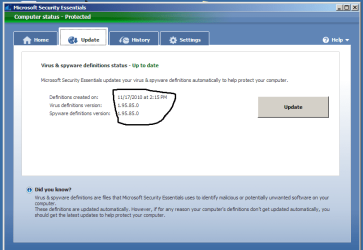
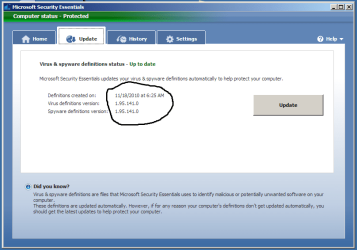
I captured the first picture a few minutes before MSE was set to update automatically (9 a.m. every day). It's reporting it's up to date. I captured the second picture after MSE updated. Now it is up to date. Why does it report it's up to date when it isn't? Thanks.

Attached Thumbnails
MSE update reporting-mse1.png   MSE update reporting-mse2.png  
My System SpecsSystem Spec

18 Nov 2010   #2

64-bit Windows 7 Ultimate SP1 & Windows 8 Enterprise
Texas


Hello Art,

MSE will show itself up to date until it checks in to see if it's still up to date. Since you have MSE set to automatically download and update itself, it will still show as up to date when it reaches the check time since it updated itself. That's all.
My System SpecsSystem Spec
18 Nov 2010   #3

Windows 7 Home Premium x64 SP 1
Florida


Hi Shawn. OK, but that seems a bit lame on MS's part. If it's not up to date, it should show that for security's sake.

It's not really a problem for me, I suppose, since I do update every day. But still (wrinkling my nose)...

Thanks.
My System SpecsSystem Spec
.


18 Nov 2010   #4

64-bit Windows 7 Ultimate SP1 & Windows 8 Enterprise
Texas


Well, technically it is up to date at the last time it checked in.

If you had MSE set to not automatically update itself when it checked in, then you would see it as not up to update afterwards if an update was available.
My System SpecsSystem Spec
18 Nov 2010   #5

Windows 7 Home Premium 64 bit
Oklahoma


But it really is up to date for the period it's telling you and then as it gets another update it will still be up to date.
My System SpecsSystem Spec
18 Nov 2010   #6

Windows 7 Home Premium x64 SP 1
Florida


Shawn and 1Bowtie: In an ideal world, when a new update is created at MS, it should communicate to my MSE that it longer is up to date. But since it doesn't work like that...Oh well. As I said, not a big deal. Thanks.
My System SpecsSystem Spec
18 Nov 2010   #7

64-bit Windows 7 Ultimate SP1 & Windows 8 Enterprise
Texas


Ideally yes, but MSE only checks in at the time you have Windows Update set to check for updates and right before MSE does a scheduled scan (if checked in MSE settings).
My System SpecsSystem Spec
18 Nov 2010   #8

Windows 7 Home Premium x64 SP 1
Florida


Yeah. I agree =
My System SpecsSystem Spec
Reply

 MSE update reporting problems?


Thread Tools


Similar help and support threads for: MSE update reporting
Thread Forum
Solved GPU-Z reporting no physx Graphic Cards
x64 Win7 is reporting only 3GB out of 4GB RAM Hardware & Devices
Error reporting not reporting error BSOD Help and Support
Reporting an incorrect update Windows Updates & Activation
Antivirus is on but is reporting... ? System Security


All times are GMT -5. The time now is 04:55 AM.


Seven Forums Android App Seven Forums IOS App Follow us on Facebook

Windows 7 Forums is an independent web site and has not been authorized,
sponsored, or otherwise approved by Microsoft Corporation.
"Windows 7" and related materials are trademarks of Microsoft Corp.
© Designer Media Ltd
  

1 2 3 4 5 6 7 8 9 10 11 12 13 14 15 16 17 18 19 20 21 22 23 24 25 26 27 28 29 30 31 32