
You are using an out of date browser. It may not display this or other websites correctly.
You should upgrade or use an alternative browser.
You should upgrade or use an alternative browser.
cookies?
- Thread starter the dummy
- Start date

Tracking cookies are a little different than cookies, me personally wouldn't worry about them too much, i just clear them as and when i do a SuperAnti Spyware scan.
Cookies:
Tracking Cookies:
**Please Note**
The above is not my work, i have just paste it there so you have an explanation
Please feel free to read more on the article - What are tracking cookies on my computer? - 14 Jul 2010 - Computeractive
This article also provides advise on stopping cookies.
Regards,
JDobbsy1987
Cookies:
A cookie is a small file stored on your computer by a web browser, that contains information about your visit to a specific website. It might hold details about when you last viewed the website, your viewing preferences, or products you recently clicked on.
Advertisement
It may also record your IP address, the time of your visit and the browser you use. Cookies are harmless, since they are no more than a text file, and without them some aspects of the web, such as shopping carts, would not work properly.
Tracking Cookies:
Tracking cookies are slightly different. These are cookies placed on your computer by a website affiliated with the one you visit, and are sometimes called third-party cookies. Often this is a company that provides adverts for multiple websites, such as Doubleclick.
These companies’ websites can use tracking cookies to build up a picture of your web surfing habits. It cannot track every site you visit, only those that carry that company’s adverts.
**Please Note**
The above is not my work, i have just paste it there so you have an explanation
Please feel free to read more on the article - What are tracking cookies on my computer? - 14 Jul 2010 - Computeractive
This article also provides advise on stopping cookies.
Regards,
JDobbsy1987
My Computer
At a glance
Windows 8.1 Pro x64Intel Core i5-2500K @ 3.30GHz - S11558GB Corsair DDR3 XMS3, PC3-12800NVIDIA GeForce GTX 650
- Computer type
- PC/Desktop
- Computer Manufacturer/Model Number
- Self Built
- OS
- Windows 8.1 Pro x64
- CPU
- Intel Core i5-2500K @ 3.30GHz - S1155
- Motherboard
- Asus P8P67 LE Rev3, Intel P67, S115
- Memory
- 8GB Corsair DDR3 XMS3, PC3-12800
- Graphics Card(s)
- NVIDIA GeForce GTX 650
- Sound Card
- On-Board
- Monitor(s) Displays
- 3 x 24" {Extended Display}
- Screen Resolution
- 1920 x 1080
- Hard Drives
- 300GB Seagate Barracuda 7200
- PSU
- 550W Coolermaster GX550
- Case
- Silverstone Precision PS04B
- Cooling
- Stock
- Keyboard
- Logitech K120
- Mouse
- World of Warcraft Cataclysm MMO Gaming Mouse
- Internet Speed
- 80 MB
- Antivirus
- MSE / Windows Defender
- Browser
- Chrome

Use Spyware Blaster(free version) to block tracking cookies
SpywareBlaster® | Prevent spyware and malware. Free download.
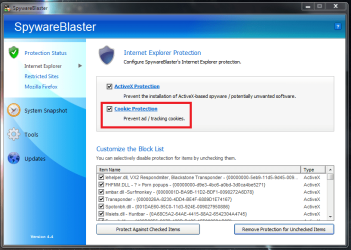
SpywareBlaster® | Prevent spyware and malware. Free download.
My Computer
At a glance
Windows 10 Pro x64, Arch LinuxIntel Core 2 Quad Q8200 OC'd 3.08GHz8GB DDR2 900MhzMSI GT730 2GB GDDR5 (Kepler)
- Computer type
- PC/Desktop
- Computer Manufacturer/Model Number
- Custom Build
- OS
- Windows 10 Pro x64, Arch Linux
- CPU
- Intel Core 2 Quad Q8200 OC'd 3.08GHz
- Motherboard
- Asus Rampage formula LGA775
- Memory
- 8GB DDR2 900Mhz
- Graphics Card(s)
- MSI GT730 2GB GDDR5 (Kepler)
- Sound Card
- Supreme FX2
- Monitor(s) Displays
- Samsung LS22F350 LED
- Screen Resolution
- 1080P
- Hard Drives
- Kingston SSDNow UV400 120GB, 500GB Hitachi, 2TB Samsung, 500GB Seagate FreeAgent, 640GB Samsung, 160GB Toshiba (Arch)
- PSU
- AeroCool 500W Bronze
- Cooling
- Cooler Master V6 + 3X fans
- Keyboard
- Prolink keyboard
- Mouse
- Logitech M705
- Internet Speed
- 1MiB/s
- Browser
- Chrome Beta
I get tracking cookies every day but Vipre gets rid of them each day
My Computer
At a glance
Windows 7 Professional 64-bit SP1Intel E84004GB Crucial BallistixATI ASUS Radeon HD 4830
- Computer Manufacturer/Model Number
- Home Built
- OS
- Windows 7 Professional 64-bit SP1
- CPU
- Intel E8400
- Motherboard
- MSI P35 Neo
- Memory
- 4GB Crucial Ballistix
- Graphics Card(s)
- ATI ASUS Radeon HD 4830
- Sound Card
- Realtek ALC888 on Board
- Monitor(s) Displays
- Asus 22-inch VH226H Widescreen
- Screen Resolution
- 1920 x 1080
- Hard Drives
- Two Western Digital 500GB
- PSU
- Hiper HPU-4M 530W
- Case
- Thermaltake Tsunami Dream Black
- Cooling
- Air/Fans
- Keyboard
- Saitek Eclipse
- Mouse
- Razer
- Internet Speed
- Sky Broadband
- Other Info
- USB Hub/Card Reader - 2 Pen Drives, 1 Phone Dock
Thanks for the link Borg 386 I use Vipre in a layered defence and its just a plus there is settings for cookies.
I use Vipre in a layered defence and its just a plus there is settings for cookies.My Computer
At a glance
Windows 7 Professional 64-bit SP1Intel E84004GB Crucial BallistixATI ASUS Radeon HD 4830
- Computer Manufacturer/Model Number
- Home Built
- OS
- Windows 7 Professional 64-bit SP1
- CPU
- Intel E8400
- Motherboard
- MSI P35 Neo
- Memory
- 4GB Crucial Ballistix
- Graphics Card(s)
- ATI ASUS Radeon HD 4830
- Sound Card
- Realtek ALC888 on Board
- Monitor(s) Displays
- Asus 22-inch VH226H Widescreen
- Screen Resolution
- 1920 x 1080
- Hard Drives
- Two Western Digital 500GB
- PSU
- Hiper HPU-4M 530W
- Case
- Thermaltake Tsunami Dream Black
- Cooling
- Air/Fans
- Keyboard
- Saitek Eclipse
- Mouse
- Razer
- Internet Speed
- Sky Broadband
- Other Info
- USB Hub/Card Reader - 2 Pen Drives, 1 Phone Dock

I've heard good things about Vipre Ciara, been meaning to give it a try. One of these days...maybe during winter break...when I get my life back...for a bit....
My Computer
At a glance
Win 7 32 Home Premium, Win 7 64 Pro, Win 8.1,...Intel Core 2 Duo 2.93GHzNot much with my ADHDATI Radeon HD 4350
- Computer type
- PC/Desktop
- Computer Manufacturer/Model Number
- Dell Hell oh Well
- OS
- Win 7 32 Home Premium, Win 7 64 Pro, Win 8.1, Win 10
- CPU
- Intel Core 2 Duo 2.93GHz
- Memory
- Not much with my ADHD
- Graphics Card(s)
- ATI Radeon HD 4350
- Monitor(s) Displays
- 24" HDTV/Monitor
- Screen Resolution
- Blurry after a Scotch or 2
- Hard Drives
- 1 HDD 250 GB, 1 HDD 1 TB, 3 - 1 TB Externals
- Case
- Don't get on my case...man :D
- Cooling
- I have an Air Conditioner & Diet Pepsi
- Keyboard
- Saitek Cyborg
- Mouse
- 10 yr old MS optical mouse that still works
- Internet Speed
- Never fast enough
- Antivirus
- Various
- Browser
- Various
I like it , Free Trial > VIPRE Antivirus Software Trial - Download a Free Trial of VIPRE Here
, Free Trial > VIPRE Antivirus Software Trial - Download a Free Trial of VIPRE HereMy Computer
At a glance
Windows 7 Professional 64-bit SP1Intel E84004GB Crucial BallistixATI ASUS Radeon HD 4830
- Computer Manufacturer/Model Number
- Home Built
- OS
- Windows 7 Professional 64-bit SP1
- CPU
- Intel E8400
- Motherboard
- MSI P35 Neo
- Memory
- 4GB Crucial Ballistix
- Graphics Card(s)
- ATI ASUS Radeon HD 4830
- Sound Card
- Realtek ALC888 on Board
- Monitor(s) Displays
- Asus 22-inch VH226H Widescreen
- Screen Resolution
- 1920 x 1080
- Hard Drives
- Two Western Digital 500GB
- PSU
- Hiper HPU-4M 530W
- Case
- Thermaltake Tsunami Dream Black
- Cooling
- Air/Fans
- Keyboard
- Saitek Eclipse
- Mouse
- Razer
- Internet Speed
- Sky Broadband
- Other Info
- USB Hub/Card Reader - 2 Pen Drives, 1 Phone Dock
Thanx for the link...bookmarked it. I'm off to class...Happy & Safe Holidays to you & everyone
My Computer
At a glance
Win 7 32 Home Premium, Win 7 64 Pro, Win 8.1,...Intel Core 2 Duo 2.93GHzNot much with my ADHDATI Radeon HD 4350
- Computer type
- PC/Desktop
- Computer Manufacturer/Model Number
- Dell Hell oh Well
- OS
- Win 7 32 Home Premium, Win 7 64 Pro, Win 8.1, Win 10
- CPU
- Intel Core 2 Duo 2.93GHz
- Memory
- Not much with my ADHD
- Graphics Card(s)
- ATI Radeon HD 4350
- Monitor(s) Displays
- 24" HDTV/Monitor
- Screen Resolution
- Blurry after a Scotch or 2
- Hard Drives
- 1 HDD 250 GB, 1 HDD 1 TB, 3 - 1 TB Externals
- Case
- Don't get on my case...man :D
- Cooling
- I have an Air Conditioner & Diet Pepsi
- Keyboard
- Saitek Cyborg
- Mouse
- 10 yr old MS optical mouse that still works
- Internet Speed
- Never fast enough
- Antivirus
- Various
- Browser
- Various
And to you Borg 386
My Computer
At a glance
Windows 7 Professional 64-bit SP1Intel E84004GB Crucial BallistixATI ASUS Radeon HD 4830
- Computer Manufacturer/Model Number
- Home Built
- OS
- Windows 7 Professional 64-bit SP1
- CPU
- Intel E8400
- Motherboard
- MSI P35 Neo
- Memory
- 4GB Crucial Ballistix
- Graphics Card(s)
- ATI ASUS Radeon HD 4830
- Sound Card
- Realtek ALC888 on Board
- Monitor(s) Displays
- Asus 22-inch VH226H Widescreen
- Screen Resolution
- 1920 x 1080
- Hard Drives
- Two Western Digital 500GB
- PSU
- Hiper HPU-4M 530W
- Case
- Thermaltake Tsunami Dream Black
- Cooling
- Air/Fans
- Keyboard
- Saitek Eclipse
- Mouse
- Razer
- Internet Speed
- Sky Broadband
- Other Info
- USB Hub/Card Reader - 2 Pen Drives, 1 Phone Dock


My Computer
At a glance
Windows 7 Home Premium x64AMD Phenom II X6 1600T16GB PC3-10700 (1342MHz)ATI Radeon 5770 HD (x2) CrossFire
- Computer Manufacturer/Model Number
- OEM - Me
- OS
- Windows 7 Home Premium x64
- CPU
- AMD Phenom II X6 1600T
- Motherboard
- GigaByte GZ-990FXA-UD3
- Memory
- 16GB PC3-10700 (1342MHz)
- Graphics Card(s)
- ATI Radeon 5770 HD (x2) CrossFire
- Sound Card
- On-board RealTek chipset
- Monitor(s) Displays
- 3x Hanns-G 1920x1080 Monitors
- Screen Resolution
- 3x Hanns-G 1920x1080 Monitors
- Hard Drives
- Intel 25-V SSD 40GB: 218 MB/s AT: 0.1ms
Intel X-25M SSD 80GB: 230MB/s AT: 0.1ms
Seagate 750GB: 133 MB/s AT: 13ms (perpendicular storage)
Buffalo HD-PCTU3 1TB External drive
- PSU
- OCZ Stealth X Stream 750W
- Case
- Cheap (unknown)
- Cooling
- Stock
- Keyboard
- HP USB
- Mouse
- LogiTech USB
- Internet Speed
- 1.5 Mbps - Slow - At the tail-end of a rural network
- Other Info
- Printer: Epson Stylus C-84
Scanner: HP 3500C Flatbed
DVD-RW: Plextor
DVD-ROM: Unknown
WEI: 7.4
Similar threads

- Replies
- 0
- Views
- 433
- Replies
- 2
- Views
- 5K

- Replies
- 3
- Views
- 2K
- Replies
- 2
- Views
- 5K