
Help with Virus Damage

daeth

New member
Hi
Recently a virus managed to get onto my computer.
My anti virus detected and stoped it, but not before it did some damage.
I quickly deleted the virus, which may not have been the best move, since I now don't know which virus it was.

While I believe I've gotten rid of the virus and all scans have come up clean, I'm now having problems with my user account.

Firstly a number of programs which are supposed to auto start up when I log on now don't. Most importantly my Anti virus program. Though it starts up fine when I use the icon. The only exception to this is Steam.

Secondly task manager no longer wants to switch to administrator mode.
When I press "Show proccess from all users" nothing happens.
However when I launch task manager from the start menu as administrator it works just fine.

Thirdly I get numerous programs being blocked by internet security options.
these only seem to occur when a program is indirectly launched. E.g ARM.exe when I run adope acrobat reader, or the windows firewall advanced settings when launced from control panel (it works fine when I open it through explorer).
When investicating this I found that internet properties/ security has 5 Zones.
Internet, Local intranet,Trusted sites,Restricted And My computer.
however My computer has an odd icon with a key symbol, and shows nothing when I click on it.
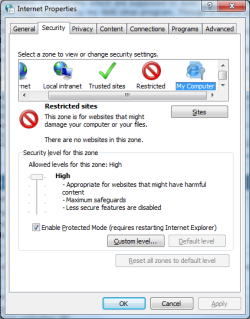
Untitled.png

My System Restores before the virus have been completly corrrupted, and I reallly don't want to have to reinstall everything so if any one could help me fix this damage, I would appreciate it.

Thanks
 

My Computer

OS
Windows 7 Professional 64bit
CPU
Intel i7 930
Memory
8 GB
Graphics Card(s)
NVidia GeForce GT 220

My Computer

Computer type
PC/Desktop
Computer Manufacturer/Model Number
Custom Built
OS
Windows 7 Enterprise x64
CPU
i7-5820K
Motherboard
Asus X99 A
Memory
16GB DDR4
Graphics Card(s)
ASUS 2GB Nvidia 960GTX OC'd
Monitor(s) Displays
24"
Screen Resolution
1920x1080
Hard Drives
Samsung 1TB 840 SSD
Western Digital 1TB Black Drive
Seagate 2TB NAS Drive
PSU
Antec Earthwatts 650w
Case
Antec DF-85
If all else fails format and reinstall
 

My Computer

Computer Manufacturer/Model Number
HP Envy 17 4054ca
OS
Windows 7 baby ! : D
CPU
Intel Core i7 720QM @ 1.60GHz
Motherboard
Hewlett-Packard 1449 (CPU)
Memory
6.0GB Dual-Channel DDR3 @ 662MHz
Graphics Card(s)
ATI Mobility Radeon HD 5650
Sound Card
IDT High Definition Audio CODEC
Monitor(s) Displays
Generic PnP Monitor @ 1600x900
Screen Resolution
1600X900
Hard Drives
78.15GB INTEL SSDSA2M080G2GC ATA Device (IDE)
Hi
Recently a virus managed to get onto my computer.
My anti virus detected and stoped it, but not before it did some damage.
I quickly deleted the virus, which may not have been the best move, since I now don't know which virus it was.

While I believe I've gotten rid of the virus and all scans have come up clean, I'm now having problems with my user account.

Firstly a number of programs which are supposed to auto start up when I log on now don't. Most importantly my Anti virus program. Though it starts up fine when I use the icon. The only exception to this is Steam.

Secondly task manager no longer wants to switch to administrator mode.
When I press "Show proccess from all users" nothing happens.
However when I launch task manager from the start menu as administrator it works just fine.

Thirdly I get numerous programs being blocked by internet security options.
these only seem to occur when a program is indirectly launched. E.g ARM.exe when I run adope acrobat reader, or the windows firewall advanced settings when launced from control panel (it works fine when I open it through explorer).
When investicating this I found that internet properties/ security has 5 Zones.
Internet, Local intranet,Trusted sites,Restricted And My computer.
however My computer has an odd icon with a key symbol, and shows nothing when I click on it.
View attachment 138841

My System Restores before the virus have been completly corrrupted, and I reallly don't want to have to reinstall everything so if any one could help me fix this damage, I would appreciate it.

Thanks

Reinstall is Last option - May I suggest a System File Check

See http://www.sevenforums.com/tutorials/1538-sfc-scannow-command-system-file-checker.html For More Information

   Note
This may not fix the Problem(s) and I would recommend running the scan 3 Times for System file checker can only fix a certain amount of corrupt files at a time


Also could you please tell us what Anti-Virus you are using and can you access Windows Firewall?

Many Thanks,
Josh
 

My Computer

Computer type
PC/Desktop
Computer Manufacturer/Model Number
Custom Built
OS
Windows 7 Professional x64 SP1 ; Windows Server 2012 R2 Standard
CPU
Intel Core i5 2400 @ 3.10GHz
Motherboard
Foxconn H67MP-S/-V/H67MP
Memory
8.0GB DDR3 @ 665MHz (2GBx4)
Graphics Card(s)
AMD Radeon HD 6870
Sound Card
Realtek High Definition Audio
Monitor(s) Displays
AOC 2243W & SMB1930NW
Screen Resolution
1440x900 & 1920x1080
Hard Drives
977GB Seagate ST31000524AS ATA Drive (SATA)
250GB WD iSCSI attached Drive
PSU
750W Gaming PSU
Case
Novatech Night
Cooling
Fan
Keyboard
Dell Standard PS/2 Keyboard
Mouse
R.A.T 07 Gaming Mouse
Internet Speed
Download: 10 Mbps Ping: 30ms Upload: 0.81 Mbps
Browser
Google Chrome
Other Info
Optiarc DVD RW AD-5260S ATA Device
A quick action I would take is boot in to safe mode first as there's a very little / no chance of virus running in the memory there. Now run Malwarebyte's Antimalware in full scan mode. Then run SUPERAntispyware, also in full scan. These scans & removal might not bring your OS to the full health, but it will stop infection from spreading all over. Good luck.
 

My Computer

Computer Manufacturer/Model Number
CHIP (Custom)
OS
Windows 7 Pro. 64 Bit + Back|Track 5 (Both Updated)
CPU
AMD FX 4100 (3.6GHz, 2 x 2MB L2, 8MB L3) Socket AM3
Motherboard
Biostar A880GZ (AM3+)
Memory
Kingmax DDR3 - 2 x 2GB (1333 MHz)
Graphics Card(s)
XFX ATi Radeon HD 5570 (1GB DDR3)
Sound Card
On Board (Realtec HD Codec)
Monitor(s) Displays
Samsung SyncMaster 2033sw (20") : DVI Connected
Screen Resolution
1600 x 900 (60Hz)
Hard Drives
Seagate 500GB SATA 2.0
PSU
UMAX 550W
Case
Basic White
Cooling
AMD Stock
Keyboard
Logitech
Mouse
Logitech Mouse
Internet Speed
BSNL DataOne 512KB/s
Other Info
Protected with.....
Bitdefender Internet Security 2012
SUPERAntiSpyware
Malwarebytes Anti Malware
OpenDNS
Reinstall is Last option - May I suggest a System File Check
If you get something on your computer and your AV stops it before any damage is done...then I agree.

However, if there is damage done and a few strange anomolies...i'd either put an image back down or format and start over without thinking twice. It's just not worth having your identity compromised or personal information lost if something is running in the background that you simply don't know about.

That's just my opinion on the subject. You may or may not agree.
 

My Computer

Computer Manufacturer/Model Number
Self-Built in July 2009
OS
Windows 7 Ultimate x64
CPU
Intel Q9550 2.83Ghz OC'd to 3.40Ghz
Motherboard
Gigabyte GA-EP45-UD3R rev. 1.1, F12 BIOS
Memory
8GB G.Skill PI DDR2-800, 4-4-4-12 timings
Graphics Card(s)
EVGA 1280MB Nvidia GeForce GTX570
Sound Card
Realtek ALC899A 8 channel onboard audio
Monitor(s) Displays
23" Acer x233H
Screen Resolution
1920x1080
Hard Drives
Intel X25-M 80GB Gen 2 SSD
Western Digital 1TB Caviar Black, 32MB cache. WD1001FALS
PSU
Corsair 620HX modular
Case
Antec P182
Cooling
stock
Keyboard
ABS M1 Mechanical
Mouse
Logitech G9 Laser Mouse
Internet Speed
15/2 cable modem
Other Info
Windows and Linux enthusiast. Logitech G35 Headset.
Back
Top