| Windows 7: Files disappeared/unreadable |
22 Mar 2011
|
#1 | | |
Files disappeared/unreadable User reports desktop icons missing. I open Windows explorer to check user profiles, but the root directory of the system drive appears empty. Some popup window reports 37% of the drive is unreadable. I shut down computer remove the drive, attach it to my Windows 7 box and scan for file curruption and/or infection.
Chkdsk notes 120,074 files on disk but not problem. Avg free scan 232,216 objects but finds no infection. But Windows explorer shows root folder as empty. And by way of an aside the Recycle bin corrupted error pops up, but I elect to ignore it.
I attach screen shots. First the chkdsk screen:
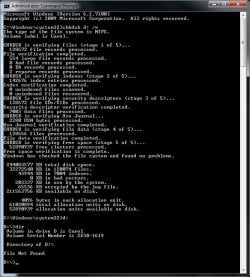
Note the dir command reports nothing. Then the avg scan:
Then the explorer screen.
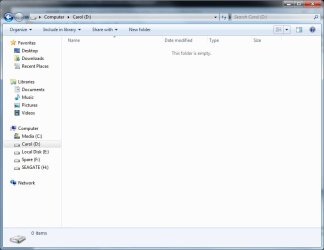
And for completeness the security settings.
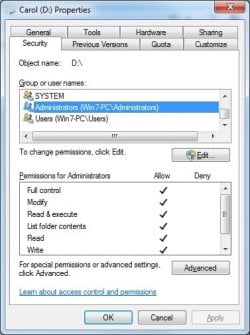
I am totally lost here and would appreciate any pointers. | My System Specs |
| |
23 Mar 2011
|
#2 | | Windows 7 Ultimate SP1 (x64) South Australia |
Hi McCart,
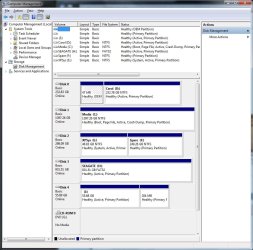
Can you post an image of the Disk Management? Is D: a separate disk, or a partition on the same disk?
Regards,
Golden | My System Specs | | Computer type PC/Desktop System Manufacturer/Model Number Golden Mk. I.3 OS Windows 7 Ultimate SP1 (x64) CPU Intel i7 860 @ 2.80 GHz Motherboard Gigabyte P55A-UD3R Rev.1. Award BIOS F13 Memory 16GB Corsair Vengance DDR3 @ 661 MHz Dual Channel (9-9-9-24) Graphics Card EVGA NVidia GTX 560 1024MB Sound Card Realtek Integrated Monitor(s) Displays Dual Samsung SyncMaster 2494HS Screen Resolution 1920*1080 and 1920*1080 Keyboard Logitech G110 Mouse Logitech MX518 PSU Thermaltake ToughPower QFan 750W Case Thermaltake Element S VK60001W2Z Cooling Corsair H60 Water Cooling, 2*230mm and 2*80mm case fans Hard Drives 1*OCZ Vertex 2 60GB SSD;
2*Samsung F3 SpinPoint 1TB in RAID0;
3*Samsung F1 SpinPoint 1TB in RAID5;
1*Western Digital 500GB External USB 3.0
1*Seagate 500GB External USB 2.0 Internet Speed Not fast enough!!! Antivirus MSE and Malwarebytes Pro Browser Chrome Version 25 Other Info Laptop: ASUS X54C, Intel Core i3-2330M @ 2.0Ghz, 4GB RAM, Intel HD on-board graphics, Windows 7 Professional SP1 (x64), LinuxMint 14 (x64), PepperMint 3 (x86) |
23 Mar 2011
|
#3 | | |
Thank you for your reply.
Yes D is a separate disk. Here is the Disk Management screenshot: | My System Specs | | |
23 Mar 2011
|
#4 | | Windows 7 Ultimate SP1 (x64) South Australia |
Bizarre. Can you install and run a FULL scan using Malwarebytes, preferably from Safe Mode?
I'm not yet convinced this is a malware issue, but its easiest to close that off by scanning with something else.
If that doesn't turn up anything, can you try taking ownership of the drive using this shortcut: Take Ownership Shortcut
Regards,
Golden | My System Specs | | Computer type PC/Desktop System Manufacturer/Model Number Golden Mk. I.3 OS Windows 7 Ultimate SP1 (x64) CPU Intel i7 860 @ 2.80 GHz Motherboard Gigabyte P55A-UD3R Rev.1. Award BIOS F13 Memory 16GB Corsair Vengance DDR3 @ 661 MHz Dual Channel (9-9-9-24) Graphics Card EVGA NVidia GTX 560 1024MB Sound Card Realtek Integrated Monitor(s) Displays Dual Samsung SyncMaster 2494HS Screen Resolution 1920*1080 and 1920*1080 Keyboard Logitech G110 Mouse Logitech MX518 PSU Thermaltake ToughPower QFan 750W Case Thermaltake Element S VK60001W2Z Cooling Corsair H60 Water Cooling, 2*230mm and 2*80mm case fans Hard Drives 1*OCZ Vertex 2 60GB SSD;
2*Samsung F3 SpinPoint 1TB in RAID0;
3*Samsung F1 SpinPoint 1TB in RAID5;
1*Western Digital 500GB External USB 3.0
1*Seagate 500GB External USB 2.0 Internet Speed Not fast enough!!! Antivirus MSE and Malwarebytes Pro Browser Chrome Version 25 Other Info Laptop: ASUS X54C, Intel Core i3-2330M @ 2.0Ghz, 4GB RAM, Intel HD on-board graphics, Windows 7 Professional SP1 (x64), LinuxMint 14 (x64), PepperMint 3 (x86) |
23 Mar 2011
|
#5 | | |
Thank you again for your replies and suggestions.
I have added the reg key, and Malwarebytes is running as I write.
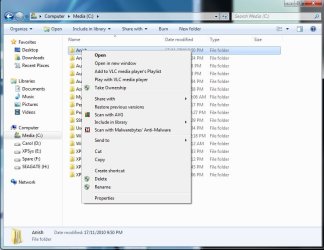
The problem with the reg key is I can't see anything on the D drive to take ownership of. To illustrate I attach 3 screenshots. First the context menu from a folder on my working C drive shows the "Take Ownership" item correctly. 
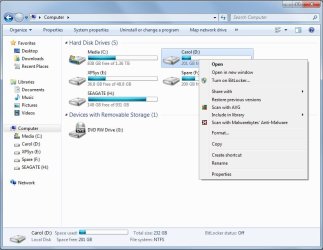
Second if I right click over the whole D drive the Take ownership item is not there. 
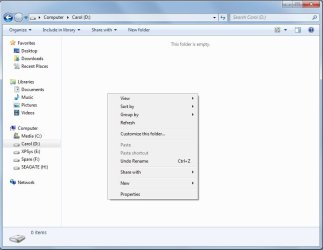
Third, if I open the D drive there is nothing there to hover over. 
I will post again when the scan has finished. | My System Specs | | |
24 Mar 2011
|
#6 | | |
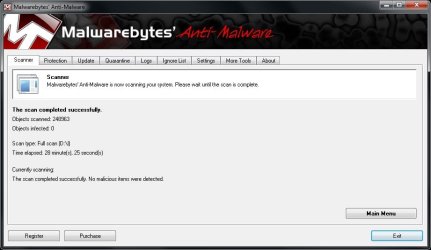
I attach screenshots from 2 Malwarebytes scans. The first found a couple of items in _restore files. I can't believe these were doing any harm, but I removed them anyway. The screenshot is shown below.
The second scan found nothing (screenshot below). | My System Specs | | |
24 Mar 2011
|
#7 | | Windows 7 Ultimate SP1 (x64) South Australia |
Hi,
Thanks for the clear feedback and good illustrative images. So, at the moment:
- AVG = no malware
- MBAM = no malware after cleaning
I'm going to ask some of our more experienced members to post here to troubleshoot further - its looking more like a system/harware issue. Whilst we wait for them to do that, could I bother you to do one last scan again? I don't think it will find anything, but its just one last nail in the coffin of any malware issues.
Please go to the ESET online scanner and do a scan there.
Please visit back here to see any other suggestions.
Regards,
Golden | My System Specs | | Computer type PC/Desktop System Manufacturer/Model Number Golden Mk. I.3 OS Windows 7 Ultimate SP1 (x64) CPU Intel i7 860 @ 2.80 GHz Motherboard Gigabyte P55A-UD3R Rev.1. Award BIOS F13 Memory 16GB Corsair Vengance DDR3 @ 661 MHz Dual Channel (9-9-9-24) Graphics Card EVGA NVidia GTX 560 1024MB Sound Card Realtek Integrated Monitor(s) Displays Dual Samsung SyncMaster 2494HS Screen Resolution 1920*1080 and 1920*1080 Keyboard Logitech G110 Mouse Logitech MX518 PSU Thermaltake ToughPower QFan 750W Case Thermaltake Element S VK60001W2Z Cooling Corsair H60 Water Cooling, 2*230mm and 2*80mm case fans Hard Drives 1*OCZ Vertex 2 60GB SSD;
2*Samsung F3 SpinPoint 1TB in RAID0;
3*Samsung F1 SpinPoint 1TB in RAID5;
1*Western Digital 500GB External USB 3.0
1*Seagate 500GB External USB 2.0 Internet Speed Not fast enough!!! Antivirus MSE and Malwarebytes Pro Browser Chrome Version 25 Other Info Laptop: ASUS X54C, Intel Core i3-2330M @ 2.0Ghz, 4GB RAM, Intel HD on-board graphics, Windows 7 Professional SP1 (x64), LinuxMint 14 (x64), PepperMint 3 (x86) |
24 Mar 2011
|
#8 | | Windows 7 Ultimate x64 Milton Keynes, United Kingdom |
Hi,
Just out of curiocity could the files/folders have been somehow given the hidden attribute?
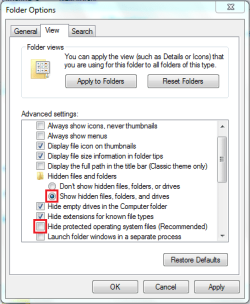
If you open explorer then click Organize > Folder and Search options > View and set the following...
Now try to access the drive. The fact that it's not giving and error when accessing the drive makes me think that it's being read correctly just the files/folders are the main issue. | My System Specs | | System Manufacturer/Model Number Compaq Desktop OS Windows 7 Ultimate x64 CPU AMD Sempron Dual Core Memory 3GB Graphics Card NVIDIA GeForce 6150SE nForce 430 Screen Resolution 1024x768 Hard Drives 150GB Sata |
24 Mar 2011
|
#9 | | Windows 7 Ult x64 - SP1/ Windows 8 Pro x64 Wanderer |
Looks like the drive directory is corrupt or was deleted.
Do you have any image backups?
Seagate and Western Digital offer free versions of Acronis on their websites, Macrium Reflect is free and very good.
Try a HDD scan from the drive manufacturer:
For Seagate: SeaTools
For Western Digital: Western Digital Data Lifeguard Tools
Available software from WD: Downloads SATA & SAS If it's a different one, just search their website.
If they are no help then try running Recuva. Quote: Accidentally deleted an important file? Lost something important when your computer crashed? No problem! Recuva recovers files deleted from your Windows computer, Recycle Bin, digital camera card, or MP3 player. And it's free! Recuva is recommended on Seven Forums 'FREE Great Programs for Windows 7' Quote: Recuva (pronounced "recover") is a utility to restore files that have been accidentally deleted from your computer. This includes files emptied from the Recycle bin as well as images and other files that have been deleted by user error from digital camera memory cards or MP3 players. It will even bring back files that have been deleted by bugs, crashes and viruses!
Another option, run: How to Repair Windows 7 System Files with System File Checker
Last edited by Dave76; 24 Mar 2011 at 06:13 AM..
| My System Specs | | Computer type PC/Desktop System Manufacturer/Model Number 76~2.0 OS Windows 7 Ult x64 - SP1/ Windows 8 Pro x64 CPU Intel Core i5-3570K 4.6GHz Motherboard Gigabyte GA-Z77X UD3H, f18 Memory 8GB (2X4GB) DDR3 1600 Corsair Vengeance CL8 1.5v Graphics Card Sapphire HD 7770 Vapor-X OC 1GB DDR5 Sound Card Onboard VIA VT2021 Monitor(s) Displays 22" LCD Dell Screen Resolution 1680x1050 Keyboard Logitech Wave Mouse CM Sentinel PSU Corsair HX650W Case Cooler Master Storm Scout Cooling Corsair H80 2x12cm Noctua NF P12 , 2x14cm case fans Hard Drives Samsung 840Pro 128GB SSD,
Seagate Barracuda 500GB SATA2 7200rpm 32MB cache, Seagate Barracuda 1TB SATA2 7200rpm 32MB cache, Internet Speed Dismal Antivirus Avast Browser Opera Next Other Info eSATA ports,
External eSATA Seagate 500GB SATA2 7200rpm,
External USB WD 500GB |
24 Mar 2011
|
#10 | | |
Thank you all again for taking the time to look at this problem.
In particular, thank you to Orbital Shark, because after changing that setting I can now see the folders on the D drive and I seem to be able to drill right in as far as the user files, which seem to be there unharmed.
Two questions arise.
First, how did the hidden attribute get on to every file? I am following Golden's recommendation and running the eset online scan, but it will take a couple of hours to complete.
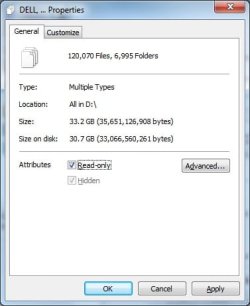
Second, how do I get it off most files while leaving it on important system files. I was tempted to take it off everything, but it won't let me (see below). 
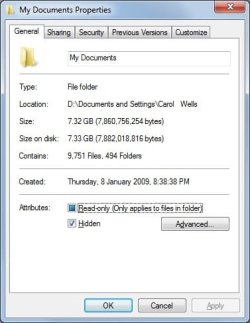
But if I navigate to a documents folder, I can take it off everything there (see below). But it will take a while fixing all the folders that need fixing (desktop, favourites) individually. 
Does anyone know of any shortcuts? | My System Specs | | Files disappeared/unreadable problems? All times are GMT -5. The time now is 01:31 AM. | |