Windows 7 Forums


Windows 7: Window's Security Center cannot start.

07 Apr 2011  
johnwillyums

Windows 7 Home Premium 64 bit
4,742 posts
Colne, Lancashire, UK
 
 
Window's Security Center cannot start.

Hi folks,
I did a clean install of Windows 7 x64 this week and have been setting everything back up all week.
A lot of updates have been coming down over the week and yesterday I finally got SP1 along with lots of securuty updates. Now security center won't start. I have a red cross on the flag logo on the task bar.
This gives me a message saying that security center won't start.
Also MSE won't open. It flashes open briefly, showing red, and closes instantly.
I've installed AVG to protect my pc but I'm concerned that something has gone amiss.
I've tried uninstalling and re installing MSE but it just won't open.
Anyone got any ideas on this.
Cheers, John

My System SpecsSystem Spec

07 Apr 2011  
Bill2

Windows 7 x64 pro/ Windows 7 x86 Pro/ XP SP3 x86
5,148 posts


To start off, download and run the free malwarebytes antimalware. Run a full scan, let it clean whatever it wants, reboot, then let us know.
My System SpecsSystem Spec
07 Apr 2011  
johnwillyums

Windows 7 Home Premium 64 bit
4,742 posts
Colne, Lancashire, UK


Hi Bill2. I already ran MBytes and SUPERAntispyware scans. Picked up some adware but nothing else.
I just came in from work and booted up. I still have a cross on my flag and "Windows security center service can't be started" message.
If I try and open MSE it flashes up with red start box for a millisecond and it's then gone.
I might try system restore to before SP1 because it was all right before that.
What do you think? John
My System SpecsSystem Spec
.


07 Apr 2011  
johnwillyums

Windows 7 Home Premium 64 bit
4,742 posts
Colne, Lancashire, UK


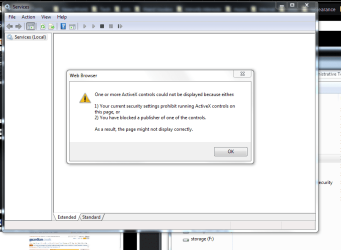
I just checked services via control panel and I get this. The plot thickens.
Attached Thumbnails
Window's Security Center cannot start.-services.png  
My System SpecsSystem Spec
07 Apr 2011  
Bill2

Windows 7 x64 pro/ Windows 7 x86 Pro/ XP SP3 x86
5,148 posts


Did you try starting the security center service from the services mmc? Click Start orb, type services.msc, hit Enter. Scroll down to security center and make sure its started and set to start automatically at startup.

If that doesnt help run a sfc scan, you know how to do it.

Also try uninstalling and reinstalling mse.
My System SpecsSystem Spec
07 Apr 2011  
johnwillyums

Windows 7 Home Premium 64 bit
4,742 posts
Colne, Lancashire, UK


Hi Bill. Things are getting worse. I have 4 browsers installed and all of them are returning page errors. Just running VIPRERescue and it's taking ages.
It immediately told me that it's rootkit scan couldn't function so it may be one of those.
Sophos?
I'll try what you suggest when the scan has finished.

Thanks for your support, John
My System SpecsSystem Spec
07 Apr 2011  
Carolyn

Windows 7 Ultimate 64 bit
402 posts


If I may ask, what prompted you to do the clean install in the first place? Did you reformat the drive before installing?
My System SpecsSystem Spec
07 Apr 2011  
Jacee

Windows 7 Ultimate 32bit SP1
7,144 posts


Download DDS from one of these links:
Mirror 1 Mirror 2 Mirror 3
  • Disable any script blocking protection
  • Double click the dds icon to run the tool.
  • When done, DDS will open two (2) logs:
    1. DDS.txt
    2. Attach.txt <-- this will be minimized in the task tray
  • Save both reports to your desktop.
Include the contents of both logs in your new topic.
The scan will instruct you to post Attach.txt as an attachment
My System SpecsSystem Spec
07 Apr 2011  
johnwillyums

Windows 7 Home Premium 64 bit
4,742 posts
Colne, Lancashire, UK


Thanks folks. Just running Sophos Antirootkit. struggling to post as all my browsers are screwing up. I may go to Linux and post from there.
My System SpecsSystem Spec
07 Apr 2011  
johnwillyums

Windows 7 Home Premium 64 bit
4,742 posts
Colne, Lancashire, UK


Hmmn. Things seem to be ok on this browser at the moment (Lunascape6/Gecko) so I'll try and post again. Sophos is still running.
@Carolyn. I did the clean install (and formatted) because I was running a dul boot with Linux Mint and was going through GRUB initially and then into Windows boot loader.
Either this or the fact that I had a custom theme seemed to be preventing SP1 from installing. Also I like to do a clean install once a year.
@Jacee. Thanks, I'll try your suggestion and post the logs as soon as this rootkit scan is finished.
My System SpecsSystem Spec
Reply

 Window's Security Center cannot start. problems?


Thread Tools


Similar help and support threads for: Window's Security Center cannot start.
Thread Forum
Solved How can I get Windows Security Center Service to start? General Discussion
Security center and windows defender wont start. System Security
my security center won't start System Security
Windows Security Center Can't Start. System Security
Security Center doesnt start System Security


All times are GMT -5. The time now is 11:33 PM.


Windows 7 Forums is an independent web site and has not been authorized,
sponsored, or otherwise approved by Microsoft Corporation.
"Windows 7" and related materials are trademarks of Microsoft Corp.
© Designer Media Ltd