Windows 7 Forums


Windows 7: Avast Icon Whacked

08 Jul 2009   #1

Win 7 RC 64-Bit, XP Pro 32-Bit, Suse Linux
 
 
Avast Icon Whacked

I've been using Avast (free) since I installed Win 7. I had it pinned to the Task Bar. Today the little icon took a dump and is just a white square...same thing now in the programs list. Avast works, just the icon got whacked.


Nothing serious, just really weird.
My System SpecsSystem Spec

08 Jul 2009   #2

Windows 7 Ultimate x64, XP Mode, W8 RP VM, Linux Mint Debian 2nd OS HD- 7 Pro x64 second case
New England


You now have to manually browse the Programs(x86) directory\Avast folder found there for the main executable and right click on that to create a new shortcut you can drag onto the desktop.

Once on the desktop you can easily rename the "shortcut to Avast" to Avast and drag it onto the taskbar to see that taken care of. For the Start menu, http://www.sevenforums.com/tutorials...in-folder.html
My System SpecsSystem Spec
08 Jul 2009   #3

Windows® 8 Pro (64-bit)
Mumbai, India


but why does it happen? even some of my icons are **whacked**. see the pic below.
Name:  Capture.PNG
Views: 695
Size:  60.4 KB
My System SpecsSystem Spec
.


08 Jul 2009   #4

Windows 7 Ultimate x64 SP1


Delete your icon cache, it will rebuild itself, see if it helps any.
Icon Cache - Rebuild - Vista Forums
My System SpecsSystem Spec
08 Jul 2009   #5
Legacy Code


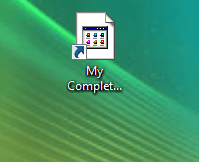
I had a similar problem earlier on with a few Icons on my desktop (See attachment )

I solved it by right clicking on the Icon , Selecting Properties and then opting to change the Icon.

Double click on the "default icon" and then Apply. Took a few attempts at it ,But got it back to normal.

Hope that helps ?
Attached Thumbnails
Avast Icon Whacked-mse-icon-problem.png   Avast Icon Whacked-back-normal-o-.png  
My System SpecsSystem Spec
08 Jul 2009   #6

Windows 7 Ultimate x64, XP Mode, W8 RP VM, Linux Mint Debian 2nd OS HD- 7 Pro x64 second case
New England


One thing I found even right after seeing a clean install of 7 go on followed by all the programs one would always tend to see the same problem with the shortcut. The solution was to right click on the desktop shortcut prior to pinning it in order to browse to the program's folder and click on the actual ico file and apply that.
My System SpecsSystem Spec
08 Jul 2009   #7

Windows 7 Ultimate x64 Service Pack 1
Doncaster, UK


You could always try rebooting your system to see if that helps.
My System SpecsSystem Spec
08 Jul 2009   #8

Windows 7 Ultimate x64, XP Mode, W8 RP VM, Linux Mint Debian 2nd OS HD- 7 Pro x64 second case
New England


If the program was just installed just like seen with the tuner card or even dvd burning software a restart is often prompted for. But this has been on for a lot longer then one day even by your description there already having seen numerous restarts.

On a few stubborn to take shortcuts temporarily applying a substitute icon until the original is located in the main program folder will often make the original stick.
My System SpecsSystem Spec
08 Jul 2009   #9

Windows® 8 Pro (64-bit)
Mumbai, India


Quote   Quote: Originally Posted by Airbot View Post
Delete your icon cache, it will rebuild itself, see if it helps any.
Icon Cache - Rebuild - Vista Forums
Did not work. I reinstalled DAP and it worked.
My System SpecsSystem Spec
08 Jul 2009   #10

Windows 7 Ultimate x64, XP Mode, W8 RP VM, Linux Mint Debian 2nd OS HD- 7 Pro x64 second case
New England


Hey pop pop The same method used on the desktop shortcut you pin to the taskbar will also work for the Start>All Programs>Avast folder item there as well.
My System SpecsSystem Spec
Reply

 Avast Icon Whacked problems?


Thread Tools


Similar help and support threads for: Avast Icon Whacked
Thread Forum
Icon Help: Icons missing and replaced with Illustrator File Icon General Discussion
White 'File' icon showing over top of normal desktop icon General Discussion
Can I use Avast with Norton 2010?Is Avast is light AV? System Security


All times are GMT -5. The time now is 02:13 AM.


Seven Forums Android App Seven Forums IOS App Follow us on Facebook

Windows 7 Forums is an independent web site and has not been authorized,
sponsored, or otherwise approved by Microsoft Corporation.
"Windows 7" and related materials are trademarks of Microsoft Corp.
© Designer Media Ltd
  

1 2 3 4 5 6 7 8 9 10 11 12 13 14 15 16 17 18 19 20 21 22 23 24 25 26 27 28 29 30 31 32