
Windows 7 Forums Search
Welcome to Windows 7 Forums. Our forum is dedicated to helping you find solutions with any problems, errors or issues you are experiencing with Windows 7. The Windows 7 forum also covers news and updates and has an extensive Windows 7 tutorial section that covers a wide range of tips and tricks.


Windows 7 - PUM.Hidden.Desktop

 
12-27-2011   #1


Win7 Home Premium x64 SP1/Windows 8 Consumer Preview x64


PUM.Hidden.Desktop

Hello Guys

Malwarebytes flagged the following reg entry as malicious and I can't get rid of it. It says its removed but on reboot it reappears.I've tried scanning from Hirens bootable cd, same result it wont budge. MSE, Superantispyware and ESET online find nothing and on doing research it says it can effect desktop icons but hasn't effected my system in any obvious way.

Any help on removing this is much appreciated.
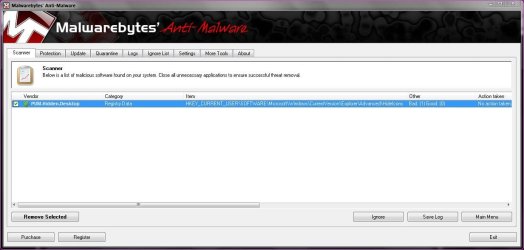
PUM.Hidden.Desktop-capture.jpg

Regards Danny

My System SpecsSystem Spec
12-27-2011   #2


Windows 7 Ultimate 32-bit


PUM.Hidden.Desktop

Hi Danny,

I had the same result from an MBAM scan today and it took me a little time to work it out but (for me at any rate), I usually have my desktop icons hidden (this is set by me manually by right-clicking on the desktop and clicking View -> Show desktop icons).

I do this just to keep my desktop 'clean' looking and switch the icons back to visible if/when I need them.

Bottom-line: when I turned the icons back to visible (View -> Show desktop icons) and ran another scan, MBAM didn't flag anything up; I think this is just MBAM erring on the side of caution if your desktop icons are set to hidden.

I obviously can't say that this is the same situation that you've encountered but it's resolved it for me...
My System SpecsSystem Spec
12-27-2011   #3


Windows 7 Ultimate x64 SP1, LinuxMint 9 LTS x64, Debian 6, Ubuntu 10.04 LTS x64


Danny,

PUM's are Potentially Unwanted Modifications - it sounds like Malwarebytes is flagging a hidden icon/s as potetially malicious. It could be a false positive - check it out at the Malwarebytes forums just to be sure.

Regards,
Golden
My System SpecsSystem Spec
.


12-27-2011   #4


Win7 Home Premium x64 SP1/Windows 8 Consumer Preview x64


Thanks guys

Have posted on the Malwarebytes forum and spire13's comments seem to make sense as I'm running the same scenario with desktop icons hidden. Will wait till morning as usually MBAM update there definitions quite quickly when FPs like this occur.
Will post back later though

Danny
My System SpecsSystem Spec
12-28-2011   #5


Win7 Home Premium x64 SP1/Windows 8 Consumer Preview x64


Well Mbam updated to a new version this morning and its still flagging it up but it would appear that spire13 was correct and if I tick the show desktop icons box on the desktop context menu it doesn't flag it up. Just going to report it on the Mbam forum as a possible FP.

Thanks
My System SpecsSystem Spec
12-28-2011   #6


Windows 7 Professional SP1 32-bit


Well, it's not really a false positive in that it's even reported as malicious in any sense of the word.

It's simply exactly what MBAM calls it to begin with: a potentially unwanted modification. One that MBAM is telling you is in itself completely harmless but might not be what you want it to be.

Since you've determined that it is in fact NOT an unwanted modification, feel free to simply add this item to your exclude list on the next scan and be done with it.

(Personally I have two or three of these PUMs too but I've done every one of them myself on purpose. I just had to gently tell MBAM about it.)
My System SpecsSystem Spec
12-28-2011   #7


Windows 7 x64 home premium


I'm getting the same flag on my system too. Glad I checked here before trying to remove it!
My System SpecsSystem Spec
Reply

 PUM.Hidden.Desktop problems?


Thread Tools


Similar Threads for: PUM.Hidden.Desktop
Thread Forum
Hidden Desktop Shortcuts' Hotkey not working General Discussion
Solved Hidden beautiful desktop pictures Customization
Hidden international desktop themes to Windows 7 Themes and Styles
Desktop dropdown/hidden menu help Customization
hide the hidden programs from desktop in open menu? General Discussion


All times are GMT -5. The time now is 01:11 AM.


Windows 7 Forums is an independent web site and has not been authorized,
sponsored, or otherwise approved by Microsoft Corporation.
"Windows 7" and related materials are trademarks of Microsoft Corp.
© Designer Media Ltd
  

1 2 3 4 5 6 7 8 9 10 11 12 13 14 15 16 17 18 19 20 21 22 23 24 25 26 27 28 29 30