Windows 7 Forums


Windows 7: Windows Live Family Safety Sign In

31 Dec 2011   #1

Windows 7 32 bit
 
 
Windows Live Family Safety Sign In

Hi all, I recently installed Family Safety on our laptop for the safety of our grandsons. Now when they ask permission to visit a specific site, and I need to allow that site to be visited, the only ID option which comes up is our regular email address not the ID option I entered upon registering for the account. Can anyone advise me on how to resolve this issue? Thanks in advance for any help!

My System SpecsSystem Spec

31 Dec 2011   #2

Windows 8 Pro with Media Center x64
Southern California, USA


Hello rose, a big welcome to you to Sevenforums!

This is the live family saftey website: https://fss.live.com/safety/default.aspx
You will need to enter the same user name and password that you use to log in to hotmail for your email, and it has to be the same one you signed up the live saftey accounts with.

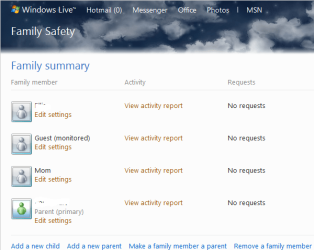
Windows Live Family Safety Sign In-capture.png

This is what it looks like. You can view the activity of each member you sign up. There are more settings on the left hand side (after you click a family member) that you can change to add more security to your child.

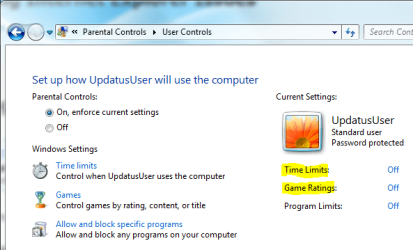
Don't forget the settings you can change in parental controls, including adding children to the list

Windows Live Family Safety Sign In-captured.png
My System SpecsSystem Spec
Reply

 Windows Live Family Safety Sign In problems?


Thread Tools


Similar help and support threads for: Windows Live Family Safety Sign In
Thread Forum
problem with family safety live. (I need some help) Software
Solved Windows Live Family Safety System Security
Windows Family Safety System Security
Windows Live Family Safety updated System Security
Updated Version of Windows Live Family Safety Released News


All times are GMT -5. The time now is 12:33 PM.


Seven Forums Android App Seven Forums IOS App Follow us on Facebook

Windows 7 Forums is an independent web site and has not been authorized,
sponsored, or otherwise approved by Microsoft Corporation.
"Windows 7" and related materials are trademarks of Microsoft Corp.
© Designer Media Ltd
  

1 2 3 4 5 6 7 8 9 10 11 12 13 14 15 16 17 18 19 20 21 22 23 24 25 26 27 28 29 30 31 32