| Windows 7: Malwarebytes v1.60.1800 Program Update Freezing with XP |
03 Jan 2012
|
#1 | | Win 7 Home Premium 64bit Ver 6.1.7600 Build 7601 - SP1 Central Pa. |
Malwarebytes v1.60.1800 Program Update Freezing with XP 01-02-2012
As of this post I have only seen this problem arise when Mbam's upgrade is installed with a stand alone XP OS, and not with a Windows 7 - XP dual-boot system, but that is not to say it cannot happen.
There has already been one SevenForums member that has had problems, and that is what prompts me to post.
This is what happened to me: 
Quote: Originally Posted by Anak LPT, this will not solve your current situation, but I wanted to relate what I went through.
I looked through your thread, and saw the reference to XP, and MBAM and the trouble your having with your XP OS, and updating MBAM.
On my XP Pro SP3 machine I went to upgrade to the new version today (1.60.0.1800) through the program, and it generated a program crash report. Task manager could not end it because it was not listed.
I then un-installed it, downloaded a fresh copy, re-installed, and it generated the same report.
Researched "Mbam xp crash" Found this: https://forums.malwarebytes.org/index.php?showtopic=103207
I finally just removed it, and will wait until MBAM figures it out.
In the meantime I saw this: 
Quote: Originally Posted by gregrocker Interesting coincidence, Anak. LPT seems to be pretty sure Malwarebytes is connected to this hang. We only see good Malwarebytes performance in Windows 7 but since this is XP it may need to be rooted out.
See if you can kill the Malwarebytes Service in Task Manager Services tab first thing, then kill any running Processes related to MB.
Perhaps one of the Malwarebytes developers here will help with a line command to run from booted XP CD Repair console to kill it's processes altogether if this fails.
Since you refer to it being in your System Tray, do you have the paid Real Time Shield? I had to dupilcate the problem because I did not check the process tab as per gr's instructions, and this is how it went.
After the program upgrade Mbam updated itself, but did not open to the Scanner Tab, after a short delay I clicked on the shortcut, and I saw this: 
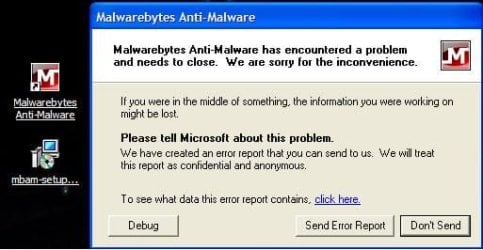
That is the shortcut icon with the setup File along side the error box.
I then clicked on "To see what data this error report contains" 
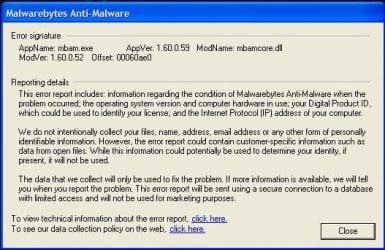
Then on "To view technical information about this report":
Our C & Dbg guys will like this:
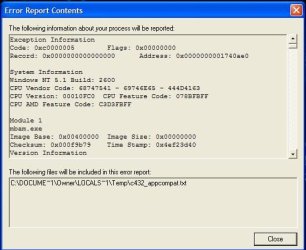
At this point I closed all that out, and preformed the "Three Finger Salute" to open the Task Manager, and this time Mbam was listed. I selected it, and clicked on "End Task".
This is what I saw:
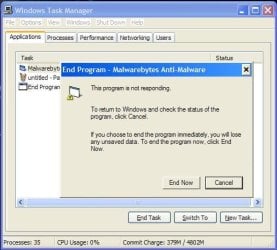
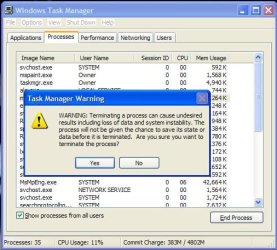
I then went to the Processes Tab, found Mbam.exe (sixth one down), selected it, and clicked on "End Process". Received a warning, and clicked on Yes. 
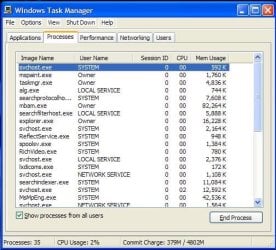
I closed Task Manager, and was back at the Desktop, and a little unsure of what to do next.
If you go to the Mbam Forum , and look for an XP tie-in you will see several threads.
I even tried the MSE Exclusions rules, then a re-install, and ran into the same problem I described above. If I didn't have to have exclusions before, why do I have to now?
Something is not right.
Then I saw in this post from the Mbam Forums about making sure that Mbam is completly removed. Here is the link for the Mbam Cleaner
I ran that.
Re-installed Mbam.
It updated itself, and went right to the Scanner Tab.
There was a pop-up that asked if I wanted to try the Pro version for a fortnight, and I clicked on Yes.
Ran a quick scan, and all is okay.
I know it is a little dangerous to have both Mbam, an MSE on Real-Time Protection, but for what I went through I thought, why not?
For the record, I have searched, and some users are affected by having both run, and some users are not. I will post back if they act up. | My System Specs |
| Computer type PC/Desktop System Manufacturer/Model Number Gateway DX4831e (Mid-Tower Desktop) OS Win 7 Home Premium 64bit Ver 6.1.7600 Build 7601 - SP1 CPU Intel i3 530 2.93GHz, 2933MHz 2 Cores 4 Logical Processors Motherboard Gateway H57M01 133 megahertz Memory 6GB of 1,333MHz DDR3 SDRAM Graphics Card 32MB Intel Graphics Media Accelerator HD IGChip Sound Card Realtek High Definition Audio Monitor(s) Displays Gateway HX2000 20inch TFT active matrix TN Screen Resolution 1600 x 900 x 59 hertz Keyboard MS 'Natural' Standard PS/2 Enhanced 101-102 Key Mouse Gateway USB wired optical PSU 300watts. Case Mid-Tower Desktop Cooling Stock from Gateway Hard Drives WDC WD10EADS-00M2B0 [HDD] (1000.20 GB) -- drive 0,
HL-DT-ST DVDRAM GH41N [CD-ROM dr]
HP Photosmart Plus B210a e_series AIO Printer
Four card readers, and Four USB 2.0 Internet Speed Verizon FIOS 24.57Mbps Down - 5.68Mbps up Antivirus MSE Browser IE9.0.8112.16421-Upd ver 9.0.13, FireFox 19.2, Opera 12.14 Other Info BIOS: American Megatrends Inc. P01-A0 11/17/2009
System Specs by Belarc.
Join Date March 27th 2010 at 10:44:15 AM. |
03 Jan 2012
|
#2 | | Win 7 Home Premium 64bit Ver 6.1.7600 Build 7601 - SP1 Central Pa. |
It has been a little over three hours since I have been running Mbam, and MSE together, and I turned off MSE's Real-Time Protection.
What I noticed was every time I went to preview/edit one of my posts/replies or go to another web site the browser (IE8) would switch to the new site, but it hung until I clicked on an open part of the tab's window.
Then the title bar would flash quickly, and the new site would snap open.
I turned off MSE's Real-Time Protection, and left the Pro version of Mbam run. I watched as the performance of the browser slowly improved to, where now the response is instantaneous with my mouse clicks to move forward or back a page/tab/or site.
Without further research I can only surmise that Mbam has a learning curve.
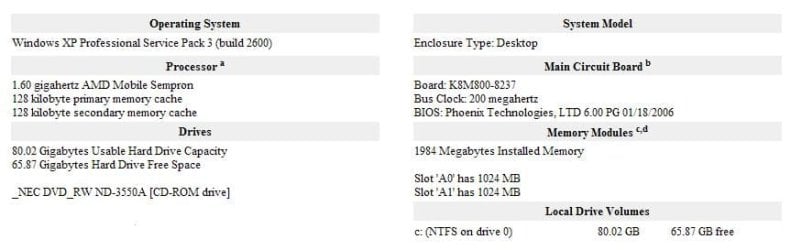
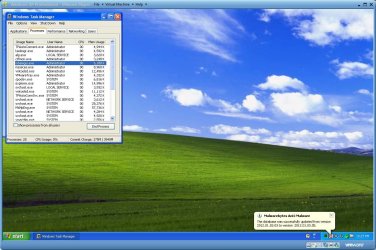
To give you an idea of my XP machine:
Later today I will run a full scan with Mbam, and post the results.
Until then, it is getting late for me, and I am signing off for now.... | My System Specs | | Computer type PC/Desktop System Manufacturer/Model Number Gateway DX4831e (Mid-Tower Desktop) OS Win 7 Home Premium 64bit Ver 6.1.7600 Build 7601 - SP1 CPU Intel i3 530 2.93GHz, 2933MHz 2 Cores 4 Logical Processors Motherboard Gateway H57M01 133 megahertz Memory 6GB of 1,333MHz DDR3 SDRAM Graphics Card 32MB Intel Graphics Media Accelerator HD IGChip Sound Card Realtek High Definition Audio Monitor(s) Displays Gateway HX2000 20inch TFT active matrix TN Screen Resolution 1600 x 900 x 59 hertz Keyboard MS 'Natural' Standard PS/2 Enhanced 101-102 Key Mouse Gateway USB wired optical PSU 300watts. Case Mid-Tower Desktop Cooling Stock from Gateway Hard Drives WDC WD10EADS-00M2B0 [HDD] (1000.20 GB) -- drive 0,
HL-DT-ST DVDRAM GH41N [CD-ROM dr]
HP Photosmart Plus B210a e_series AIO Printer
Four card readers, and Four USB 2.0 Internet Speed Verizon FIOS 24.57Mbps Down - 5.68Mbps up Antivirus MSE Browser IE9.0.8112.16421-Upd ver 9.0.13, FireFox 19.2, Opera 12.14 Other Info BIOS: American Megatrends Inc. P01-A0 11/17/2009
System Specs by Belarc.
Join Date March 27th 2010 at 10:44:15 AM. |
03 Jan 2012
|
#3 | | Windows 8 - 64-bit So. Ar. |
I had that problem.. was awful, my whole desktop kept freezing when I would boot up.. NOT anything would help me.. I had to keep doing a hard shutdown. I'll be back later to let you know .. how things went.. LPt /
suny329..... New member here shortly after this problem happemed after updating Malwarebytes. | My System Specs | | Computer type Laptop System Manufacturer/Model Number Gateway 17.3" LCD Intel Dual-Core, 8GB RAM 1TB HDD Windows 8 Laptop OS Windows 8 - 64-bit CPU 2.2GHz Intel Pentium dual-core B960 processor with 2MB L3 ca Memory 8GB DDR3 Graphics Card Intel HD Graphics with 128MB of dedicated system memory Monitor(s) Displays 17.3" Ultrabright HD widescreen LED-backlit LCD Screen Resolution 1280 X 1024 Keyboard Multi Gesture Touchpad Mouse USB - portable mouse... I added this PSU Intel B960 processor Case XXXXX Cooling XXXXX Hard Drives 1TB hard drive-1000 GB HDD
DVD-Super Multi DL drive Antivirus Avast Browser I E 10 Other Info I see nothing about Motherboard info.
I'm not sure about Sound Card
Ports :(3) USB 2.0, (1) HDMI, (1) VGA, (1) Headphone out, (1) Microphone in, (1) Ethernet LAN
•Fast Wi-Fi wireless and wired Gigabit Ethernet networking
•HDMI output
•Kensington lock slot
I have no idea what all this actually means |
03 Jan 2012
|
#4 | | Windows 8 - 64-bit So. Ar. |
Anak I need to run the MB cleaner.. I'm running show and jumpy this morning.
Will it do any harm to what's been fixed ?
Be back after work today. | My System Specs | | Computer type Laptop System Manufacturer/Model Number Gateway 17.3" LCD Intel Dual-Core, 8GB RAM 1TB HDD Windows 8 Laptop OS Windows 8 - 64-bit CPU 2.2GHz Intel Pentium dual-core B960 processor with 2MB L3 ca Memory 8GB DDR3 Graphics Card Intel HD Graphics with 128MB of dedicated system memory Monitor(s) Displays 17.3" Ultrabright HD widescreen LED-backlit LCD Screen Resolution 1280 X 1024 Keyboard Multi Gesture Touchpad Mouse USB - portable mouse... I added this PSU Intel B960 processor Case XXXXX Cooling XXXXX Hard Drives 1TB hard drive-1000 GB HDD
DVD-Super Multi DL drive Antivirus Avast Browser I E 10 Other Info I see nothing about Motherboard info.
I'm not sure about Sound Card
Ports :(3) USB 2.0, (1) HDMI, (1) VGA, (1) Headphone out, (1) Microphone in, (1) Ethernet LAN
•Fast Wi-Fi wireless and wired Gigabit Ethernet networking
•HDMI output
•Kensington lock slot
I have no idea what all this actually means |
03 Jan 2012
|
#5 | | Windows 7 Ultimate SP1 (x64) South Australia |

Quote: Originally Posted by Anak I know it is a little dangerous to have both Mbam, an MSE on Real-Time Protection, but for what I went through I thought, why not? Hi Anak,
Under Windows 7 I have been running MSE and MBAM in real-time and have never had any issues - perhaps under XP it does?
Good job on hunting down all the issues.
LPT : using the uninstall tool will simpy clean out MBAM from your system. What do you mean by undo the fixes?
Regards,
Golden | My System Specs | | Computer type PC/Desktop System Manufacturer/Model Number Golden Mk. I.3 OS Windows 7 Ultimate SP1 (x64) CPU Intel i7 860 @ 2.80 GHz Motherboard Gigabyte P55A-UD3R Rev.1. Award BIOS F13 Memory 16GB Corsair Vengance DDR3 @ 661 MHz Dual Channel (9-9-9-24) Graphics Card EVGA NVidia GTX 560 1024MB Sound Card Realtek Integrated Monitor(s) Displays Dual Samsung SyncMaster 2494HS Screen Resolution 1920*1080 and 1920*1080 Keyboard Logitech G110 Mouse Logitech MX518 PSU Thermaltake ToughPower QFan 750W Case Thermaltake Element S VK60001W2Z Cooling Corsair H60 Water Cooling, 2*230mm and 2*80mm case fans Hard Drives 1*OCZ Vertex 2 60GB SSD;
2*Samsung F3 SpinPoint 1TB in RAID0;
3*Samsung F1 SpinPoint 1TB in RAID5;
1*Western Digital 500GB External USB 3.0
1*Seagate 500GB External USB 2.0 Internet Speed Not fast enough!!! Antivirus MSE and Malwarebytes Pro Browser Chrome Version 25 Other Info Laptop: ASUS X54C, Intel Core i3-2330M @ 2.0Ghz, 4GB RAM, Intel HD on-board graphics, Windows 7 Professional SP1 (x64), LinuxMint 14 (x64), PepperMint 3 (x86) |
03 Jan 2012
|
#6 | | Windows 8 - 64-bit So. Ar. |
Golden there's a long thread from the past 2 days on Windows 7 Forum..
if I had the link handy I would share it with you.. I'm home for lunch. | My System Specs | | Computer type Laptop System Manufacturer/Model Number Gateway 17.3" LCD Intel Dual-Core, 8GB RAM 1TB HDD Windows 8 Laptop OS Windows 8 - 64-bit CPU 2.2GHz Intel Pentium dual-core B960 processor with 2MB L3 ca Memory 8GB DDR3 Graphics Card Intel HD Graphics with 128MB of dedicated system memory Monitor(s) Displays 17.3" Ultrabright HD widescreen LED-backlit LCD Screen Resolution 1280 X 1024 Keyboard Multi Gesture Touchpad Mouse USB - portable mouse... I added this PSU Intel B960 processor Case XXXXX Cooling XXXXX Hard Drives 1TB hard drive-1000 GB HDD
DVD-Super Multi DL drive Antivirus Avast Browser I E 10 Other Info I see nothing about Motherboard info.
I'm not sure about Sound Card
Ports :(3) USB 2.0, (1) HDMI, (1) VGA, (1) Headphone out, (1) Microphone in, (1) Ethernet LAN
•Fast Wi-Fi wireless and wired Gigabit Ethernet networking
•HDMI output
•Kensington lock slot
I have no idea what all this actually means |
03 Jan 2012
|
#7 | | Win 7 Home Premium 64bit Ver 6.1.7600 Build 7601 - SP1 Central Pa. |
You think that one is long, wait till I get done with the previous posts here.
By the by, Fish an' chips for dinner? | My System Specs | | Computer type PC/Desktop System Manufacturer/Model Number Gateway DX4831e (Mid-Tower Desktop) OS Win 7 Home Premium 64bit Ver 6.1.7600 Build 7601 - SP1 CPU Intel i3 530 2.93GHz, 2933MHz 2 Cores 4 Logical Processors Motherboard Gateway H57M01 133 megahertz Memory 6GB of 1,333MHz DDR3 SDRAM Graphics Card 32MB Intel Graphics Media Accelerator HD IGChip Sound Card Realtek High Definition Audio Monitor(s) Displays Gateway HX2000 20inch TFT active matrix TN Screen Resolution 1600 x 900 x 59 hertz Keyboard MS 'Natural' Standard PS/2 Enhanced 101-102 Key Mouse Gateway USB wired optical PSU 300watts. Case Mid-Tower Desktop Cooling Stock from Gateway Hard Drives WDC WD10EADS-00M2B0 [HDD] (1000.20 GB) -- drive 0,
HL-DT-ST DVDRAM GH41N [CD-ROM dr]
HP Photosmart Plus B210a e_series AIO Printer
Four card readers, and Four USB 2.0 Internet Speed Verizon FIOS 24.57Mbps Down - 5.68Mbps up Antivirus MSE Browser IE9.0.8112.16421-Upd ver 9.0.13, FireFox 19.2, Opera 12.14 Other Info BIOS: American Megatrends Inc. P01-A0 11/17/2009
System Specs by Belarc.
Join Date March 27th 2010 at 10:44:15 AM. |
03 Jan 2012
|
#8 | | Win 7 Home Premium 64bit Ver 6.1.7600 Build 7601 - SP1 Central Pa. |
01-03-12, 16:18 GMT
I already had v1.60.1800 running on my 7 box, and wanted to do some type of control, so I used the Mbam Cleaner (Direct Download), and then re-installed v1.60.1800.
One thing about doing it that way is the user gets the chance to run a fortnight of trials with the Pro version, and that is what I have on our XP box, with MSE's Real Time Protection (RTP) dis-abled because of problems mention earlier.
Here on our 7 box I will try to leave MSE's RTP running for as long as I can...So far the two are behaving, I am not getting the problems mention earlier.
Now to answer some previous postings: 
Quote: Originally Posted by LADYPINKtomato1 Anak I need to run the MB cleaner.. I'm running show and jumpy this morning.
Will it do any harm to what's been fixed ?
Be back after work today. I have not noticed any harm to our XP or 7 system.
The Mbam Cleaner (Direct Download) Is a 66KB .exe file that should be downloaded to one's Desktop, I also have a copy of the new v1.60.1800 installation File ready to go when the Cleaner is done.
All one has to do is Click on the Cleaner File to open it. Then click Yes on the UAC Dialog box. within five to six seconds you will see its "This utility will remove all components of Mbam, are you sure you want to continue"? Dialog box, click on Yes.
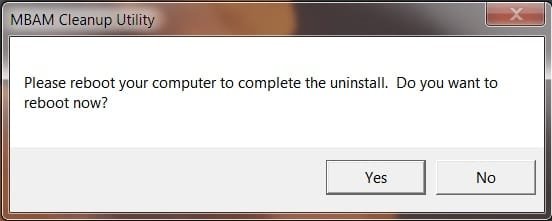
Five to six seconds later "Please reboot your computer to complete the uninstall".
"Do you want to reboot now"? Dialog box, click on Yes.
The dialog box will close, and your machine will start its reboot process.
When it is done it will return to your desktop.
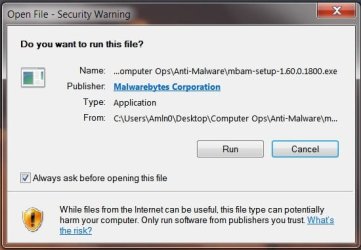
Remember that Mbam installer File? Click on that, and you will see this: 
Click on Run.
You will again see the UAC prompt, Do you really want to install this software? Click on Yes.
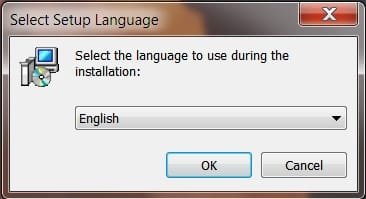
It will then move to "Select Setup Language" Here you can pick your Language:
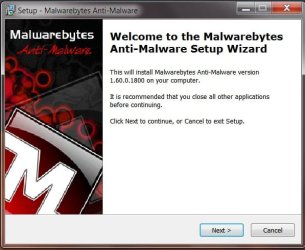
Next up is the Mbam Set-up Wizard, click Next:
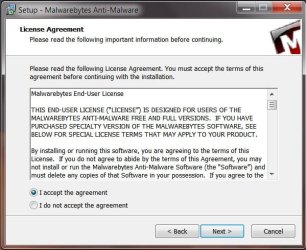
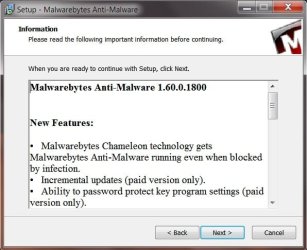
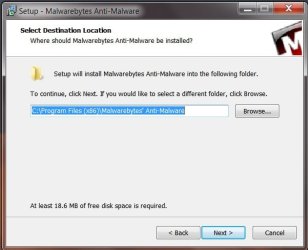
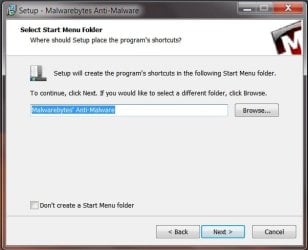
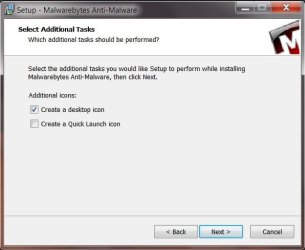
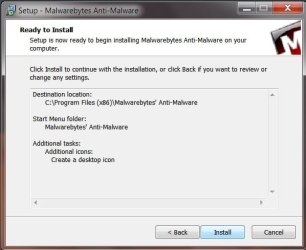
From here there are six choices to make, sequence is left to right, then down to left:    
You the user, will have to decide what is best for you. On the sixth one click on Install, and let the program installer run its course.
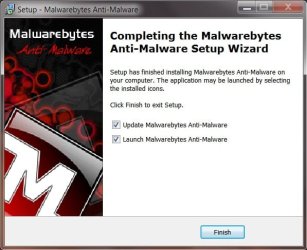
You should see this, when done. Click on Finish:
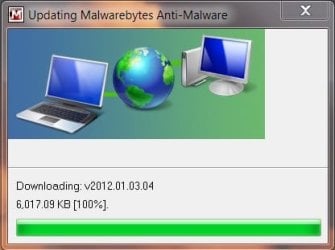
You should see it updating:
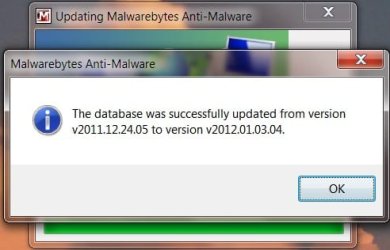
Then success!
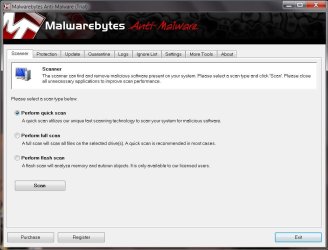
Click on OK, and you will be back at the Scanner tab of the Program. 
If for any reason you do not see the Free Fortnight Trial, Click on the protection tab, and then on Enable.
This was the second time I used the cleaner, and re-installed Mbam, and I believe it was an artifact.
I did not see the dialog box asking if I wanted to do the free trial, so I went to that Tab, and enabled, and it was turned on.
Now for Sir Golden: 
Quote: Originally Posted by Golden 
Quote: Originally Posted by Anak I know it is a little dangerous to have both Mbam, an MSE on Real-Time Protection, but for what I went through I thought, why not? Hi Anak,
Under Windows 7 I have been running MSE and MBAM in real-time and have never had any issues - perhaps under XP it does? As of the time of this post I can know you are correct in your statement!
I have both RTP's enabled on our 7box, and you would not believe the amount of editing I have done to produce this post...And, not even a whimper out of either of them! 
Quote: Originally Posted by Golden Good job on hunting down all the issues. Thank You! 
Quote: Originally Posted by Golden LPT : using the uninstall tool will simpy clean out MBAM from your system. What do you mean by undo the fixes?
Regards,
Golden Unless there is some anomaly with your XP system, Golden is correct.
Some useful links: malwarebytescleaner.exe Direct download. Mbam Common Issues, Questions, and their Solutions General Malwarebytes' Anti-Malware Forum
If any of the links in this thread do not work please let me know!
Anak....aka....Steve
Last edited by Anak; 03 Jan 2012 at 06:10 PM..
Reason: Ongoing Cleanup
| My System Specs | | Computer type PC/Desktop System Manufacturer/Model Number Gateway DX4831e (Mid-Tower Desktop) OS Win 7 Home Premium 64bit Ver 6.1.7600 Build 7601 - SP1 CPU Intel i3 530 2.93GHz, 2933MHz 2 Cores 4 Logical Processors Motherboard Gateway H57M01 133 megahertz Memory 6GB of 1,333MHz DDR3 SDRAM Graphics Card 32MB Intel Graphics Media Accelerator HD IGChip Sound Card Realtek High Definition Audio Monitor(s) Displays Gateway HX2000 20inch TFT active matrix TN Screen Resolution 1600 x 900 x 59 hertz Keyboard MS 'Natural' Standard PS/2 Enhanced 101-102 Key Mouse Gateway USB wired optical PSU 300watts. Case Mid-Tower Desktop Cooling Stock from Gateway Hard Drives WDC WD10EADS-00M2B0 [HDD] (1000.20 GB) -- drive 0,
HL-DT-ST DVDRAM GH41N [CD-ROM dr]
HP Photosmart Plus B210a e_series AIO Printer
Four card readers, and Four USB 2.0 Internet Speed Verizon FIOS 24.57Mbps Down - 5.68Mbps up Antivirus MSE Browser IE9.0.8112.16421-Upd ver 9.0.13, FireFox 19.2, Opera 12.14 Other Info BIOS: American Megatrends Inc. P01-A0 11/17/2009
System Specs by Belarc.
Join Date March 27th 2010 at 10:44:15 AM. |
04 Jan 2012
|
#9 | | Windows 7 Pro 64 SP1 East Bay Area, CA |
Quote: I know it is a little dangerous to have both Mbam, an MSE on Real-Time Protection, but for what I went through I thought, why not?
For the record, I have searched, and some users are affected by having both run, and some users are not. I will post back if they act up.
Hi Steve,
Just out of curiosity I installed my full version of XP Pro in VMWare, installed MSE then the MBAM Pro trial to see if I would get any reaction like you or LPt got.
I haven't had any hiccups after a few reboots and quite a few hours of running. Both have the RTP enabled.
Just thought I'd share my little test with you. | My System Specs | | Computer type PC/Desktop System Manufacturer/Model Number Compaq sr5410f case OS Windows 7 Pro 64 SP1 CPU AMD X2 4450E @ 2.3 ghz Motherboard Biostar MCP6P M2+ Memory 4.0 g Graphics Card Nvidia GeForce 9600 GT , 512mb Sound Card onboard Monitor(s) Displays auria eq2367 Screen Resolution 1920 x 1080 Keyboard logitech wave cordless Mouse logitech LX8 cordless laser mouse PSU 250 watts Case Compaq Cooling couple fans Hard Drives 1 tb Hitachi HDT721010SLA scsi, 500 gb external Internet Speed comcast hi speed 19 dn 8 up Antivirus Microsoft Security Essentials Browser IE10 Other Info Laptop specs: HP g7-1365dx /
CPU: AMD A6-3420M APU with Radeon(tm) HD Graphics /
RAM: Crucial 8Gb (2x4Gb) /
SSD: Crucial M4-CT128M4SSD2 ATA Device/ FW 000F /
GFX: AMD Radeon HD 6520G /
OS: Microsoft Windows 7 Professional 64-bit 7601 Multiprocessor Free Service Pack 1 |
04 Jan 2012
|
#10 | | Win 7 Home Premium 64bit Ver 6.1.7600 Build 7601 - SP1 Central Pa. |
Hi Derek, that's great!
The more instances we have the better.
Just to clarify; you have XP running in VMWare on a Windows 7 OS?
Is that correct or not?
I ran all day yesterday (01-03)/today(01-04) on our 7box, and I am 'bout ready to go to bed then later this morning I will be on the XPbox for the rest of the day (01-04)
I would like to see if I can get IE8 to settle down with the both of them (Mbam-MSE) on RTP. | My System Specs | | Computer type PC/Desktop System Manufacturer/Model Number Gateway DX4831e (Mid-Tower Desktop) OS Win 7 Home Premium 64bit Ver 6.1.7600 Build 7601 - SP1 CPU Intel i3 530 2.93GHz, 2933MHz 2 Cores 4 Logical Processors Motherboard Gateway H57M01 133 megahertz Memory 6GB of 1,333MHz DDR3 SDRAM Graphics Card 32MB Intel Graphics Media Accelerator HD IGChip Sound Card Realtek High Definition Audio Monitor(s) Displays Gateway HX2000 20inch TFT active matrix TN Screen Resolution 1600 x 900 x 59 hertz Keyboard MS 'Natural' Standard PS/2 Enhanced 101-102 Key Mouse Gateway USB wired optical PSU 300watts. Case Mid-Tower Desktop Cooling Stock from Gateway Hard Drives WDC WD10EADS-00M2B0 [HDD] (1000.20 GB) -- drive 0,
HL-DT-ST DVDRAM GH41N [CD-ROM dr]
HP Photosmart Plus B210a e_series AIO Printer
Four card readers, and Four USB 2.0 Internet Speed Verizon FIOS 24.57Mbps Down - 5.68Mbps up Antivirus MSE Browser IE9.0.8112.16421-Upd ver 9.0.13, FireFox 19.2, Opera 12.14 Other Info BIOS: American Megatrends Inc. P01-A0 11/17/2009
System Specs by Belarc.
Join Date March 27th 2010 at 10:44:15 AM. Malwarebytes v1.60.1800 Program Update Freezing with XP problems? All times are GMT -5. The time now is 07:10 AM. | |