Windows 7 Forums Search
Welcome to Windows 7 Forums. Our forum is dedicated to helping you find solutions with any problems, errors or issues you are experiencing with Windows 7. The Windows 7 forum also covers news and updates and has an extensive Windows 7 tutorial section that covers a wide range of tips and tricks.


Windows 7 - Where did Spywareblaster's original icon go?

 
01-04-2012   #1


Windows 7 HP 64-bit


Where did Spywareblaster's original icon go?

Somehow I deleted my taskbar of all its shortcut icons. When I got to replacing SWB, I deleted it and installed the latest edition (4.5). Viewing the installed SWB in Windows Explorer (program files (x86), I noted that the icon next to spywareblaster.exe was a generic icon and not the one I'm used to seeing. Tried everything, including uninstalling and loading from different sources, but still the generic icon. What gives?

My System SpecsSystem Spec
01-04-2012   #2


Windows 7 Ultimate x64 SP1


Hello Flycaster,

Could you post a screenshot of this to see if anything may stand out?

For now, you might see if rebuilding the icon cache may help.
My System SpecsSystem Spec
01-04-2012   #3


Windows 7 HP 64-bit


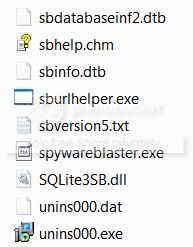
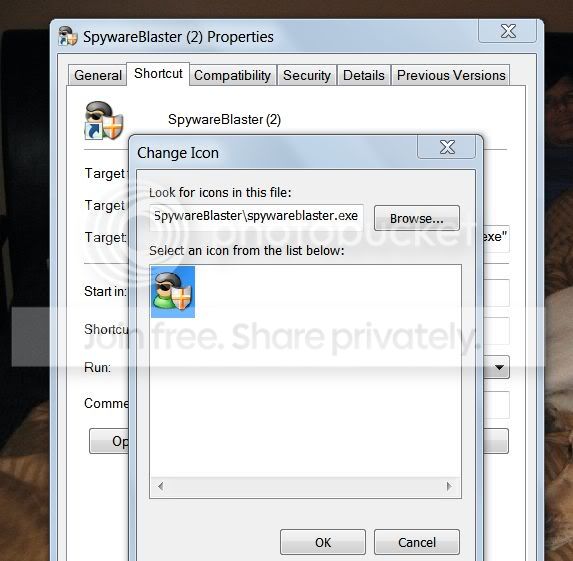
I'm going to hold off doing the cache rebuild, but here are 3 screen shots to illustrate the problem:

spywareblaster.exe icon in Windows Explorer and on the taskbar (after pinning it)


Spywareblaster icon as it appears in desktop icon and on taskbar after pinning it.


Spywareblaster icon as it appears in Taskbar>Spywareblaster>Porperties


Interestingly, as you can see, the icon is fine in the Properties???

Last edited by flycaster; 01-04-2012 at 05:45 PM..
My System SpecsSystem Spec
.


01-04-2012   #4


Windows 7 Ultimate x86 SP1 & Back Track 5 Dual Boot with BURG


Quote   Quote: Originally Posted by flycaster View Post
I'm going to hold off doing the cache rebuild, but here are 3 screen shots to illustrate the problem:

spywareblaster.exe icon in Windows Explorer and on the taskbar (after pinning it)


Spywareblaster icon as it appears in desktop icon and on taskbar after pinning it.


Spywareblaster icon as it appears in Taskbar>Spywareblaster>Porperties


Interestingly, as you can see, the icon is fine in the Properties???
Hello flycaster,

Why do you want to hold off on the icon cache rebuilding? It sounds like the best solution right now.

Tom
My System SpecsSystem Spec
01-04-2012   #5


Windows 7 Ultimate x64 SP1


Yep, I would recommend to rebuild the icon cache to see how that works, and go from there if it doesn't.
My System SpecsSystem Spec
01-04-2012   #6


Windows 7 HP 64-bit


Rebuilt cache as instructed. The icon is back on the taskbar, but is still generic in Windows Explorer? Thanks. Although you guys have given me good advice over the years, I'm still cautious when I'm doing something I really don't know much about...thus my little delay in rebuilding the cache. BTW, could someone tell me just what happened (why) when I lost this icon (and only this icon)?
My System SpecsSystem Spec
01-04-2012   #7


Windows 7 Ultimate x64 SP1


That's great news Flycaster.

As a test, change the icon size of the .exe file in Windows Explorer to see if the icon may be correct for a larger size icon. Perhaps, they didn't have a correct icon for the smaller size.

All of this could happen if the icon cache got corrupted somehow, or loaded a bad copy of the icon into the icon cache. Either way, rebuilding the icon cache clears and resets it so it will load a new copy of the icons into the icon cache.
My System SpecsSystem Spec
Reply

 Where did Spywareblaster's original icon go? problems?


Thread Tools


Similar Threads for: Where did Spywareblaster's original icon go?
Thread Forum
How do I change icon back to original? General Discussion
Spywareblaster's icon is generic in taskbar? General Discussion
Get Original Drive Icon back Customization
original Microsoft Works icon gone Software
SpywareBlaster 4.2 System Security


All times are GMT -5. The time now is 01:14 AM.


Windows 7 Forums is an independent web site and has not been authorized,
sponsored, or otherwise approved by Microsoft Corporation.
"Windows 7" and related materials are trademarks of Microsoft Corp.
© Designer Media Ltd
  

1 2 3 4 5 6 7 8 9 10 11 12 13 14 15 16 17 18 19 20 21 22 23 24 25 26 27 28 29 30