
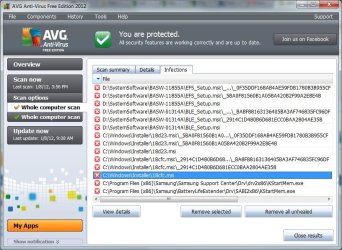
Okay, so while I was watching TV (on the TV), my AVG Resident Shield thing popped up with multiple thread detection. Apparently I have five infections of "Trojan horse SHeur4.MTZ." Googling it did not come up with the specific trojan.
These were all found in the Samsung Support Center and BatteryLife extenders.
The results:
c:\Program Files (x86)\Samsung\BatteryLifeExtender\Drv\SABI2x86\KStartMem.exe
c:\Program Files (x86)\Samsung\Samsung Support Center\Drv\drv2x86\KStartMem.exe
My options are to "Remove selected," "Remove all unhealed," and "Close." If I right click on one, it says "Move to vault" and "Go to file." I clicked "Remove selected" and they were moved to the vault.
What does the virus do? What is KStartMem.exe? Should I take any further action?
Edit: Did a virus scan and the virus came up in some more places. Lovely.
D:\SystemSoftware\BASW-01314A\BLE_Setup.msi\_D1916ABB420E953A1F6ECB8cFDACD69C:\_BA8F88163136405BA3AF746835FC96DF
D:\SystemSoftware\BASW-01314A\BLE_Setup.msi\_D1916ABB420E953A1F6ECB8cFDACD69C
D:\SystemSoftware\BASW-01314A\BLE_Setup.msi
C\Windows\Installer\1191e.msi:\_D1916ABB420E953A1F6ECB8cFDACD69C:\_BA8F88163136405BA3AF746835FC96DF
C\Windows\Installer\1191e.msi:\_D1916ABB420E953A1F6ECB8cFDACD69C
C\Windows\Installer\1191e.msi:
I'm trying to remove these objects, but I'm getting the message:
Moved object is bigger than the archive size limit
Object mentioned below is bigger than maximum size permitted
D:\SystemSoftware\BASW-01314A\BLE_Setup.msi
C\Windows\Installer\1191e.msi:
So . . . what do I do?
These were all found in the Samsung Support Center and BatteryLife extenders.
The results:
c:\Program Files (x86)\Samsung\BatteryLifeExtender\Drv\SABI2x86\KStartMem.exe
c:\Program Files (x86)\Samsung\Samsung Support Center\Drv\drv2x86\KStartMem.exe
My options are to "Remove selected," "Remove all unhealed," and "Close." If I right click on one, it says "Move to vault" and "Go to file." I clicked "Remove selected" and they were moved to the vault.
What does the virus do? What is KStartMem.exe? Should I take any further action?
Edit: Did a virus scan and the virus came up in some more places. Lovely.
D:\SystemSoftware\BASW-01314A\BLE_Setup.msi\_D1916ABB420E953A1F6ECB8cFDACD69C:\_BA8F88163136405BA3AF746835FC96DF
D:\SystemSoftware\BASW-01314A\BLE_Setup.msi\_D1916ABB420E953A1F6ECB8cFDACD69C
D:\SystemSoftware\BASW-01314A\BLE_Setup.msi
C\Windows\Installer\1191e.msi:\_D1916ABB420E953A1F6ECB8cFDACD69C:\_BA8F88163136405BA3AF746835FC96DF
C\Windows\Installer\1191e.msi:\_D1916ABB420E953A1F6ECB8cFDACD69C
C\Windows\Installer\1191e.msi:
I'm trying to remove these objects, but I'm getting the message:
Moved object is bigger than the archive size limit
Object mentioned below is bigger than maximum size permitted
D:\SystemSoftware\BASW-01314A\BLE_Setup.msi
C\Windows\Installer\1191e.msi:
So . . . what do I do?
Last edited:
My Computer
At a glance
Windows 7 Home 64 bit OEM
- OS
- Windows 7 Home 64 bit OEM


 at least now i know that its a false positive, i can sleep tonight ..phew