|
Welcome to Windows 7 Forums. Our forum is dedicated to helping you find solutions with any problems, errors or issues you are experiencing with Windows 7. The Windows 7 forum also covers news and updates and has an extensive Windows 7 tutorial section that covers a wide range of tips and tricks.
Windows 7 - Best Free Security Setup? |
01-19-2012
|
#1 | | |
Best Free Security Setup? Hi, i'm looking to get a decent security setup for my PC. There's one catch, all the programs have to be free!
I need programs to run virus scans and give me complete protection against viruses and malware. I had a look around the forum and everyone has their own opinion on what the best setup is. So, leave a reply with the definitive best free security setup!
Thanks,
-jloc.
Last edited by jloc; 01-19-2012 at 03:03 PM..
| My System Specs | | System Manufacturer/Model Number HP OS Windows 7 Ultimate CPU DualCore Intel Pentium D 930, 3000 MHz (15 x 200) Motherboard Asus P5LP-LE (Emery) Memory 3x512MB DDR2 Graphics Card NVIDIA GeForce 7800 GTX Sound Card Realtek ALC882/D/M @ Intel 82801GB ICH7 Monitor(s) Displays Iiyama ProLite E2407HDS Screen Resolution 1920 x 1080 70 Hz Keyboard Hewlett Packard Wireless Ergo Mouse Logitech USB Wheel Mouse Hard Drives WDC WD10EARS-00Y5B1 ATA Device Internet Speed 10mbps Download - 1mbps Upload |
01-19-2012
|
#2 | | Win 7 Ultimate 64-bit. SP1. |

Quote: Originally Posted by jloc Hi, i'm looking to get a completely secure security setup for my PC. There's one catch, all the programs have to be free!
I need programs to run virus scans and give me completely protection against viruses and malware. I had a look around the forum and everyone has their own opinion on what the best setup is. So, leave a reply with the definitive best free security setup!
Thanks,
-jloc. Re your requirements in red in your post..... wishful thinking thus far! 
Education / knowledge is the best way to learn to avoid the nasties....
Prevention preferable to cure.
People need to understand that to protect themselves from the evils of the internet their basic protection should include....
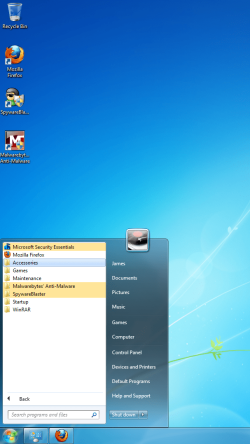
*Anti Virus Program { Microsoft Security Essentials is popular & is used by many people here.}
*Anti Malware Program . Malwarebytes. http://www.malwarebytes.org/products
* SpywareBlaster { free}sits happily in the background offering great protection.
Read about it - SpywareBlaster® | Prevent spyware and malware. Free download.
*Firewall. {The inbuilt Windows Firewall is considered appropriate}
*Router / firewall Router security
One needs to exercise caution with what is clicked on.
Avoid engaging in activities such as file sharing, warez cracks, adult content, online gambling or other high-risk behaviors. The obvious one of course is the responsibility of the person clicking the mouse.
Exercise that responsibility - Resist temptation! | My System Specs | | System Manufacturer/Model Number LAPTOP. HP Pavilion dv7-4010TX . OS Win 7 Ultimate 64-bit. SP1. CPU Intel i7 -720QM.[1.6GHz Turbo Boost 2.8GHz. 6MB Cache.] Memory 8 DDR 3 RAM. 1066MHZ Graphics Card ATI 1024 MB. DDR3. Radeon HD5650 Monitor(s) Displays 17.3" High Definition Brightview LCD. LED Backlit. Screen Resolution 1600 x 900. Mouse Logitech Anywhere mouse. MX. Case Laptop / notebook. Hard Drives 640GB Internet Speed ADSL [ but too slow ] |
01-19-2012
|
#3 | | |

Quote: Originally Posted by JMH 
Quote: Originally Posted by jloc Hi, i'm looking to get a completely secure security setup for my PC. There's one catch, all the programs have to be free!
I need programs to run virus scans and give me completely protection against viruses and malware. I had a look around the forum and everyone has their own opinion on what the best setup is. So, leave a reply with the definitive best free security setup!
Thanks,
-jloc. Re your requirements in red in your post..... wishful thinking thus far! 
Education / knowledge is the best way to learn to avoid the nasties....
Prevention preferable to cure.
People need to understand that to protect themselves from the evils of the internet their basic protection should include....
*Anti Virus Program { Microsoft Security Essentials is popular & is used by many people here.}
*Anti Malware Program {Malwarebytes}
* SpywareBlaster { free}sits happily in the background offering great protection.
Read about it - SpywareBlaster® | Prevent spyware and malware. Free download.
*Firewall. {The inbuilt Windows Firewall is considered appropriate}
*Router / firewall Router security
One needs to exercise caution with what is clicked on.
Avoid engaging in activities such as file sharing, warez cracks, adult content, online gambling or other high-risk behaviors. The obvious one of course is the responsibility of the person clicking the mouse.
Exercise that responsibility - Resist temptation! Oh god, I have horrible spelling when i'm tired! Then again, there's nothing wrong with a completely secure security setup
Anyway, thanks for the recommendations. Malwarebytes is a great little program, SpywareBlaster seems good and MSE has some good reviews. Thanks | My System Specs | | System Manufacturer/Model Number HP OS Windows 7 Ultimate CPU DualCore Intel Pentium D 930, 3000 MHz (15 x 200) Motherboard Asus P5LP-LE (Emery) Memory 3x512MB DDR2 Graphics Card NVIDIA GeForce 7800 GTX Sound Card Realtek ALC882/D/M @ Intel 82801GB ICH7 Monitor(s) Displays Iiyama ProLite E2407HDS Screen Resolution 1920 x 1080 70 Hz Keyboard Hewlett Packard Wireless Ergo Mouse Logitech USB Wheel Mouse Hard Drives WDC WD10EARS-00Y5B1 ATA Device Internet Speed 10mbps Download - 1mbps Upload |
01-19-2012
|
#4 | | |
Free? My gawd... you get what you pay for... but there again, sometimes more... ESET :: Get a FREE Online Virus Scan | My System Specs | | System Manufacturer/Model Number Custom built machine OS W7 x64 CPU Intel Q9300 2.5Ghz Quad LGA775 (Would like Q9650) Motherboard Gigabyte GA-EP45T-UD3R (F6 Bios) Memory 4Gb OCZ Gold 1,333Mhz Graphics Card Palit HD4850 O/C Sonic 512Mb DDR3, Dual DViD's Sound Card Azalia to twin Samson 50w Studio Monitors Monitor(s) Displays Twin Dell (E-IPS) U2311H 23.6" Screens Screen Resolution 1920 x 1080 @ 60Hz Keyboard Cherry PS/2 custom model Mouse Logitech M500 Laser Mouse PSU OCZ 600w Case Lian-Li PC8 acoustifoamed' aluminium tower Cooling Scythe 140mm Zipang Hard Drives Twin 1Tb Barracuda archivage, Twin TV/PVR 2Tb Samsungs, (80Gb Barracuda for the OS, but SSD envisaged...) Internet Speed ADSL2+ @14Mbps downstream & Cat6 Gigabit Ethernet Other Info Silicon Dust HD Homerun Dual FTA (Ethernet) TV Tuner, Billion BiPac 7800N router & ZyXEL 8x Gigabit Switch. Lian-Li CR26 Card Reader, Samsung SCX4300 AiO laser printer/scanner. NOD32 Anti-Virus. |
01-19-2012
|
#5 | | Win 7 Ultimate 64-bit. SP1. |
Have used all but MSE on our computers here for ages & have never had any intrusions thus far... | My System Specs | | System Manufacturer/Model Number LAPTOP. HP Pavilion dv7-4010TX . OS Win 7 Ultimate 64-bit. SP1. CPU Intel i7 -720QM.[1.6GHz Turbo Boost 2.8GHz. 6MB Cache.] Memory 8 DDR 3 RAM. 1066MHZ Graphics Card ATI 1024 MB. DDR3. Radeon HD5650 Monitor(s) Displays 17.3" High Definition Brightview LCD. LED Backlit. Screen Resolution 1600 x 900. Mouse Logitech Anywhere mouse. MX. Case Laptop / notebook. Hard Drives 640GB Internet Speed ADSL [ but too slow ] |
01-19-2012
|
#6 | | Vista and Windows7, sometimes Ubuntu and Fedora |
Your best protection is frequent imaging. As JMH says, there is no way in the world you can protect yourself 100%. But with recent images, you can always bail yourself out of a tight spot - whether caused by malware or by some other system malfunction.
If you want to be really careful, run in a sandbox (e.g. Sandboxie). But then you cannot download anything into your real system without special arrangements. But at least you get a chance to scan whatever you want to transfer to the real system. | My System Specs | | System Manufacturer/Model Number HP, Dell, Gateway - 2 laptops and 2 desktops OS Vista and Windows7, sometimes Ubuntu and Fedora CPU from 1.6GHz Duo to 2.5GHz Quad Monitor(s) Displays 2x HP w2207 Keyboard with trackball - no mices Mouse terrible devices, who wants them Hard Drives 5x HDD, 2x SSD, 6x Externals Internet Speed DSL 6000 |
01-19-2012
|
#7 | | |
Thanks whs, JMH and Qdos. Hopefully i'll be a little safer now | My System Specs | | System Manufacturer/Model Number HP OS Windows 7 Ultimate CPU DualCore Intel Pentium D 930, 3000 MHz (15 x 200) Motherboard Asus P5LP-LE (Emery) Memory 3x512MB DDR2 Graphics Card NVIDIA GeForce 7800 GTX Sound Card Realtek ALC882/D/M @ Intel 82801GB ICH7 Monitor(s) Displays Iiyama ProLite E2407HDS Screen Resolution 1920 x 1080 70 Hz Keyboard Hewlett Packard Wireless Ergo Mouse Logitech USB Wheel Mouse Hard Drives WDC WD10EARS-00Y5B1 ATA Device Internet Speed 10mbps Download - 1mbps Upload |
01-19-2012
|
#8 | | Vista and Windows7, sometimes Ubuntu and Fedora |
That is what I would call a 'minimum setup'. But only images can save your bacon when you get infected. | My System Specs | | System Manufacturer/Model Number HP, Dell, Gateway - 2 laptops and 2 desktops OS Vista and Windows7, sometimes Ubuntu and Fedora CPU from 1.6GHz Duo to 2.5GHz Quad Monitor(s) Displays 2x HP w2207 Keyboard with trackball - no mices Mouse terrible devices, who wants them Hard Drives 5x HDD, 2x SSD, 6x Externals Internet Speed DSL 6000 |
01-19-2012
|
#9 | | |
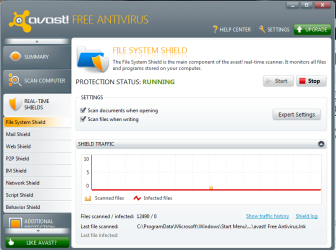
As mentioned Windows Security Essentials is a good product although in my opinion it is limited.....I choose Avast Security Free for my needs coupled with the Windows 7 firewall to complete my needs. you can always add malwarebytes as previously posted but Avast offers a multitude of scanners that provide good service including a sandbox for running questionable programs or first time runs.
Avast scanners:
Backup images are the final answer to malware as mentioned above. I cannot recommend this process highly enough....I personally use Windows Home Server for this process but the backup image in Windows 7 is more than acceptable (BETTER if you store it off pc). | My System Specs | | System Manufacturer/Model Number Systemax N2000 Gaming PC OS Windows 7 Ultimate x64 CPU Q6600 @2.4ghz (G0 stepping) Motherboard XFX nforce 680i LT Memory 8 gb OCZ vista essential sli PC-6400 Graphics Card Dual 9800gt in SLI mode Sound Card Integrated 8.1 High Definition Audio Monitor(s) Displays Dual Sceptre x246w 24 inch monitors Screen Resolution 1920 x 1200 each monitor Keyboard MS Intelitype 6000 v2.0 Mouse MS Intelipoint 6000 PSU Cooler Master Real Power Pro 1250W Case N2000 server tower Cooling Thermaltake Bigwater 760 is Hard Drives 500 GB SATA II / 7500 rpm Internet Speed Wi-power 1.5GB up / 512k down Other Info Windows 7 Ultimate x64, Windows 7 Pro x64, Windows Home Premium X86, Windows XP pro, Windows Home Server x86, Ubuntu 10.4 x86 and x64, Ubuntu server 10.4, SQL Server 2005, MySQL 5.0 |
01-19-2012
|
#10 | | Windows 7 Ultimate x64 SP1, LinuxMint 9 LTS x64, Debian 6, Ubuntu 10.04 LTS x64 |
Hi,
Don't forget to keep Adobe Reader and Flashplayer, and also Java, updated if you use that : this is something that is often overlooked, yet these applications are a prominent source of malware infections.
Use the this tutorial to help you determine what else may require updating in order to plaug other security holes: Secunia ONLINE Software Inspector
Regards,
Golden | My System Specs | | System Manufacturer/Model Number Golden Mk. I.3 OS Windows 7 Ultimate x64 SP1, LinuxMint 9 LTS x64, Debian 6, Ubuntu 10.04 LTS x64 CPU Intel i7 860 @ 2.80 GHz Motherboard Gigabyte P55A-UD3R Rev.1. Award BIOS F13 Memory 16GB Corsair Vengance DDR3 @ 661 MHz Dual Channel (9-9-9-24) Graphics Card EVGA NVidia GTX 560 1024MB Sound Card Realtek Integrated Monitor(s) Displays Dual Samsung SyncMaster 2494HS Screen Resolution 1920*1080 and 1920*1080 Keyboard Logitech G110 Mouse Logitech MX518 PSU Thermaltake ToughPower QFan 750W Case Thermaltake Element S VK60001W2Z Cooling Corsair H60 Water Cooling, 2*230mm and 2*80mm case fans Hard Drives 1*OCZ Vertex 2 60GB SSD;
2*Samsung F3 SpinPoint 1TB in RAID0;
2*Samsung F1 SpinPoint 1TB in RAID1;
1*Western Digital WD10EARS 1TB
1*Western Digital 500GB External USB 3.0
1*Seagate 500GB External USB 2.0 Internet Speed Not fast enough!!! Best Free Security Setup? problems? All times are GMT -5. The time now is 01:17 AM. |  |