
Solved Whit is Link Runner virus ?

Arc

٩͡[๏̯͡๏]۶
My laptop (very occasionally connects to the web) got a virus called link:Runner by avast freeware. I scanned with malwarebytes, too! Everything is scanned and deleted. Still, whenever a pendrive is attached to it, it gets such stuffs , instantly !
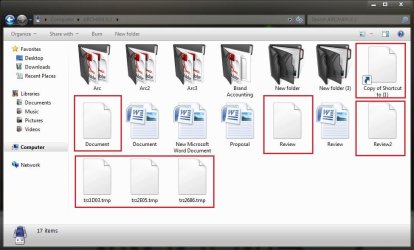
Capture.JPG

Few days ago, a professor came from outside to deliver some lectures. I took some useful documents from his laptop using a pendrive, and attached that back in the laptop, and the story started.

Is there any way to get rid of it, or I am to go for a clean install ?
 

My Computer

Computer type
PC/Desktop
Computer Manufacturer/Model Number
Self Assembled
OS
Microsoft Windows 10 Pro Insider Preview 64-bit
CPU
Intel(R) Core(TM) i3-4130 CPU @ 3.40GHz
Motherboard
Gigabyte Technology Co., Ltd. B85M-D3H
Memory
Corsair Vengence 4GB x2 (8.00GB Dual-Channel DDR3 @ 798MHz)
Graphics Card(s)
2047MB GeForce GTS 450 (ZOTAC International)
Sound Card
Onboard (Realtek High Definition Audio)
Monitor(s) Displays
LG Flatron E2040T
Screen Resolution
1600x900
Hard Drives
Western Digital 1 TB
Seagate 500 GB
PSU
Corsair VS550
Case
Cooler Master K380
Cooling
Cooler Master Seidon 120V Plus
Keyboard
Logitech MK260r
Mouse
Logitech MK260r
Internet Speed
PMPL Broadband
Antivirus
Windows Defender + MBAM
Browser
Firefox
Other Info
Dell Studio 15" Laptop
Hi, Arc.

It appears that autorun.inf has not been disabled on the pen drive. Two options are Panda USB Vaccine, or BitDefender’s USB Immunizer which can be used to protect your computer from any infected USB device.

A similar tool is install dr_Bora's MCShield::Anti-Malware Tool::. This tool will block the autorun.inf, preventing any transferred infected files from automatically opening on your computer. It includes a signature scan.

You should also specifically scan the pen drive with your antivirus software.
 

My Computer

OS
Windows 7 & Windows Vista Ultimate
  • Like
Reactions: Arc
Corrine, after getting this one for the first time, I scanned the entire laptop with Avast free and MBAM, which killed all the infected files. Now the scans say that there is no threat in the laptop. Still, whenever and whatever pendrive connected to it, it generates these files in it automatically.

I full formatted a pen drive and reattached it there, got the same thing . When the same pendrive is connected to my desktop, everything is being killed automatically, and it appears to be totally free from anything.

I will use the vaccines those you have suggested, thanks a lot :D
But what to do with the source of the trouble, I mean the laptop ?
 

My Computer

Computer type
PC/Desktop
Computer Manufacturer/Model Number
Self Assembled
OS
Microsoft Windows 10 Pro Insider Preview 64-bit
CPU
Intel(R) Core(TM) i3-4130 CPU @ 3.40GHz
Motherboard
Gigabyte Technology Co., Ltd. B85M-D3H
Memory
Corsair Vengence 4GB x2 (8.00GB Dual-Channel DDR3 @ 798MHz)
Graphics Card(s)
2047MB GeForce GTS 450 (ZOTAC International)
Sound Card
Onboard (Realtek High Definition Audio)
Monitor(s) Displays
LG Flatron E2040T
Screen Resolution
1600x900
Hard Drives
Western Digital 1 TB
Seagate 500 GB
PSU
Corsair VS550
Case
Cooler Master K380
Cooling
Cooler Master Seidon 120V Plus
Keyboard
Logitech MK260r
Mouse
Logitech MK260r
Internet Speed
PMPL Broadband
Antivirus
Windows Defender + MBAM
Browser
Firefox
Other Info
Dell Studio 15" Laptop
Well, I just decided to do a fresh install there, as Carl said that it is a fun !

Just did the vaccination, after formatting it. Nothing is appearing there anymore :D Thanks again for it, Corrine !
 

My Computer

Computer type
PC/Desktop
Computer Manufacturer/Model Number
Self Assembled
OS
Microsoft Windows 10 Pro Insider Preview 64-bit
CPU
Intel(R) Core(TM) i3-4130 CPU @ 3.40GHz
Motherboard
Gigabyte Technology Co., Ltd. B85M-D3H
Memory
Corsair Vengence 4GB x2 (8.00GB Dual-Channel DDR3 @ 798MHz)
Graphics Card(s)
2047MB GeForce GTS 450 (ZOTAC International)
Sound Card
Onboard (Realtek High Definition Audio)
Monitor(s) Displays
LG Flatron E2040T
Screen Resolution
1600x900
Hard Drives
Western Digital 1 TB
Seagate 500 GB
PSU
Corsair VS550
Case
Cooler Master K380
Cooling
Cooler Master Seidon 120V Plus
Keyboard
Logitech MK260r
Mouse
Logitech MK260r
Internet Speed
PMPL Broadband
Antivirus
Windows Defender + MBAM
Browser
Firefox
Other Info
Dell Studio 15" Laptop
Arc,

I'm glad you got the problem resolved. I'm thinking that since you were having the problem only on the laptop which is seldom connected to the Internet, it is possible it was behind on updates and did not have the KB that turned off autorun installed.
 

My Computer

OS
Windows 7 & Windows Vista Ultimate
Arc,

I'm glad you got the problem resolved. I'm thinking that since you were having the problem only on the laptop which is seldom connected to the Internet, it is possible it was behind on updates and did not have the KB that turned off autorun installed.
That's a very good point :geek:
I have reinstalled it already ..... and got all the updates there.

Asking one more question, if I connect a vaccinated pendrive to an affected computer (sometimes it becomes urgent:o and I dont know which one is affected or not) is it still risky to connect the pendrive back to my laptop ? I have installed Avast and MBAM there.
 

My Computer

Computer type
PC/Desktop
Computer Manufacturer/Model Number
Self Assembled
OS
Microsoft Windows 10 Pro Insider Preview 64-bit
CPU
Intel(R) Core(TM) i3-4130 CPU @ 3.40GHz
Motherboard
Gigabyte Technology Co., Ltd. B85M-D3H
Memory
Corsair Vengence 4GB x2 (8.00GB Dual-Channel DDR3 @ 798MHz)
Graphics Card(s)
2047MB GeForce GTS 450 (ZOTAC International)
Sound Card
Onboard (Realtek High Definition Audio)
Monitor(s) Displays
LG Flatron E2040T
Screen Resolution
1600x900
Hard Drives
Western Digital 1 TB
Seagate 500 GB
PSU
Corsair VS550
Case
Cooler Master K380
Cooling
Cooler Master Seidon 120V Plus
Keyboard
Logitech MK260r
Mouse
Logitech MK260r
Internet Speed
PMPL Broadband
Antivirus
Windows Defender + MBAM
Browser
Firefox
Other Info
Dell Studio 15" Laptop
In the event malware infects the pendrive, having autorun.inf disabled will prevent the malware from automatically running on your laptop. However, it is incumbent on you to scan any files you are transferring to ensure they are clean before opening them on your laptop.
 

My Computer

OS
Windows 7 & Windows Vista Ultimate
When attaching a drive, there is an option "scan and fix", but that time it went faster, the malware indication came faster than the scan and fix dialog !

As you are saying, I hope disabling autoruns will prevent malwares to open automatically :)

If it occurs once again, I will ask you again for suggestions . This is the first time such a thing happened to me.
 

My Computer

Computer type
PC/Desktop
Computer Manufacturer/Model Number
Self Assembled
OS
Microsoft Windows 10 Pro Insider Preview 64-bit
CPU
Intel(R) Core(TM) i3-4130 CPU @ 3.40GHz
Motherboard
Gigabyte Technology Co., Ltd. B85M-D3H
Memory
Corsair Vengence 4GB x2 (8.00GB Dual-Channel DDR3 @ 798MHz)
Graphics Card(s)
2047MB GeForce GTS 450 (ZOTAC International)
Sound Card
Onboard (Realtek High Definition Audio)
Monitor(s) Displays
LG Flatron E2040T
Screen Resolution
1600x900
Hard Drives
Western Digital 1 TB
Seagate 500 GB
PSU
Corsair VS550
Case
Cooler Master K380
Cooling
Cooler Master Seidon 120V Plus
Keyboard
Logitech MK260r
Mouse
Logitech MK260r
Internet Speed
PMPL Broadband
Antivirus
Windows Defender + MBAM
Browser
Firefox
Other Info
Dell Studio 15" Laptop
Back
Top