| Windows 7: MSE always saying I need to do a scan |
27 Jan 2012
|
#1 | | Windows 7 Pro X64 Space Coast of Florida |
MSE always saying I need to do a scan I use Microsoft Security Essentials. I have it set to do a Quick scan every day at 3PM as my computer is almost always on then. I assume it's working but can't check as that information does not seem to be logged anywhere.
Every couple days the MSE icon in the taskbar turns orange indicating I have not done a scan in a while when it should have been done the previous day, certainly several times in the last week or so.
I've uninstalled and reinstalled MSE but it doesn't make any difference.
Anyone have any ideas on how to fix this. It's not a problem, just an annoyance. | My System Specs |
| System Manufacturer/Model Number Dell Precision 370 OS Windows 7 Pro X64 CPU Intel Pentium 4 Dual LP 3.4Ghz Memory 4GB DDR PC2-5200 ECC Graphics Card NVIDIA Quadro FX 3400/4400 Sound Card SoundMAX Integrated Digital Audio Monitor(s) Displays HP 22" w2207 LCD Screen Resolution 1680 x 1050 Hard Drives 300GB Maxtor 6L300RD PATA
128GB Kingston SV200S3128G SSD (boot)
1.5TB Seagate ST3150041AS SATA Internet Speed Cable via Road Runner 2MB Upload, 20MB Download |
27 Jan 2012
|
#2 | | Windows 7 Home Premium 64 bit Illinois |
| My System Specs | | System Manufacturer/Model Number Self-built OS Windows 7 Home Premium 64 bit CPU Intel Core i7-3770 Motherboard MSI Z77A-G45 Memory G.SKILL 8GB (2 x 4GB) DDR3 F3-10666CL9D-8GBNT Graphics Card Sapphire ATI Radeon HD 6670 Sound Card On-Board Realtek Monitor(s) Displays Samsung SyncMaster P2370HD, Dell 1703FPT Screen Resolution 1920 x 1080, 1280 x 1024 Keyboard Logitech K270 Mouse Logitech M705 PSU SeaSonic M12II SS-500GM Case Lian Li PC-9F Cooling Zalman CNPS9900ALED Hard Drives Samsung HD103SJ Internet Speed 16 Mbps Other Info Bose Companion 2 Multimedia Speakers |
27 Jan 2012
|
#3 | | Vista, Windows7, Mint Mate, Zorin, Windows 8 Florida in winter, Black Forest/Germany |
That may be because the system was not on at 3PM that day or the previous day. Just don't set it to scan at a set time. | My System Specs | | System Manufacturer/Model Number HP, Dell, Gateway, Toshiba - 4 laptops and 2 desktops OS Vista, Windows7, Mint Mate, Zorin, Windows 8 CPU from 1.6GHz Duo to i7 Monitor(s) Displays 2x HP w2207 Keyboard with trackball - no mices Mouse Trackball mice Hard Drives 5x HDD, 7x SSD, 12x Externals Internet Speed DSL 6000 |
27 Jan 2012
|
#4 | | |
Have you tried running a full scan at least once? | My System Specs | | OS Windows 7 Ultimate x64 CPU Intel Core i5 2500k at 3.3 GhZ Memory 2x4GB DDR3 1333Hz Graphics Card Ati Radeon 6770 Sound Card Speakers Monitor(s) Displays 1x 15" HD 572 Screen Resolution 1024x768 Keyboard Wired Keyboard Mouse Wired Mouse PSU 500W Cooling 3x Fans Hard Drives 2x500GB Internet Speed 10MB/s Other Info Netbook: Dell Inspiron Mini |
27 Jan 2012
|
#5 | | Win 7 Pro x64 Council Bluffs, Iowa |
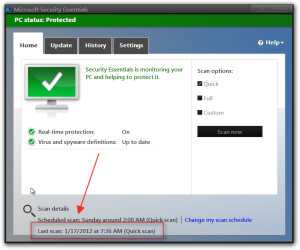
I do not know how to help your problem but it does show at the bottom the last time a scan was done.
Jerry | My System Specs | | Computer type Laptop System Manufacturer/Model Number Sager NP9170 OS Win 7 Pro x64 CPU Intel(R) Core(TM) i7-3630QM CPU @ 2.40GHz Motherboard CLEVO P170EM Memory 12 GB Graphics Card (1) Intel(R) HD Graphics 4000 (2) NVIDIA GeForce GTX 675M Sound Card (1) Realtek High Definition Audio (2) Intel(R) Display Aud Monitor(s) Displays 17.3 Screen Resolution 1920x1080 Keyboard Backlite Hard Drives (1) M4-CT256M4SSD2 ATA Device 256 GB (2) ST9500424AS ATA Device 500 GB Antivirus MSE, Malwarebytes Pro Browser Firefox |
27 Jan 2012
|
#6 | | Windows 7 SP1, Home Premium, 64-bit |

Quote: Originally Posted by Ztruker I use Microsoft Security Essentials. I have it set to do a Quick scan every day at 3PM as my computer is almost always on then. I assume it's working but can't check as that information does not seem to be logged anywhere.
Every couple days the MSE icon in the taskbar turns orange indicating I have not done a scan in a while when it should have been done the previous day, certainly several times in the last week or so.
I've uninstalled and reinstalled MSE but it doesn't make any difference.
Anyone have any ideas on how to fix this. It's not a problem, just an annoyance. I have the same issue
I have set auto scans to Wednesday at 3 pm. My PC is nearly always on at that hour.
Periodically, my icon will go orange and I am forced to scan manually.
This did NOT occur on the earliest versions of MSE.
I am using 2.1.1116.0.
I just live with it and do manual scans when forced to. | My System Specs | | System Manufacturer/Model Number Ignatz Special; 4 speed manual gearbox; factory air conditioning; one of one OS Windows 7 SP1, Home Premium, 64-bit CPU Intel Sandy Bridge i5-2500, not overclocked Motherboard Gigabyte H67A-UD3H-B3, full ATX Memory 4 GB Crucial DDR3-1333 Graphics Card none; graphics are integrated on CPU Sound Card onboard: Realtek ALC892; external: USB Behringer UF0-202 Monitor(s) Displays NEC 90GX2-BK 19" LCD Screen Resolution 800 x 640 Keyboard Leopold Tenkeyless with Cherry Blue switches, USB Mouse Logitech or Microsoft optical wired; either USB or PS 2 PSU Seasonic SS-560KM, modular Case Antec Solo II Cooling CPU: Scythe Big Shuriken; Case: Scythe Slipstream 800 & 500 Hard Drives System: Intel 320 Series SSD, 80 GB;
Data: Samsung Spinpoint 103SJ, 1 TB;
Backup: WD Caviar Green WD15EADS-00P8B0, 1.5TB Other Info Power consumption of this system, including monitor: 68 watts at idle; 144 watts at full load |
27 Jan 2012
|
#7 | | |
Are you using CCleaner? Or some other cleaning program?
The problem could be as simple as cleaning the log files MSE uses. | My System Specs | | System Manufacturer/Model Number Alienware Aurora ALX R4 OS Windows 7 x64 (SP1) CPU Intel Core i7-3930K (3.2GHz, Turbo 4GHz) Motherboard Alienware Aurora-R4 x79 Memory 4x Samsung 4GB PC3-12800 DDR3 (16GB 1600MHz) Graphics Card Nvidia Geforce GTX 690 (Stock) Sound Card RealTek Integrated Audio Monitor(s) Displays Dell UltraSharp U3011 Screen Resolution 2560x1600 Other Info Dell Inspiron Mini 10v (Intel Atom N270 1.6 GHz; 1GB; Windows 7 Ultimate) |
27 Jan 2012
|
#8 | | Windows 7 SP1, Home Premium, 64-bit |

Quote: Originally Posted by logicearth Are you using CCleaner? Or some other cleaning program?
The problem could be as simple as cleaning the log files MSE uses. I do occasionally use CCleaner--I'll investigate to see if there is any correlation. | My System Specs | | System Manufacturer/Model Number Ignatz Special; 4 speed manual gearbox; factory air conditioning; one of one OS Windows 7 SP1, Home Premium, 64-bit CPU Intel Sandy Bridge i5-2500, not overclocked Motherboard Gigabyte H67A-UD3H-B3, full ATX Memory 4 GB Crucial DDR3-1333 Graphics Card none; graphics are integrated on CPU Sound Card onboard: Realtek ALC892; external: USB Behringer UF0-202 Monitor(s) Displays NEC 90GX2-BK 19" LCD Screen Resolution 800 x 640 Keyboard Leopold Tenkeyless with Cherry Blue switches, USB Mouse Logitech or Microsoft optical wired; either USB or PS 2 PSU Seasonic SS-560KM, modular Case Antec Solo II Cooling CPU: Scythe Big Shuriken; Case: Scythe Slipstream 800 & 500 Hard Drives System: Intel 320 Series SSD, 80 GB;
Data: Samsung Spinpoint 103SJ, 1 TB;
Backup: WD Caviar Green WD15EADS-00P8B0, 1.5TB Other Info Power consumption of this system, including monitor: 68 watts at idle; 144 watts at full load |
27 Jan 2012
|
#9 | | Windows 7 Home Premium 64 bit Illinois |
The only other thing I can think of is to place a check in the box of......Check for the latest virus and spyware definitions before running a scheduled scan.
I too think it's a quirk, that occurs from time to time. | My System Specs | | System Manufacturer/Model Number Self-built OS Windows 7 Home Premium 64 bit CPU Intel Core i7-3770 Motherboard MSI Z77A-G45 Memory G.SKILL 8GB (2 x 4GB) DDR3 F3-10666CL9D-8GBNT Graphics Card Sapphire ATI Radeon HD 6670 Sound Card On-Board Realtek Monitor(s) Displays Samsung SyncMaster P2370HD, Dell 1703FPT Screen Resolution 1920 x 1080, 1280 x 1024 Keyboard Logitech K270 Mouse Logitech M705 PSU SeaSonic M12II SS-500GM Case Lian Li PC-9F Cooling Zalman CNPS9900ALED Hard Drives Samsung HD103SJ Internet Speed 16 Mbps Other Info Bose Companion 2 Multimedia Speakers |
27 Jan 2012
|
#10 | | |
You could also try reinstalling MSE. | My System Specs | | OS Windows 7 Ultimate x64 CPU Intel Core i5 2500k at 3.3 GhZ Memory 2x4GB DDR3 1333Hz Graphics Card Ati Radeon 6770 Sound Card Speakers Monitor(s) Displays 1x 15" HD 572 Screen Resolution 1024x768 Keyboard Wired Keyboard Mouse Wired Mouse PSU 500W Cooling 3x Fans Hard Drives 2x500GB Internet Speed 10MB/s Other Info Netbook: Dell Inspiron Mini MSE always saying I need to do a scan problems? All times are GMT -5. The time now is 09:36 AM. | |