Windows 7 Forums Search
Welcome to Windows 7 Forums. Our forum is dedicated to helping you find solutions with any problems, errors or issues you are experiencing with Windows 7. The Windows 7 forum also covers news and updates and has an extensive Windows 7 tutorial section that covers a wide range of tips and tricks.


Windows 7 - Can't disable UAC on non-admin account

 
02-10-2012   #1


Windows 7


Can't disable UAC on non-admin account

I guess some recent Windows updates have change the way UAC settings are changed. Now it seems impossible to change UAC settings of non-admin account.

It says that that I have to be logged in as an administrator, but before opening this window it anyway asked for admin password.

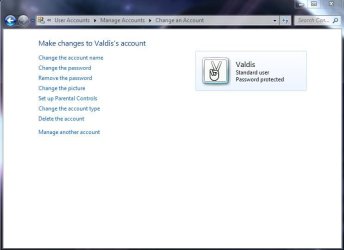
In User Account settings for a specific account there is no possibility to change UAC behavior.

Anyone knows how can I do it?

Attached Thumbnails
Can't disable UAC on non-admin account-uac.jpg   Can't disable UAC on non-admin account-uac2.jpg  
My System SpecsSystem Spec
02-10-2012   #2


Windows 7 x64 sp1


There is a method involving group policies that may work for you here.

I would have a read over this thread on technet first though.
disabling UAC - reg setting
My System SpecsSystem Spec
02-10-2012   #3


Windows 7


I wanted to change UAC setting to get rid of destop dimming. Now when I checked my current UAC settings again I realized that there should be no dimming already with current settings (previously I tried to lover the notification setting by one level automatically as I usually do when I get dimming).

So the problem actually is that the desktop dims when it shouldn't. Not sure in which case it happens though, have to wait until it happens again.

But the fact you can't change UAC settings for non-admin users is really weird.
Attached Thumbnails
Can't disable UAC on non-admin account-uac.jpg  

Last edited by voldemarz; 02-11-2012 at 05:27 AM.. Reason: fix typos
My System SpecsSystem Spec
.


02-10-2012   #4


Windows 7 x64 sp1


are you certain this is causing the desktop dimming?
seems to me it would much more likely be a setting in power options.
or the monitor itself even.
My System SpecsSystem Spec
02-11-2012   #5


Windows 7


I don't know what is causing it. I'm talking about the kind of dimming which happens when you try to do something that requires admin rights and then password input box pops up and desktop is dimmed. I usually set UAC settings so that I don't get dimmed desktop right after I have installed Windows. That is why I was surprised to see my desktop dimmed.

I guess we can mark this problem as solved. I have to gather more info about the actual problem (when it happens again) and then I'll probably come back for some help.
My System SpecsSystem Spec
Reply

 Can't disable UAC on non-admin account problems?


Thread Tools


Similar Threads for: Can't disable UAC on non-admin account
Thread Forum
Using default admin account vs standard user account General Discussion
Solved Access my user account encrypted files from my admin account? General Discussion
3rd party SW will run in Admin account but not User account... Software
TV shows both my account and Admin account Network & Sharing
Making User Account into Admin Account System Security


All times are GMT -5. The time now is 01:24 AM.


Windows 7 Forums is an independent web site and has not been authorized,
sponsored, or otherwise approved by Microsoft Corporation.
"Windows 7" and related materials are trademarks of Microsoft Corp.
© Designer Media Ltd
  

1 2 3 4 5 6 7 8 9 10 11 12 13 14 15 16 17 18 19 20 21 22 23 24 25 26 27 28 29 30