| Windows 7: MSE Trojan Cleanup Prompt |
11 Jun 2012
|
#1 | | Windows 7 Professional 64 bit |
MSE Trojan Cleanup Prompt I apologize for the length of this. I just feel it is important to give all the details as they may help with coming up with a solution. I thank anyone in advance for lending me your time in helping me fix this problem.
=============================================================
I've got a bit of a problem with my system in that I am getting a very odd Microsoft Security Essentials message that I am trying to figure out.
To start, today upon start-up and after bit of browsing my computer was fine. After this problem occurred. I retraced my steps and the only things that I've done on my computer today are...
1) Let Adobe Flash update itself
2) Download and email several pictures from my Droid SD card for a college project.
Since I really haven't done anything abnormal today (Install any programs, etc.) I have to believe that one of those two actions caused all this to happen. I noticed that when I went on YouTube or any other site that required the use of Flash, that I got a 'An Error has Occurred" prompt on the video. I then uninstalled and re-installed all my Adobe Flash programs but I still have the same problem. SEE EDIT#2
Now, here is the real problem....
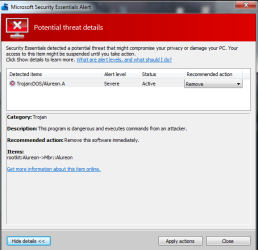
Upon start up of my computer, I get a Microsoft Security Essentials (MSE) dialog box in the lower right hand corner of my screen saying that there is a "Potential Threat" that's been suspended by MSE.
I've attached photo #1 showing that prompt.
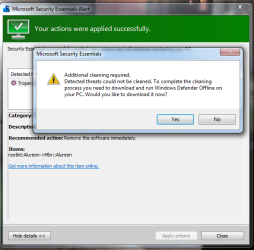
After clicking 'Show Details' I then get the 2nd dialog box that shows the details of the alert.
I've attached photo #2 showing that box.
From there it asks if you'd like to 'Apply Actions' in which it brings you to the 3rd dialog box that asks you to "Download and Run Windows Defender Offline on your PC" to get rid of the thread.
This is where I've stopped as it seems like a classic ploy to have me download something even nastier. I may just be paranoid, but it raised a red flag for me.
If I do choose to ignore the last prompt it takes me to yet another dialog saying that the threat has been removed successfully and that a re-boot is needed. Once I go ahead and do that, I'm right back at square one as it says that the same thread is there once again.
I normally run Norton Antivirus as it has successfully kept away all the smaller bugs thus far but I fear a bigger one may have gotten through this time. SEE EDIT #1
If anyone would happen to be able to lend me some assistance, I would be very grateful.
Best Regards
Edit #1: I forgot to mention that I opened up Norton and did a complete system scan in which no viruses/trojans, etc. were found so that has me a bit stumped as well.
Edit #2: After using a test YouTube link via FaceBook, the video will play properly. I was able to further search via YouTube and other videos did indeed play so thankfully that problem seems to have resolved itself. | My System Specs |
| OS Windows 7 Professional 64 bit CPU Intel (R) Core (TM) i7 CPU 950 @ 3.07 GHz Motherboard ASUSTeK Computer INC. SABERTOOTH X58 Memory 24.0 GB Graphics Card AMD Radeon HD 6800 Series Sound Card (1) AMD High Definition Audio Device (2) Realtek High Defi Case Cooler Master Hard Drives Samsung 128gb SSD, WDC 1TB HDD, Hitachi 1TB HDD, |
12 Jun 2012
|
#2 | | Win 7 Pro 64-bit South Central Texas |
From the screen shots you've provided, it appears to be a genuine MSE alert. However, the bad guys have become very skillful in making their alerts look like the real thing.
Windows Defender Offline is a real Microsoft product and it can be obtained directly from the WDO website. This product can (sometimes) find malware that other anti-malware products might miss. (No anti-malware product is 100% effective 100% of the time. If there was such a product we'd all be using it. That's why it's a good idea to have a few other on-demand scanners like Malwarebytes, Superantispyware, Hitman Pro, ESET, WDO, etc to check if the primary product might have missed something.) Microsoft warns that WDO should be downloaded and created on a computer that is not suspected of being infected. What is Windows Defender Offline?
The fact that you believe the problem is now corrected should not lull you into a false sense of security. Depending on how the malware was written, it might run immediately, or it might run at unexpected times. If it was my computer I'd run as many on-demand scanners as I could just to maximize the probablility that the computer really is clean. | My System Specs | | Computer type Laptop System Manufacturer/Model Number Sony Vaio VPCEB47GM Laptop OS Win 7 Pro 64-bit CPU Intel i5 2.4 Ghz Memory 8GB DDR3 Graphics Card Intel HD 3000 Sound Card IDT High Definition Monitor(s) Displays 15.6 WGXA Anti-Glare LED Screen Resolution 1280x800 Hard Drives 640Gb 7200rpm Antivirus MSE Browser Opera (primary) with IE9 backup |
12 Jun 2012
|
#3 | | Windows 7 Professional 64 bit |
Thank you for the tip marsmimar. I'm gonna boot up my laptop and get the software downloaded here shortly.
At the moment the prompt does not come up for me as I uninstalled and reinstalled MSE and the prompt did not show up after restarting my computer a few times. I'm going to still run that program though to see.
Also on a separate note. It seems as if the Flash problems have come up again as I now get the 'An Error Has Occurred' message when viewing YouTube, etc. I've installed and re-installed Flash a handful of times including going to an older 10.X version (I believe the current one is 11.X) and still nothing.
Could the possible malware be causing that to occur? | My System Specs | | OS Windows 7 Professional 64 bit CPU Intel (R) Core (TM) i7 CPU 950 @ 3.07 GHz Motherboard ASUSTeK Computer INC. SABERTOOTH X58 Memory 24.0 GB Graphics Card AMD Radeon HD 6800 Series Sound Card (1) AMD High Definition Audio Device (2) Realtek High Defi Case Cooler Master Hard Drives Samsung 128gb SSD, WDC 1TB HDD, Hitachi 1TB HDD, |
12 Jun 2012
|
#4 | | Win 7 Pro 64-bit South Central Texas |
Adobe Flash is a popular magnet for malware writers because so many computers have it installed. It's also possible that Flash wasn't fully uninstalled whenever you uninstalled/reinstalled in the past. If any Flash remnants were left on your computer they could prevent a clean reinstall. Adobe has an uninstaller that's supposed to remove all traces of Flash. Flash Player Help | Uninstall Flash Player | Windows
I'd run it at least a couple of times just to make sure. I wouldn't use an older version of Flash. Older versions are susceptible to all kinds of malware. The latest version (11.3.300.257) can be obtained here. Don't forget to uncheck any unwanted "stuff" like toolbars, browsers, etc. Adobe - Install Adobe Flash Player | My System Specs | | Computer type Laptop System Manufacturer/Model Number Sony Vaio VPCEB47GM Laptop OS Win 7 Pro 64-bit CPU Intel i5 2.4 Ghz Memory 8GB DDR3 Graphics Card Intel HD 3000 Sound Card IDT High Definition Monitor(s) Displays 15.6 WGXA Anti-Glare LED Screen Resolution 1280x800 Hard Drives 640Gb 7200rpm Antivirus MSE Browser Opera (primary) with IE9 backup |
12 Jun 2012
|
#5 | | Windows 7 Professional 64 bit |
Thanks marsmimar. I'll go ahead and give that a try.
I downloaded Malwarebytes as you suggested and it came across and removed 8 different malware items (3 of which were 'Trojan' labeled)
I've still got the YouTube/Flash problem though. So I'll go ahead and give that official Adobe uninstaller a try right now.
Thank you so much for your help so far.
=======================================================================
Edit/Update: I followed the uninstall steps for Flash and made sure to check the three flass folder locations and delete the leftover files from there.
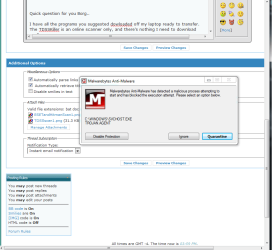
Then upon reinstalling Flash, I had a notification box appear two different times.
The first time I had the warning box appear right after the installation. I then followed the steps and the the un/reinstall once more. The second time it waited about 10 minutes before appearing.
The notification box is attached below.
At the moment, Flash still does not work properly as it seems it's still 'communicating' with whatever the Malwarebytes said it already removed.
Last edited by jdizzle921; 12 Jun 2012 at 02:55 AM..
| My System Specs | | OS Windows 7 Professional 64 bit CPU Intel (R) Core (TM) i7 CPU 950 @ 3.07 GHz Motherboard ASUSTeK Computer INC. SABERTOOTH X58 Memory 24.0 GB Graphics Card AMD Radeon HD 6800 Series Sound Card (1) AMD High Definition Audio Device (2) Realtek High Defi Case Cooler Master Hard Drives Samsung 128gb SSD, WDC 1TB HDD, Hitachi 1TB HDD, |
12 Jun 2012
|
#6 | | Win 7 Pro 64-bit South Central Texas |
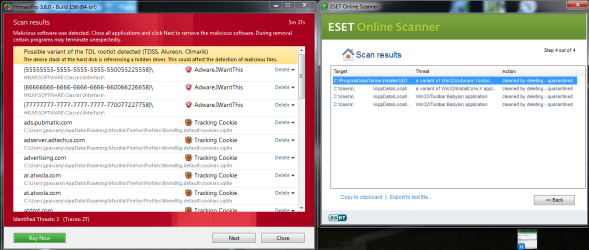
It's very possible that there's still malware on the computer. If you haven't tried Windows Defender Offline I'd recommend it. I've also had good results with Hitman Pro. It uses the data bases of 5 different companies during its scans. Hitman Pro 3 - SurfRight
Unfortunately, if a computer gets infected, you can never be 100% sure that all of the malware has been removed. Even if you run 8 different scans, and even if they all come back clean, the 9th or 10th scan could reveal malware. But let's take it one step at a time. If Hitman Pro and WDO don't help there are some MSMVP security experts who hang out on this Forum who would be available for additional help. | My System Specs | | Computer type Laptop System Manufacturer/Model Number Sony Vaio VPCEB47GM Laptop OS Win 7 Pro 64-bit CPU Intel i5 2.4 Ghz Memory 8GB DDR3 Graphics Card Intel HD 3000 Sound Card IDT High Definition Monitor(s) Displays 15.6 WGXA Anti-Glare LED Screen Resolution 1280x800 Hard Drives 640Gb 7200rpm Antivirus MSE Browser Opera (primary) with IE9 backup |
12 Jun 2012
|
#7 | | Windows 7 Ultimate SP1 (x64) South Australia |
Hi,
It might also be a good idea to post the names of the items Malwarebytes found - depending on what it found, you might have to try other tools to clean your system.
Lee already mentioned ESET : this is the link to the free on-line scanner, which is well regarded: ESET :: Get a FREE Online Virus Scan
Regards,
Golden | My System Specs | | Computer type PC/Desktop System Manufacturer/Model Number Golden Mk. I.3 OS Windows 7 Ultimate SP1 (x64) CPU Intel i7 860 @ 2.80 GHz Motherboard Gigabyte P55A-UD3R Rev.1. Award BIOS F13 Memory 16GB Corsair Vengance DDR3 @ 661 MHz Dual Channel (9-9-9-24) Graphics Card EVGA NVidia GTX 560 1024MB Sound Card Realtek Integrated Monitor(s) Displays Dual Samsung SyncMaster 2494HS Screen Resolution 1920*1080 and 1920*1080 Keyboard Logitech G110 Mouse Logitech MX518 PSU Thermaltake ToughPower QFan 750W Case Thermaltake Element S VK60001W2Z Cooling Corsair H60 Water Cooling, 2*230mm and 2*80mm case fans Hard Drives 1*OCZ Vertex 2 60GB SSD;
2*Samsung F3 SpinPoint 1TB in RAID0;
3*Samsung F1 SpinPoint 1TB in RAID5;
1*Western Digital 500GB External USB 3.0
1*Seagate 500GB External USB 2.0 Internet Speed Not fast enough!!! Antivirus MSE and Malwarebytes Pro Browser Chrome Version 25 Other Info Laptop: ASUS X54C, Intel Core i3-2330M @ 2.0Ghz, 4GB RAM, Intel HD on-board graphics, Windows 7 Professional SP1 (x64), LinuxMint 14 (x64), PepperMint 3 (x86) |
12 Jun 2012
|
#8 | | Windows 7 Home Premium 32 bit In a house with a cat trying to kill me |
I had to wrestle with a PC recently that was compromised by Alureon. When using Windows Defender Offline, I received the same messages (Additional cleaning required). I can't tell you if the MSE does in fact prompt you to d/l Defender, as the PC I had to fix didn't even have a working Windows environment. And no disks of any kind (The lady lost them....)
If you do indeed have that virus, be aware it's hard to remove because it makes a cloaked partition that it boots from every time, bypassing the regular boot sector. Even after a factory reset, the virus was still present (Along with another rootkit). I can offer you the following tools to try, they may help, however, in the end I used a bootable partition manager to make sure the partition was indeed erased.
Hopefully you don't have Alureon, but it's best to take no chances as this is one tough virus to get out.
Technical Details: Backdoor.Tidserv | Symantec
Removal tool Backdoor.Tidserv Removal Tool | Symantec
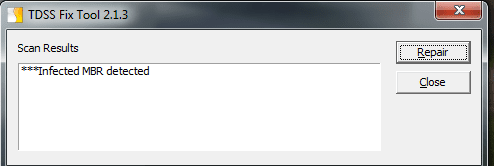
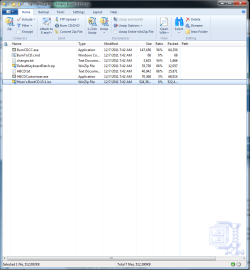
Kaspersky TDSSKiller Anti-rootkit utility TDSSKiller
Note: When using this tool, make sure to click on the "Change Parameters" and check "Detect TDLFS File system" & "Verify file digital signatures".
If you do have this virus, you may wish to consider a clean install as an option, after you have thoroughly wiped the drive. Clean Install Windows 7
Last edited by Borg 386; 12 Jun 2012 at 08:58 AM..
| My System Specs | | System Manufacturer/Model Number Dell Hell oh Well OS Windows 7 Home Premium 32 bit CPU Intel Core 2 Duo 2.93GHz Memory Not much with my ADHD Graphics Card ATI Radeon HD 4350 Monitor(s) Displays I have one...It's bright. A 19 inch CRT actually. Keyboard It's 10 years old and amazingly still works Mouse Same deal with the mouse, 10 yrs old, if it ain't broke... Case Don't get on my case...man :D Cooling I have an Air Conditioner & Diet Pepsi Hard Drives 250 GB Main Drive, 2 - 1 TB Externals, various FD's. |
12 Jun 2012
|
#9 | | Windows 7 home premium 64bit tampa |
Good afternoon everyone,
I just want to say, "jdizzle921" I am currently having the same issue as yourself only different is virus is named Alureon.E instead of Alureon.A. So if its okay I am going to subscribe to your thread if that's alright or premitted? while I wait for further assistance with my thread.
regards,
kyle miller | My System Specs | | System Manufacturer/Model Number Gateway OS Windows 7 home premium 64bit CPU intel i3 Memory 6gb Graphics Card nvidia Monitor(s) Displays samsung plasma 50' Case factory Cooling 1 fan Hard Drives 1tb |
12 Jun 2012
|
#10 | | Windows 7 Home Premium 32 bit In a house with a cat trying to kill me |
Quote: Alureon.E is the detection name for infected Volume Boot Records (VBR) produced by certain variants of the Win32/Alureon rootkit family. The rootkit infects 32-bit and 64-bit systems. Alureon E is just a different variant of Alureon A
The hidden partition will be small, 1 to 3 MB, it may or may not show up on your MS Disk Management. It generally doesn't. You can use a bootable partition manager to find it.
Hiren's Boot CD 15.1 contains a few bootable partition managers. Hiren's BootCD 15.1 - All in one Bootable CD » www.hiren.info
Outright deleting the offending partition may/may not leave your original boot sector readable and is not always guaranteed to remove all of the virus. It depends on the variant.
Kaspersky TDSSKiller attempts to fix this by writing a generic boot code to repair the original one.
However, the best course of action would be to do a clean install after making sure the entire HD is formatted.
@kylemiller - Try the above tools if a clean install is not possible. | My System Specs | | System Manufacturer/Model Number Dell Hell oh Well OS Windows 7 Home Premium 32 bit CPU Intel Core 2 Duo 2.93GHz Memory Not much with my ADHD Graphics Card ATI Radeon HD 4350 Monitor(s) Displays I have one...It's bright. A 19 inch CRT actually. Keyboard It's 10 years old and amazingly still works Mouse Same deal with the mouse, 10 yrs old, if it ain't broke... Case Don't get on my case...man :D Cooling I have an Air Conditioner & Diet Pepsi Hard Drives 250 GB Main Drive, 2 - 1 TB Externals, various FD's. MSE Trojan Cleanup Prompt problems? All times are GMT -5. The time now is 09:27 PM. | |