| Windows 7: open MS Security essentials from cmd? |
08 Jul 2012
|
#1 | | |
open MS Security essentials from cmd? how do u open MS Security essential in a window from command line? | My System Specs |
| System Manufacturer/Model Number MP Mini Netbook 110 OS Win7 Starter 32 bits |
08 Jul 2012
|
#2 | | Win 7 Pro 64-bit South Central Texas |
| My System Specs | | Computer type Laptop System Manufacturer/Model Number Sony Vaio VPCEB47GM Laptop OS Win 7 Pro 64-bit CPU Intel i5 2.4 Ghz Memory 8GB DDR3 Graphics Card Intel HD 3000 Sound Card IDT High Definition Monitor(s) Displays 15.6 WGXA Anti-Glare LED Screen Resolution 1280x800 Hard Drives 640Gb 7200rpm Antivirus MSE Browser Opera (primary) with IE9 backup |
08 Jul 2012
|
#3 | | Win 7 Pro x64 SP1, Win 7 Ult x86 SP1 NC, USA |
To open the MSE window try this Command
"C:\Program Files\Microsoft Security Client\msseces.exe"
This file location is for Win 7 x64 / MSE ver 4 | My System Specs | | Computer type PC/Desktop System Manufacturer/Model Number home built OS Win 7 Pro x64 SP1, Win 7 Ult x86 SP1 CPU AMD Athlon II x4 620 Motherboard Gigabyte GA-MA785G-UD3H Memory 6GB GSkill DDR2 800 Graphics Card AMD 4670 GPU + AMD 4200 IGP Sound Card on board Realtek ALC889A Monitor(s) Displays RCA 40" LCD TV, Insignia 32" LCD TV, HP 15" LCD monitor Screen Resolution 1680 x 1050... Keyboard Gyration wireless, Logitech wireless, Dell USB wired Mouse Gyration wireless, Logitech wireless, V7 USB wired PSU Corsair 500 W Case Rosewill mid tower Cooling CM 90mm Tower Hard Drives OCZ Vertex 3 120GB,
Samsung F3 1TB (3),
Several others - WD, Seagate, Hitachi, ... Internet Speed Uverse - 12Mbps D / 1.5Mbps U Antivirus Avast free OR MSE. (+ MBAM Pro). Browser 1-Firefox, 2-IE. (Chrome and Opera for testing) Other Info 2 PCs: Primary: dual-boot, Test: triple-boot.
Mainly HTPC/Gen purpose (no gaming).
Trendnet USB KVM.
LG DVD burner/Blue Ray Player.
Tray system for removable SATA backup drives.
Not currently OCd, under-volted.
I use Hybrid sleep, rarely re-boot or shutdown.
Hauppauge HD-PVR, Avermedia PCIe TV Tuner, Hauppauge PCI TV Tuner. |
11 Jul 2012
|
#4 | | |
that did not work,
do u know the command for Windows 7 starter 32 bits? 
Quote: Originally Posted by DavidW7ncus To open the MSE window try this Command
"C:\Program Files\Microsoft Security Client\msseces.exe"
This file location is for Win 7 x64 / MSE ver 4 | My System Specs | | System Manufacturer/Model Number MP Mini Netbook 110 OS Win7 Starter 32 bits |
11 Jul 2012
|
#5 | | |
that did not work. 
Quote: Originally Posted by marsmimar | My System Specs | | System Manufacturer/Model Number MP Mini Netbook 110 OS Win7 Starter 32 bits |
12 Jul 2012
|
#6 | | Win 7 Pro x64 SP1, Win 7 Ult x86 SP1 NC, USA |
I don't have Starter, but you can search for msseces.exe to find the file location on your system.
You do need to wrap the command in the double quotes (as shown).
What version of MSE do you have? (Version 4 is the latest version.)
Do you have Real Time protection enabled? (MSE starts when Windows starts)
Please clarify what "That did not work" means.
What happens, what error message(s) do you get, can you post screen prints of the error(s) ... ? | My System Specs | | Computer type PC/Desktop System Manufacturer/Model Number home built OS Win 7 Pro x64 SP1, Win 7 Ult x86 SP1 CPU AMD Athlon II x4 620 Motherboard Gigabyte GA-MA785G-UD3H Memory 6GB GSkill DDR2 800 Graphics Card AMD 4670 GPU + AMD 4200 IGP Sound Card on board Realtek ALC889A Monitor(s) Displays RCA 40" LCD TV, Insignia 32" LCD TV, HP 15" LCD monitor Screen Resolution 1680 x 1050... Keyboard Gyration wireless, Logitech wireless, Dell USB wired Mouse Gyration wireless, Logitech wireless, V7 USB wired PSU Corsair 500 W Case Rosewill mid tower Cooling CM 90mm Tower Hard Drives OCZ Vertex 3 120GB,
Samsung F3 1TB (3),
Several others - WD, Seagate, Hitachi, ... Internet Speed Uverse - 12Mbps D / 1.5Mbps U Antivirus Avast free OR MSE. (+ MBAM Pro). Browser 1-Firefox, 2-IE. (Chrome and Opera for testing) Other Info 2 PCs: Primary: dual-boot, Test: triple-boot.
Mainly HTPC/Gen purpose (no gaming).
Trendnet USB KVM.
LG DVD burner/Blue Ray Player.
Tray system for removable SATA backup drives.
Not currently OCd, under-volted.
I use Hybrid sleep, rarely re-boot or shutdown.
Hauppauge HD-PVR, Avermedia PCIe TV Tuner, Hauppauge PCI TV Tuner. |
12 Jul 2012
|
#7 | | 64-bit Windows 7 Ultimate SP1 & Windows 8 Enterprise Texas |
Hello fluidmotion,
You might see if the paths used in the shortcuts in the tutorials below will work for you as well.
(For just MSE itself) %ProgramFiles%\Microsoft Security Client\msseces.exe Hope this helps,
Shawn | My System Specs | | Computer type PC/Desktop System Manufacturer/Model Number Self built custom OS 64-bit Windows 7 Ultimate SP1 & Windows 8 Enterprise CPU Intel i7-3930K 3.2 Ghz (O/C 4 Ghz) Motherboard ASRock X79 Extreme11 Memory 32 GB (8GBx4) G.SKILL DDR3 Quad PC3-19200 2400MHz Graphics Card Sapphire HD5870 Eyefinity 6 2GB Sound Card SB Recon 3Di Integrated Chip Monitor(s) Displays 3x 27" Asus VE278Q Screen Resolution 1920x1080 Keyboard Logitech Cordless Desktop MX 5500 Revolution Mouse Logitech Cordless Desktop MX 5500 Revolution PSU OCZ Series Gold OCZZ1000M 1000W Case Thermaltake Level 10 GT Snow Edition Cooling Corsair Hydro H100 Hard Drives 256GB OCZ Vector
160GB OCZ RevoDrive X2
2 x 1TB Samsung HDD HD154UI SATA Internet Speed 50 Mb/s Download and 2 Mb/s Upload Other Info Microsoft LifeCam Cinema
Lite-On iHBS212 12x BD Writer
Samsung CLX-3175FW Printer
Netgear WNDR3800 Router
Motorola SBG6580 Cable Modem
2x APC Back-UPS XS 1500 |
13 Jul 2012
|
#8 | | |
thank u,
worked! 
Quote: Originally Posted by Brink Hello fluidmotion,
You might see if the paths used in the shortcuts in the tutorials below will work for you as well.
(For just MSE itself) %ProgramFiles%\Microsoft Security Client\msseces.exe Hope this helps,
Shawn | My System Specs | | System Manufacturer/Model Number MP Mini Netbook 110 OS Win7 Starter 32 bits |
13 Jul 2012
|
#9 | | |
how do u find version of MSE? 
Quote: Originally Posted by DavidW7ncus I don't have Starter, but you can search for msseces.exe to find the file location on your system.
You do need to wrap the command in the double quotes (as shown).
What version of MSE do you have? (Version 4 is the latest version.)
Do you have Real Time protection enabled? (MSE starts when Windows starts)
Please clarify what "That did not work" means.
What happens, what error message(s) do you get, can you post screen prints of the error(s) ... ? | My System Specs | | System Manufacturer/Model Number MP Mini Netbook 110 OS Win7 Starter 32 bits |
13 Jul 2012
|
#10 | | Win 7 Pro 64-bit South Central Texas |

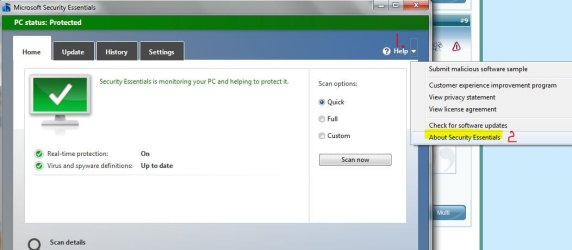
Quote: Originally Posted by fluidmotion how do u find version of MSE? Open MSE. Click on small down arrow next to Help > click on About Security Essentials. Another dialog box will open with current MSE info. | My System Specs | | Computer type Laptop System Manufacturer/Model Number Sony Vaio VPCEB47GM Laptop OS Win 7 Pro 64-bit CPU Intel i5 2.4 Ghz Memory 8GB DDR3 Graphics Card Intel HD 3000 Sound Card IDT High Definition Monitor(s) Displays 15.6 WGXA Anti-Glare LED Screen Resolution 1280x800 Hard Drives 640Gb 7200rpm Antivirus MSE Browser Opera (primary) with IE9 backup open MS Security essentials from cmd? problems? All times are GMT -5. The time now is 07:19 AM. | |