
| Windows 7: Portable Encryption of OS Partitions |
31 Jul 2012
|
#1 | | Windows 7 Ultimate 64-bit |
Portable Encryption of OS Partitions TrueCrypt does not allow to encrypt the OS Partition because there is no 32KB space available in the beginning of the drive.
My question;
If I use Portable TrueCrypt,
Can I encrypt all partitions on the drive or all of the drive which has OS Partitions using this Portable TrueCrypt and when I am going to use the drive(s) again, I will completely decrypt the drive(s) / partitions from this Portable TrueCrypt.
(I am going to put my computer in a storage place. The thing is the place is not safe. So, I will not use the encrypted HDD which have my OSs in it. I just want to keep it encrypted in the storage place. So, waiting for it to decrypt the whole drive when I am going to use it, is not a problem. This will be probably one time encryption before I put it in the storage and one time decryption process when I get it back).
Can TrueCrypt Portable (or Traveller Disk) boot a computer and encrypt and decrypt the whole drives without needing an OS?
I guess the question here is that can this Portable TrueCrypt boot the computer and decrypt the whole drive? And is it safe to encrypt OS Partitions or the drive with the OS Partitions with Portable TrueCrypt?
Do you have any ideas about this?
If it is possible, how much do you think it will take to encrypt 8 TB? (I am thinking to encrypt my external drives with Portable TrueCrypt too).
Do you have any idea for this one time encryption and decryption of Internal and External Harddisks? | My System Specs |
| System Manufacturer/Model Number ASUS G72 Notebook OS Windows 7 Ultimate 64-bit CPU Intel® Core™2 Duo mobile processor P8700 2.53 GHz Memory 6GB DDRII Graphics Card NVIDIA GeForce GTX 260M Sound Card EAX Advanced HD 4.0 + Logitech Wireless Headset G930 Monitor(s) Displays 17.3" LED-backlit LCD high-definition plus widescreen Screen Resolution 1600 x 900 Mouse Logitech Wireless Trackball M570 Cooling Targus Hard Drives 2 x Seagate Momentus 500 GB 5400.6 SATA 3Gb/s Internet Speed 3 to 6 Mbps Download / .5 to 1 Mbps Upload Other Info Clear Modem with Wi-fi*
Comodo Internet Security Premium |
01 Aug 2012
|
#2 | | Windows 7 Ultimate SP1 (x64) South Australia |

Quote: Originally Posted by IMAyNeed If it is possible, how much do you think it will take to encrypt 8 TB? (I am thinking to encrypt my external drives with Portable TrueCrypt too). Hi,
Forget it - you are talking days to encrypt that amount of data. If you have a power failure during that time..........
If you absolutely must, use System Encryption (page 33 in attachment) - its complicated and has risks, so if you aren't sure, I would advise against this.
A less riskier method of securing your computer is to remove the HDD, and store that elsewhere, or simply limit the ability of someone to boot into your system using this: SysKey - Set Startup Password to Lock or Unlock Windows
Regards,
Golden | My System Specs | | Computer type PC/Desktop System Manufacturer/Model Number Golden Mk. I.3 OS Windows 7 Ultimate SP1 (x64) CPU Intel i7 860 @ 2.80 GHz Motherboard Gigabyte P55A-UD3R Rev.1. Award BIOS F13 Memory 16GB Corsair Vengance DDR3 @ 661 MHz Dual Channel (9-9-9-24) Graphics Card EVGA NVidia GTX 560 1024MB Sound Card Realtek Integrated Monitor(s) Displays Dual Samsung SyncMaster 2494HS Screen Resolution 1920*1080 and 1920*1080 Keyboard Logitech G110 Mouse Logitech MX518 PSU Thermaltake ToughPower QFan 750W Case Thermaltake Element S VK60001W2Z Cooling Corsair H60 Water Cooling, 2*230mm and 2*80mm case fans Hard Drives 1*OCZ Vertex 2 60GB SSD;
2*Samsung F3 SpinPoint 1TB in RAID0;
3*Samsung F1 SpinPoint 1TB in RAID5;
1*Western Digital 500GB External USB 3.0
1*Seagate 500GB External USB 2.0 Internet Speed Not fast enough!!! Antivirus MSE and Malwarebytes Pro Browser Chrome Version 25 Other Info Laptop: ASUS X54C, Intel Core i3-2330M @ 2.0Ghz, 4GB RAM, Intel HD on-board graphics, Windows 7 Professional SP1 (x64), LinuxMint 14 (x64), PepperMint 3 (x86) |
01 Aug 2012
|
#3 | | Windows 7 Ultimate 64-bit |
Thanks.
I remember there was a software for Windows, Mac and Linux which was only setting a password for the drive. You would install it on every operating system on the computer to reach your data, but I do not remember that software and I couldn't find it on search engines.
I can't do system encryption because TrueCrypt is asking 32KB empty space at the beginning of the drive and informing me that I don't have it. I have a GPT Disk with a 200 MB GPT Protective Partition at the beginning.
All I want to do is set a password for the drives or a software that can boot from USB or CD to lock/unlock the drives/partitions.
I have 2 internal disks (1 for operating systems and 1 for data) and 4 external drives (not flash, big drives) that I want to protect if they are found.
I don't even want to deal with encrypting, I am just interested in locking the drives; but only option I found on the internet was encryption and only one with a little bit of explanations is TrueCrypt.
Thank you for the attachment and locking Windows suggestion.
I am still thinking what I am going to do. I need to make it in a way that the data in the drives won't be able to read by let's say a Live USB or CD or on another machine. I don't care if they format it as long as they can't read the data. | My System Specs | | System Manufacturer/Model Number ASUS G72 Notebook OS Windows 7 Ultimate 64-bit CPU Intel® Core™2 Duo mobile processor P8700 2.53 GHz Memory 6GB DDRII Graphics Card NVIDIA GeForce GTX 260M Sound Card EAX Advanced HD 4.0 + Logitech Wireless Headset G930 Monitor(s) Displays 17.3" LED-backlit LCD high-definition plus widescreen Screen Resolution 1600 x 900 Mouse Logitech Wireless Trackball M570 Cooling Targus Hard Drives 2 x Seagate Momentus 500 GB 5400.6 SATA 3Gb/s Internet Speed 3 to 6 Mbps Download / .5 to 1 Mbps Upload Other Info Clear Modem with Wi-fi*
Comodo Internet Security Premium |
01 Aug 2012
|
#4 | | Windows 7 Ultimate SP1 (x64) South Australia |

Quote: Originally Posted by IMAyNeed I don't care if they format it as long as they can't read the data. Hi,
In that case, why not just create a Macrium image of the drives on an external USB drive for storage elsewhere, then wipe the internal drives prior to putting the PC into storage. Disk - Clean and Clean All with Diskpart Command Imaging with free Macrium
Regards,
Golden | My System Specs | | Computer type PC/Desktop System Manufacturer/Model Number Golden Mk. I.3 OS Windows 7 Ultimate SP1 (x64) CPU Intel i7 860 @ 2.80 GHz Motherboard Gigabyte P55A-UD3R Rev.1. Award BIOS F13 Memory 16GB Corsair Vengance DDR3 @ 661 MHz Dual Channel (9-9-9-24) Graphics Card EVGA NVidia GTX 560 1024MB Sound Card Realtek Integrated Monitor(s) Displays Dual Samsung SyncMaster 2494HS Screen Resolution 1920*1080 and 1920*1080 Keyboard Logitech G110 Mouse Logitech MX518 PSU Thermaltake ToughPower QFan 750W Case Thermaltake Element S VK60001W2Z Cooling Corsair H60 Water Cooling, 2*230mm and 2*80mm case fans Hard Drives 1*OCZ Vertex 2 60GB SSD;
2*Samsung F3 SpinPoint 1TB in RAID0;
3*Samsung F1 SpinPoint 1TB in RAID5;
1*Western Digital 500GB External USB 3.0
1*Seagate 500GB External USB 2.0 Internet Speed Not fast enough!!! Antivirus MSE and Malwarebytes Pro Browser Chrome Version 25 Other Info Laptop: ASUS X54C, Intel Core i3-2330M @ 2.0Ghz, 4GB RAM, Intel HD on-board graphics, Windows 7 Professional SP1 (x64), LinuxMint 14 (x64), PepperMint 3 (x86) |
01 Aug 2012
|
#5 | | Windows 7 Ultimate 64-bit |
I can't store it anywhere else. I won't have any place to put them (I won't even have a place to put myself, forget about putting those drives).
I have only one place to leave my computer and its accessories (which is most of my possessions except the musical equipment). So, there is no other place. They will be in a luggage somewhere (I am only taking the flash drives with me). So, I need a way of some encryption or locking the drives. | My System Specs | | System Manufacturer/Model Number ASUS G72 Notebook OS Windows 7 Ultimate 64-bit CPU Intel® Core™2 Duo mobile processor P8700 2.53 GHz Memory 6GB DDRII Graphics Card NVIDIA GeForce GTX 260M Sound Card EAX Advanced HD 4.0 + Logitech Wireless Headset G930 Monitor(s) Displays 17.3" LED-backlit LCD high-definition plus widescreen Screen Resolution 1600 x 900 Mouse Logitech Wireless Trackball M570 Cooling Targus Hard Drives 2 x Seagate Momentus 500 GB 5400.6 SATA 3Gb/s Internet Speed 3 to 6 Mbps Download / .5 to 1 Mbps Upload Other Info Clear Modem with Wi-fi*
Comodo Internet Security Premium |
01 Aug 2012
|
#6 | | Windows 7 Ultimate SP1 (x64) South Australia |
Hi,
In that case, use the Startup Password, and also see if your BIOS has a password option.
Regards,
Golden | My System Specs | | Computer type PC/Desktop System Manufacturer/Model Number Golden Mk. I.3 OS Windows 7 Ultimate SP1 (x64) CPU Intel i7 860 @ 2.80 GHz Motherboard Gigabyte P55A-UD3R Rev.1. Award BIOS F13 Memory 16GB Corsair Vengance DDR3 @ 661 MHz Dual Channel (9-9-9-24) Graphics Card EVGA NVidia GTX 560 1024MB Sound Card Realtek Integrated Monitor(s) Displays Dual Samsung SyncMaster 2494HS Screen Resolution 1920*1080 and 1920*1080 Keyboard Logitech G110 Mouse Logitech MX518 PSU Thermaltake ToughPower QFan 750W Case Thermaltake Element S VK60001W2Z Cooling Corsair H60 Water Cooling, 2*230mm and 2*80mm case fans Hard Drives 1*OCZ Vertex 2 60GB SSD;
2*Samsung F3 SpinPoint 1TB in RAID0;
3*Samsung F1 SpinPoint 1TB in RAID5;
1*Western Digital 500GB External USB 3.0
1*Seagate 500GB External USB 2.0 Internet Speed Not fast enough!!! Antivirus MSE and Malwarebytes Pro Browser Chrome Version 25 Other Info Laptop: ASUS X54C, Intel Core i3-2330M @ 2.0Ghz, 4GB RAM, Intel HD on-board graphics, Windows 7 Professional SP1 (x64), LinuxMint 14 (x64), PepperMint 3 (x86) |
01 Aug 2012
|
#7 | | Windows 7 Ultimate 64-bit |
I will use that startup password option.
Unfortunately, my BIOS does not have HDD Password option (It has a password for boot though [a setup password that can be setup to ask at every restart to use the machine]; so they won't be able to use my machine, but they will be able to use another machine to read the data in the internal drives).
I was just thinking of that. I could put my drives in another computer and lock them, but then I would need the same computer or the same model computer when I take back my items which will be when I don't know. I could use an older computer to put with the drives so that I can use that computer's drive lock option maybe.
For the external drives, I don't know what am I going to do yet. Actually, for the internal drives too. Luckily, I still have some time before putting my stuff there. So, I hope I can think of some thing to do.
It is a little complicated issue since I have to put all of my stuff in one luggage. If I use a USB or CD for recovery; I would have to keep at least 1 in the luggage, 1 with me. If it can be copied, on the Internet, or in the encrypted flash drive.
Thank you very much for your replies. Even though, I haven't decided what I am going to do yet, every reply is giving me another thought of pros and cons of taking an action. | My System Specs | | System Manufacturer/Model Number ASUS G72 Notebook OS Windows 7 Ultimate 64-bit CPU Intel® Core™2 Duo mobile processor P8700 2.53 GHz Memory 6GB DDRII Graphics Card NVIDIA GeForce GTX 260M Sound Card EAX Advanced HD 4.0 + Logitech Wireless Headset G930 Monitor(s) Displays 17.3" LED-backlit LCD high-definition plus widescreen Screen Resolution 1600 x 900 Mouse Logitech Wireless Trackball M570 Cooling Targus Hard Drives 2 x Seagate Momentus 500 GB 5400.6 SATA 3Gb/s Internet Speed 3 to 6 Mbps Download / .5 to 1 Mbps Upload Other Info Clear Modem with Wi-fi*
Comodo Internet Security Premium |
01 Aug 2012
|
#8 | | Windows 7 Ultimate SP1 (x64) South Australia |
Hi,
One last suggestion which will definately work:
1. Create a Macrium Image on an external drive as suggested.
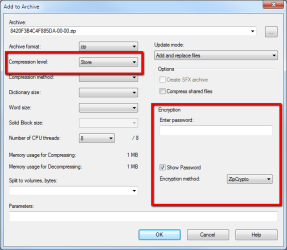
2. Use 7ZIP to zip this image with minimal compression ( storage)....but....choose the password option
3. Wipe the internal disks using DISKPART prior to storage.
So, all that is left are several .ZIP files on the external which cannot be accessed without the password - quite safe.
Regards,
Golden
Last edited by Golden; 01 Aug 2012 at 05:18 AM..
Reason: add link to 7ZIP downlaod
| My System Specs | | Computer type PC/Desktop System Manufacturer/Model Number Golden Mk. I.3 OS Windows 7 Ultimate SP1 (x64) CPU Intel i7 860 @ 2.80 GHz Motherboard Gigabyte P55A-UD3R Rev.1. Award BIOS F13 Memory 16GB Corsair Vengance DDR3 @ 661 MHz Dual Channel (9-9-9-24) Graphics Card EVGA NVidia GTX 560 1024MB Sound Card Realtek Integrated Monitor(s) Displays Dual Samsung SyncMaster 2494HS Screen Resolution 1920*1080 and 1920*1080 Keyboard Logitech G110 Mouse Logitech MX518 PSU Thermaltake ToughPower QFan 750W Case Thermaltake Element S VK60001W2Z Cooling Corsair H60 Water Cooling, 2*230mm and 2*80mm case fans Hard Drives 1*OCZ Vertex 2 60GB SSD;
2*Samsung F3 SpinPoint 1TB in RAID0;
3*Samsung F1 SpinPoint 1TB in RAID5;
1*Western Digital 500GB External USB 3.0
1*Seagate 500GB External USB 2.0 Internet Speed Not fast enough!!! Antivirus MSE and Malwarebytes Pro Browser Chrome Version 25 Other Info Laptop: ASUS X54C, Intel Core i3-2330M @ 2.0Ghz, 4GB RAM, Intel HD on-board graphics, Windows 7 Professional SP1 (x64), LinuxMint 14 (x64), PepperMint 3 (x86) |
01 Aug 2012
|
#9 | | Windows 7 Ultimate 64-bit |
Thanks. That sure would solve the problem with the internal drives.
How about locking the external drives (At least some). That shouldn't be hard I suppose. Some password software maybe. Or creating a folder which is encrypted with a password. I can put everything I want in that folder and protect it with a password?
Am I going right about the external drives? Do you have any ideas? | My System Specs | | System Manufacturer/Model Number ASUS G72 Notebook OS Windows 7 Ultimate 64-bit CPU Intel® Core™2 Duo mobile processor P8700 2.53 GHz Memory 6GB DDRII Graphics Card NVIDIA GeForce GTX 260M Sound Card EAX Advanced HD 4.0 + Logitech Wireless Headset G930 Monitor(s) Displays 17.3" LED-backlit LCD high-definition plus widescreen Screen Resolution 1600 x 900 Mouse Logitech Wireless Trackball M570 Cooling Targus Hard Drives 2 x Seagate Momentus 500 GB 5400.6 SATA 3Gb/s Internet Speed 3 to 6 Mbps Download / .5 to 1 Mbps Upload Other Info Clear Modem with Wi-fi*
Comodo Internet Security Premium |
01 Aug 2012
|
#10 | | Windows 7 Ultimate SP1 (x64) South Australia |
Hi,
For the externals, use the same procedure - place everything into .ZIP with a password.
Regards,
Golden | My System Specs | | Computer type PC/Desktop System Manufacturer/Model Number Golden Mk. I.3 OS Windows 7 Ultimate SP1 (x64) CPU Intel i7 860 @ 2.80 GHz Motherboard Gigabyte P55A-UD3R Rev.1. Award BIOS F13 Memory 16GB Corsair Vengance DDR3 @ 661 MHz Dual Channel (9-9-9-24) Graphics Card EVGA NVidia GTX 560 1024MB Sound Card Realtek Integrated Monitor(s) Displays Dual Samsung SyncMaster 2494HS Screen Resolution 1920*1080 and 1920*1080 Keyboard Logitech G110 Mouse Logitech MX518 PSU Thermaltake ToughPower QFan 750W Case Thermaltake Element S VK60001W2Z Cooling Corsair H60 Water Cooling, 2*230mm and 2*80mm case fans Hard Drives 1*OCZ Vertex 2 60GB SSD;
2*Samsung F3 SpinPoint 1TB in RAID0;
3*Samsung F1 SpinPoint 1TB in RAID5;
1*Western Digital 500GB External USB 3.0
1*Seagate 500GB External USB 2.0 Internet Speed Not fast enough!!! Antivirus MSE and Malwarebytes Pro Browser Chrome Version 25 Other Info Laptop: ASUS X54C, Intel Core i3-2330M @ 2.0Ghz, 4GB RAM, Intel HD on-board graphics, Windows 7 Professional SP1 (x64), LinuxMint 14 (x64), PepperMint 3 (x86) Portable Encryption of OS Partitions problems? All times are GMT -5. The time now is 11:22 AM. | |