Windows 7 Forums


Windows 7: Malwarebytes auto starts scans after restart

28 Dec 2012  
fireberd

Windows 7, 64 bit Home SP1, Win 8 Pro 64 bit
3,768 posts
Citrus Co, FL
 
 
Malwarebytes auto starts scans after restart

I recently did a complete clean reinstall. I have Malwarebytes Pro (paid version) set to scan at 5:30 am daily. However, it now will start a scan after a reboot. I can't find any setting for this???

Jack

My System SpecsSystem Spec

28 Dec 2012  
marsmimar

Win 7 Pro 64-bit
6,693 posts
South Central Texas


I think this has to do with Malwarebytes now using the "RunOnce" registry key. This causes programs to run whenever the computer reboots or a user logs in.

Run and RunOnce Registry Keys (Windows)

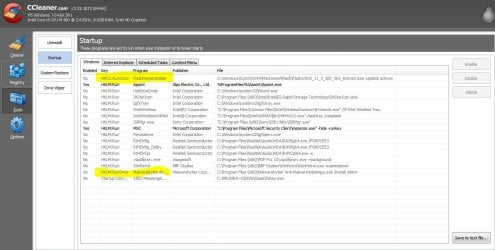
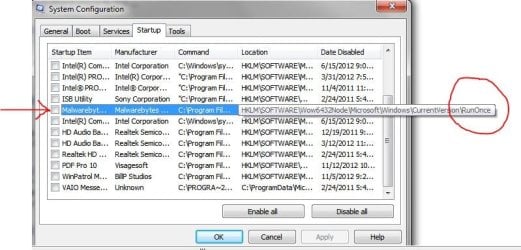
I first noticed this a couple of weeks ago when I installed Malwarebytes 1.70 beta. (Never had this issue in prior versions.) CCleaner > Tools > Startup > Windows tab showed a new RunOnce entry. Once I disabled it the startup scans stopped. If you don't have CCleaner you can still access it through msconfig > startup tab. (Just as a side note, Adobe Flash Player Update has used RunOnce for a long time and I got tired of it scanning every time I started my computer.)

Malwarebytes auto starts scans after restart-ccleaner.jpg Malwarebytes auto starts scans after restart-mbam.jpg
My System SpecsSystem Spec
28 Dec 2012  
fireberd

Windows 7, 64 bit Home SP1, Win 8 Pro 64 bit
3,768 posts
Citrus Co, FL


I don't find that anywhere. There's nothing in the Run Once registry listing. I don't see it in msconfig, ccleaner, Startup or Win Patrol.

Last edited by fireberd; 28 Dec 2012 at 04:22 PM..
My System SpecsSystem Spec
.


28 Dec 2012  
marsmimar

Win 7 Pro 64-bit
6,693 posts
South Central Texas


Only other suggestion I have is to contact Malwarebytes. Sorry I couldn't be more help, Jack.

Malwarebytes : Comprehensive Support for our Home Users
My System SpecsSystem Spec
28 Dec 2012  
fireberd

Windows 7, 64 bit Home SP1, Win 8 Pro 64 bit
3,768 posts
Citrus Co, FL


I've run the malware clean utility, rebooted, and installed the latest version. It has not popped up and ran a scan after reboot (tried several times).

I got the utility and link to the new version HERE

The new version has a new icon for Malwarebytes.

If its still OK tomorrow, I'll mark this solved.

Thanks/Jack
My System SpecsSystem Spec
28 Dec 2012  
Phone Man

Windows 7 HP 64bit, Windows 8 Pro w/Media Center 64bit
2,398 posts
Covington, La


What about your Update settings. I have my scheduled to check for updates every hour and run a Flash Scan if it finds an update. Check your MB log files and see what it is doing.

Jim
My System SpecsSystem Spec
28 Dec 2012  
fireberd

Windows 7, 64 bit Home SP1, Win 8 Pro 64 bit
3,768 posts
Citrus Co, FL


I only have it set to check for updates at 5:30 am (daily) and to run a quick scan (daily) at 6:00 am. I don't have the option checked to run a scan after update.

This is something that happened after a clean reinstall. As I noted I uninstalled and then installed a newer version of Malwarebytes and so far no popup scan after a reboot/restart. I'll see what happens after a day.

Jack
My System SpecsSystem Spec
28 Dec 2012  
Layback Bear

Windows 7 Home Premium 64 bit. SP-1
8,758 posts
Northern Ohio


I do believe that when installing the older version the option of scanning at boot was in the installation process and not in the program itself. This is just going by memory of my 3 brain cells.
My System SpecsSystem Spec
29 Dec 2012  
fireberd

Windows 7, 64 bit Home SP1, Win 8 Pro 64 bit
3,768 posts
Citrus Co, FL


The installation of the new version seems to have fixed the problem. I'm marking this solved.
My System SpecsSystem Spec
29 Dec 2012  
marsmimar

Win 7 Pro 64-bit
6,693 posts
South Central Texas


Glad to hear all is working well, Jack.
My System SpecsSystem Spec
Reply

 Malwarebytes auto starts scans after restart problems?


Thread Tools


Similar help and support threads for: Malwarebytes auto starts scans after restart
Thread Forum
Windows 7 installing starts from beginning after restart. Installation & Setup
BSOD Restart Loop - Starts in SafeMode BSOD Help and Support
Malwarebytes does not auto update System Security
BSOD, forces restart but have auto restart off BSOD Help and Support
Auto restart even if uncheck automatic restart BSOD Help and Support


All times are GMT -5. The time now is 04:32 PM.


Windows 7 Forums is an independent web site and has not been authorized,
sponsored, or otherwise approved by Microsoft Corporation.
"Windows 7" and related materials are trademarks of Microsoft Corp.
© Designer Media Ltd