| Windows 7: "You are about to be logged off" "Windows will shut down in 1 minute" |
25 Jan 2013
|
#1 | | Windows 7 Professional 64bit Auckland, New Zealand |
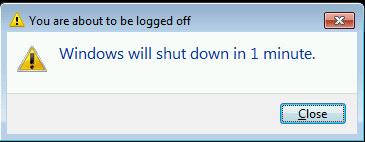
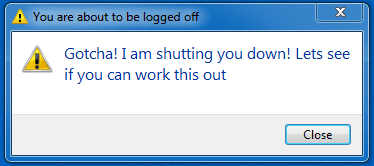
"You are about to be logged off" "Windows will shut down in 1 minute" I am ashamed to say I seem to have obtained some sort of malware, virus, or perhaps some some "funny" fella using a .bat or .vbs file. At seemingly random times a window will pop up:
I highly doubt this is anything to do with legitimate windows functions.
I have searched the running processes, and nothing seems fishy there. I ran a full scan with malware bytes, nothing came up, and I have run a full scan on my primary drive with microsoft security essentials, and I am currently running one on my secondary drives, also nothing. I also ran a quick search for .vbs and .bat files on my primary drive where I install all programs except games (its an SSD), and saw nothing out of the ordinary.
Before the conversation arouses, I am not interested in having new antivirus software sold to me, I don't stand for any antivirus I have to pay for, nor "lite" or trial versions of software. I don't want something like avast about which almost every forum thread complaining about networking issues for things like games, seems to complain about. So unless you have something free, proven very effective, light weight that isn't going to treat me like a baby, asking if im sure I want to delete every file and telling me when my cpu is actually being used by a program like norton does >.<, I politely ask that you leave it out of this thread. I have run microsoft security essentials for a couple of years now and never had an issue, it is perfectly sufficient for me, in my opinion.
Little bit of background. I actively run Microsoft Security Essentials, and due to this issue, currently have malware bytes running. More often than not I have my firewall disabled, I know to some this is heresy, however on an almost daily basis I run all sorts of lan and internet servers for people I play with, and frankly, creating exceptions to every program which wants to communicate over the internet is a huge pain in the ass, and doesn't even work half the time. The first event occurred about 8 hours ago, since then the window has popped up 3 times. I cannot recall downloading anything which could be host to such a function in the past few days. I downloaded a few videos, some images, a couple of scripts for servers. I also downloaded updates for skype, steam, and google earth. Odly enough, it occurs to me that the first event was mere minutes after applying the skype update...but for that to be the cause seems very unlikely to me.
If anyone has suggestions it would be greatly appreciated,
Thanks,
Tom | My System Specs |
| System Manufacturer/Model Number Custom Build OS Windows 7 Professional 64bit CPU Intel i7 3770k 3.5ghz Motherboard Asus P8Z77-V Deluxe Memory Corsair Vengeance 16gb (4x4gb) Graphics Card Gigabyte GV-R795WF3-3GD Raedon 7950 OC 1200/1600mhz core/mem Sound Card None Monitor(s) Displays AOC 23.6" (main) HP 1730 (side) Screen Resolution 1920x1080 Keyboard Logitech G110 gaming keyboard Mouse Gigabyte M6900 PSU Corsair AX-650W ATX Case Corsair 500R black Cooling Corsair 500r Stock cooling (3x120mm, 1x200mm) & Corsair H100 Hard Drives Western Digital Caviar Black 1TB - 64mb cache
Western Digital Caviar Green 1TB - 32mb cache
Samsung 830 SSD 128Gb Boot Drive Other Info Corsair Hydro 100 CPU Cooler |
25 Jan 2013
|
#2 | | Windows 7 Ultimate SP1 (x64) South Australia |
Actually, if I'm not mistaken that looks very much like the shutdown command run from Windows cmd.
I know you said you haven't found any .bat files, but just to be sure, you aren't using your own .bat files for anything are you? Have a look in the server script you downloaded. Code: C:\Windows\system32>shutdown
Usage: shutdown [/i | /l | /s | /r | /g | /a | /p | /h | /e] [/f]
[/m \\computer][/t xxx][/d [p|u:]xx:yy [/c "comment"]]
No args Display help. This is the same as typing /?.
/? Display help. This is the same as not typing any options.
/i Display the graphical user interface (GUI).
This must be the first option.
/l Log off. This cannot be used with /m or /d options.
/s Shutdown the computer.
/r Shutdown and restart the computer.
/g Shutdown and restart the computer. After the system is
rebooted, restart any registered applications.
/a Abort a system shutdown.
This can only be used during the time-out period.
/p Turn off the local computer with no time-out or warning.
Can be used with /d and /f options.
/h Hibernate the local computer.
Can be used with the /f option.
/e Document the reason for an unexpected shutdown of a computer.
/m \\computer Specify the target computer.
/t xxx Set the time-out period before shutdown to xxx seconds.
The valid range is 0-315360000 (10 years), with a default of 30.
If the timeout period is greater than 0, the /f parameter is
implied.
/c "comment" Comment on the reason for the restart or shutdown.
Maximum of 512 characters allowed.
/f Force running applications to close without forewarning users.
The /f parameter is implied when a value greater than 0 is
specified for the /t parameter.
/d [p|u:]xx:yy Provide the reason for the restart or shutdown.
p indicates that the restart or shutdown is planned.
u indicates that the reason is user defined.
If neither p nor u is specified the restart or shutdown is
unplanned.
xx is the major reason number (positive integer less than 256).
yy is the minor reason number (positive integer less than 65536).
Reasons on this computer:
(E = Expected U = Unexpected P = planned, C = customer defined)
Type Major Minor Title
U 0 0 Other (Unplanned)
E 0 0 Other (Unplanned)
E P 0 0 Other (Planned)
U 0 5 Other Failure: System Unresponsive
E 1 1 Hardware: Maintenance (Unplanned)
E P 1 1 Hardware: Maintenance (Planned)
E 1 2 Hardware: Installation (Unplanned)
E P 1 2 Hardware: Installation (Planned)
E 2 2 Operating System: Recovery (Planned)
E P 2 2 Operating System: Recovery (Planned)
P 2 3 Operating System: Upgrade (Planned)
E 2 4 Operating System: Reconfiguration (Unplanned)
E P 2 4 Operating System: Reconfiguration (Planned)
P 2 16 Operating System: Service pack (Planned)
2 17 Operating System: Hot fix (Unplanned)
P 2 17 Operating System: Hot fix (Planned)
2 18 Operating System: Security fix (Unplanned)
P 2 18 Operating System: Security fix (Planned)
E 4 1 Application: Maintenance (Unplanned)
E P 4 1 Application: Maintenance (Planned)
E P 4 2 Application: Installation (Planned)
E 4 5 Application: Unresponsive
E 4 6 Application: Unstable
U 5 15 System Failure: Stop error
U 5 19 Security issue
E 5 19 Security issue
E P 5 19 Security issue
E 5 20 Loss of network connectivity (Unplanned)
U 6 11 Power Failure: Cord Unplugged
U 6 12 Power Failure: Environment
P 7 0 Legacy API shutdown
C:\Windows\system32> Failing that, I would guess the fact that you don't run a firewall will have opened you up to some form of penetration..... | My System Specs | | Computer type PC/Desktop System Manufacturer/Model Number Golden Mk. I.3 OS Windows 7 Ultimate SP1 (x64) CPU Intel i7 860 @ 2.80 GHz Motherboard Gigabyte P55A-UD3R Rev.1. Award BIOS F13 Memory 16GB Corsair Vengance DDR3 @ 661 MHz Dual Channel (9-9-9-24) Graphics Card EVGA NVidia GTX 560 1024MB Sound Card Realtek Integrated Monitor(s) Displays Dual Samsung SyncMaster 2494HS Screen Resolution 1920*1080 and 1920*1080 Keyboard Logitech G110 Mouse Logitech MX518 PSU Thermaltake ToughPower QFan 750W Case Thermaltake Element S VK60001W2Z Cooling Corsair H60 Water Cooling, 2*230mm and 2*80mm case fans Hard Drives 1*OCZ Vertex 2 60GB SSD;
2*Samsung F3 SpinPoint 1TB in RAID0;
3*Samsung F1 SpinPoint 1TB in RAID5;
1*Western Digital 500GB External USB 3.0
1*Seagate 500GB External USB 2.0 Internet Speed Not fast enough!!! Antivirus MSE and Malwarebytes Pro Browser Chrome Version 25 Other Info Laptop: ASUS X54C, Intel Core i3-2330M @ 2.0Ghz, 4GB RAM, Intel HD on-board graphics, Windows 7 Professional SP1 (x64), LinuxMint 14 (x64), PepperMint 3 (x86) |
25 Jan 2013
|
#3 | | Windows 7 Professional 64bit Auckland, New Zealand |
I don't doubt the fact I had no firewall is quite likely to have played a part here. Call me stubborn, but in almost 2 years of minimum firewall usage, this is the only issue I have had, and the amount of times re-enabling it has only caused issues networking with other people I know and trust, which exceptions don't seem to solve, is just annoying. I do not regret using no firewall, and while I genuinely appreciate the advice, I am already aware of this, and mentioning it does not solve my issue (In the short term  ).
And in answer to your first question, I don't use .bat files. However I do recognize how similar this is to that command, which is why I wonder if this isn't the result of some script kiddie. | My System Specs | | System Manufacturer/Model Number Custom Build OS Windows 7 Professional 64bit CPU Intel i7 3770k 3.5ghz Motherboard Asus P8Z77-V Deluxe Memory Corsair Vengeance 16gb (4x4gb) Graphics Card Gigabyte GV-R795WF3-3GD Raedon 7950 OC 1200/1600mhz core/mem Sound Card None Monitor(s) Displays AOC 23.6" (main) HP 1730 (side) Screen Resolution 1920x1080 Keyboard Logitech G110 gaming keyboard Mouse Gigabyte M6900 PSU Corsair AX-650W ATX Case Corsair 500R black Cooling Corsair 500r Stock cooling (3x120mm, 1x200mm) & Corsair H100 Hard Drives Western Digital Caviar Black 1TB - 64mb cache
Western Digital Caviar Green 1TB - 32mb cache
Samsung 830 SSD 128Gb Boot Drive Other Info Corsair Hydro 100 CPU Cooler |
25 Jan 2013
|
#4 | | Windows 7 Ultimate SP1 (x64) South Australia |

Quote: Originally Posted by Tomha However I do recognize how similar this is to that command, which is why I wonder if this isn't the result of some script kiddie. Very likely, check your server scripts - especially those uploaded to you server. | My System Specs | | Computer type PC/Desktop System Manufacturer/Model Number Golden Mk. I.3 OS Windows 7 Ultimate SP1 (x64) CPU Intel i7 860 @ 2.80 GHz Motherboard Gigabyte P55A-UD3R Rev.1. Award BIOS F13 Memory 16GB Corsair Vengance DDR3 @ 661 MHz Dual Channel (9-9-9-24) Graphics Card EVGA NVidia GTX 560 1024MB Sound Card Realtek Integrated Monitor(s) Displays Dual Samsung SyncMaster 2494HS Screen Resolution 1920*1080 and 1920*1080 Keyboard Logitech G110 Mouse Logitech MX518 PSU Thermaltake ToughPower QFan 750W Case Thermaltake Element S VK60001W2Z Cooling Corsair H60 Water Cooling, 2*230mm and 2*80mm case fans Hard Drives 1*OCZ Vertex 2 60GB SSD;
2*Samsung F3 SpinPoint 1TB in RAID0;
3*Samsung F1 SpinPoint 1TB in RAID5;
1*Western Digital 500GB External USB 3.0
1*Seagate 500GB External USB 2.0 Internet Speed Not fast enough!!! Antivirus MSE and Malwarebytes Pro Browser Chrome Version 25 Other Info Laptop: ASUS X54C, Intel Core i3-2330M @ 2.0Ghz, 4GB RAM, Intel HD on-board graphics, Windows 7 Professional SP1 (x64), LinuxMint 14 (x64), PepperMint 3 (x86) |
25 Jan 2013
|
#5 | | Windows 7 Professional 64bit Auckland, New Zealand |
Had a look, but they are all quite simple scripts, most of which don't actually interact directly with windows, but rather which are loaded into/through the server programs. None of them appear to be of any interest though.. | My System Specs | | System Manufacturer/Model Number Custom Build OS Windows 7 Professional 64bit CPU Intel i7 3770k 3.5ghz Motherboard Asus P8Z77-V Deluxe Memory Corsair Vengeance 16gb (4x4gb) Graphics Card Gigabyte GV-R795WF3-3GD Raedon 7950 OC 1200/1600mhz core/mem Sound Card None Monitor(s) Displays AOC 23.6" (main) HP 1730 (side) Screen Resolution 1920x1080 Keyboard Logitech G110 gaming keyboard Mouse Gigabyte M6900 PSU Corsair AX-650W ATX Case Corsair 500R black Cooling Corsair 500r Stock cooling (3x120mm, 1x200mm) & Corsair H100 Hard Drives Western Digital Caviar Black 1TB - 64mb cache
Western Digital Caviar Green 1TB - 32mb cache
Samsung 830 SSD 128Gb Boot Drive Other Info Corsair Hydro 100 CPU Cooler |
25 Jan 2013
|
#6 | | Windows 7 Ultimate SP1 (x64) South Australia |
Sorry, I'm sure what else to suggest.....something appears to be running the shutdown command. You'll have to try and track it down. | My System Specs | | Computer type PC/Desktop System Manufacturer/Model Number Golden Mk. I.3 OS Windows 7 Ultimate SP1 (x64) CPU Intel i7 860 @ 2.80 GHz Motherboard Gigabyte P55A-UD3R Rev.1. Award BIOS F13 Memory 16GB Corsair Vengance DDR3 @ 661 MHz Dual Channel (9-9-9-24) Graphics Card EVGA NVidia GTX 560 1024MB Sound Card Realtek Integrated Monitor(s) Displays Dual Samsung SyncMaster 2494HS Screen Resolution 1920*1080 and 1920*1080 Keyboard Logitech G110 Mouse Logitech MX518 PSU Thermaltake ToughPower QFan 750W Case Thermaltake Element S VK60001W2Z Cooling Corsair H60 Water Cooling, 2*230mm and 2*80mm case fans Hard Drives 1*OCZ Vertex 2 60GB SSD;
2*Samsung F3 SpinPoint 1TB in RAID0;
3*Samsung F1 SpinPoint 1TB in RAID5;
1*Western Digital 500GB External USB 3.0
1*Seagate 500GB External USB 2.0 Internet Speed Not fast enough!!! Antivirus MSE and Malwarebytes Pro Browser Chrome Version 25 Other Info Laptop: ASUS X54C, Intel Core i3-2330M @ 2.0Ghz, 4GB RAM, Intel HD on-board graphics, Windows 7 Professional SP1 (x64), LinuxMint 14 (x64), PepperMint 3 (x86) |
25 Jan 2013
|
#7 | | Windows 7 x64 Ultimate A Finnish immigrant in Leipzig, Germany |
The Shutdown message you get is a normal one Windows shows when a scheduled shutdown is going to happen.
A short explanation:
I give my Windows 7 PC a command to shutdown in 1000 seconds by giving this command in Command Prompt: Code: shutdown -s -t 1000 - -s = shutdown, other options for instance -r to reboot or -h to hibernate
- -t XXXX = shutdown delay where XXXX is time in seconds, if -t switch is not used the default delay is 30 seconds
After giving this command Windows pops up a balloon tip near notification are telling about the delayed action:
(1000 seconds used in my example = 16 minutes)
When there is about one minute to go I will get this:
(Notice, it's not always quite exact, this message will be shown when there's something between one and two minutes to go to delayed shutdown.)
It is like a last warning, giving me enough time to launch Command Prompt to abort delayed shutdown process with this command: When aborted, Windows shows a balloon tip near notification area telling about this:
To put this short: I do not believe you have got an infection. You could try to find the culprit by searching the whole computer for files that contain word shutdown to see if there's a batch file on your computer which will be launched when you do a certain task.
Type this to Search field when in Explorer > Computer to get a list of all files containing word shutdown: You could also check the Task Scheduler to see if there's a for you unknown task that launches a delayed, scheduled shutdown.
Kari | My System Specs | | Computer type Laptop System Manufacturer/Model Number HP ENVY 17-1150eg OS Windows 7 x64 Ultimate CPU 1.6 GHz Intel Core i7-720QM Processor Memory 6 GB Graphics Card ATI Mobility Radeon HD 5850 Graphics Sound Card Beats sound system with integrated subwoofer Monitor(s) Displays 17" laptop display, 22" LCD and 32" Full HD TV through HDMI Screen Resolution 1600*900, 1680*1050 and 1920*1080 Keyboard Logitech diNovo Media Desktop Laser (bluetooth) Mouse Logitech MX1000 Laser (Bluetooth) Hard Drives Internal: 2 x 500 GB SATA Hard Disk Drive 7200 rpm
External: 2TB for backups, 3TB USB3 network drive for media Internet Speed 50/10 Mbps VDSL Antivirus MSE, Windows Defender Browser Maxthon 3.5.2. Other Info Windows 7 Ultimate Retail Full in English, additional Guest-user accounts in Finnish, German and Swedish (Working languages English & Swedish, Family language German, my own language, mother tongue, Finnish. I really need Ultimate to get to use Language Packs!) |
25 Jan 2013
|
#8 | | Windows 7 Professional 64bit Auckland, New Zealand |
Thanks Kari, the Task Scheduler didn't have any scheduled shutdowns, and the search is running now. | My System Specs | | System Manufacturer/Model Number Custom Build OS Windows 7 Professional 64bit CPU Intel i7 3770k 3.5ghz Motherboard Asus P8Z77-V Deluxe Memory Corsair Vengeance 16gb (4x4gb) Graphics Card Gigabyte GV-R795WF3-3GD Raedon 7950 OC 1200/1600mhz core/mem Sound Card None Monitor(s) Displays AOC 23.6" (main) HP 1730 (side) Screen Resolution 1920x1080 Keyboard Logitech G110 gaming keyboard Mouse Gigabyte M6900 PSU Corsair AX-650W ATX Case Corsair 500R black Cooling Corsair 500r Stock cooling (3x120mm, 1x200mm) & Corsair H100 Hard Drives Western Digital Caviar Black 1TB - 64mb cache
Western Digital Caviar Green 1TB - 32mb cache
Samsung 830 SSD 128Gb Boot Drive Other Info Corsair Hydro 100 CPU Cooler |
25 Jan 2013
|
#9 | | Windows 7 x64 Ultimate A Finnish immigrant in Leipzig, Germany |
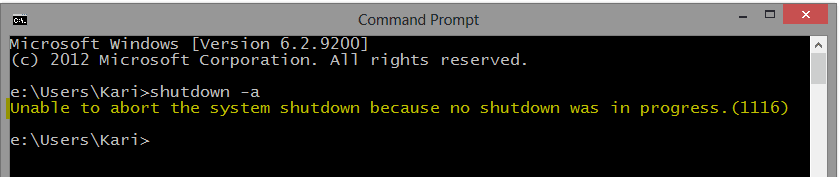
In any case you can test if this really is a scheduled delayed shutdown process or something else. If / when you get the message again, open Command Prompt (could be a good idea to pin it to Taskbar?) and abort shutdown.
As aborting shutdown only works if there really exists a scheduled shutdown, Windows tells you there are no scheduled shutdowns if this message of yours is something else:
Kari | My System Specs | | Computer type Laptop System Manufacturer/Model Number HP ENVY 17-1150eg OS Windows 7 x64 Ultimate CPU 1.6 GHz Intel Core i7-720QM Processor Memory 6 GB Graphics Card ATI Mobility Radeon HD 5850 Graphics Sound Card Beats sound system with integrated subwoofer Monitor(s) Displays 17" laptop display, 22" LCD and 32" Full HD TV through HDMI Screen Resolution 1600*900, 1680*1050 and 1920*1080 Keyboard Logitech diNovo Media Desktop Laser (bluetooth) Mouse Logitech MX1000 Laser (Bluetooth) Hard Drives Internal: 2 x 500 GB SATA Hard Disk Drive 7200 rpm
External: 2TB for backups, 3TB USB3 network drive for media Internet Speed 50/10 Mbps VDSL Antivirus MSE, Windows Defender Browser Maxthon 3.5.2. Other Info Windows 7 Ultimate Retail Full in English, additional Guest-user accounts in Finnish, German and Swedish (Working languages English & Swedish, Family language German, my own language, mother tongue, Finnish. I really need Ultimate to get to use Language Packs!) |
25 Jan 2013
|
#10 | | Windows 7 Professional 64bit Auckland, New Zealand |
The searches didn't find anything. I have the command prompt on the task bar, and next time it pops up, ill try stop the shutdown and report back then. Thanks for the suggestions | My System Specs | | System Manufacturer/Model Number Custom Build OS Windows 7 Professional 64bit CPU Intel i7 3770k 3.5ghz Motherboard Asus P8Z77-V Deluxe Memory Corsair Vengeance 16gb (4x4gb) Graphics Card Gigabyte GV-R795WF3-3GD Raedon 7950 OC 1200/1600mhz core/mem Sound Card None Monitor(s) Displays AOC 23.6" (main) HP 1730 (side) Screen Resolution 1920x1080 Keyboard Logitech G110 gaming keyboard Mouse Gigabyte M6900 PSU Corsair AX-650W ATX Case Corsair 500R black Cooling Corsair 500r Stock cooling (3x120mm, 1x200mm) & Corsair H100 Hard Drives Western Digital Caviar Black 1TB - 64mb cache
Western Digital Caviar Green 1TB - 32mb cache
Samsung 830 SSD 128Gb Boot Drive Other Info Corsair Hydro 100 CPU Cooler "You are about to be logged off" "Windows will shut down in 1 minute" problems? All times are GMT -5. The time now is 12:15 AM. | |