| Windows 7: Windows Update - Impossible To Get |
21 Feb 2013
|
#1 | | Windows 7 Pro, 64-bit Lakeland, Florida USA |
Windows Update - Impossible To Get I receive an error message every time I try to do a Windows Update. It usually displays itself as Error 80070005(about which this article references: Error 0x80070005 when you try to install updates by using Microsoft Update or Windows Update). I’ve done scans (Microsoft Essentials/Malware Antibytes), yet still no malware/virus is ever detected. I do know that my system is very vulnerable not being able to get Windows Updates. Could anyone give me any adviceto resolve this issue? My PC is Windows 7 Pro OS, 64-bit (Dell Optiplex 760). | My System Specs |
| System Manufacturer/Model Number Dell Optiplex 760 OS Windows 7 Pro, 64-bit |
21 Feb 2013
|
#2 | | Windows 7 Pro-x64 South Texas |
Did you run MSERT as the article suggests? Choose Run from the download so there's less chance of it being corrupt. It's only good for 10 days anyway. Be sure to select Full scan and let it run. It could take several hours depending on your system.
After it completes, run SFC /scannow from an elevated command prompt. If you get errors you may need to run it up to a couple of more times. Report back any console messages. | My System Specs | | Computer type PC/Desktop System Manufacturer/Model Number Built 2/11/2011 OS Windows 7 Pro-x64 CPU i7-2600 3.4GHz - 3.8GHz Turbo Motherboard Intel DH67BL-B3 Memory 8Gb - 2x4GB, Muskin 991770 PC3-1333 Graphics Card Integrated Intel HD 2000 Sound Card Integrated Intel 10.1 HD, RealTek ALC892 Monitor(s) Displays Asus LCD VH222H, Haier HL24XSL2a Screen Resolution 1920x1080, 1920x1080 Keyboard Logitech EX100 Wireless Mouse Logitech EX100 Wireless PSU Seasonic 650W 80+ Gold Modular Case Rosewill Defender Cooling Stock CPU, Four 120mm case fans, PCH fan added Hard Drives Crucial C300-128Gb,
Western Digital WD5002AALX - 500Gb,
Western Digital WD7501AALS - 750Gb Internet Speed 2.5/1.5 Mbs Antivirus Microsoft Security Essentials Browser Microsoft Internet Explorer 10 Other Info Antec Veris Premier-Multimedia IR Station,
Cyber Accoustics-3602 Speakers,
AFT XM-5U Card Reader,
Hauppauge TV-HVR-2250,
Sony LX300 USB Turntable |
21 Feb 2013
|
#3 | | Windows 7 Home Premium On East 4th Street, USA |
maranatha4u,
Let's see if the following helps...
Press the Windows key and the R key at the same time.
In the Run box that appears, type: services.msc
Press: OK
In the list of Services, right-click on: Windows Update
Click on: Stop
Exit the Services window.
Next, go to Start > Control Panel
In the CP search box (upper right) type: Folder Options
Press: Enter
In Folder Options window, select the View tab
Under Advanced Settings, Files and Folders, select: Show hidden files and folders
Remove the check from: Hide protected operating system files
Click: OK
Now, right-click the Windows key, and select: Explore
Navigate to: C:/Windows/SoftwareDistribution
Right-click SoftwareDistribution and select: Rename
Rename the folder to: SoftwareDistribution.old
Go back to services.msc
In the Services window, right-click on: Windows Update
Click on: Start
Restart your computer.
Any luck? | My System Specs | | OS Windows 7 Home Premium |
21 Feb 2013
|
#4 | | Windows 7 Pro, 64-bit Lakeland, Florida USA |

Quote: Originally Posted by cottonball maranatha4u,
Let's see if the following helps...
Press the Windows key and the R key at the same time.
In the Run box that appears, type: services.msc
Press: OK
In the list of Services, right-click on: Windows Update
Click on: Stop
Exit the Services window.
Next, go to Start > Control Panel
In the CP search box (upper right) type: Folder Options
Press: Enter
In Folder Options window, select the View tab
Under Advanced Settings, Files and Folders, select: Show hidden files and folders
Remove the check from: Hide protected operating system files
Click: OK
Now, right-click the Windows key, and select: Explore
Navigate to: C:/Windows/SoftwareDistribution
Right-click SoftwareDistribution and select: Rename
Rename the folder to: SoftwareDistribution.old
Go back to services.msc
In the Services window, right-click on: Windows Update
Click on: Start
Restart your computer.
Any luck? ________________________________________________________________________________
Hello, Cottonball!
I just want to THANK YOU for your help !!!! You'll never know how appreciative I am, especially in view of the fact that I've had SCORES of other "techs" try to help me get this resolved yet NOT ONE of them was successful; all their attempts proved futile. You were the ONLY ONE who got this resolved, as I did precisely as you had instructed. Almost immediately, I received the popup that there were 84 updates to install @ 664.6 MB! And, it said that it never has been done.
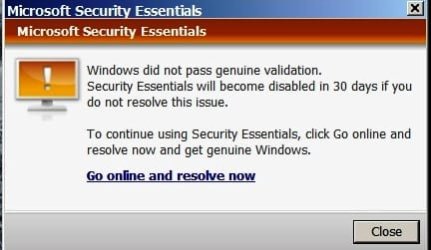
After the updates were installed (it DID take awhile!) and re-booted, I did received the message that Windows was not genuine (???). This very much puzzles me, as I purchased this computer from an individual who purchased it directly from Dell (Dell Optiplex 760) . . . and, I had contacted Dell (I have all the communications to me via e-mail), and they asseverated the fact that my tower was still under warranty with them. So, how can it be that fact that Windows is not genuine??? I did see, however, that there may be something wrongly installed/improperly installed that may be causing this issue also.
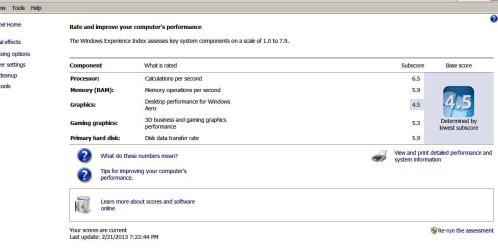
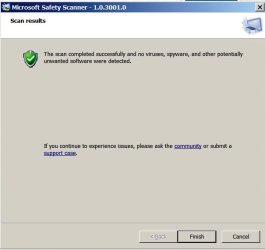
Here are a few images attached. The one message Cottonball, as you can see, "threatened" me about canceling Windows Essential antivirus program in 30 days if I don't get it resolved. Is Essential any better than Microsoft Safety Scanner (which I just found out about), or, should both be used?
Once again, thank you SO VERY MUCH for your help. You're absolutely brilliant, and I know I'm not exaggerating here. Incidentally, we have a 20-month-old female Dachshund - our favorite of all dogs. My Facebook: www.facebook.com/lhild | My System Specs | | System Manufacturer/Model Number Dell Optiplex 760 OS Windows 7 Pro, 64-bit |
21 Feb 2013
|
#5 | | Windows 7 Ultimate 32bit SP1 |
maranatha4u, see if this works for you....
Copy and paste these lines in Note pad. @Echo on pushd\windows\system32\drivers\etc attrib -h -s -r hosts echo 127.0.0.1 localhost>HOSTS attrib +r +h +s hosts popd ipconfig /release ipconfig /renew ipconfig /flushdns netsh winsock reset all netsh int ip reset all shutdown -r -t 1 del %0
Save as flush.bat to your desktop.
Double click on the flush.bat file to run it.Vista and Windows 7... right click the .bat file and choose to run as Administrator. Your computer will reboot itself.
Next, download TFC by Old Timer TFC - Temp File Cleaner by OldTimer - Geeks to Go Forums and save it to your desktop. Save any unsaved work. TFC will close ALL open programs including your browser!
Double-click on TFC.exe to run it. If you are using Vista/Windows 7 right-click on the file and choose Run As Administrator.
Click the Start button to begin the cleaning process and let it run uninterrupted to completion. Important! If TFC prompts you to reboot, please do so immediately. If not prompted, manually reboot the machine anyway to ensure a complete clean.
Now, download MSE http://www.microsoft.com/en-us/downl...s.aspx?id=5201 and " save it to your downloads". Go off line to uninstall MSE, reboot and then right click to run as Administrator on MSE in your saved downloads to re-install. (do NOT click run!) Let it update and scan!
Let us know if you're still having the same problems. | My System Specs | | System Manufacturer/Model Number Bruce ... somewhere in his 40's OS Windows 7 Ultimate 32bit SP1 CPU Intel(R) Core(TM)2 Quad CPU @ 2.40GHz, 2400 MHz Motherboard INTEL/D975XBX2 Memory 4 GB Graphics Card ATI Radeon HD 2600 Pro Monitor(s) Displays Samsung SyncMaster 914v Screen Resolution 1280 x 1024 Keyboard Standard PS/2 Keyboard Mouse Microsoft PS/2 Mouse PSU Rocketfish 700 W Case G.Skill Gigabyte Chassis Hard Drives 2/500GB each ... ST3500630AS ATA Device.
One is not connected Internet Speed DSL Antivirus Avira Internet Security Browser IE 9 Other Info ATI HDMI Audio |
21 Feb 2013
|
#6 | | Windows 7 Pro, 64-bit Lakeland, Florida USA |
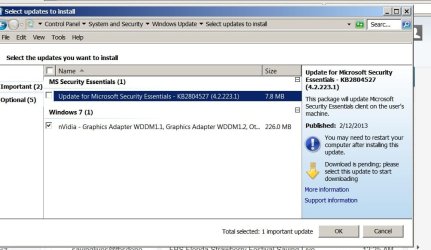
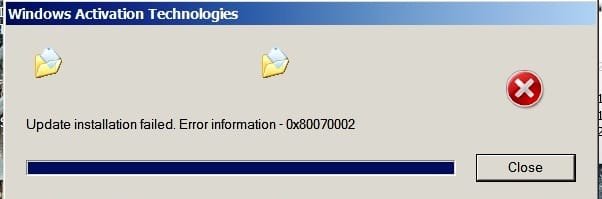
Thanks so much. I'll do as you've mentioned here. When I did the Windows Update a few minutes ago from the start menu (and, maybe Cottonball can see this post too), it scrolled for a minute or so and then I got that nasty red error message, telling me that there were two (2) update that didn't go through - the Essentials (which I'll do as you said here to try to resolve, but the other one was the nVidia. Please see the attached screenshot. But, I'll do as you said right now and get back with you.
Thank, once again, so very much for your help in this. | My System Specs | | System Manufacturer/Model Number Dell Optiplex 760 OS Windows 7 Pro, 64-bit |
21 Feb 2013
|
#7 | | Windows 7 Ultimate 32bit SP1 |
nVidia is an "optional" update driver. Do not update non MS drivers using Windows update!
Uncheck that selection, and put a checkmark in the box above it (MSE) | My System Specs | | System Manufacturer/Model Number Bruce ... somewhere in his 40's OS Windows 7 Ultimate 32bit SP1 CPU Intel(R) Core(TM)2 Quad CPU @ 2.40GHz, 2400 MHz Motherboard INTEL/D975XBX2 Memory 4 GB Graphics Card ATI Radeon HD 2600 Pro Monitor(s) Displays Samsung SyncMaster 914v Screen Resolution 1280 x 1024 Keyboard Standard PS/2 Keyboard Mouse Microsoft PS/2 Mouse PSU Rocketfish 700 W Case G.Skill Gigabyte Chassis Hard Drives 2/500GB each ... ST3500630AS ATA Device.
One is not connected Internet Speed DSL Antivirus Avira Internet Security Browser IE 9 Other Info ATI HDMI Audio |
21 Feb 2013
|
#8 | | Windows 7 Pro, 64-bit Lakeland, Florida USA |
Thanks so much; I'll uncheck that area. | My System Specs | | System Manufacturer/Model Number Dell Optiplex 760 OS Windows 7 Pro, 64-bit |
22 Feb 2013
|
#9 | | Windows 7 Home Premium On East 4th Street, USA |
Press on with Jacee's guidance. It will take a group effort to solve this.
At some point, when you get a break, please do the following to obtain some info...
Go to Start > All Programs > Accessories > Command Propmpt
Right-click the Command Prompt, and select: Run as Admnistrator
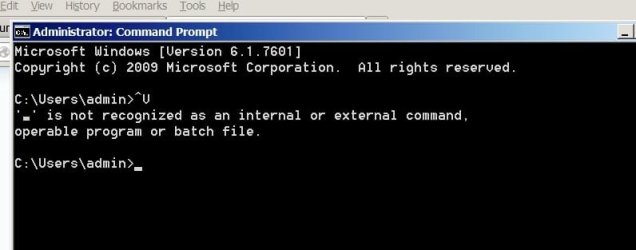
At the blinking cursor of the Command Prompt, copy paste the text inside the quote box below, and press Enter: Please provide an image of the results.
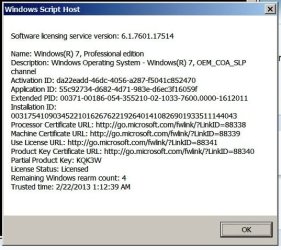
Next, do the same as above, but this time use the following text: Also provide an image of the results. SLMgr = Software Licensing Manager
Now, let's use the Event Viewer tool VEW by Vino Rosso to look at system event logs for error messages and other information that may be pertinent.
VEW download: http://images.malwareremoval.com/vino/VEW.exe
Save to the Desktop
Right-click the icon on the Desktop (VEW.exe), and select: Run as Administrator
Click Allow at the User Account Control (UAC) prompt.
At the VEW program console:
In the Select log to query section, check:
Application
System
In the Select type to list section, check:
Critical (not XP)
Error
Warning
In the Number or date of events section, check:
Number of events
Type 20 in the 1 -20 box
Now, press the Run button.
A Notepad report opens on the Desktop when the program is done.
Please post it here for our eyes to look at. | My System Specs | | OS Windows 7 Home Premium |
22 Feb 2013
|
#10 | | Windows 7 Pro, 64-bit Lakeland, Florida USA |
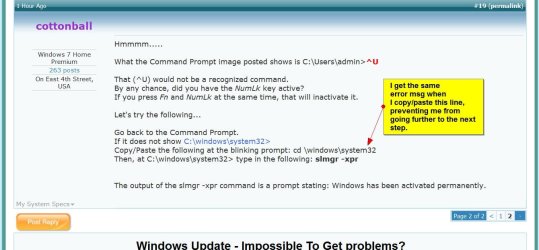
Cottonball, I got the first one but, for whatever reason, I get an error msg on the second one. First one is attached. | My System Specs | | System Manufacturer/Model Number Dell Optiplex 760 OS Windows 7 Pro, 64-bit Windows Update - Impossible To Get problems? All times are GMT -5. The time now is 12:39 AM. | |