| Windows 7: Can't edit and resave a .txt file?? |
26 Oct 2009
|
#1 | | |
Can't edit and resave a .txt file?? I'm obviously not used to all this new permission stuff.
I have files on external drives that I need to access and update. So I opened a 'txt' file I had created with Notepad (with XP or Vista64), made a small change and then I was not allowed to re-save to the same folder with the same name. Ctrl+S popped up a 'file save' dialogue box and when I navigated to the folder on the external drive and tried to overwrite the original I got Permission Denied.
What's going on?
I will also access this same drive with other computers running XP or Vista64 so I don't want to do anything that will make it impossible to share the data.
This is not a public computer, I'm the only user, I have a hardware firewall, I have never ever had a single virus in 20 years of computing (old 8088 days..), I image my hard disks regularly .. so I don't need a super security system preventing me from opening and saving my own files.
I'm just afraid to poke at it for fear of rendering these files inaccessible on my other systems.
Thanks for any advice :-) | My System Specs |
| |
26 Oct 2009
|
#2 | | Windows 7 Ultimate 32bit SP1 |
Can you right click on the file and 'Run as Administrator'? | My System Specs | | System Manufacturer/Model Number Bruce ... somewhere in his 40's OS Windows 7 Ultimate 32bit SP1 CPU Intel(R) Core(TM)2 Quad CPU @ 2.40GHz, 2400 MHz Motherboard INTEL/D975XBX2 Memory 4 GB Graphics Card ATI Radeon HD 2600 Pro Monitor(s) Displays Samsung SyncMaster 914v Screen Resolution 1280 x 1024 Keyboard Standard PS/2 Keyboard Mouse Microsoft PS/2 Mouse PSU Rocketfish 700 W Case G.Skill Gigabyte Chassis Hard Drives 2/500GB each ... ST3500630AS ATA Device.
One is not connected Internet Speed DSL Antivirus Avira Internet Security Browser IE 9 Other Info ATI HDMI Audio |
26 Oct 2009
|
#3 | | Windows 7 Ultimate 32bit SP1 |
Edit to the above .... 'take ownership' is what you want to click on.
BTW, I've opened many .txt files and edit them. I click the X and it asks if I want to save, don't save or cancel ... I click on save and it stays in the same folder with the same name. | My System Specs | | System Manufacturer/Model Number Bruce ... somewhere in his 40's OS Windows 7 Ultimate 32bit SP1 CPU Intel(R) Core(TM)2 Quad CPU @ 2.40GHz, 2400 MHz Motherboard INTEL/D975XBX2 Memory 4 GB Graphics Card ATI Radeon HD 2600 Pro Monitor(s) Displays Samsung SyncMaster 914v Screen Resolution 1280 x 1024 Keyboard Standard PS/2 Keyboard Mouse Microsoft PS/2 Mouse PSU Rocketfish 700 W Case G.Skill Gigabyte Chassis Hard Drives 2/500GB each ... ST3500630AS ATA Device.
One is not connected Internet Speed DSL Antivirus Avira Internet Security Browser IE 9 Other Info ATI HDMI Audio |
26 Oct 2009
|
#4 | | Windows 7 Ultimate x64 SP1 Somewhere on the 3rd rock from the sun. |
This may be a permissions folder, but it also depends upon where you are trying to write to, and especially if you upgraded / clean installed Windows 7 while carrying over folders from a previous operating system.
If you try to write to System Protected areas, like %systemroot% (aka \Windows\System32\) or %ProgramFiles% (aka \Program Files\) you'll get an error - this is by design.
If you are trying to write to a folder you definitely have access to write in (My Documents, etc) then check to see if the file is read only.
If you are trying to write to a folder that you created using an older operating system after having clean installed Windows 7, it can definitely be a permission issue. The easiest thing to do is to go folder by folder and take ownership of the folders that belong to you (meaning leave out \Recycler, and the hidden \System Restore folders, and other similar system created folders if they exist), but this can be a daunting task, as you'll then need to also add yourself to the permission list to allow yourself to read, write, etc. to those folders.
There is an easier way to fix it depending upon your scenario from the three I have listed, so please post back on which scenario fits you.... | My System Specs | | Computer type PC/Desktop System Manufacturer/Model Number The Beast Model V OS Windows 7 Ultimate x64 SP1 CPU Core i7 965 EE @3.6 GHz Motherboard eVGA x58 Classified3 Memory 3 * 4GB Mushkin Enh Redline CL7 DDR3 1600 MHz (PC3-12800) Graphics Card eVGA 560 Ti 448 Core Classified + eVGA GTX260 SSC (PhysX) Sound Card Realtek HD Audio (on-board) Monitor(s) Displays 2 * Acer X213Wbd Screen Resolution 2 * 1680 x 1050 Keyboard Logitech G15 Keyboard Mouse Logitech Performance Mouse MX PSU ThermalTake BlackWidow TX TR2 850 W Case ThermalTake Level 10 GT (Black) Cooling Corsair H100 CPU | 2 * TT 140mm TriLED | 2 * Antec TriCool Hard Drives 1 * Intel Cheryville 520 180 GB SATA III SSD |
1 * Intel X-25M G2 80 GB SATA II SSD |
2 * Seagate 1 TB 32MB Cache 7200.12 SATA II Mech. Internet Speed Cable - 35 Mbit down / 12 Mbit up advertised (30 / 6 act.) Antivirus M$Se / MBAM Pro / WinPatrol Pro Browser Chome(dev) / Canary / Firefox Minefield / Opera Next / IE 10 Other Info Wacom Bamboo Touch |
Hauppauge WinTV-HVR-1850 |
Optimus STAV-3400 AV Receiver |
Bose 301 Series III Speakers (Main channel) |
Bose 161 Speakers (Surround) |
Optimus 3 way 100-W speaker (Center) |
Logitech Clearchat PC Wireless Headset |
Koss ProDJ 100 Headphones |
Microsoft LifeCam Studio |
Motorola Droid BIONIC |
ASUS Transformer Infinity 64GB |
29 Oct 2009
|
#5 | | |
I cannot find any sign of a Right-click "take ownership' option.
As a commercial photographer I have over 20 external hard disks of archived jobs (everything dublicated on 2 drives) and need to be able to start up a drive, access the files and make modifications as needed.
What I have found is a 'Security' tab that allows me to set permissions for the whole drive.
I just inserted an external SATA drive and the displayed permissions are: Everyone: Nothing ticked except Special permissions which has a gray checkmark Creator Owner: Nothing ticked except Special permissions which has a gray checkmark System: All choices ticked EXCEPT Special permissions Administrators: All choices ticked EXCEPT Special permissions Users: Full control, Modify, Write NOT ticked (Special permissions has gray checkmark)
Is this what it should be set to? Or is there something wonky which explains why I was unable to do a simple update to a .txt file?
As a test I set access permissions for Everyone to everything Allowed and that solved it. Though it took a few minutes for all the permissions to be modified on that drive and that scared me, because I still need to access these files with the other systems in my office. And I feared what that all that whirring on the hard drive would do to my ability to access those files from my other systems.
Is there a simple 'global setting' solution?
Thanks for any help :-)
Russell | My System Specs | | |
30 Oct 2009
|
#6 | | Windows 7 Ultimate x64 (Retail) Honolulu, HI, USA |
I think you already found it.
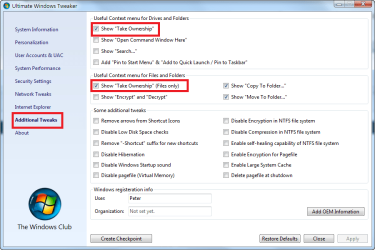
But there is a simple way to add the 'take ownership' for drives, folders and files menu items to your explorer right click context menu which would make solving this problem a little easier in the future.
To do this you can use a free portable (does not need to be installed) app called ' Ultimate Windows Tweaker" to add the take ownership items to the context menu. Below is a screen shot of the part of the app that allows adding these items. As you can see, it's just a simple check box and then you'll have the take ownership entries on the right click context menu. (You can also subsequently remove them from the menu with the app by unchecking the same boxes.) | My System Specs | | System Manufacturer/Model Number HP DV8t quad OS Windows 7 Ultimate x64 (Retail) CPU i7-Q 720 Motherboard Motherboard Chipset Intel Ibex Peak-M PM55, Intel Lynnfield Memory 6 GB Graphics Card nVidia GeForce GT 230M (1GB) Sound Card IDT High Definition Audio CODEC Monitor(s) Displays 18.4 inch HP Infinity FHD (Samsung 184HT03-001) Screen Resolution 1920 x 1080 Keyboard laptop Mouse Logitech VX Revolution Cooling Zalman NC-2000 notebook cooling pad Hard Drives Hitachi 500GB 7200 rpm (x2)
Seagate FreeAgent 1.5 TB External USB (x2)
Thermaltake BlacX eSATA/USB 2.0 3.5/2.5 HD dock Other Info Backup Unit: Lenovo T61p |
30 Oct 2009
|
#7 | | |
In the meantime I found and installed the 'take ownership' registry tweak posted at: Take Ownership Shortcut
Should I uninstall that before installing the ' Ultimate Windows Tweaker' which looks a lot like the old XP Powertools. (thanks for that btw!)
I'm really surprised Microsoft did not predict that a lot of mom&pop computer users will want to access their files stored on removable media. And how are they supposed to deal with stuff like this? They're barely techno savvy enough to just write email. I find it hard to believe there would not be a simple pop-up warning "Security Alert! You are trying to access files on a new media volume. Do you wish to enable full read-write access?" Or something like that. Just making it impossible to open a file and re-save it (after added another cookie recipe, or an entry into a family tree) doesn't make a whole lot of sense. Why don't I see this behaviour with Vista?
Russell | My System Specs | | |
23 Dec 2009
|
#8 | | |
Are you kidding me. Microsoft never figured that people would need to edit files in their Windows 7 PC?
Are you kidding me! This is the most stupid things I have ever seen or heard of from Microsoft. WTF!
I have to go and get some kind of tweaker to edit a simple .TXT or .CFG file. You are kidding, right? | My System Specs | | |
04 Mar 2010
|
#9 | | |
Permissions etc: what a cock-up Yes I agree, having spent a couple of hours to research how to change the read only status of my documents, which I find Win 7 changed without my permission.
You would expect that effecting changes would be easy but forget that, MS has other ideas. I had to mess about for ages & read various posts (many unresolved) before accidentally correcting the problem. I also had to dwnld a tweak & install (against a MS warning that the provider could not be checked & I was about to make a registry change - not mentioned in the tutorial).
This is unforgiveable, MS you should be ashamed of poor implementation of whatever it was you were supposedly providing.
peterlonz | My System Specs | | OS win 7 CPU Intel Core i7-860 2.8GHz Motherboard Gigabyte GA-P55-UD3P P55 1156pin DDR3 MoBrd Memory 4 Gb Graphics Card Gigabyte PCI-E 1Gb 9600GT Sound Card On board Monitor(s) Displays 17" LG Flatron L1730S PSU 460 watts Case Coolmaster Centurion 05 Cooling 120mm + 80mm fans Hard Drives Seagate 1 Tb x 2 |
31 Jul 2010
|
#10 | | |
If you open your texteditor (e.g. notepad) "As Administrator", then open the file you want to edit from the file menu. You are then able to edit and save the file.
The suggestion earlier to "Run as Administrator" would not work as you are not trying to run the file, but edit it. What you are trying to "run" is your text editor.
I believe this is the way Microsoft intended for you to be able to edit these files. :-) | My System Specs | | Can't edit and resave a .txt file?? problems? All times are GMT -5. The time now is 06:29 AM. | |