System Manufacturer/Model Number Samsung NP530U4B-S02IN OS Windows® 8 Pro (64-bit) CPU Intel® Core™ i5 Processor 2467M (1.60GHz, 3MB L3 Cache) Motherboard Samsung Electronics Memory 6GB DDR3 System Memory at 1,333MHz (on BD 4GB + 2GB x 1) Graphics Card AMD Radeon™ HD7550M 1GB DDR3 (Ext. Graphic) Sound Card Realtek High Definition Audio Monitor(s) Displays 35.56cm (14.0) SuperBright 300nit HD LED Display Screen Resolution 1366x768
Hard Drives 1TB S-ATA II Hard Drive (5400RPM) with ExpressCache 16GB SSD Internet Speed sucks Antivirus Microsoft Security Essentials Browser Google Chrome (Sync enabled)
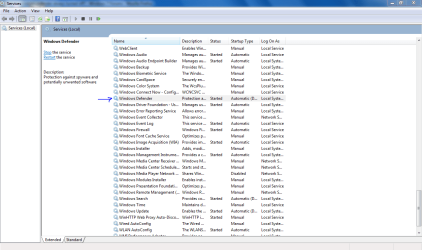
hmm thank you very much for that. but i started it once i turned on my pc/windows for this session. the settinds i saw were already: Automatic (delayed start) & Started.
System Manufacturer/Model Number 2 x home-brew OS Win 7 Ultimate 64-bit, Win7 N 32-bit, WHS CPU AMD 64 X2 3600+, AMD Phenom II X3 720BE Motherboard Gigabyte MA770-UD3, Gigabyte MA790GP-4UDH4, GA-890GPA-UDH3 Memory 4GB DDR2 OCZ dual-channel, 6GB DDR2 Corsair Graphics Card Gigabyte HD 4850 on the dual-booter, built-in on others Sound Card 2 x onboard Monitor(s) Displays LG Flatron W2353V Screen Resolution 1920 x 1080
Keyboard Logitech diNovo Edge Mouse Logitech MX Revolution PSU Corsair HX 620, Corsair 450, Kamariki et al. Case Lian Li PC-7F, Antec Sonata, Macase Hard Drives Seagates, Samsung, WD Internet Speed 1500kb/s Other Info There's a few other PCs in my 'office', all older machines, running Ubuntu 9.10, Vista Ultimate and one surviving Windows ME machine (due to some old programs that I haven't moved...). I believe another 'veteran' still runs OpenSuse...
hmm thank you very much for that. but i started it once i turned on my pc/windows for this session. the settinds i saw were already: Automatic (delayed start) & Started.
Change the settings to Disable and Stop the service.
Restart your pc.
Revert the changes back to Automatic (delayed start) & Started.
System Manufacturer/Model Number Samsung NP530U4B-S02IN OS Windows® 8 Pro (64-bit) CPU Intel® Core™ i5 Processor 2467M (1.60GHz, 3MB L3 Cache) Motherboard Samsung Electronics Memory 6GB DDR3 System Memory at 1,333MHz (on BD 4GB + 2GB x 1) Graphics Card AMD Radeon™ HD7550M 1GB DDR3 (Ext. Graphic) Sound Card Realtek High Definition Audio Monitor(s) Displays 35.56cm (14.0) SuperBright 300nit HD LED Display Screen Resolution 1366x768
Hard Drives 1TB S-ATA II Hard Drive (5400RPM) with ExpressCache 16GB SSD Internet Speed sucks Antivirus Microsoft Security Essentials Browser Google Chrome (Sync enabled)
MSE will turn Defender off by default as it assumes the role of anti-malware for your system.... If you are running MSE, there is no need for Defender, and that is why it is disabled....
System Manufacturer/Model Number ASUSTeK Computer INC. CM5675 OS Windows 7 Ultimate CPU Core(TM) i5 CPU 650 @ 3.20GHz Motherboard ASUSTeK Computer INC. CM5675 Memory 6.00 GB Graphics Card Intel(R) HD Graphics Sound Card Intel HD integtrated Monitor(s) Displays Samsung 24' Screen Resolution 1900/1020
Hard Drives (1) INTEL SSD SA2M120G2GC ATA Device (2) ST31000528AS ATA Device Internet Speed 30mb
System Manufacturer/Model Number ASUSTeK Computer INC. CM5675 OS Windows 7 Ultimate CPU Core(TM) i5 CPU 650 @ 3.20GHz Motherboard ASUSTeK Computer INC. CM5675 Memory 6.00 GB Graphics Card Intel(R) HD Graphics Sound Card Intel HD integtrated Monitor(s) Displays Samsung 24' Screen Resolution 1900/1020
Hard Drives (1) INTEL SSD SA2M120G2GC ATA Device (2) ST31000528AS ATA Device Internet Speed 30mb
Why is windows defender always turned off? problems?