| Windows 7: UAC + "Unknown Publisher" |
08 Feb 2009
|
#1 | | W7x64 US, NY's Hudson Valley |
UAC + "Unknown Publisher" I disabled UAC in Vista, but would like to give it a try in Windows 7, especially since you need UAC on to have Gadgets, which I also want to investigate.
But... I have a TSR pgm with 'unknown publisher' I want to be permanently approved to run without the UAC popup. There is a 'don't ask any more for this pgm' checkbox, but it doesn't work (UAC keeps asking). With UAC on it won't run at startup. With UAC off, it starts fine. Is there a way to do this? | My System Specs |
| |
08 Feb 2009
|
#2 | | |

Quote: Originally Posted by JeeperDon I disabled UAC in Vista, but would like to give it a try in Windows 7, especially since you need UAC on to have Gadgets, which I also want to investigate.
But... I have a TSR pgm with 'unknown publisher' I want to be permanently approved to run without the UAC popup. There is a 'don't ask any more for this pgm' checkbox, but it doesn't work (UAC keeps asking). With UAC on it won't run at startup. With UAC off, it starts fine. Is there a way to do this? Hi Don,
UAC doesnt have a 'don't ask any more for this pgm' checkbox and never will
Microsoft designed Task Scheduler to fill the void by not including a "White-List" for UAC
This Tutorial I created will show you how to allow the application to run with full System Administrative permissions without a UAC dialogue, I use it myself for launching some legacy applications that dont run on Vista and Windows 7 when UAC is enabled and it works perfectly Bypass UAC - Vista Forums
It will be updated for Windows 7 when it reaches RC status, if you have any problems then dont hesitate to ask
Steven | My System Specs | | |
08 Feb 2009
|
#3 | | W7x64 US, NY's Hudson Valley |
Thanks, that works. I looked further, it wasn't the UAC that asked the question I referred to, but the "Open File Security Warning" complaining about unknown publisher. | My System Specs | | |
17 Feb 2009
|
#4 | | Vista H.P. SP1 x32 Seven RC x64 |
You may have a "remember check box" for UAC with this soft: User Access Control - Vista User Account Control - UAC | Norton Labs
It's for Vista, I use it well under Vista but didn't try under Seven.
Maybe will it work.. or not, I don't know... | My System Specs | | OS Vista H.P. SP1 x32 Seven RC x64 CPU Q6600 @ 3.4Ghz Motherboard GA-EP45-DS3L Memory 4Go PC2-6400 Graphics Card 8500GT @ 700/500 Sound Card Audigy Platinium Monitor(s) Displays Mitsubishi Diamond Pro 920 + Mitsubishi Diamond Pro 720 Screen Resolution 1600x1200 twice Keyboard MS Wireless Multimedia 6000 V2.0 Mouse IntellEye Explorer 3.0 PSU Corsair VX550W Case Thermaltake Xaser III Cooling Watercooling (CPU, GPU, HDD, NB) Hard Drives Hitachi 160Go
Maxtor 160Go (system drive)
Maxtor 200Go in Antec MX-1 EC external box (eSATA-USB2.0) Internet Speed ADSL 18Mbit/s/1Mbit/s |
17 Feb 2009
|
#5 | | Windows 7 Ultimate x64 + x86 + Windows 8 x64 Newport, South Wales, UK |
Hello LePoilu,
The major problem with keeping a list of allowed programs is the possibility of this list becoming available to malware which then imitates the allowed program and defeats the system. The manual human input with UAC is the design strength of the system - assuming of course that the user does not become "click Happy" | My System Specs | | Computer type PC/Desktop System Manufacturer/Model Number Real World Computing (Me + a little help from Acer) OS Windows 7 Ultimate x64 + x86 + Windows 8 x64 CPU AMD Phenom II X6 1035T 2.6 GHz Motherboard Aspire M3400 Memory 4Gb PC10600 DDR3 1333 MHz Graphics Card NVIDIA GeForce 315 512MB Sound Card OnBoard - Realtek High Definition Audio Monitor(s) Displays Philips 32" HDTV, (HDMI) + 26" TV (VGA) Screen Resolution 1920 x 1080 @60Hz + 1360 x 768 @60Hz Keyboard Microsoft Wireless 800 or Stock Acer, (depends where I sit) Mouse Microsoft Wireless 800 or Stock Acer, (depends where I sit) PSU Stock (400W) Case Acer M3400 Cooling Stock Hard Drives 500 GB Seagate ST3500418AS SATA II
1 TB Hitachi HDS5C1010CLA382 SATAII
1 TB Samsung Spinpoint F1 HD103SI SATA II (external)
Plus various other (client ) HDDs as needed Internet Speed Temporaray 3G Dongle Antivirus Avast Browser Chrome Other Info USB Capture + Webcam(s) Bamboo Digitizer tablet
Also run Acer AspireOne 530h Netbook, Dual Core Atom + 1GB (Win7 Ult x86) Plus various test systems for new projects |
17 Feb 2009
|
#6 | | Vista H.P. SP1 x32 Seven RC x64 |
You right in a certain point of vue
But what is the risk we are talking about ?
A malware should be in your system. So, first problem here: how did it cam here? Then It should access to the list of allowed program. I may suppose this kind of list is not a *.txt without a minimum of security. Second probleme for the malware.
And as this is not a feature of the OS (at this day), but a third-party tools, that meen the malware should be very specific for this tool.
And finally, if the malware know the content of the list, it should be able to simulate a uge variaty of software, because it can not predict what software the user have and which are allowed in the list.
Lot of condition before you may experience a security issue.
On the other side you can remove a lot of annoying message.
Exemple: On my Vista I use this for 2 softwares loaded on system startup (Speedfan and Rivatuner), and other.
Without the tool: each time I reboot my system I need to stay and wait until I can clic to launch this 2 softwares.
Why use a automatic startup if I still have to manually validate each software ??? | My System Specs | | OS Vista H.P. SP1 x32 Seven RC x64 CPU Q6600 @ 3.4Ghz Motherboard GA-EP45-DS3L Memory 4Go PC2-6400 Graphics Card 8500GT @ 700/500 Sound Card Audigy Platinium Monitor(s) Displays Mitsubishi Diamond Pro 920 + Mitsubishi Diamond Pro 720 Screen Resolution 1600x1200 twice Keyboard MS Wireless Multimedia 6000 V2.0 Mouse IntellEye Explorer 3.0 PSU Corsair VX550W Case Thermaltake Xaser III Cooling Watercooling (CPU, GPU, HDD, NB) Hard Drives Hitachi 160Go
Maxtor 160Go (system drive)
Maxtor 200Go in Antec MX-1 EC external box (eSATA-USB2.0) Internet Speed ADSL 18Mbit/s/1Mbit/s |
17 Feb 2009
|
#7 | | Windows 7 Ultimate x64 + x86 + Windows 8 x64 Newport, South Wales, UK |
Hi LePoilu,
The thing with anything included in the system, is that it is fixed, and thus provides a "sitting duck" target for malware writers,. It's similar to the fitting of security to Cars by the manufacturer - as it's always fitted in the same place the thief soon learns how to disable it. In this case the same set of programs will become standards on whitelists thus making them targets.
UAC does not stop a user from downloading a trojan, that is not it's purpose
As for the problem you have with start-up programs this is actually answered by DMEX in this thread.
I did look at the Norton tool when it was released last year for Vista - but decided that the fact that it reported all its activities back to Symantec was not a good idea | My System Specs | | Computer type PC/Desktop System Manufacturer/Model Number Real World Computing (Me + a little help from Acer) OS Windows 7 Ultimate x64 + x86 + Windows 8 x64 CPU AMD Phenom II X6 1035T 2.6 GHz Motherboard Aspire M3400 Memory 4Gb PC10600 DDR3 1333 MHz Graphics Card NVIDIA GeForce 315 512MB Sound Card OnBoard - Realtek High Definition Audio Monitor(s) Displays Philips 32" HDTV, (HDMI) + 26" TV (VGA) Screen Resolution 1920 x 1080 @60Hz + 1360 x 768 @60Hz Keyboard Microsoft Wireless 800 or Stock Acer, (depends where I sit) Mouse Microsoft Wireless 800 or Stock Acer, (depends where I sit) PSU Stock (400W) Case Acer M3400 Cooling Stock Hard Drives 500 GB Seagate ST3500418AS SATA II
1 TB Hitachi HDS5C1010CLA382 SATAII
1 TB Samsung Spinpoint F1 HD103SI SATA II (external)
Plus various other (client ) HDDs as needed Internet Speed Temporaray 3G Dongle Antivirus Avast Browser Chrome Other Info USB Capture + Webcam(s) Bamboo Digitizer tablet
Also run Acer AspireOne 530h Netbook, Dual Core Atom + 1GB (Win7 Ult x86) Plus various test systems for new projects |
17 Feb 2009
|
#8 | | Vista H.P. SP1 x32 Seven RC x64 |

Quote: Originally Posted by Barman58 UAC does not stop a user from downloading a trojan, that is not it's purpose I know that well.
In my opinon. I really prefere a car with good grip (activ security) but less airbag (passiv security) that the opposite ... (the both togethere is the best  ) 
Quote: Originally Posted by Barman58 As for the problem you have with start-up programs this is actually answered by DMEX in this thread. I see that and will certainly use this "tip" for my Windows Seven. But It's like using a big truc for a littre postal letter. And I don't think it's "the good way for the things" 
Quote: Originally Posted by Barman58 I did look at the Norton tool when it was released last year for Vista - but decided that the fact that it reported all its activities back to Symantec was not a good idea this is another consideration  | My System Specs | | OS Vista H.P. SP1 x32 Seven RC x64 CPU Q6600 @ 3.4Ghz Motherboard GA-EP45-DS3L Memory 4Go PC2-6400 Graphics Card 8500GT @ 700/500 Sound Card Audigy Platinium Monitor(s) Displays Mitsubishi Diamond Pro 920 + Mitsubishi Diamond Pro 720 Screen Resolution 1600x1200 twice Keyboard MS Wireless Multimedia 6000 V2.0 Mouse IntellEye Explorer 3.0 PSU Corsair VX550W Case Thermaltake Xaser III Cooling Watercooling (CPU, GPU, HDD, NB) Hard Drives Hitachi 160Go
Maxtor 160Go (system drive)
Maxtor 200Go in Antec MX-1 EC external box (eSATA-USB2.0) Internet Speed ADSL 18Mbit/s/1Mbit/s |
17 Feb 2010
|
#9 | | |
I am having a hard time too 
Quote: Originally Posted by JeeperDon Thanks, that works. I looked further, it wasn't the UAC that asked the question I referred to, but the "Open File Security Warning" complaining about unknown publisher. I am looking on the internet and ran across this while trying to override this same message so I can run a program. I click on yes to allow but it doesnt do anything from go off the screen. I have tried to figure out what you did by the advice given to you but I can't figure it out so I am wondering if you could possibly explain in a different way or explain what you did when you later found it cane from a diff source altogether. Thanks | My System Specs | | |
17 Feb 2010
|
#10 | | |

Quote: Originally Posted by iawilkins 
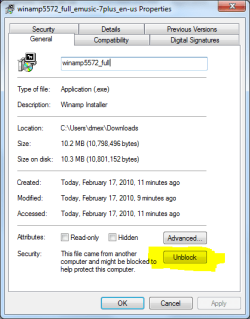
Quote: Originally Posted by JeeperDon Thanks, that works. I looked further, it wasn't the UAC that asked the question I referred to, but the "Open File Security Warning" complaining about unknown publisher. I am looking on the internet and ran across this while trying to override this same message so I can run a program. I click on yes to allow but it doesnt do anything from go off the screen. I have tried to figure out what you did by the advice given to you but I can't figure it out so I am wondering if you could possibly explain in a different way or explain what you did when you later found it cane from a diff source altogether. Thanks If its a file you downloaded, right-click it and go properties and then click the Unblock button, it shouldn't prompt you with the "Open File Security Warning" after that
Steven | My System Specs | | UAC + "Unknown Publisher" problems? All times are GMT -5. The time now is 07:36 PM. | |