
| Windows 7: Need help installing antivirus. |
15 Dec 2009
|
#1 | | |
Need help installing antivirus. I recently had Eset smart security 4 (x64) but it was giving me problems with updating so i had to uninstall it. I was unable to uninstall it normally so i had to manually uninstall it using safe mode and instructions from ESET Knowledgebase - How do I manually uninstall my ESET security product?.
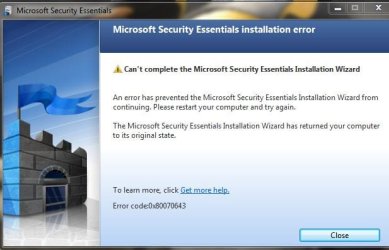
After doing that i tried to install microsoft security essentials because i heard it was quite good. When the installation started this error appeared immediately and closed the installation.
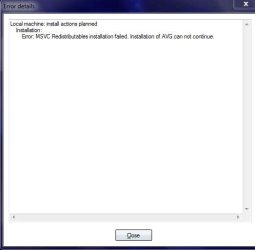
I figured MSE must be at fault and then tried to get AVG, which also had an installation error.
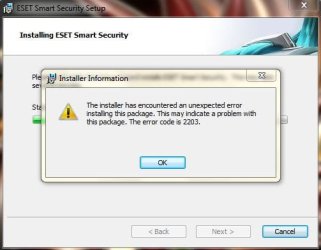
I decided to see if installing ESET again would fix my problem but it also had an error with installation.
I thought maybe i can't install anything so i tried to install 2 updates from windows update. The updates installed perfectly.
I then decided i would ask the awesome people on www.sevenforums.com for help so here i am. Any help would be greatly appreciated. | My System Specs |
| System Manufacturer/Model Number HP OS Windows 7 |
15 Dec 2009
|
#2 | | Windows 7 Home Premium SP1, clean install, upgrade disc CT |

Quote: Originally Posted by zippyzap I recently had Eset smart security 4 (x64) but it was giving me problems with updating so i had to uninstall it. I was unable to uninstall it normally so i had to manually uninstall it using safe mode and instructions from ESET Knowledgebase - How do I manually uninstall my ESET security product?.
After doing that i tried to install microsoft security essentials because i heard it was quite good. When the installation started this error appeared immediately and closed the installation. Attachment 42128
I figured MSE must be at fault and then tried to get AVG, which also had an installation error. Attachment 42126
I decided to see if installing ESET again would fix my problem but it also had an error with installation. Attachment 42127
I thought maybe i can't install anything so i tried to install 2 updates from windows update. The updates installed perfectly.
I then decided i would ask the awesome people on www.sevenforums.com for help so here i am. Any help would be greatly appreciated.  One cause of a problem like this is that remnants of the old A/V is still present. Go to website of your former A/V and use their uninstall tool (or something similar) | My System Specs | | System Manufacturer/Model Number Dell XPS 420 OS Windows 7 Home Premium SP1, clean install, upgrade disc CPU Intel Core2 processsor Q8200(2.33Ghz 1333FSB) Quad Core Tech Motherboard Dell Memory 6 gb Graphics Card ATI Radeon 256MB HD3650 Sound Card Intergrated 7.1 Channel Audio Monitor(s) Displays Dell SP2009W 20" Keyboard Dell USB Keyboard Mouse Dell Premium Optical USB Cooling Fan Hard Drives 640 GB Serial ATA Hard drive Internet Speed DSL 2.85 |
15 Dec 2009
|
#3 | | Windows 7 Build 7600 64 bit |
All you need to do is delete all the files in your temp folder located in the spot specified in your system variable.
Start > Run > Type "sysdm.cpl" > advanced > click environment variables > your temp folder location will be specified in the user variables field.
Go to the temp folder location and try to delete all files. Don't be afraid to remove all files from this folder since this is a temp folder.
You can also go to User-->username-->Application Data/Appdata-->Local-->Temp(delete all file in TEMP)
You can also try this command to delete all files located in any temp folder on your computer:
del %temp% /f /s /q
Ur can reinstall now...
Dunno if it work but its work for me..
And this is software i have use to fix the error 2203 on my brother com.
Have a nice day
Regard
-izzdihar | My System Specs | | System Manufacturer/Model Number AMD-ATI OS Windows 7 Build 7600 64 bit CPU AMD Phenom II X4 920 Motherboard TA 790GX 128M Memory Kingston HyperX 8GB-With Cooling Fan! Graphics Card Nvidia 280 Sound Card Realtek® HD Monitor(s) Displays SyncMaster Samsung 24 Inc and 19 Inc Keyboard Logitech Mouse Logitech PSU 1000W Case Cooler Master Cooling XpressCool Hard Drives Sata 1TB ,Maxtor 250GB x1 Internet Speed Connection 1GBPS but slow |
15 Dec 2009
|
#4 | | |

Quote: Originally Posted by richc46 One cause of a problem like this is that remnants of the old A/V is still present. Go to website of your former A/V and use their uninstall tool (or something similar) I had to use their uninstall tool to get rid of it but i don't know if any remnants would still be on my system. | My System Specs | | System Manufacturer/Model Number HP OS Windows 7 |
15 Dec 2009
|
#5 | | |
The problem arises with ESET itself. I've found on numerous occasions that when clients come in looking for an updated anti-virus that works better than NOD32 or ESET (an I usually recommend Kaspersky as a paid-for solution, or Avast or Microsoft Security Essentials as a free solution).
The trouble arises in uninstalling ESET or NOD32. If you go through Control Panel -> Add/Remove Programs, then you're in trouble. They advise that you MUST use the uninstall icon in the start menu for ESET or NOD32, otherwise it will not uninstall properly. This in itself is the primary reason why I do not use ESET products, because it shouldn't matter how you uninstall it, because when you do, it should remove itself fully.
I hate to say so, but usually the only way I can get ESET off a system so that another competing anti-virus solution can be installed, is to wipe the system and re-install Windows (And I'm a firm believer that formatting and installing is the ABSOLUTE last resort and should preferably not be used as a "solution") - This is so because not even the "official" ESET removal tools and/or manual removal inststruction work properly.
Even if you where to successfully re-install ESET (the IDENTICAL version you had installed - which is impossible, because the install never factors in any possible updates you may have previously used), then uninstall it using their recommended methods, will not work, and as a result, no other competing anti-virus product can be installed. | My System Specs | | System Manufacturer/Model Number Custom Build OS Windows 7 Ultimate x64 CPU AMD Phenom 9600 Quad Core Motherboard ASUS MB-M3A32-MVP Deluxe/WiFi Memory 2 x A-Data 2GB DDR2-800 Graphics Card ASUS ATI Radeon HD 2400PRO Sound Card C-Media 7.1 Surround Monitor(s) Displays Sahara 19" Screen Resolution 1600x1200 Keyboard Mercury Mouse Logitech PSU 800W Case Thermaltake Tai-Chi Cooling Tai-Chi Water Cooler Hard Drives 1 x 80GB Seagate (IDE)
2 x 120GB Seagate (IDE/Sata)
2 x 200GB Seagate (IDE/Sata)
1 x 250GB Seagate (Sata)
1 x 320GB Seagate (Sata)
2 x 1TB Seagate (Sata)
1 x 1.5TB Seagate (Sata) Internet Speed 384kbps |
15 Dec 2009
|
#6 | | W7x64 Pro, SuSe 12.1/** W7 x64 Pro, XP MCE Indian Territory |
| My System Specs | | System Manufacturer/Model Number DIY OS W7x64 Pro, SuSe 12.1/** W7 x64 Pro, XP MCE CPU Phenom II 1090T w/Noctua NH-D14 /**4400+ X2 w/CM Hyper TX 3 Motherboard ASRock 890FX Deluxe 4/**A8N-SLI Memory 2 x 2GB Patriot PGS34g1600LLKA/**4x1GB Corsair VS Graphics Card EVGA GTX460 SC/**EVGA 8800GTS Sound Card Asus Xonar D2X/**Xonar D1 Monitor(s) Displays Acer X233H, Dell E152FPc /**LG M237-WD Screen Resolution 1920x1080 & 1024x768/**1980x1080 Keyboard Logitech Media USB/**Saitek Eclipse Mouse Cordless Trackman Wheel/**Ditto PSU CM RS600 w/ APC BX1000G/**Antec 500 TP w/ APC BX1000 Case HAF922/**Antec 1040IIB Cooling 3x200mm, 1x140 and 1x120mm/**5x80mm fans Hard Drives WDC 2TB, 1.5TB, 1TB, 500GB,Seagate 500GB , Maxtor 80GB /**500GB Seagate & WDC 1TB Black Internet Speed 3.3Mbps Other Info SB 560 5.1 w/ Sennheiser RS140/**Creative T20 speakers, Dvico FusionHDTV7 Gold RT, Cisco E3000, HP 5510V AIO, Linksys E3000, Belkin F5U237 hub and **F5D8055 adapter
(** = 2nd rig) |
15 Dec 2009
|
#7 | | |

Quote: Originally Posted by Dzomlija The problem arises with ESET itself. I've found on numerous occasions that when clients come in looking for an updated anti-virus that works better than NOD32 or ESET (an I usually recommend Kaspersky as a paid-for solution, or Avast or Microsoft Security Essentials as a free solution).
The trouble arises in uninstalling ESET or NOD32. If you go through Control Panel -> Add/Remove Programs, then you're in trouble. They advise that you MUST use the uninstall icon in the start menu for ESET or NOD32, otherwise it will not uninstall properly. This in itself is the primary reason why I do not use ESET products, because it shouldn't matter how you uninstall it, because when you do, it should remove itself fully.
I hate to say so, but usually the only way I can get ESET off a system so that another competing anti-virus solution can be installed, is to wipe the system and re-install Windows (And I'm a firm believer that formatting and installing is the ABSOLUTE last resort and should preferably not be used as a "solution") - This is so because not even the "official" ESET removal tools and/or manual removal inststruction work properly.
Even if you where to successfully re-install ESET (the IDENTICAL version you had installed - which is impossible, because the install never factors in any possible updates you may have previously used), then uninstall it using their recommended methods, will not work, and as a result, no other competing anti-virus product can be installed.
Ouch, i was hoping to avoid that... i will try Izzdihar's and seekermeister's solutions first and hope i don't need to reformat. | My System Specs | | System Manufacturer/Model Number HP OS Windows 7 |
15 Dec 2009
|
#8 | | |
I had to reformat my pc to fix the problem.
but at least i have microsoft security essentials now | My System Specs | | System Manufacturer/Model Number HP OS Windows 7 |
15 Dec 2009
|
#9 | | Windows 7 Home Premium SP1, clean install, upgrade disc CT |
| My System Specs | | System Manufacturer/Model Number Dell XPS 420 OS Windows 7 Home Premium SP1, clean install, upgrade disc CPU Intel Core2 processsor Q8200(2.33Ghz 1333FSB) Quad Core Tech Motherboard Dell Memory 6 gb Graphics Card ATI Radeon 256MB HD3650 Sound Card Intergrated 7.1 Channel Audio Monitor(s) Displays Dell SP2009W 20" Keyboard Dell USB Keyboard Mouse Dell Premium Optical USB Cooling Fan Hard Drives 640 GB Serial ATA Hard drive Internet Speed DSL 2.85 |
16 Dec 2009
|
#10 | | |

Quote: Originally Posted by zippyzap I had to reformat my pc to fix the problem.
but at least i have microsoft security essentials now  Yeah, sorry that it had to come to that, but ESET's products don't like being uninstalled. It's almost as if they think their product is so good, you wouldn't want to uninstall, and therefore punish you by destroying the ability to install competing products if you try.
And to date, I have yet to find a way of removing ESET products successfully so that a competing AV solution can be installed. I'll let you know in a couple of years if I find the solution... | My System Specs | | System Manufacturer/Model Number Custom Build OS Windows 7 Ultimate x64 CPU AMD Phenom 9600 Quad Core Motherboard ASUS MB-M3A32-MVP Deluxe/WiFi Memory 2 x A-Data 2GB DDR2-800 Graphics Card ASUS ATI Radeon HD 2400PRO Sound Card C-Media 7.1 Surround Monitor(s) Displays Sahara 19" Screen Resolution 1600x1200 Keyboard Mercury Mouse Logitech PSU 800W Case Thermaltake Tai-Chi Cooling Tai-Chi Water Cooler Hard Drives 1 x 80GB Seagate (IDE)
2 x 120GB Seagate (IDE/Sata)
2 x 200GB Seagate (IDE/Sata)
1 x 250GB Seagate (Sata)
1 x 320GB Seagate (Sata)
2 x 1TB Seagate (Sata)
1 x 1.5TB Seagate (Sata) Internet Speed 384kbps Need help installing antivirus. problems? All times are GMT -5. The time now is 01:12 AM. | |