Well didn't take long...my girlfriend's computer with a brand new Win 7 Pro installation has a Trojan...Bit Defender stops it from accessing the Internet and Quarantines it...but it keeps reappearing as a new name. The location is always the same though as shown in the attached JPG. The Folders (source) always stay the same...but Bit Defender just Quarantines it...can't seem to find the source and remove it tho ?
The C:\Windows\ServiceProfiles\NetworkService\AppData\Temp\ is always the same...the wbwb.tmp changes...the svchost.exe is always the same.
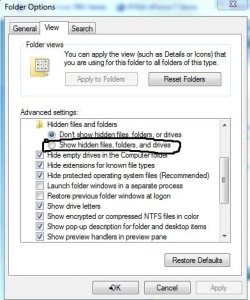
When I first opened the W\SP\NS directory...there was no "APPDATA" folder...and some how I managed to get the "\SERVICEPROFILE\NETWORKSERVICE\" to become hidden...while trying to show the APPDATA folder ?
Any help on how to both get the SERVICEPROFILE\NETWORKSERVICE folders to reappear, and, isolate this Trojan and remove it will be greatly appreciated.
Thanks, Tim
The C:\Windows\ServiceProfiles\NetworkService\AppData\Temp\ is always the same...the wbwb.tmp changes...the svchost.exe is always the same.
When I first opened the W\SP\NS directory...there was no "APPDATA" folder...and some how I managed to get the "\SERVICEPROFILE\NETWORKSERVICE\" to become hidden...while trying to show the APPDATA folder ?
Any help on how to both get the SERVICEPROFILE\NETWORKSERVICE folders to reappear, and, isolate this Trojan and remove it will be greatly appreciated.
Thanks, Tim
My Computer
At a glance
Windows 7 Pro 64bit SP1AMD FX-6100 Six-Core Processor2ea Corsair-1333MHz-PC3-10666-240-pin-CMX4GX3...NVIDIA GeForce GT 630 - 1023MB (EVGA)
- Computer type
- PC/Desktop
- Computer Manufacturer/Model Number
- Self built
- OS
- Windows 7 Pro 64bit SP1
- CPU
- AMD FX-6100 Six-Core Processor
- Motherboard
- M5A78L-M LX PLUS
- Memory
- 2ea Corsair-1333MHz-PC3-10666-240-pin-CMX4GX3M1A1333C9
- Graphics Card(s)
- NVIDIA GeForce GT 630 - 1023MB (EVGA)
- Sound Card
- OnBoard Via High Def Audio
- Monitor(s) Displays
- Samsung 204B main - ASUS VS228 secondary
- Screen Resolution
- 1920x1080 main - 1920x1080 secondary
- Hard Drives
- Samsung SSD 840 128GB Win7 Pro 64bit - Western Digital WDC 465GB - Seagate 640GB Sata B/U - Maxtor 500GB Sata B/U - Maxtor 200GB Sata
- PSU
- Antec 650 watt
- Cooling
- Multiple case fans
- Keyboard
- MS USB dual Wireless Keyboard - IntelliType Pro
- Mouse
- MS USB dual Wireless Mouse - IntelliPoint
- Internet Speed
- Cox Cable
- Antivirus
- Bitdefender IS 2014
- Browser
- FireFox Primary - IE 11
- Other Info
- Hauppaguge Win TV HVR-1250 (Model 22xxx, Hybrid ATSC/QAM)
Samsung HD103SI USB 1TB Desktop Drive - Backup & Disk Image storage