| Windows 7: Need lock-down guide - sending laptop to repair |
07 Feb 2010
|
#1 | | winxp pro, Vista home pro x64, win7 pro x86 & x64 |
Need lock-down guide - sending laptop to repair Hi Folks
I need a guide on how to lock-down the guest account so that the repair shop doesn't have access to most of it's contents. System setup: - Dual Boot Vista Home Premium / Windows 7 Pro (actually tripple-boot with WINE)
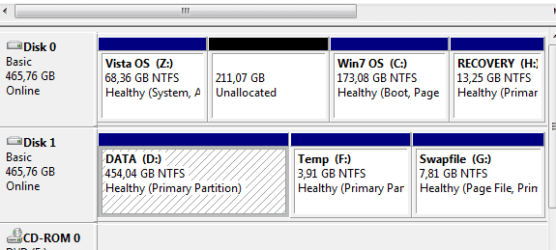
- Partitioning according attached image.
Steps done so far: - Activated Guest account.
- Drive D: applied security setting for Guest as Deny All
I want also to restrict as much as possible the content listing of the two system partitions, that is if it's possible to restrict listing what's installed on it, restrict access to certain programs,and so on- Questions: - Can I put Deny All to the VISTA partition from Windows 7 and vice versa?
- Can I restrict listing but still maintain the ability to run programs?
- If I move the program shortcuts from ProgramData to my normal User account, will they still be accessible to the Guest account?
Hope for a quick answer
/DM
EDIT: Can I use a disk imaging software like Norton Ghost or Acronis TrueImage to create working images for Vista from Windows 7 and vice versa in case of an "expert" reformatting the drives?
Last edited by daemonmonkey; 07 Feb 2010 at 06:42 AM..
| My System Specs |
| OS winxp pro, Vista home pro x64, win7 pro x86 & x64 |
07 Feb 2010
|
#2 | | Windows 7 build 7600 64 bit |
Encrypt partition with sensitive data, NTFS permissions won't stop them. | My System Specs | | OS Windows 7 build 7600 64 bit CPU Intel Core2Quad Q8200 2.33 GHz @ 2.33 GHz Motherboard Gigabyte GA-P35-S3 rev. 1 Memory GoodRAM DDR2 3 x 1 GB 800 MHz Graphics Card HIS ATI Radeon HD 4850 512 MB VRAM Sound Card Creative X-FI Gamer PSU 400 W |
07 Feb 2010
|
#3 | | Windows 7 Ultimate x64 Service Pack 1 Doncaster, UK |
What problems are you having necessitating its repair? | My System Specs | | Computer type PC/Desktop System Manufacturer/Model Number Dwarf Dwf/11/2012 OS Windows 7 Ultimate x64 Service Pack 1 CPU Intel Core-i5-3570K 4-core @ 3.4GHz (Ivy Bridge) (OC 4.2GHz) Motherboard ASRock Z77 Extreme4-M Memory 4 x 4GB DDR3-1600 Corsair Vengeance CMZ8GX3M2A1600C9B (16GB) Graphics Card 2 x AMD Radeon HD7770 1GB CrossFired (OC 1100MHz/1250MHz) Sound Card Realtek High Definition on board solution (ALC 898) Monitor(s) Displays ViewSonic VA1912w Widescreen (VGA) Screen Resolution 1440x900 Keyboard Microsoft Comfort Curve Keyboard 3000 (USB) Mouse Microsoft Comfort Mouse 3000 for Business (USB) PSU XFX Pro Series 850W Semi-Modular Case Gigabyte IF233 Cooling 1 x 120mm Front Inlet 1 x 120mm Rear Exhaust Hard Drives OCZ Agility 3 SSD 120GB SATA III x2 (RAID 0)
Samsung HD501LJ 500GB SATA II x2
Hitachi HDS721010CLA332 1TB SATA II
Iomega 1.5TB Ext USB 2.0
WD 2.0TB Ext USB 3.0 Internet Speed NetGear DG834Gv3 ADSL Modem/Router (Ethernet) ~4.0 Mb/s (O2) Antivirus Avast! 8.0.1483 Browser IE 9 Other Info Optical Drive: HL-DT-ST BD-RE BH10LS30 SATA Bluray
Lexmark S305 Printer/Scanner/Copier (USB)
CTF-430 Tablet & Pen
WEI Score: 7.7/7.9/7.4/7.4/7.9
Asus Eee PC 1011PX Netbook (Windows 7 x86 Starter) |
07 Feb 2010
|
#4 | | Windows 7 Ultimate x64 + x86 + Windows 8 x64 Newport, South Wales, UK |
If you do not trust the repair shop the best advice I can give is to find another repair shop.
If the laptop is going into the shop for a hardware repair that does not require the hard disk you could always simply remove the drive completely.
If this is a software issue or hardware that will require access to the system drives then you cannot really expect the technicians to work without full access to the drive, the only thing you can do is totally remove any sensitive data. | My System Specs | | Computer type PC/Desktop System Manufacturer/Model Number Real World Computing (Me + a little help from Acer) OS Windows 7 Ultimate x64 + x86 + Windows 8 x64 CPU AMD Phenom II X6 1035T 2.6 GHz Motherboard Aspire M3400 Memory 4Gb PC10600 DDR3 1333 MHz Graphics Card NVIDIA GeForce 315 512MB Sound Card OnBoard - Realtek High Definition Audio Monitor(s) Displays Philips 32" HDTV, (HDMI) + 26" TV (VGA) Screen Resolution 1920 x 1080 @60Hz + 1360 x 768 @60Hz Keyboard Microsoft Wireless 800 or Stock Acer, (depends where I sit) Mouse Microsoft Wireless 800 or Stock Acer, (depends where I sit) PSU Stock (400W) Case Acer M3400 Cooling Stock Hard Drives 500 GB Seagate ST3500418AS SATA II
1 TB Hitachi HDS5C1010CLA382 SATAII
1 TB Samsung Spinpoint F1 HD103SI SATA II (external)
Plus various other (client ) HDDs as needed Internet Speed Temporaray 3G Dongle Antivirus Avast Browser Chrome Other Info USB Capture + Webcam(s) Bamboo Digitizer tablet
Also run Acer AspireOne 530h Netbook, Dual Core Atom + 1GB (Win7 Ult x86) Plus various test systems for new projects |
07 Feb 2010
|
#5 | | W7 X-64 RTM,SUSE 11.1, XP PRO SP3 as a VM, VMware ESXi Hafnarfjörður IS |
Hi there
can you boot this machine from a DVD,
If you can then use a stand alone Backup - you can download a trial of acronis or other software - to backup to external drive and then WIPE the laptops HDD. You can use GPARTED or similar to force a wipe of the HDD.
Now you can restore the "initial configuration" if the laptop came with pre-installed stuff - if not just send the laptop for repair with an empty disc.
Technicians will have bootable OS'es etc for repairing the computer -- when you get it back make sure they haven't charged you for "re-installing an OS".
If the system isn't bootable then remove the HDD and insert another one if you can --laptop HDD's are generally easy to remove and swap.
Enc pic of typical SATA laptop HDD.
Cheers
jimbo | My System Specs | | System Manufacturer/Model Number Custom built OS W7 X-64 RTM,SUSE 11.1, XP PRO SP3 as a VM, VMware ESXi CPU Q9400 QUAD Motherboard P5QL-CM Memory 8GB Graphics Card On Motherborad Sound Card Realtek HD audio Monitor(s) Displays Apple Cinema display Mouse Toshiba wireless laser Hard Drives 4 X 1TB SATA Internet Speed > 20MB up |
07 Feb 2010
|
#6 | | winxp pro, Vista home pro x64, win7 pro x86 & x64 |

Quote: Originally Posted by Dwarf What problems are you having necessitating its repair? Just a warranty keyboard repair (it's a laptop). 
Quote: Originally Posted by Barman58 If you do not trust the repair shop the best advice I can give is to find another repair shop.
If the laptop is going into the shop for a hardware repair that does not require the hard disk you could always simply remove the drive completely.
If this is a software issue or hardware that will require access to the system drives then you cannot really expect the technicians to work without full access to the drive, the only thing you can do is totally remove any sensitive data. It's a warranty repair, thus I'm stuck with this repair shop. HP tech said that I could not remove the drives, and that I should back up the data, bedause he could not guarantee that the shop doesn't format the drives.
My main reason for this is really the big trouble to reinstall all software according to my needs. At the same time I don't want them fiddling around in my personal data, not that it is sensitive, but I do have some personal stuff. Also I don't want them to get their hands on my media files, MP3's etc.
I don't believe that a shop has a standard procedure of reformatting drives, but I've known of repair guys that have the FFR procedure as standard, even if it is swapping a CD-drive or replacing a keyboard.... Attached: pics of my two HDD's... | My System Specs | | OS winxp pro, Vista home pro x64, win7 pro x86 & x64 |
07 Feb 2010
|
#7 | | 32bit: XP, Win7 H.P. / 64bit: 2008R2, Win7 Pro, Ultimate / Several flavors of Linux Denver, Colorado |

Quote: Originally Posted by daemonmonkey Just a warranty keyboard repair (it's a laptop).
It's a warranty repair, thus I'm stuck with this repair shop. HP tech said that I could not remove the drives, and that I should back up the data, bedause he could not guarantee that the shop doesn't format the drives.
OK, this seals the deal...it's an HP repair. THEREFORE, I strongly recommend you create a full image of all partitions. DON'T FOREGET to include the MBR (some backup programs don't do the MBR unless specified as a switch).
Then delete all the stuff you want (don't want on the drive) and if necessary run a "zero wipe" program to overwrite all free space.
I bring all of this up because there is a HIGH PROBABILITY the HP repair WILL do you a "favor" and return the lappy to it's original As-shipped conditions. That means your partitions will be wiped/loaded to as-shipped as well as all the HP bloatware installed, etc.
When it returns (hopefully repaired) you can restore everything the way it was.
Speaking From Experience,
GEWB | My System Specs | | System Manufacturer/Model Number (5 different computers booting up to 12 systems) OS 32bit: XP, Win7 H.P. / 64bit: 2008R2, Win7 Pro, Ultimate / Several flavors of Linux |
08 Feb 2010
|
#8 | | winxp pro, Vista home pro x64, win7 pro x86 & x64 |

Quote: Originally Posted by GEWB
OK, this seals the deal...it's an HP repair. THEREFORE, I strongly recommend you create a full image of all partitions. DON'T FOREGET to include the MBR (some backup programs don't do the MBR unless specified as a switch).
Then delete all the stuff you want (don't want on the drive) and if necessary run a "zero wipe" program to overwrite all free space.
I bring all of this up because there is a HIGH PROBABILITY the HP repair WILL do you a "favor" and return the lappy to it's original As-shipped conditions. That means your partitions will be wiped/loaded to as-shipped as well as all the HP bloatware installed, etc.
When it returns (hopefully repaired) you can restore everything the way it was.
Speaking From Experience,
GEWB Thanks GEWB
Seems that your advice (and of the others here) is the one I should follow. I don't care about wiping etc. as the main reason is the huge work in restoring the computer as I want it.
I hope the consumer laws here in Scandinavia are strong enough to make them think twice before doing such a thing. It IS illegal to breach security measures, to destroy data unless approved by the EU, etc. Doesn't help when facts are there, so hopefully by sending in a note that they aren't allowed to do things like that without contacting me can scare them enough... A huge THANK YOU to all who have responded!   | My System Specs | | OS winxp pro, Vista home pro x64, win7 pro x86 & x64 Need lock-down guide - sending laptop to repair problems? All times are GMT -5. The time now is 07:22 PM. | |