Windows defender keeps bugging me...

slughappy1

New member
Every time I log in, Windows Defender tells me that "This program is turned off". I installed MSE when I first installed 7. MSE is running and Defender keeps bugging me that it's turned off. How can I fix it so Defender will stop telling me that it is turned off?
 

My Computer

OS
Windows 7
It is supposed to be turned off/uninstalled automatically when MSE is installed, but it doesn't "always" seem to work that way. Go to "Programs and Features" in the control panel and see if it is still listed there. It shouldn't be, but if it is, uninstall it.
 

My Computer

Computer Manufacturer/Model Number
Toshiba Satellite L455D
OS
Windows 7 Home Premium
CPU
Amd Semperon 2.10GHz
Memory
2 Gig
Graphics Card(s)
ATI Radeon 3100
Sound Card
Realtek
Monitor(s) Displays
15.6 inch
Screen Resolution
1366x768
Hard Drives
250gig
Mouse
Logitech Wireless
Internet Speed
16/2 cable
Is it listed as a running process? Is it running as a service?
 

My Computer

Computer Manufacturer/Model Number
Toshiba L505
OS
Windows 7 64x
CPU
AMD Turion II Dual-Core Mobile M520 2.30 GHz
Memory
4GB
Graphics Card(s)
ATI Radeon HD 4200
Hmmm....ok. How about going into Control Panel\Administrative Tools > Services and disabling in there? Other than that, i'm not sure why it would still pop-up when MSE is installed.

Can also go to msconfig and make sure it is not checked to startup when the comuter starts up.
 

My Computer

Computer Manufacturer/Model Number
Toshiba Satellite L455D
OS
Windows 7 Home Premium
CPU
Amd Semperon 2.10GHz
Memory
2 Gig
Graphics Card(s)
ATI Radeon 3100
Sound Card
Realtek
Monitor(s) Displays
15.6 inch
Screen Resolution
1366x768
Hard Drives
250gig
Mouse
Logitech Wireless
Internet Speed
16/2 cable
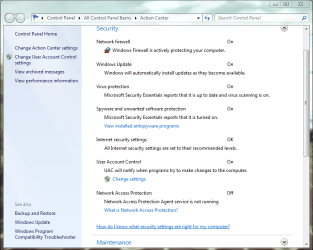
I checked and it's not in the running services. I went into Services and Disabled Windows Defender. The next time I booted up I got the same pop up. I've attached a screen shot of the pop up, and the Action Center. There isn't anything in the Action Center to change like it suggests.
 

Attachments

  • Capture.PNG
    Capture.PNG
    47.8 KB · Views: 9
  • Capture1.PNG
    Capture1.PNG
    155.6 KB · Views: 33

My Computer

OS
Windows 7
If you are trying to disable Defender -- and I'm unsure whether u are -- you could try disabling via msconfig perhaps>
 

My Computer

OS
Windows XP - Now Windows 7 Home Premium (64-bit).
I am trying to disable it. I have MSE that I use instead. I don't see Windows Defender in MSCONFIG.
 

My Computer

OS
Windows 7
Hello Slughappy1, and welcome to Seven Forums.

You may have had a botched MSE install. See if turning on Windows Defender, then uninstalling and reinstalling MSE again may stop this for you.
 

My Computer

Computer type
PC/Desktop
Computer Manufacturer/Model Number
Self built custom
OS
64-bit Windows 11 Pro for Workstations
CPU
Intel i7-8700K OC'd to 5 GHz
Motherboard
ASUS ROG Maximus XI Formula Z390
Memory
64 GB (4x16GB) G.SKILL TridentZ RGB DDR4 3600 MHz
Graphics Card(s)
ASUS ROG-STRIX-GTX1080TI-O11G-GAMING
Sound Card
Integrated
Monitor(s) Displays
2 x Samsung Odyssey G7 27"
Screen Resolution
2560x1440
Hard Drives
1TB Samsung 990 PRO M.2,
4TB Samsung 990 PRO PRO M.2,
TerraMaster F8 SSD Plus NAS
PSU
Seasonic Prime Titanium 850W
Case
Thermaltake Core P3
Cooling
Corsair Hydro H115i
Keyboard
Logitech wireless K800
Mouse
Logitech MX Master 4
Internet Speed
2 Gb/s Download and 100 Mb/s Upload
Antivirus
Malwarebyte Anti-Malware Premium
Browser
Google Chrome
Other Info
Logitech Z625 speaker system,
Logitech BRIO 4K Pro webcam,
HP Color LaserJet Pro MFP M477fdn,
APC SMART-UPS RT 1000 XL - SURT1000XLI,
Galaxy S23 Plus phone
View attachment 71402
Make sure this or anything else pertaining to defender is unchecked.
Had the same problem and it worked for me.
 
Last edited:

My Computer

Computer type
PC/Desktop
Computer Manufacturer/Model Number
Acer M5641
OS
Windows 7 Home Premium 64bit
CPU
Q6600
Motherboard
Nvidia MCP73PV
Memory
4GB.
Graphics Card(s)
Sapphire Vapor-X 5750
Sound Card
XFI Extreem music
Monitor(s) Displays
Acer X223W
Screen Resolution
1680x1050
Hard Drives
WD10 02FAEX
WD64 00AAKS
PSU
stock 450w
Case
acer
Cooling
stock
Keyboard
Microsoft Digital Media Pro.
Mouse
Logitech MX620
Internet Speed
49.51Mbs down 4.98Mbs up 17.6ms ping
Antivirus
MSE
Browser
Waterfox
Other Info
Shaw Cable
Netgear R6200
Windows 7 Ultimate Defender

I have just installed Windows 7 Ultimate, and I want to ensure that my PC is protected. When I check Defender it says it is turned off. I keep trying to turn it on and it will fluctuate back and forth between on and off, so I never know if it working or not.

Can someone help me?

Thanks,

LeeM
 

My Computer

OS
Windows 7 Ultimate
I have just installed Windows 7 Ultimate, and I want to ensure that my PC is protected. When I check Defender it says it is turned off. I keep trying to turn it on and it will fluctuate back and forth between on and off, so I never know if it working or not.

Can someone help me?

Thanks,

LeeM

Hello LeeM !!

I would recommend Microsoft Security Essentials for the best security

- Captain
 

My Computer

Computer Manufacturer/Model Number
Samsung NP550P5C-S02IN
OS
Windows 7 Ultimate - 64-bit | Windows 8 Pro - 64-bit
CPU
Intel® Core™ i7 Processor 3,610QM (2.30Hz, 6MB L3 Cach
Memory
8 GB
Graphics Card(s)
NVIDIA® GeForce® GT 650M 2GB Graphics, Optimus™ techno
Sound Card
SoundAlive™ JBL 3 Speakers (With sub-Woofer)
Monitor(s) Displays
39.62cm (15.6) SuperBright 300nit HD+ LED Display
Screen Resolution
1,600 x 900, Anti-Reflective
Hard Drives
1TB S-ATA II Hard Drive (5,400RPM)

My Computer

Computer type
PC/Desktop
Computer Manufacturer/Model Number
Scan 3XS P55 liteDAW
OS
Windows Home Premium (64)
CPU
Intel Core i7 860
Motherboard
Gigabyte GA-P55A-UD4
Memory
8GB (4x2GB) Corsair TwinX XMS3
Graphics Card(s)
1GB Gainward 9500 GT
Sound Card
M-Audio Delta 66
Monitor(s) Displays
Acer v223wBBd
Screen Resolution
1680 x 1050
Hard Drives
1 x 500 GB WD Barracuda (OS+Docs)
2 x 1TB Samsung Spinpoint F3 (Data)
PSU
Enermax EMD625AWT II - 625W Enermax Modu82+ II
Case
Fractal Design Define R2 Black
Cooling
Prolima Megahalems Super 6 Heatpipe Tower Cooler
Keyboard
Microsoft Digital Media Pro
Mouse
Belkin Optical Ergo
Internet Speed
8 Mbps nominal (14.9 achieved !)
Other Info
Digital Audio Workstation
From what I understood MSE does not uninstall Defender. It is just supposed to turn it completely off. Which it failed to do. What is weird is that fact that MSE did in fact work properly for a while. Defender just randomly started telling me it wasn't started. Then a clean install of MSE didn't fix it either.
 

My Computer

OS
Windows 7
Defender cannot be uninstalled. It is built-in to Windows, and can only be disabled.
 

My Computer

Computer Manufacturer/Model Number
Custom
OS
Windows 7 Professional x64
CPU
Intel i7 2600K OC'd @ 4620 MHz
Motherboard
Asus P8Z68-V Pro
Memory
16GB GSkill Sniper 2133 Mhz (4x4GB)
Graphics Card(s)
EVGA GeForce GTX 480 SuperClocked+
Sound Card
Realtek High Definition Audio
Monitor(s) Displays
2x Acer S273HLbmii 27"
Screen Resolution
2 x 1920x1080
Hard Drives
64GB Crucial M4 SSD

Storage: Hitachi 1TB 5400RPM, Samsung 1.5TB 5400RPM
PSU
Corsair HW Series 750w (modular)
Case
Cooler Master HAF 932 Advanced Blue Edition
Cooling
CM Hyper 212+ CPU cooler, 3x 230mm + 1x 140mm case fans
Keyboard
Logitech MK320 (wireless)
Mouse
Logitech MK320 (wireless)
Internet Speed
30 Mb/s : 2 Mb/s
From what I understood MSE does not uninstall Defender. It is just supposed to turn it completely off. Which it failed to do. What is weird is that fact that MSE did in fact work properly for a while. Defender just randomly started telling me it wasn't started. Then a clean install of MSE didn't fix it either.

Hello !!

Try to download the Removal Tool. Download this cleanup tool from Microsoft: http://go.microsoft.com/fwlink/?linkid=81699 (this tool is for OneCare but works with MSE also). After the tool runs if it prompts for a reboot please do so

If that fails then follow the below steps

1. Download MSE from the website and save the file on the Desktop.
2. Start Search by typing CMD and select "Run as Administrator".
3. In the Command Prompt console type: CD %USERPROFILE%\Desktop <- Hit ENTER
4. Type: msse <- then hit the TAB button.
mssefullinstall-amd64fre-en-us-vista-win7.exe

6. Now put a space in between the whole line and put /U as seen below:
mssefullinstall-amd64fre-en-us-vista-win7.exe /U

7. Hit ENTER and this should uninstall Microsoft Security Essentials.

After that

1. Type in services.msc in Start menu search box and hit enter. Click continue button if you are prompted with a UAC message.

2. Scroll down the services list to you see Windows Defender name. Right-click on the Windows Defender name and select Properties.

3. Under General tab, set the start up type to “Disabled” and click the Apply button to save the changes.

Then reboot and install MSE.

Hope this helps,
Captain

 

My Computer

Computer Manufacturer/Model Number
Samsung NP550P5C-S02IN
OS
Windows 7 Ultimate - 64-bit | Windows 8 Pro - 64-bit
CPU
Intel® Core™ i7 Processor 3,610QM (2.30Hz, 6MB L3 Cach
Memory
8 GB
Graphics Card(s)
NVIDIA® GeForce® GT 650M 2GB Graphics, Optimus™ techno
Sound Card
SoundAlive™ JBL 3 Speakers (With sub-Woofer)
Monitor(s) Displays
39.62cm (15.6) SuperBright 300nit HD+ LED Display
Screen Resolution
1,600 x 900, Anti-Reflective
Hard Drives
1TB S-ATA II Hard Drive (5,400RPM)
Back
Top