
Windows 7 Forums


Windows 7: Scan Your Thumb Drive for Viruses from the AutoPlay Dialog

25 May 2010  
Dinesh

Windows® 8 Pro (64-bit)
8,233 posts
Mumbai, India
 
 
Scan Your Thumb Drive for Viruses from the AutoPlay Dialog

Guys, its a nice trick for MSE users. Just follow the instructions given my MysticGeek from the How-To Geek blog. I tried and it works.
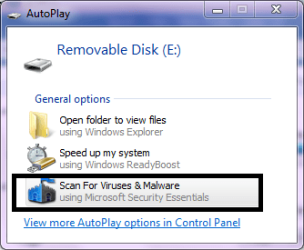


Scan Your Thumb Drive for Viruses from the AutoPlay Dialog-capture.png

Read more: Scan Your Thumb Drive for Viruses from the AutoPlay Dialog - How-To Geek
My System SpecsSystem Spec

25 May 2010  
derekimo

Windows 7 Pro 64 SP1
10,090 posts
East Bay Area, CA


Good info Dinesh, Thanks.
My System SpecsSystem Spec
25 May 2010  
Dinesh

Windows® 8 Pro (64-bit)
8,233 posts
Mumbai, India


Thanks Derek.
My System SpecsSystem Spec
.


25 May 2010  
Corrine

Windows 7 & Windows Vista Ultimate
2,476 posts
Upstate NY


Thanks, Dinesh! (The creator referenced by Mysticgeek, Ramesh Srinivasan, is a Microsoft MVP and well known for his contributions.)

To add, I hope everyone has Autoplay turned off:
  1. Open AutoPlay by clicking the Start button > Control Panel or, in the search box, type autoplay, and then click AutoPlay
  2. To turn AutoPlay off, clear the "Use AutoPlay for all media and devices"
  3. Click Save.
My System SpecsSystem Spec
25 May 2010  
Dinesh

Windows® 8 Pro (64-bit)
8,233 posts
Mumbai, India


Quote   Quote: Originally Posted by Corrine View Post
To add, I hope everyone has Autoplay turned off:
  1. Open AutoPlay by clicking the Start button > Control Panel or, in the search box, type autoplay, and then click AutoPlay
  2. To turn AutoPlay off, clear the "Use AutoPlay for all media and devices"
  3. Click Save.
I know its about added security but I love to have autoplay turned on so that I can avail of some default options when the media is plugged in.
My System SpecsSystem Spec
25 May 2010  
Corrine

Windows 7 & Windows Vista Ultimate
2,476 posts
Upstate NY


Its one thing for CD/DVDs you have created but for people who do pass around USB sticks, they should at least consider using the "ask me every time" setting.
My System SpecsSystem Spec
25 May 2010  
Dinesh

Windows® 8 Pro (64-bit)
8,233 posts
Mumbai, India


Quote   Quote: Originally Posted by Corrine View Post
Its one thing for CD/DVDs you have created but for people who do pass around USB sticks, they should at least consider using the "ask me every time" setting.
It happened with me once when I plugged in a HIGHLY infected usb drive.
Here's what happened.
My System SpecsSystem Spec
25 May 2010  
Corrine

Windows 7 & Windows Vista Ultimate
2,476 posts
Upstate NY


You are very fortunate that those files were already in detection by your A/V. Sality is particularly nasty and you would have been better off formatting if it had been a new variant.
My System SpecsSystem Spec
Reply

 Scan Your Thumb Drive for Viruses from the AutoPlay Dialog problems?


Thread Tools


Similar help and support threads for: Scan Your Thumb Drive for Viruses from the AutoPlay Dialog
Thread Forum
creating a 2 OS thumb drive Installation & Setup
Hiding Autoplay dialog from Autorun.inf Software
USB Thumb Drive vs Portable HDD Hardware & Devices
Help may have messed up thumb drive. General Discussion
thumb drive troubles Hardware & Devices


All times are GMT -5. The time now is 01:43 AM.


Windows 7 Forums is an independent web site and has not been authorized,
sponsored, or otherwise approved by Microsoft Corporation.
"Windows 7" and related materials are trademarks of Microsoft Corp.
© Designer Media Ltd