Windows 7 Forums


Windows 7: ughhh more problems........

01 Jun 2010  
64met

Windows 7 Ultimate x64
66 posts
 
 
ughhh more problems........

Now, I have an error message popping up every time I access the internet: It reads; program on your computer has corrupted your default search provider setting. IE has -re-set your search provider: BING
IE will now open where you can change setting... I do this, change it back to google- and next time I go online same error- it has defaulted to bing again???

Can anyone help with this/offer suggestions? Thxs

My System SpecsSystem Spec

01 Jun 2010  
zigzag3143

Win 8 Release candidate 8400
2,141 posts


Quote   Quote: Originally Posted by 64met View Post
Now, I have an error message popping up every time I access the internet: It reads; program on your computer has corrupted your default search provider setting. IE has -re-set your search provider: BING
IE will now open where you can change setting... I do this, change it back to google- and next time I go online same error- it has defaulted to bing again???

Can anyone help with this/offer suggestions? Thxs
Yes, run a virus scan quick. If it passes then restore from a backup, or do a repair install.


Ken
My System SpecsSystem Spec
01 Jun 2010  
64met

Windows 7 Ultimate x64
66 posts


Quote   Quote: Originally Posted by zigzag3143 View Post
Quote   Quote: Originally Posted by 64met View Post
Now, I have an error message popping up every time I access the internet: It reads; program on your computer has corrupted your default search provider setting. IE has -re-set your search provider: BING
IE will now open where you can change setting... I do this, change it back to google- and next time I go online same error- it has defaulted to bing again???

Can anyone help with this/offer suggestions? Thxs
Yes, run a virus scan quick. If it passes then restore from a backup, or do a repair install.


Ken
Thxs, Ken! I am a noob- could u please explain restore from backup or a repair-install??? Not sure where to start. BTW: I ran virus scan (Microsoft essentials) all is good. Thank you!
My System SpecsSystem Spec
.


01 Jun 2010  
Bill2

Windows 7 x64 pro/ Windows 7 x86 Pro/ XP SP3 x86
5,148 posts


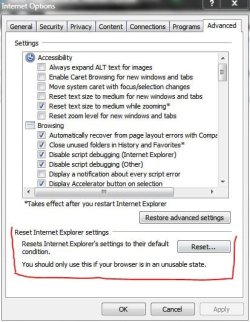
1) IE - Tools - Internet Options - Advanced Tab - click Restore then click Reset - Apply / OK

IE - Tools - Internet Options - Security Tab - click reset all zones to default - Apply / OK

Close and restart IE.

1) In IE, go to Tools - Manage Add-ons - Search Providers - Select the Search Provider you want by clicking on one. Then on LOWER LEFT check -> Prevent programs from suggesting changes to my default search provider.

3) Could be a BHO. Download BHOremover (Free, needs no install), download and run.
SpyBHORemover : Advanced Spy BHO Explorer & Eliminator - www.SecurityXploded.com
My System SpecsSystem Spec
01 Jun 2010  
64met

Windows 7 Ultimate x64
66 posts


Quote   Quote: Originally Posted by Bill2 View Post
1) IE - Tools - Internet Options - Advanced Tab - click Restore then click Reset - Apply / OK

IE - Tools - Internet Options - Security Tab - click reset all zones to default - Apply / OK

Close and restart IE.

1) In IE, go to Tools - Manage Add-ons - Search Providers - Select the Search Provider you want by clicking on one. Then on LOWER LEFT check -> Prevent programs from suggesting changes to my default search provider.

3) Could be a BHO. Download BHOremover (Free, needs no install), download and run.
SpyBHORemover : Advanced Spy BHO Explorer & Eliminator - www.SecurityXploded.com
Thxs for reply/help! Unfortunately nothing worked.... I did all of the above and even restarted my pc.... still getting the error message? Is there anything else I can try? Thanks again

the software found a potential threat called ASK tool bar, it was deleted with the scan. But still receiving error.
My System SpecsSystem Spec
01 Jun 2010  
Bill2

Windows 7 x64 pro/ Windows 7 x86 Pro/ XP SP3 x86
5,148 posts


Try running IE8 with add-ons disabled.

Go to Start > Programs > Accessories > System Tools > Internet Explorer (No Add-ons) to start IE8 without any add-ons. Try using the browser and see if the same problem arises.

If the problem does not occur again, start IE8 normally, go to Tools, Manage Add-ons.Disable all the add-ons under 'Toolbars and Extensions'. Enable each add-on one at each time and see if the problem occurs again. Once it occurs again after enabling an add-on, you have nailed the culprit.
My System SpecsSystem Spec
01 Jun 2010  
64met

Windows 7 Ultimate x64
66 posts


Quote   Quote: Originally Posted by Bill2 View Post
Try running IE8 with add-ons disabled.

Go to Start > Programs > Accessories > System Tools > Internet Explorer (No Add-ons) to start IE8 without any add-ons. Try using the browser and see if the same problem arises.

If the problem does not occur again, start IE8 normally, go to Tools, Manage Add-ons.Disable all the add-ons under 'Toolbars and Extensions'. Enable each add-on one at each time and see if the problem occurs again. Once it occurs again after enabling an add-on, you have nailed the culprit.

Ok, just want to be sure... first, run IE w/out add ons; then go to step two and enable add ons? Thxs
My System SpecsSystem Spec
01 Jun 2010  
Bill2

Windows 7 x64 pro/ Windows 7 x86 Pro/ XP SP3 x86
5,148 posts


Yep, enable addons ONE BY ONE. Just trying to see which one of them may be causing the problem, if any.
My System SpecsSystem Spec
01 Jun 2010  
64met

Windows 7 Ultimate x64
66 posts


Quote   Quote: Originally Posted by Bill2 View Post
Yep, enable addons ONE BY ONE. Just trying to see which one of them may be causing the problem, if any.

ok, did that. The one still causing me problems is ask toolbar? But under IE search providers its coming up as bing? I have forced it to google, close IE/ open back up again to the error message. I also did a system restore thinking that might help- still no luck. Any ideas on what to do next? Thxs
My System SpecsSystem Spec
01 Jun 2010  
Bill2

Windows 7 x64 pro/ Windows 7 x86 Pro/ XP SP3 x86
5,148 posts


1) Try uninstalling the ask toolbar from Control Panel-Program Features-Add/Remove. You can also try uninstalling via CCleaner. Then do a registry cleanup.


2) After step 1) uninstall and reinstall IE.
  1. Click Start and then click Control Panel.
  2. Under Programs, click Uninstall a program.
  3. In the tasks pane, click Turn Windows features on or off.
  4. In the list of windows features, clear the check box next to Internet Explorer 8.
  5. You receive a warning message in a pop-up window. Click Yes
My System SpecsSystem Spec
Reply

 ughhh more problems........ problems?


Thread Tools


Similar help and support threads for: ughhh more problems........
Thread Forum
USB Problems, Errors and port problems! Hardware & Devices
Many BSOD problems cant seem to find any software or hardware problems General Discussion
Can't start up my computer. (Driver problems, BSOD, other problems) BSOD Help and Support
52 Windows problems & solutions Quick fixes-XP,Vista,Win 7 problems General Discussion
extract problems, random BSOD errors all those problems BSOD Help and Support


All times are GMT -5. The time now is 07:25 PM.


Windows 7 Forums is an independent web site and has not been authorized,
sponsored, or otherwise approved by Microsoft Corporation.
"Windows 7" and related materials are trademarks of Microsoft Corp.
© Designer Media Ltd