Windows 7 Forums Search
Welcome to Windows 7 Forums. Our forum is dedicated to helping you find solutions with any problems, errors or issues you are experiencing with Windows 7. The Windows 7 forum also covers news and updates and has an extensive Windows 7 tutorial section that covers a wide range of tips and tricks.


Windows 7 - Icons on Taskbar

 
08-05-2011   #1
KeL


Windows 7 32bit


Icons on Taskbar

I've been tinkering around with the icons on my taskbar lately now I've changed them all to just the way I like them. Problem is, when I launch any of them, the icon reverts back to the default icons.
For example, I've changed the icon for winamp and when I launch winamp, while it is running, it shows the winamp default icon.
Any ideas what I've done wrong?

My System SpecsSystem Spec
08-05-2011   #2


The 7th OS made by Billy Microsoft


Go to: C:\Users\Administrator\AppData\Roaming\Microsoft\Internet Explorer\Quick Launch\User Pinned\TaskBar -drag the shortcut you want to change to desktop, unpin it from the taskbar, replace shortcut with the icon you want, and then click pin to taskbar.
My System SpecsSystem Spec
08-06-2011   #3
KeL


Windows 7 32bit


I cant seem to find my AppData folder. Is there another way to do this?
My System SpecsSystem Spec
.


08-06-2011   #4


Windows 7 Ultimate x64 SP1


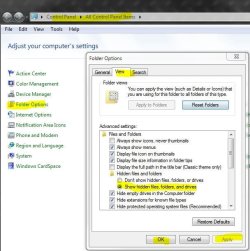
Appdata is a hidden folder, go here and apply, then you'll see it.

Icons on Taskbar-j.jpg
My System SpecsSystem Spec
08-06-2011   #5
KeL


Windows 7 32bit


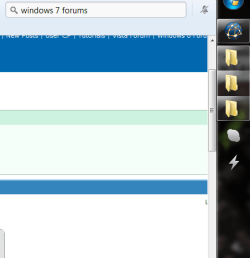
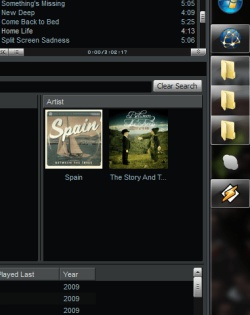
As u can see from the before and after shots, it doesn't work. Was hoping that the icons will remain the custom icons I choose.
Attached Thumbnails
Icons on Taskbar-before.png   Icons on Taskbar-after.png  
My System SpecsSystem Spec
08-22-2011   #6


Windows 7 64Bit Ultimate Edition SP1


Which method did you use to change the icons? All i do is go to the program on "All Programs" within the start menu, right click and go to "Properties" then to the shortcut tab (Opens there on default for me, not sure for everyone else) and click on "Change Icon", then browse for the ico image that i want to use and once i have selected that, i go back to the program i just changed on "All Programs" within the start menu and then right click and choose "Pin to Taskbar"


My System SpecsSystem Spec
Reply

 Icons on Taskbar problems?


Thread Tools


Similar Threads for: Icons on Taskbar
Thread Forum
Win 7 taskbar all icons from start menu on taskbar General Discussion
Solved incorrect icons showing when customising taskbar icons General Discussion
TaskBar Icons Constantly Changing My Icons For Chrome any Help? General Discussion
Taskbar icons with custom lists, or different taskbar "modes"? Customization
how many icons could i fit on the taskbar? General Discussion


All times are GMT -5. The time now is 02:10 AM.


Windows 7 Forums is an independent web site and has not been authorized,
sponsored, or otherwise approved by Microsoft Corporation.
"Windows 7" and related materials are trademarks of Microsoft Corp.
© Designer Media Ltd
  

1 2 3 4 5 6 7 8 9 10 11 12 13 14 15 16 17 18 19 20 21 22 23 24 25 26 27 28 29 30