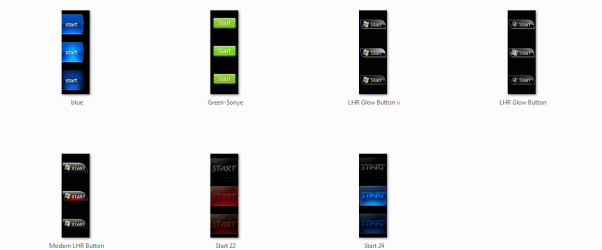
I have been trying to place a custom start button into my Windows 7 instalation because I dislike the orb. The problem is that unlike Windows Vista (which I have done this mod to) took the new image without a hassle and changed the start button area to suit the image. Windows 7 on the other hand is stubborn about it and will not adjust the start button area to suit the new image and the button is slightly transparent. I want to know if there is a way to get Windows 7 to allow it to accept and display the image correctly. Attached is what I hope to accomplish. Note: the image is taken in Windows Vista and not Windows 7 since it mod worked in Vista.
you could change the image button you have to a bitmap, if it isnt already and use a start orb changer to change the orb using your bitmap. (download link at end of first post)
System Manufacturer/Model Number Hewlett packard/p6512uk OS Microsoft Windows 7 Home Premium 64-bit 7600 CPU IIx4 amd athelon 635 processor Motherboard FOXCONN 2AA9 Memory 2x2gb Graphics Card ati radeon HD 5450 Sound Card (1) Realtek High Definition Audio (2) AMD High Definition Monitor(s) Displays samsung lcd tv 32" Screen Resolution 1360x 768
Keyboard wireless hp Mouse wireless Hp,optical PSU ? Cooling air! Hard Drives (1) WDC WD10 01FAES-60Z2A0 SATA Disk Device (2) Maxtor OneTouch USB Device (3) ST310003 33AS USB Device (4) WD My Book 1111 USB Device Internet Speed 1.10mb/s Antivirus MSE Browser Firefox
That isn't going to work. The .png I attached shows (in Windows Vista) the start button I want to replace the orb with. That tool can only replace the orb with a orb. I guess it would be easier to explain if I also supplied a image with what Windows 7 does when I replace the default orb with this new one. But I can't do that because my old PSU died a day or two ago and I had to use another PSU to get the computer working again and it doesn't have enough SATA plugs to let me run the Windows 7 HDD.
The tool boohbah referred you to will change the original orb to the long one your trying to use. Look here at some shapes and sizes that all work using it - Custom Start Menu Button Collection
It may be worth you posting in that thread.Some one will be able to look at what you have and make any alterations if necessary
Danny
Edit - Im no expert on this but I think your bitmap should be 54x162
System Manufacturer/Model Number acer aspire 5935g OS Windows 7 Home Premium x64 SP1 CPU intel(R)core(TM)2 duo CPU T6600 @ 2.20GHz Motherboard intel gm45/gm47 revision 07 Memory 3 gb ddr3 Graphics Card ati radeon hd4570/512mb Monitor(s) Displays lop156wh2-tle1 15.3 flat Screen Resolution 1366x768
Mouse Optical Hard Drives OCZ-Agility3 60gig ssd
320gig external hdd
500gig external hdd Internet Speed 30Mbps Down/30Mbps Up
System Manufacturer/Model Number Hewlett packard/p6512uk OS Microsoft Windows 7 Home Premium 64-bit 7600 CPU IIx4 amd athelon 635 processor Motherboard FOXCONN 2AA9 Memory 2x2gb Graphics Card ati radeon HD 5450 Sound Card (1) Realtek High Definition Audio (2) AMD High Definition Monitor(s) Displays samsung lcd tv 32" Screen Resolution 1360x 768
Keyboard wireless hp Mouse wireless Hp,optical PSU ? Cooling air! Hard Drives (1) WDC WD10 01FAES-60Z2A0 SATA Disk Device (2) Maxtor OneTouch USB Device (3) ST310003 33AS USB Device (4) WD My Book 1111 USB Device Internet Speed 1.10mb/s Antivirus MSE Browser Firefox
These solutions though just seem to keep it within the Windows 7 dimensions. The moded button is larger length wise thand the Windows 7 or Windows Vista orb. It is and should be 98x162 and not 54x162 or it is just going to get squished or look squished. I have tried the tool before and it rejected the .bmp I wanted to use. Infact the button is the XP Royale button modified to the Windows Vista format. I guess when I get the Windows 7 HDD plugged in again I will try to use that software again but I feel that I will not be able to use the full resolution image like I was in Windows Vista. Not the end of the world but I really just prefer a lot of the older OS style choices compared to the ones in Windows 7. What I though I might have to do was do something like go and change a registry value or something to change the area given to the start button.
System Manufacturer/Model Number acer aspire 5935g OS Windows 7 Home Premium x64 SP1 CPU intel(R)core(TM)2 duo CPU T6600 @ 2.20GHz Motherboard intel gm45/gm47 revision 07 Memory 3 gb ddr3 Graphics Card ati radeon hd4570/512mb Monitor(s) Displays lop156wh2-tle1 15.3 flat Screen Resolution 1366x768
Mouse Optical Hard Drives OCZ-Agility3 60gig ssd
320gig external hdd
500gig external hdd Internet Speed 30Mbps Down/30Mbps Up
Well like I posted I can't really do much until I get the Windows 7 HDD powered again. On my system Vista holds the BCD and is needed to allow Windows 7 to boot. I really hate how that other PSU died (at least no other hardware was damaged).
Also, you mean the one with the collection of custom star buttons right?
Well like I posted I can't really do much until I get the Windows 7 HDD powered again. On my system Vista holds the BCD and is needed to allow Windows 7 to boot. I really hate how that other PSU died (at least no other hardware was damaged).
Also, you mean the one with the collection of custom star buttons right?
Yes just upload what you have and ask see if some one can have a look for you.
System Manufacturer/Model Number acer aspire 5935g OS Windows 7 Home Premium x64 SP1 CPU intel(R)core(TM)2 duo CPU T6600 @ 2.20GHz Motherboard intel gm45/gm47 revision 07 Memory 3 gb ddr3 Graphics Card ati radeon hd4570/512mb Monitor(s) Displays lop156wh2-tle1 15.3 flat Screen Resolution 1366x768
Mouse Optical Hard Drives OCZ-Agility3 60gig ssd
320gig external hdd
500gig external hdd Internet Speed 30Mbps Down/30Mbps Up