
Windows 7 Forums


Windows 7: Explorer not working in Classic skin, no way to 'revert' to Aero

24 Oct 2011  
ikt

Windows 7 Home Premium x64
2 posts
 
 
Explorer not working in Classic skin, no way to 'revert' to Aero

Hello. I got stuck with this Classic skin with no working explorer Window, causing all attempts to change themes again to an Aero theme not to work. Is there any way I could change to Aero without any access to the Personalisation page? That page is loaded in Explorer, and Explorer doesn't work correctly.

My System SpecsSystem Spec

24 Oct 2011  
Bongo

Win 7 Pro x64
9,592 posts
Council Bluffs, Iowa


Welcome to the Seven Forums
Click on the Start Button > All Programs > Accessories > Command Prompt copy and paste this into the command prompt and press Enter what is in Bold Red including last quote mark that should start the default Aero theme.
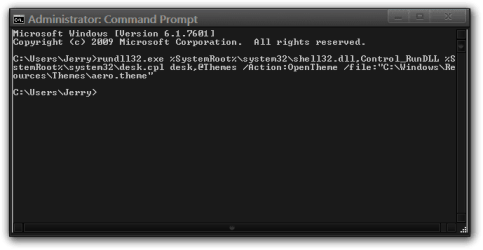
rundll32.exe %SystemRoot%\system32\shell32.dll,Control_RunDLL %SystemRoot%\system32\desk.cpl desk,@Themes /Action:OpenTheme /file:"C:\Windows\Resources\Themes\aero.theme"

Explorer not working in Classic skin, no way to 'revert' to Aero-administrator-command-prompt.png


Jerry
My System SpecsSystem Spec
Reply

 Explorer not working in Classic skin, no way to 'revert' to Aero problems?


Thread Tools


Similar help and support threads for: Explorer not working in Classic skin, no way to 'revert' to Aero
Thread Forum
Aero + classic window background Customization
Solved UXtheme isn't working - all themes revert to Aero Themes and Styles
Aero vs Windows 7 Classic Performance & Maintenance
Aero + Classic font? Customization
Classic Skin Won't Work Customization


All times are GMT -5. The time now is 06:53 AM.


Windows 7 Forums is an independent web site and has not been authorized,
sponsored, or otherwise approved by Microsoft Corporation.
"Windows 7" and related materials are trademarks of Microsoft Corp.
© Designer Media Ltd