Hey,
Im having trouble getting soft 7 v2 theme to fully work on my machine.
I put the soft 7 folder in my C:\Windows\Resources\Themes and i put the soft 7 2.0 and soft7 2.0 (top) theme files as well.
and the theme works, hover when i try to install the explorerframe.dll i run into trouble
I am running windows 7 ultimate x64 SP1 and there are 2 folders from what i understand that contain the explorerframe that has to be replaced:
c:\windows\system32
c:\windows\sysWOW64
and soft7 provides a dll for 64 and 32, so do i place the:
explorerframe.dll x64 in the c:\windows\sysWOW64
explorerframe.dll x32 in the c:\windows\system32
Or is it the other way around or do i use the same one or what?
i have tried to place the 64 dll in the, c:\windows\system32 and the 32 dll in c:\windows\sysWOW64 but no luck
Thanks in advance
My Computer
At a glance
Windows 7 Ultimate x64Intel(R) Core(TM)2 Duo CPU T9600 @ 2.80 GHz 6...6 GB DDR3ATI Mobility Radeon HD 4670
Computer Manufacturer/Model Number
Dell Studio XPS 16
OS
Windows 7 Ultimate x64
CPU
Intel(R) Core(TM)2 Duo CPU T9600 @ 2.80 GHz 6MB cache
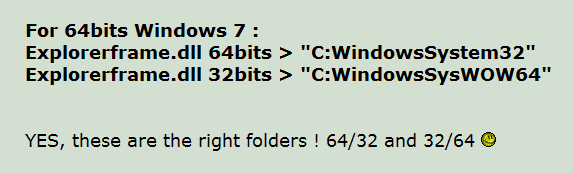
Looking at the download page I see this
maybe they do need switched I see there's no mention of service pack one maybe they have not been updated for it.
Jerry
My Computer
At a glance
Win 7 Pro x64 / Win 10 ProIntel(R) Core(TM) i7-3630QM CPU @ 2.40GHz12 GB(1) Intel(R) HD Graphics 4000 (2) NVIDIA GeFo...
Computer type
Laptop
Computer Manufacturer/Model Number
Sager NP9170
OS
Win 7 Pro x64 / Win 10 Pro
CPU
Intel(R) Core(TM) i7-3630QM CPU @ 2.40GHz
Motherboard
CLEVO P170EM
Memory
12 GB
Graphics Card(s)
(1) Intel(R) HD Graphics 4000 (2) NVIDIA GeForce GTX 675M
Sound Card
(1) Realtek High Definition Audio (2) Intel(R) Display Aud
Monitor(s) Displays
17.3
Screen Resolution
1920x1080
Hard Drives
(1) Samsung 860 EVO 500GB(OS) (1) Samsung 860 EVO 500GB(Data)
Keyboard
Backlite
Antivirus
MSE, Malwarebytes Pro
Browser
Firefox
Other Info
DESKTOP: Custom-built.
OS: Win 10 Pro x64.
CASE: Rosewill R5.
CPU: Intel I5 4670K CPU @ 3.40GHz.
CPU COOLER: Cool Master Hyper 212 EVO.
MOTHERBOARD: Asus Z87-A.
MEMORY: Kingston HyperX 2x4 GB.
GPU: Nvidia Geforce 650 TI.
PSU: Corsair TX750.
DRIVES: (1) Samsung 840 120 GB SSD (2) Western Digital blue 500 GB 7200 RPM.
Looking at the download page I see this View attachment 186104
maybe they do need switched I see there's no mention of service pack one maybe they have not been updated for it.
Jerry
\Soft7 2.0 by AP-GRAPHIK\Explorerframe.dll\Square\SP1\7601.17514 x64 (64bits)
\Soft7 2.0 by AP-GRAPHIK\Explorerframe.dll\Square\SP1\7601.17514 x86 (32bits)
My Computer
At a glance
Windows 7 Ultimate x64Intel(R) Core(TM)2 Duo CPU T9600 @ 2.80 GHz 6...6 GB DDR3ATI Mobility Radeon HD 4670
Computer Manufacturer/Model Number
Dell Studio XPS 16
OS
Windows 7 Ultimate x64
CPU
Intel(R) Core(TM)2 Duo CPU T9600 @ 2.80 GHz 6MB cache
The custom frame only works with 100% dpi settings!
I have it on the default (and will always)125% so i requested that he updates the .dll files to work on all resolution settings!!
My Computer
At a glance
Windows 7 Ultimate x64Intel(R) Core(TM)2 Duo CPU T9600 @ 2.80 GHz 6...6 GB DDR3ATI Mobility Radeon HD 4670
Computer Manufacturer/Model Number
Dell Studio XPS 16
OS
Windows 7 Ultimate x64
CPU
Intel(R) Core(TM)2 Duo CPU T9600 @ 2.80 GHz 6MB cache
The custom frame only works with 100% dpi settings!
I have it on the default (and will always)125% so i requested that he updates the .dll files to work on all resolution settings!!



 good to hear you found the solution the dpi settings can make a big difference when making a custom theme some theme makers only do the 100%