Windows 7 Forums Search
Welcome to Windows 7 Forums. Our forum is dedicated to helping you find solutions with any problems, errors or issues you are experiencing with Windows 7. The Windows 7 forum also covers news and updates and has an extensive Windows 7 tutorial section that covers a wide range of tips and tricks.


Windows 7 - Win7 Style Builder Problem | Problems Opening msstyles

 
12-17-2011   #1


Windows 7


Win7 Style Builder Problem | Problems Opening msstyles

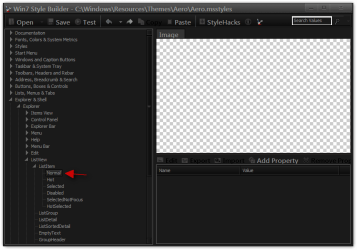
For some reason whenever I try to do anything (create a new style based on Aero, edit a visual style from Windows\Resources), it will not show preview images or object properties for anything when I try to navigate to them, as shown below.

(ListsView -> Normal is selected, and should be showing properties/preview image in the right side panels; this window isn't the active one because I had to open Snipping Tool to take this screenshot.)

Does anyone know what is wrong?


My System SpecsSystem Spec
12-17-2011   #2


Acer laptop W 7 Pro SP1 64 bit & Dell Desktop W 7 Pro SP1 32 bit


That's normal for Explorer & Shell > Explorer > ListView > ListItem > Normal
Win7 Style Builder Problem | Problems Opening msstyles-win7-style-builder-cwindowsresourcesthemesaeroaero.msstyles.png

do you have a properties and image at Explorer & Shell > Explorer > ListView > ListItem > Hot
Win7 Style Builder Problem | Problems Opening msstyles-hot.png

Jerry
My System SpecsSystem Spec
12-17-2011   #3


Windows 7


whatdy'a know.... I do have properties for "Explorer & Shell > Explorer > ListView > ListItem > Hot". It seems as though I was looking in the wrong place, silly me.

Do you know where the inactive/active window boarders are for Aero?

Last edited by lilsting10; 12-17-2011 at 04:49 PM..
My System SpecsSystem Spec
.


12-17-2011   #4


Acer laptop W 7 Pro SP1 64 bit & Dell Desktop W 7 Pro SP1 32 bit


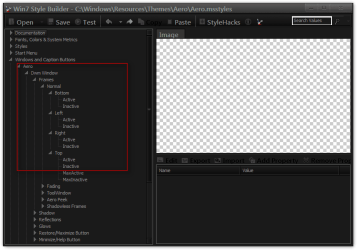
For aero
Windows and Caption Buttons > Aero > Dwm Window > Frames > Normal > Top, Left, Right, Bottom
Win7 Style Builder Problem | Problems Opening msstyles-1.png


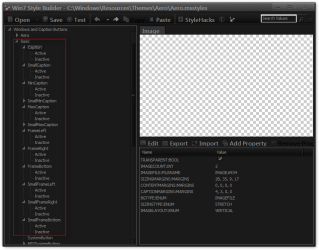
For basic
Windows and Caption Buttons > Basic > Caption to SmallFrameBottom
Win7 Style Builder Problem | Problems Opening msstyles-2.png
Jerry
My System SpecsSystem Spec
12-17-2011   #5


Windows 7


Excellent.

With Windows Style Builder I edited Bongo's 'No Glow 2' theme so that the inactive aero window has the same OPACITY:INT and COLORIZATIONOPACITY:INT as the active aero window frame.

Now I can see each window's title clearly in white instead of black, with text that doesn't have a glow around it and against a boarder that doesn't have a glazed/glass look, like Windows Aero does.

And I can still keep track of which is my current window by the glow on the minimize/mazimize/close buttons.
The only issue I have now is that if I change the boarder colors or un-tick 'enable transparency' in the normal Personalization window I go from working with an 'Installed Theme' to using an 'Unsaved Theme'.


Even if I save this (No Glow 5) in the screenshot, it doesn't allow me to create a theme file in the 'Windows\Resources\Themes' folder so that I could quickly install this onto other computers. How would I go about creating this as a theme?
My System SpecsSystem Spec
12-17-2011   #6


Acer laptop W 7 Pro SP1 64 bit & Dell Desktop W 7 Pro SP1 32 bit


Be back in a little in a few
My System SpecsSystem Spec
12-17-2011   #7


Acer laptop W 7 Pro SP1 64 bit & Dell Desktop W 7 Pro SP1 32 bit


Quote   Quote: Originally Posted by lilsting10 View Post
With Windows Style Builder I edited Bongo's 'No Glow 2' theme so that the inactive aero window has the same OPACITY:INT and COLORIZATIONOPACITY:INT as the active aero window frame.
I never thought about that good catch


Quote   Quote: Originally Posted by lilsting10 View Post
The only issue I have now is that if I change the boarder colors or un-tick 'enable transparency' in the normal Personalization window I go from working with an 'Installed Theme' to using an 'Unsaved Theme'.
That is because you changed it
Quote   Quote: Originally Posted by lilsting10 View Post
Even if I save this (No Glow 5) in the screenshot, it doesn't allow me to create a theme file in the 'Windows\Resources\Themes' folder so that I could quickly install this onto other computers. How would I go about creating this as a theme?
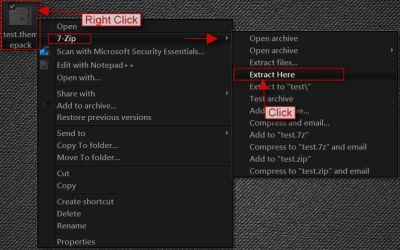
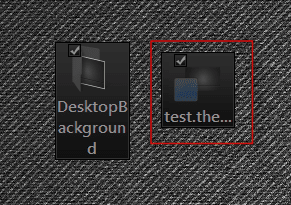
What you will need to do is after you save it in Personalization with Save as then be using the 1 you just saved then Right click and then Save theme for sharing give it the name of theme(No_Glow) save to to the desktop it's is just a .zip folder named .themepack download 7-Zip 7-Zip install it then Right click on the .themepack and use 7 Zip to extract to to your desktop what you need is the .theme file
Win7 Style Builder Problem | Problems Opening msstyles-1a.pngName:  2.png
Views: 446
Size:  69.3 KB
and a copy of the theme folder in Windows\Resources\Themes just the folder now you have the theme folder and the .theme file for the other PC to put in Windows\Resources\Themes.
Jerry
My System SpecsSystem Spec
12-17-2011   #8


Windows 7


Thanks for all your help. This is great, I can finally use Windows 7 in the way I have wanted since Vista came out.

The only issue that still bugs me is the horrid sky blue selection color in Windows Explorer.
The color itself is just a case of getting the shade right on the replacement colors in Windows Style Builder. If I were to change that to black (to match the window border color), how might I change the color of highlighted/selected files to white instead?
My System SpecsSystem Spec
12-17-2011   #9


Windows 7 Ultimate x64


I actually really like that theme the way you modified it, please send me the theme after you changed the selection colour to (I'm guessing grey/black)
My System SpecsSystem Spec
12-17-2011   #10


Windows 7


Sure thing, Faceofjoe421, although there will still be some selected items which show up as the default Vista/Windows 7 sky blue color because I'm finding Windows Style Builder incredibly hard to navigate and find what I want to. The Start Menu's hover-over color, for example, still shows as blue, but most other areas are mid-dark grey (tree nav in explorer, right content area in explorer, tree and content area in open/save popup box).

https://rapidshare.com/files/2197025..._Read_Theme.7z
My System SpecsSystem Spec
Reply

 Win7 Style Builder Problem | Problems Opening msstyles problems?


Thread Tools


Similar Threads for: Win7 Style Builder Problem | Problems Opening msstyles
Thread Forum
Solved Help with vista style builder ! Customization
Strange Style Builder problem Customization
anyone used Ave's Style Builder? Customization
Visual style builder... Software


All times are GMT -5. The time now is 02:17 AM.


Windows 7 Forums is an independent web site and has not been authorized,
sponsored, or otherwise approved by Microsoft Corporation.
"Windows 7" and related materials are trademarks of Microsoft Corp.
© Designer Media Ltd
  

1 2 3 4 5 6 7 8 9 10 11 12 13 14 15 16 17 18 19 20 21 22 23 24 25 26 27 28 29 30