Windows 7 Forums Search
Welcome to Windows 7 Forums. Our forum is dedicated to helping you find solutions with any problems, errors or issues you are experiencing with Windows 7. The Windows 7 forum also covers news and updates and has an extensive Windows 7 tutorial section that covers a wide range of tips and tricks.


Windows 7 - UXtheme isn't working - all themes revert to Aero

 
01-11-2012   #1


Windows 7 Professional x64


[Win 7 x64] UXtheme isn't working - all themes revert to Aero

1. I installed UxStyle Core Beta
2. I restarted.
3. I placed two themes in C:\Windows\Resources\Themes
4. I tried starting them from the personalization tab as well as by double-clicking the .theme files.
5. This causes the standard Aero theme to load.

Any idea what the problem could be?

EDIT: adding information from later posts so no one skips over them before giving advice:

I did everything the linked post says to do (UxStyle Core Beta): Enabling Custom Themes - Windows 7

These are the themes I'm trying to use:

Metro Lite Suite by ~exsess on deviantART
Oscuro by =kiko11 on deviantART

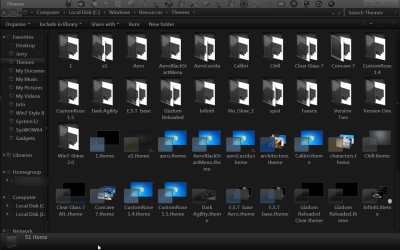
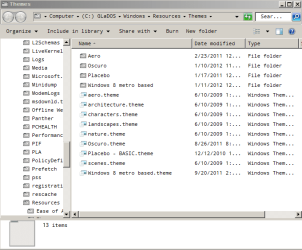
My themes folder looks like this: http://dl.dropbox.com/u/570881/themes_folder.PNG


Last edited by valzi; 01-11-2012 at 12:48 PM..
My System SpecsSystem Spec
01-11-2012   #2


Win7 Pro SP1 x64


did you used the x64bit uxtheme multi-patcher?

because on my Windows 7 SP1 PRO x64 i tried installing both the x86 (3 dll files to patch) & x64 (2 dll files to patch)
then restarted my pc..
My System SpecsSystem Spec
01-11-2012   #3


Acer laptop W 7 Pro SP1 64 bit & Dell Desktop W 7 Pro SP1 32 bit


Welcome to the Seven Forums
The preferred methods here for enabling custom themes we use one of these two tutorials.
Enabling Custom Themes - Windows 7
Or
Theme - How to Apply Custom Themes

Did you use UxStyle Core Beta or universal theme patcher?
Post a link to the themes you are trying to use.
Posts screenshot of C:\Windows\Resources\Themes window maximize (like the screenshot I have provided).
UXtheme isn't working - all themes revert to Aero-themes.png

Screenshots and Files - Upload and Post in Seven Forums
Screenshot with Paint
How to Use the Snipping Tool in Vista - Vista Forums

Jerry
My System SpecsSystem Spec
.


01-11-2012   #4


Windows 7 Professional x64


I did everything the linked post says to do (UxStyle Core Beta): Enabling Custom Themes - Windows 7

These are the themes I'm trying to use:

Metro Lite Suite by ~exsess on deviantART
Oscuro by =kiko11 on deviantART

My themes folder looks like this: http://dl.dropbox.com/u/570881/themes_folder.PNG
My System SpecsSystem Spec
01-11-2012   #5


Acer laptop W 7 Pro SP1 64 bit & Dell Desktop W 7 Pro SP1 32 bit


I downloaded and tried both themes and they work fine the Metro one looks almost like the default Aero theme.

I noticed in your screenshot that it is not the Aero theme.
Is this what it is switching to?
UXtheme isn't working - all themes revert to Aero-themes_folder.png

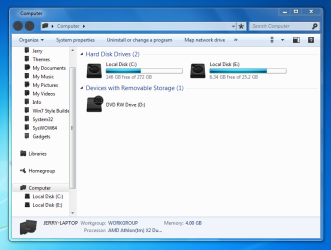
Or is it switching to Aero?
UXtheme isn't working - all themes revert to Aero-aero.png
Jerry
My System SpecsSystem Spec
01-11-2012   #6


Windows 7 Professional x64


It's switching to Aero, as in your second screenshot. I'm using classic until I get a theme installed, because I prefer classic to Aero.
My System SpecsSystem Spec
01-11-2012   #7


Acer laptop W 7 Pro SP1 64 bit & Dell Desktop W 7 Pro SP1 32 bit


Opened the folder at C:\Windows\Resources\Themes\Oscuro and take a screenshot and post it here. Screenshots and Files - Upload and Post in Seven Forums
UXtheme isn't working - all themes revert to Aero-oscuro.png

Does your system meets the minimum specs to run Aero?
UXtheme isn't working - all themes revert to Aero-ae.png

Jerry
My System SpecsSystem Spec
01-11-2012   #8


Windows 7 Professional x64


UXtheme isn't working - all themes revert to Aero-oscuro.png

Yes, my system is well beyond the requirements for Aero.
My System SpecsSystem Spec
01-11-2012   #9


Acer laptop W 7 Pro SP1 64 bit & Dell Desktop W 7 Pro SP1 32 bit


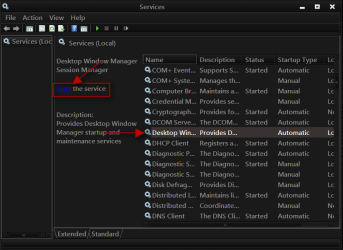
Click on the Start Button type in Services In the search box and then click on Services
UXtheme isn't working - all themes revert to Aero-1.png

Scroll down until you see Desktop Windows Manager Sessions Manager select it in click on the Stop text and let it stop after that click on Start text and see if that works. Your screen may blink when you do this.
UXtheme isn't working - all themes revert to Aero-2.pngUXtheme isn't working - all themes revert to Aero-stop.pngUXtheme isn't working - all themes revert to Aero-3.png

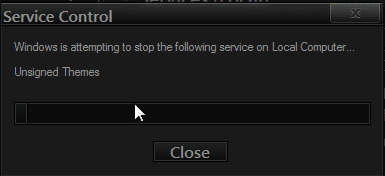
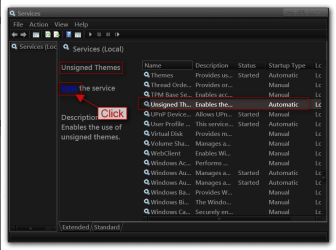
Do the same thing with unsigned themes
UXtheme isn't working - all themes revert to Aero-4.pngUXtheme isn't working - all themes revert to Aero-5.png

Also try Option 2 Of this tutorial SFC /SCANNOW Command - System File Checker
It will not harm any data or programs you have installed unless you have changed any system files.
Jerry
My System SpecsSystem Spec
01-11-2012   #10


Windows 7 Professional x64


Thanks for all the help so far, Bongo!

Desktop Window Manager Sessions Manager is disabled, not running, and the option to start it is greyed out.

sfc \scannow didn't finish, so I ran it at boot using method 1 here: SFC /SCANNOW : Run in Command Prompt at Boot That gave me the error "There is a system repair pending which requires reboot to complete." I rebooted into windows and then back to the disc several times and got the error each time. My computer does not have a pending.xml file.

Another symptom that is probably related (probably the cause, I think now) is this: when I go to Control Panel\All Control Panel Items\Performance Information and Tools and click "Rate this computer", it crashes before it's done.

I think I'm going to try doing a repair install like here: Repair Install

What's your opinion on any of this?

EDIT: I ran the compatibility check (by clicking "upgrade" after starting setup) on the windows 7 disk and it gave me this message: "Windows needs to be restarted so necessary changes to system files can be made before continuing."

Restarting, however, does not accomplish this. What can I do?

I started a new thread here because the issue now fits that forum category better: Cannot clear "System repair pending which requires reboot to complete"

Please join up at the other thread if you can still help, please, Bongo. Should I mark this current thread solved, even though it isn't?

Last edited by valzi; 01-11-2012 at 04:29 PM..
My System SpecsSystem Spec
Reply

 UXtheme isn't working - all themes revert to Aero problems?


Thread Tools


Similar Threads for: UXtheme isn't working - all themes revert to Aero
Thread Forum
Explorer not working in Classic skin, no way to 'revert' to Aero Themes and Styles
problem with aero themes Customization
Are there any new Aero themes? Themes and Styles
No themes available after uxtheme patch Themes and Styles
Aero Themes General Discussion


All times are GMT -5. The time now is 02:17 AM.


Windows 7 Forums is an independent web site and has not been authorized,
sponsored, or otherwise approved by Microsoft Corporation.
"Windows 7" and related materials are trademarks of Microsoft Corp.
© Designer Media Ltd
  

1 2 3 4 5 6 7 8 9 10 11 12 13 14 15 16 17 18 19 20 21 22 23 24 25 26 27 28 29 30