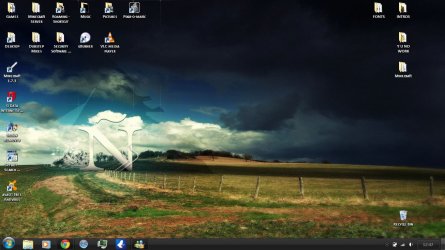
| Windows 7: Problems with getting Aero back |
13 Jan 2012
|
#11 | | Windows 7 Home Premium x64 Estonia |

Quote: Originally Posted by GianniDPC 
Quote: Originally Posted by Goldhat 
Quote: Originally Posted by GianniDPC
Yes didn't work then. But try choosing a Standard Aero theme.  That is one of the many things I have tried, nothing. Try stopping all of your theme patchers ! or try doing a System Restore back to the day when it worked. How can I stop them?
About System Restore - The problem is I have no idea when It worked, and I have so much important stuff on my computer I dont want to Restore it from the day I bought it. | My System Specs |
| System Manufacturer/Model Number Samsung R540 OS Windows 7 Home Premium x64 CPU Intel(R) Core i3 Motherboard Samsung R540 Intel BREMEN-C Motherboard BA92-06785A Memory 3,00 GB Dual-Channel Graphics Card Intel (R) HD Graphics Monitor(s) Displays 1 Screen Resolution 1366 by 768 Keyboard Standard PS/2 Keyboard Mouse CANYON OPTICAL MOUSE MS001 Hard Drives 313GB SAMSUNG SAMSUNG HM321HI (SATA) |
13 Jan 2012
|
#12 | | Win 7 Pro x64 Council Bluffs, Iowa |
Switch to the default Aero theme then
Click on the Start Button type in Services In the search box and then click on Services
Scroll down until you see Desktop Windows Manager Sessions Manager select it in click on the Stop text and let it stop after that click on Start text and see if that works. Your screen may blink when you do this.
Jerry   | My System Specs | | Computer type Laptop System Manufacturer/Model Number Sager NP9170 OS Win 7 Pro x64 CPU Intel(R) Core(TM) i7-3630QM CPU @ 2.40GHz Motherboard CLEVO P170EM Memory 12 GB Graphics Card (1) Intel(R) HD Graphics 4000 (2) NVIDIA GeForce GTX 675M Sound Card (1) Realtek High Definition Audio (2) Intel(R) Display Aud Monitor(s) Displays 17.3 Screen Resolution 1920x1080 Keyboard Backlite Hard Drives (1) M4-CT256M4SSD2 ATA Device 256 GB (2) ST9500424AS ATA Device 500 GB Antivirus MSE, Malwarebytes Pro Browser Firefox |
13 Jan 2012
|
#13 | | Windows 7 Home Premium x64 Belgium (WVL) |

Quote: Originally Posted by Goldhat 
Quote: Originally Posted by GianniDPC 
Quote: Originally Posted by Goldhat
That is one of the many things I have tried, nothing. Try stopping all of your theme patchers ! or try doing a System Restore back to the day when it worked. How can I stop them?
About System Restore - The problem is I have no idea when It worked, and I have so much important stuff on my computer I dont want to Restore it from the day I bought it. Well try to remove the theme patchers from startup and reboot ??!! maybe that helps | My System Specs | | System Manufacturer/Model Number Homebuilt OS Windows 7 Home Premium x64 CPU Core i7 2600K Motherboard Asus P8Z77-V LX Memory 4GB DDR3 Kingston HyperX Graphics Card Gigabyte GTX 670 Sound Card Realtek HD Audio Monitor(s) Displays Delium Monitor Screen Resolution 1360 x 768 Keyboard Logitech Mouse Logitech wireless mouse M 505 PSU Corsair 620W Case Antec Cooling Cooling Master Hard Drives C: (500GB) Internet Speed 60MBPS |
13 Jan 2012
|
#14 | | Windows 7 Home Premium x64 Estonia |

Quote: Originally Posted by GianniDPC 
Quote: Originally Posted by Goldhat 
Quote: Originally Posted by GianniDPC
Try stopping all of your theme patchers ! or try doing a System Restore back to the day when it worked. How can I stop them?
About System Restore - The problem is I have no idea when It worked, and I have so much important stuff on my computer I dont want to Restore it from the day I bought it. Well try to remove the theme patchers from startup and reboot ??!! maybe that helps This might sound dumb, but... How do I remove objects from startup? | My System Specs | | System Manufacturer/Model Number Samsung R540 OS Windows 7 Home Premium x64 CPU Intel(R) Core i3 Motherboard Samsung R540 Intel BREMEN-C Motherboard BA92-06785A Memory 3,00 GB Dual-Channel Graphics Card Intel (R) HD Graphics Monitor(s) Displays 1 Screen Resolution 1366 by 768 Keyboard Standard PS/2 Keyboard Mouse CANYON OPTICAL MOUSE MS001 Hard Drives 313GB SAMSUNG SAMSUNG HM321HI (SATA) |
13 Jan 2012
|
#15 | | Windows 7 Home Premium x64 Estonia |

Quote: Originally Posted by Bongo Switch to the default Aero theme then
Click on the Start Button type in Services In the search box and then click on Services
Scroll down until you see Desktop Windows Manager Sessions Manager select it in click on the Stop text and let it stop after that click on Start text and see if that works. Your screen may blink when you do this.
Jerry That one did not work either :/ | My System Specs | | System Manufacturer/Model Number Samsung R540 OS Windows 7 Home Premium x64 CPU Intel(R) Core i3 Motherboard Samsung R540 Intel BREMEN-C Motherboard BA92-06785A Memory 3,00 GB Dual-Channel Graphics Card Intel (R) HD Graphics Monitor(s) Displays 1 Screen Resolution 1366 by 768 Keyboard Standard PS/2 Keyboard Mouse CANYON OPTICAL MOUSE MS001 Hard Drives 313GB SAMSUNG SAMSUNG HM321HI (SATA) |
13 Jan 2012
|
#16 | | Windows 7 Home Premium x64 Belgium (WVL) |

Quote: Originally Posted by Goldhat 
Quote: Originally Posted by GianniDPC 
Quote: Originally Posted by Goldhat
How can I stop them?
About System Restore - The problem is I have no idea when It worked, and I have so much important stuff on my computer I dont want to Restore it from the day I bought it. Well try to remove the theme patchers from startup and reboot ??!! maybe that helps This might sound dumb, but... How do I remove objects from startup? (Windows key) + R and type msconfig
And go to the start-up tab | My System Specs | | System Manufacturer/Model Number Homebuilt OS Windows 7 Home Premium x64 CPU Core i7 2600K Motherboard Asus P8Z77-V LX Memory 4GB DDR3 Kingston HyperX Graphics Card Gigabyte GTX 670 Sound Card Realtek HD Audio Monitor(s) Displays Delium Monitor Screen Resolution 1360 x 768 Keyboard Logitech Mouse Logitech wireless mouse M 505 PSU Corsair 620W Case Antec Cooling Cooling Master Hard Drives C: (500GB) Internet Speed 60MBPS |
13 Jan 2012
|
#17 | | Windows 7 Home Premium x64 Estonia |

Quote: Originally Posted by GianniDPC 
Quote: Originally Posted by Goldhat 
Quote: Originally Posted by GianniDPC
Well try to remove the theme patchers from startup and reboot ??!! maybe that helps This might sound dumb, but... How do I remove objects from startup? (Windows key) + R and type msconfig
And go to the start-up tab I didnt find any patcher files from the Startup tab. Only Adobe Acrobat, my antivirus, Intel stuff and Microsoft Windows. | My System Specs | | System Manufacturer/Model Number Samsung R540 OS Windows 7 Home Premium x64 CPU Intel(R) Core i3 Motherboard Samsung R540 Intel BREMEN-C Motherboard BA92-06785A Memory 3,00 GB Dual-Channel Graphics Card Intel (R) HD Graphics Monitor(s) Displays 1 Screen Resolution 1366 by 768 Keyboard Standard PS/2 Keyboard Mouse CANYON OPTICAL MOUSE MS001 Hard Drives 313GB SAMSUNG SAMSUNG HM321HI (SATA) |
13 Jan 2012
|
#18 | | Microsoft Windows 7 Home Premium 64-bit 7600 cornwall UK |
use sfc/scannow. this will reset any system files you may have themed, ie .folders. wmploc , system clock etc, but should sort your problem, then re theme your pc. i believe you dont really need gamebooster. you havent filled in your system spec so i cant be sure but gamebooster is for pretty old ish machines ie vista with 1 GB of ram SFC /SCANNOW Command - System File Checker - Windows 7 Forums | My System Specs | | System Manufacturer/Model Number Hewlett packard/p6512uk OS Microsoft Windows 7 Home Premium 64-bit 7600 CPU IIx4 amd athelon 635 processor Motherboard FOXCONN 2AA9 Memory 2x2gb Graphics Card ati radeon HD 5450 Sound Card (1) Realtek High Definition Audio (2) AMD High Definition Monitor(s) Displays samsung lcd tv 32" Screen Resolution 1360x 768 Keyboard wireless hp Mouse wireless Hp,optical PSU ? Cooling air! Hard Drives (1) WDC WD10 01FAES-60Z2A0 SATA Disk Device (2) Maxtor OneTouch USB Device (3) ST310003 33AS USB Device (4) WD My Book 1111 USB Device Internet Speed 1.10mb/s Antivirus MSE Browser Firefox |
13 Jan 2012
|
#19 | | Windows 7 Ultimate x64 SP1 Philadelphia, PA |
Honestly, given the amount of time you have spent already, I would just opt for a clean install. If you plan ahead, it can take less than two hours, and you'll be back to where you are now, without the issues. | My System Specs | | OS Windows 7 Ultimate x64 SP1 CPU Intel Core i7-2600 Motherboard Gigabyte GA-P67A-UD3P-B3 Memory 12 GB Patriot Extreme DDR3-1333 Graphics Card Nvidia GTX 470 Monitor(s) Displays Dell UltraSharp 2209WA PSU OCZ ModStream 700W Case CoolerMaster HAF 912 Advanced Cooling CoolerMaster Hyper 212 Plus Hard Drives OCZ Agility3 240 GB, WD5001AALS, WD7501AALS |
13 Jan 2012
|
#20 | | Windows 7 Home Premium x64 Estonia |

Quote: Originally Posted by DeaconFrost Honestly, given the amount of time you have spent already, I would just opt for a clean install. If you plan ahead, it can take less than two hours, and you'll be back to where you are now, without the issues. I didnt quite understand what you're saying, Im Estonian and learning english for the 4th year. | My System Specs | | System Manufacturer/Model Number Samsung R540 OS Windows 7 Home Premium x64 CPU Intel(R) Core i3 Motherboard Samsung R540 Intel BREMEN-C Motherboard BA92-06785A Memory 3,00 GB Dual-Channel Graphics Card Intel (R) HD Graphics Monitor(s) Displays 1 Screen Resolution 1366 by 768 Keyboard Standard PS/2 Keyboard Mouse CANYON OPTICAL MOUSE MS001 Hard Drives 313GB SAMSUNG SAMSUNG HM321HI (SATA) Problems with getting Aero back problems? All times are GMT -5. The time now is 05:28 AM. | |